This is the full developer documentation for lu-cleaner
# lu-cleaner
> Reclaim the space taken by worktrees, dependencies and builds. A precise tool for developers moving fast — without leaving their Mac behind.
\[ DEMO ] THE DASHBOARD
Scan. Select. Breathe.
[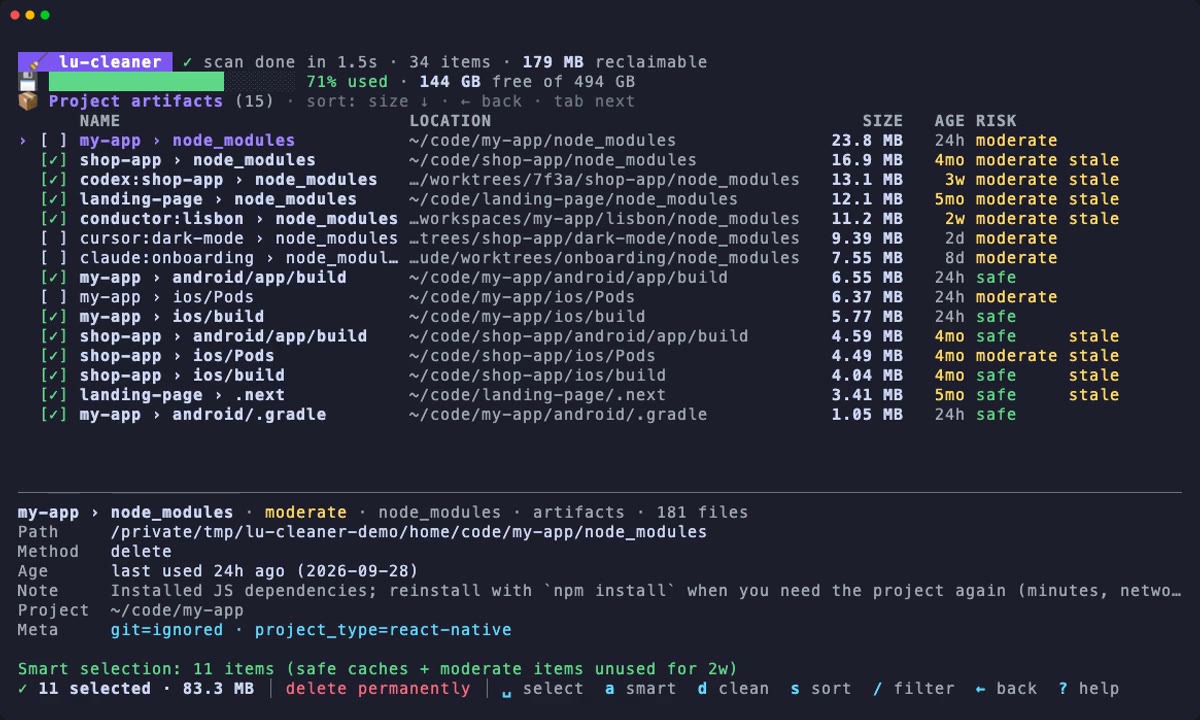](/lu-cleaner/demos/dashboard.mp4)
`lu-cleaner` on a demo home folder: scan, AI agent worktrees, project artifacts, confirmation, summary. The data is synthetic, hence sizes in MB; on a real machine, count in GB.
## Your stack moves fast. So should your cleanup.
[Section titled “Your stack moves fast. So should your cleanup.”](#your-stack-moves-fast-so-should-your-cleanup)
AI coding agents changed what fills a developer's disk. Every Codex, Cursor, Conductor or Claude Code task can spawn a **git worktree** with its own `node_modules`, `ios/Pods` and Android build. Simulators silently collect gigabytes of UI-test recordings. Package managers keep several global caches and node versions. General-purpose cleaners either don't know these places, or deliberately stay away from them.
lu-cleaner knows them — and knows which ones are safe to remove.
AI agent worktrees
Finds every linked worktree (Codex, Cursor, Conductor, Claude Code, manual), shows its branch and status — clean, dirty, unpushed, merged, orphaned — and removes finished ones with `git worktree remove`. Branches are always kept.
React Native aware
npkill-style scan of `node_modules`, `ios/Pods`, `ios/build`, `android/app/build`, `.gradle`, `.cxx`, `.expo`… with marker files and git-ignore checks so a folder named `build` that is source code is never touched.
Simulators & emulators
iOS simulators, runtimes, orphan device folders, XCTest recordings and unified logs; Android AVDs, unused system images, NDKs and Gradle distributions — including SDKs on external drives.
Safe by design
Every path is re-checked right before deletion: protected credentials and configs, inode identity, running apps, open databases, processes working inside, uncommitted work. Dry-run everywhere.
Fast
Written in Go, with native macOS reads and results streamed as they arrive. The default `eco` mode limits load; use `--scan-mode fast` when your Mac has room to accelerate.
Scriptable & LLM-friendly
`--json` everywhere, strict rules for non-interactive `--yes`, and this documentation is available as [llms.txt](/lu-cleaner/llms.txt) for your coding assistant.
## Take the wheel.
[Section titled “Take the wheel.”](#take-the-wheel)
* Interactive
```bash
go install github.com/ludwig-pro/lu-cleaner/cmd/lu-cleaner@latest
lu-cleaner # dashboard: you pick what to remove, nothing is preselected
lu-cleaner clean --smart # same, but starts with the recommended items selected
```
* One category
```bash
lu-cleaner clean # the picker again, nothing preselected
lu-cleaner worktrees # only git worktrees
lu-cleaner artifacts # only node_modules, Pods, builds…
```
* Scripted
```bash
lu-cleaner scan --json > report.json
lu-cleaner clean --yes --smart --dry-run # the plan, nothing deleted
lu-cleaner clean --yes --smart # clean the recommended items
```

## Find your starting line.
[Section titled “Find your starting line.”](#find-your-starting-line)
[Installation](/lu-cleaner/getting-started/installation/)Go install, from source, shell alias.
[Your first cleanup](/lu-cleaner/getting-started/first-cleanup/)A guided tour of the dashboard.
[Clean up AI agent worktrees](/lu-cleaner/guides/ai-worktrees/)Remove finished worktrees, strip the rest.
[Safety model](/lu-cleaner/concepts/safety/)What lu-cleaner will never delete, and why.
# Your first cleanup
> A guided walkthrough of the interactive dashboard, from the category overview and item selection to the confirmation, the progress screen and the freed-space summary.
The interactive dashboard is the safest way to clean: you see every item before anything is removed, nothing is selected until you choose it, and every deletion is re-checked at the last moment. This walkthrough follows one complete cleanup, screen by screen. The projects, paths and sizes are illustrative.
[](/lu-cleaner/demos/dashboard.mp4)
The whole walkthrough in under 40 seconds, on a demo home folder (synthetic data, hence the small sizes).
## Start the dashboard
[Section titled “Start the dashboard”](#start-the-dashboard)
```bash
lu-cleaner
```
`lu-cleaner clean` opens the same picker. Both need an interactive terminal (at least 40 × 10; 32 lines or more to see the details panel).
Rehearse first
Start with `lu-cleaner --dry-run`. Everything in this walkthrough works the same, the footer shows **○ dry-run**, and the final summary tells you what *would* have been freed. Nothing is touched.
The usual filters pre-filter the dashboard, for example `lu-cleaner -c artifacts,worktrees --older-than 30d`. Nothing is preselected: the dashboard always opens with an empty selection, and you decide what to remove. To start with the recommended items already selected, opt in with `lu-cleaner clean --smart`.
## 1. Read the category overview
[Section titled “1. Read the category overview”](#1-read-the-category-overview)
Scanners run in parallel and stream their results: categories appear and grow while the header shows `scanning 5/8 providers`. When the last scanner finishes, the status line tells you how to choose: nothing is selected yet.
🧹 lu-cleaner ✓ scan done in 21.4s · 339 items · 176 GB reclaimable 💾 ██████████████████████░░ 91% used · 43.0 GB free of 494 GB Categories · enter to open CATEGORY SIZE ITEMS SELECTED › \[ ] 🌳 Worktrees 42.8 GB 31 items \[ ] 📦 Project artifacts 36.4 GB 118 items \[ ] 📱 iOS Simulators 24.1 GB 14 items \[ ] 🔨 Xcode 18.6 GB 12 items \[ ] 🤖 Android 14.3 GB 19 items \[ ] 🧠 AI tools 12.9 GB 57 items \[ ] 🟨 JS toolchain 17.2 GB 48 items \[ ] 🧩 IDEs 3.10 GB 15 items \[ ] 💻 System 6.40 GB 25 items Nothing is selected — space picks an item, a picks the recommended ones, d cleans the selection nothing selected │ delete permanently │ enter open ␣ select a smart d clean t trash / filter ? help q quit
| Element | Meaning |
| ----------------------- | --------------------------------------------------------------------------------------------------- |
| Header | Scan status, number of items listed, and the total that could be reclaimed. |
| 💾 line | Disk usage of the volume that holds your home folder, refreshed after each cleanup. |
| SIZE | What cleaning every item of the category would free. Report-only entries are not counted. |
| SELECTED | Size of the current selection in that category. Blank until you select something. |
| `[✓]` `[~]` `[ ]` `[·]` | Everything selected, part of it, nothing, or nothing cleanable (report-only entries). |
| Status line | The latest message (here, how to select), otherwise a description of the category under the cursor. |
| Footer | Selection count and size (`nothing selected` for now), the cleaning mode, and the main keys. |
The mode in the footer matters: **delete permanently** frees space immediately, **🗑 Trash mode** (toggled with `t`) moves files and folders to `~/.Trash`, frees nothing until you empty it and skips worktrees and commands (they cannot be undone), and **○ dry-run** touches nothing.
Press `s` to sort the categories by size, and `space` to select a whole category at once (or, if something in it is already selected, to clear it). That bulk selection deliberately skips items of risk caution: you have to open the category and pick those one by one.
## 2. Open a category
[Section titled “2. Open a category”](#2-open-a-category)
Move to **Project artifacts** and press `enter` (or `→`):
🧹 lu-cleaner ✓ scan done in 21.4s · 339 items · 176 GB reclaimable 💾 ██████████████████████░░ 91% used · 43.0 GB free of 494 GB 📦 Project artifacts (118) · sort: size ↓ · ← back · tab next NAME LOCATION SIZE AGE RISK \[ ] my-app › ios/build \~/dev/my-app/ios/build 2.10 GB 5h safe › \[ ] shop-app › node_modules \~/dev/shop-app/node_modules 1.42 GB 3mo moderate stale \[ ] my-app › node_modules \~/dev/my-app/node_modules 1.31 GB 2d moderate \[ ] codex:my-app › node_modules …/worktrees/a1b2/my-app/node_modules 1.28 GB 5w moderate stale \[ ] shop-app › android/app/build \~/dev/shop-app/android/app/build 1.20 GB 3mo safe stale \[ ] shop-app › ios/Pods \~/dev/shop-app/ios/Pods 980 MB 3mo moderate stale \[ ] my-app › ios/Pods \~/dev/my-app/ios/Pods 910 MB 2d moderate … ────────────────────────────────────────────────────────────────────────────────────────────────────────────── shop-app › node_modules · moderate · node_modules · artifacts · 48,210 files Path /Users/you/dev/shop-app/node_modules Method delete Age last used 3mo ago (2026-06-24) · stale Note Installed JS dependencies; reinstall with \`yarn install\` when you need the project again (minutes, network). Project \~/dev/shop-app Meta package_manager=yarn · project_type=react-native nothing selected │ delete permanently │ ␣ select a smart d clean s sort / filter ← back ? help q quit
Each row is one item: something lu-cleaner can remove as a unit (a `node_modules` folder, a worktree, a cache, a simulator…).
| Column | Meaning |
| -------- | ----------------------------------------------------------------------------------------------------------------------------------------- |
| NAME | `project › path` for project artifacts; the `codex:` prefix means the project lives in a Codex worktree. |
| LOCATION | Where it is on disk. |
| SIZE | Space allocated on disk. `…` means the item is still being measured. |
| AGE | Time since the item was last used. It turns yellow, with a `stale` tag, after 14 days (`stale_after`). |
| RISK | safe, moderate, caution or never. See [Risk levels and smart select](/lu-cleaner/concepts/risk-and-smart-select/). |
| Tags | `stale`, `⚠` (a warning), and hints such as `dirty`, `↑2` (unpushed commits), `locked`, `running`, the tool and `⎇ branch` for worktrees. |
Dimmed rows marked `[·]` are listed for information and cannot be selected. Press `space` on one to see why.
Use `tab` / `shift+tab` to jump to the next or previous category, `←` to go back to the overview, `/` to filter by text and `s` to sort by size, age or name.
## 3. Select what to clean
[Section titled “3. Select what to clean”](#3-select-what-to-clean)
Nothing is selected until you choose. There are two ways, and you can mix them:
* **By hand.** Move to a row and press `space`. On the category overview, `space` selects a whole category (except its caution items).
* **With smart select.** Press `a`: lu-cleaner selects the *recommended* items of the current view, nothing more, and says how many in the status line. It is your explicit request, so you see what it picked before anything can be cleaned.
| Key | Effect |
| ------- | ------------------------------------------------------------------------- |
| `space` | Select or unselect the item under the cursor. |
| `a` | Smart select the current view: recommended items on, everything else off. |
| `A` | Select every cleanable item of the view, caution items included. |
| `n` | Select nothing in the view. |
| `i` | Invert the selection in the view. |
Inside a category, "the view" is the current list, after any `/` filter. On the category overview, it is every visible item. The selection is kept when you move between categories.
Try it: in **Project artifacts**, press `a`.
📦 Project artifacts (118) · sort: size ↓ · ← back · tab next NAME LOCATION SIZE AGE RISK \[ ] my-app › ios/build \~/dev/my-app/ios/build 2.10 GB 5h safe › \[✓] shop-app › node_modules \~/dev/shop-app/node_modules 1.42 GB 3mo moderate stale \[ ] my-app › node_modules \~/dev/my-app/node_modules 1.31 GB 2d moderate \[✓] codex:my-app › node_modules …/worktrees/a1b2/my-app/node_modules 1.28 GB 5w moderate stale \[✓] shop-app › android/app/build \~/dev/shop-app/android/app/build 1.20 GB 3mo safe stale \[✓] shop-app › ios/Pods \~/dev/shop-app/ios/Pods 980 MB 3mo moderate stale \[ ] my-app › ios/Pods \~/dev/my-app/ios/Pods 910 MB 2d moderate … Smart selection: 38 items (safe caches + moderate items unused for 2w) ✓ 38 selected · 9.20 GB │ delete permanently │ ␣ select a smart d clean s sort / filter ← back ? help q quit
Notice what smart select left out:
* `my-app › ios/build` was used 5 hours ago. Smart select never picks the artifacts of a project used in the last 24 hours: you are probably working on it.
* `my-app › node_modules` and `my-app › ios/Pods` are moderate: rebuilding them costs time, so they are only recommended once unused for 14 days.
You can always adjust: `space` unselects a recommended item or selects one it left out. To carry on with the recommended items of every category, press `←` to go back to the overview and press `a` there: the rest of this walkthrough cleans that selection (131 items, 69.0 GB).
When you select a caution item, the status line tells you what is at stake, for example `⚠ caution: my-app · spike/old-ui — 3 uncommitted changes`.
Two kinds of items cannot be selected yet, and `space` tells you why:
* an item still being measured (`…` in SIZE): its checks are not finished, select it once its size is shown;
* an item that needs `--force`, such as an orphaned worktree folder whose uncommitted work git can no longer see. Start lu-cleaner with `--force` to delete it, or switch to Trash mode (`t`), which moves it to the Trash where you can still recover it.
## 4. Read the details
[Section titled “4. Read the details”](#4-read-the-details)
On a terminal of 32 lines or more, a details panel shows the item under the cursor (bottom of the screen above). `enter` toggles it: press it to show the panel on a smaller terminal, or to hide it on a large one.
| Line | What it tells you |
| ----------------------- | -------------------------------------------------------------------------------------------------------------------------------------------------------------------------------------------------------------------------------- |
| First line | Name, risk, kind, scanner and number of files. |
| Path / Paths / Location | Exactly what will be removed. Group items (for example "Metro / Haste file maps (18)") list their first paths. |
| Method | `delete`, `trash (Trash mode)`, `command: …` (the tool's own cleanup, such as `xcrun simctl delete `), `worktree` (`git worktree remove`) or `report`. In Trash mode, worktrees and commands show `skipped in Trash mode`. |
| Blocked / Force | Shown for an item that needs `--force`, with the reason. |
| Reclaim | Shown when part of the data is shared with other files (hardlinks or APFS clones) and deleting frees less than the size. |
| Age | Date of last use, and whether the item is stale. |
| Warning | Why an item is risky or was not recommended. |
| Note | What the item is and how it comes back if you need it again. |
| Project, Meta | The owning project and scanner details (branch, package manager, API level…). |
Press `o` to reveal the item in Finder.
## 5. Clean and confirm
[Section titled “5. Clean and confirm”](#5-clean-and-confirm)
Press `d` (or `x`). With nothing selected, `d` only reminds you to select something. Otherwise a confirmation shows what is about to happen, with the total:
╭──────────────────────────────────────────────────────────────────────────╮ │ Clean 131 items — 69.0 GB? │ │ │ │ safe 74 items 31.2 GB │ │ moderate 57 items 37.8 GB │ │ │ │ Method delete permanently — frees space now │ │ Commands xcrun simctl delete 5A1F0C2E-7B3D-4E8A-9C61-2F4B8D0E1A37 │ │ git worktree remove … │ │ Running Xcode — items guarded by them will be skipped │ │ Largest my-app · feature/login (2.40 GB), shop-app (2.30 GB), … │ │ │ │ y/enter confirm n/esc cancel │ ╰──────────────────────────────────────────────────────────────────────────╯
* **Risk breakdown**: how many items of each risk, and their size. Items inside another selected item are cleaned with it and counted once.
* **Method**: delete permanently, move to Trash, or dry-run.
* **Skipped** (Trash mode only): worktrees and command items, which cannot be moved to the Trash and would delete permanently. Press `t` to switch back to delete mode if you want them.
* **Commands**: the external commands that will run, such as `xcrun simctl delete ` or `git worktree remove`.
* **Running**: some items refuse to be cleaned while an app uses them (Xcode for DerivedData, Simulator for simulators…). lu-cleaner checks those apps now; items guarded by a running app will be skipped, unless you started lu-cleaner with `--force`.
* **Largest**: the biggest items of the selection (on terminals of 24 lines or more).
* **Hidden**: selected items that the current `/` filter hides. They are cleaned too.
Press `y` or `enter` to confirm, `n` or `esc` to cancel. You can also clean before the scan is over: the dialog then warns that sizes may be partial.
### When the selection contains caution items
[Section titled “When the selection contains caution items”](#when-the-selection-contains-caution-items)
If the selection holds at least one caution item, either selected or lying inside a selected item (cleaning the parent removes it too, and the dialog lists it), or an item cleaned only because of `--force`, the dialog turns red and a single key is no longer enough:
╭──────────────────────────────────────────────────────────────────────────╮ │ Clean 3 items — 7.90 GB? │ │ │ │ moderate 2 items 5.80 GB │ │ caution 1 item 2.10 GB │ │ │ │ Method delete permanently — frees space now │ │ Commands git worktree remove … │ │ │ │ ⚠ 1 caution item selected: may hold data you care about. │ │ Type yes to confirm: ▏ │ │ │ │ enter confirm esc cancel │ ╰──────────────────────────────────────────────────────────────────────────╯
Type `yes` and press `enter`, or `esc` to cancel. Caution items may hold something you cannot regenerate: uncommitted work in a worktree, agent sessions, application data. A one-key confirmation is easy to hit by reflex; typing a word makes you stop and read the list.
Confirming is not the last check. A worktree that is locked, has uncommitted or untracked changes, has commits on no branch or contains another repository is still refused at removal time unless you started lu-cleaner with `--force`. See [Safety](/lu-cleaner/concepts/safety/).
[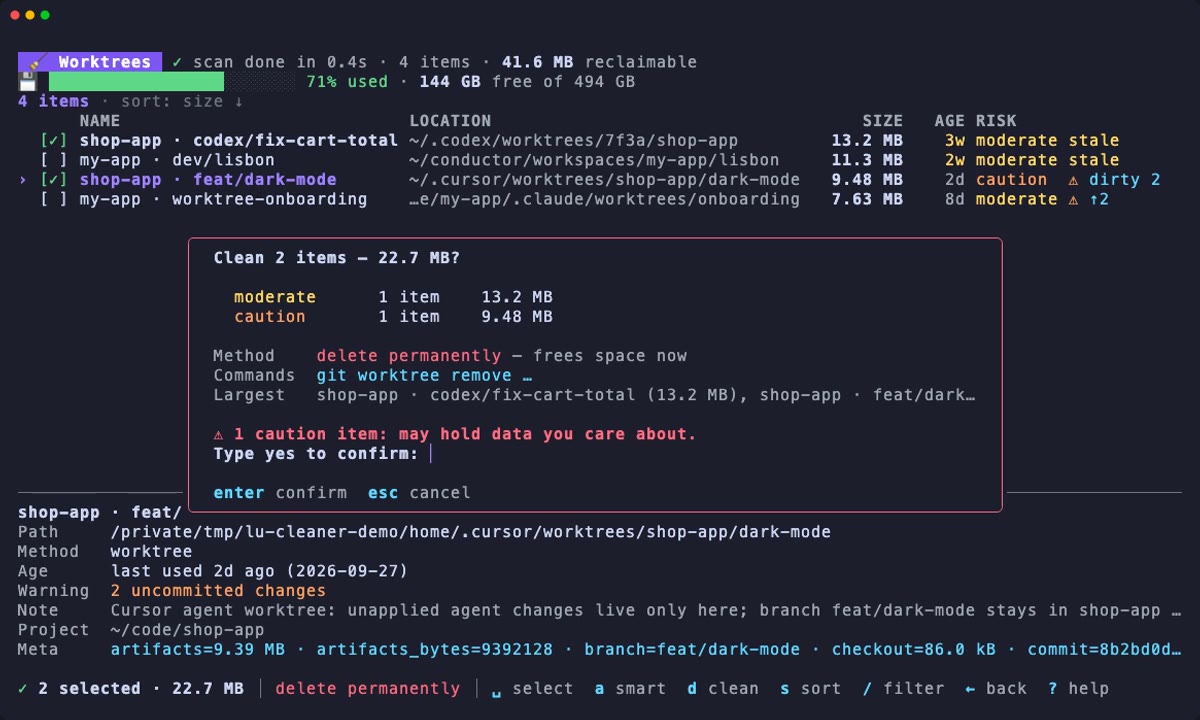](/lu-cleaner/demos/worktrees.mp4)
`lu-cleaner worktrees`: the merged Codex worktree is removed (its branch is kept); the Cursor worktree passes the typed confirmation but git refuses it at removal time, because it holds uncommitted changes.
## 6. Follow the progress
[Section titled “6. Follow the progress”](#6-follow-the-progress)
🧹 lu-cleaner ✓ scan done in 21.4s · 339 items · 176 GB reclaimable 💾 ██████████████████████░░ 91% used · 43.0 GB free of 494 GB ⠹ Cleaning 131 items — 69.0 GB 12s ctrl+c cancels items ████████████████████████████████░░░░░░░░░░░░░░░░░░ 84/131 data ██████████████████████████████▏░░░░░░░░░░░░░░░░░░░ 41.6 GB / 69.0 GB freed 41.2 GB ✓ shop-app › node_modules 1.42 GB \~/dev/shop-app/node_modules ✓ shop-app › ios/Pods 980 MB \~/dev/shop-app/ios/Pods ↷ shop-app 2.30 GB skipped: Xcode is running — quit it first (or use --force) ✓ my-app · feature/login 2.40 GB git worktree removed (branch kept)
Path deletions run four at a time; commands and worktree removals run one after the other. Each finished item gets a line:
| Mark | Meaning |
| ---- | --------------------------------------------------------------------------------------------------------------------------------------------- |
| `✓` | Done. |
| `↷` | Skipped, with the reason: an app is running, a process works inside the folder, the path changed since the scan, the safety guard refused it… |
| `✗` | Failed, with the error. |
| `○` | Dry run: what would have been done. |
Press `ctrl+c` to cancel: the items in progress finish, the remaining ones are skipped as `cancelled`.
## 7. Read the summary
[Section titled “7. Read the summary”](#7-read-the-summary)
╭──────────────────────────────────────────────────────────────╮ │ ✓ Cleaning finished in 38.2s │ │ 129 done · 2 skipped │ │ │ │ Estimated freed 65.4 GB │ │ Measured freed 64.8 GB (43.0 GB → 108 GB free) │ ╰──────────────────────────────────────────────────────────────╯ items ██████████████████████████████████████████████████ 131/131 data ██████████████████████████████████████████████████ 69.0 GB / 69.0 GB freed 65.4 GB press any key to return to the list ↷ shop-app 2.30 GB skipped: Xcode is running — quit it first (or use --force) ↷ codex:my-app › node_modules 1.28 GB skipped: in use: process 51234 runs a program or library from \~/.codex/… ✓ shop-app › node_modules 1.42 GB \~/dev/shop-app/node_modules …
Problems are listed first. Two numbers matter:
* **Estimated freed** adds up what each cleaned item was expected to free.
* **Measured freed** is the difference in free space on your home volume before and after the cleanup, as reported by the file system.
They are rarely identical, since other apps keep writing to disk. When the measured value is less than half the estimate, the summary suggests running `lu-cleaner doctor` (next section).
In Trash mode, what was moved to the Trash is never counted as freed: it gets its own line, **Moved to Trash … (not freed yet)**, and a reminder to empty the Trash.
Press any key to return to the lists. Cleaned items disappear; skipped and failed items stay listed and selected. To retry them, quit the app that blocked them and press `d` again.
Every cleanup is recorded in the history (`lu-cleaner history`), and when you quit with `q`, the summary of the last one is printed in your terminal:
✓ 129 items cleaned · 65.4 GB freed (estimated) Disk free: 43.0 GB → 108 GB (64.8 GB measured) Skipped: 2 - codex:my-app › node_modules: in use: process 51234 runs a program or library from \~/.codex/worktrees/a1b2/my-app/node_modules - shop-app: Xcode is running — quit it first (or use --force)
## If the space is not freed
[Section titled “If the space is not freed”](#if-the-space-is-not-freed)
macOS does not always return deleted space right away. Here is what to check, in order:
1. **Run the doctor.** It lists APFS local snapshots, the size of the Trash and the running apps that block cleaning:
```bash
lu-cleaner doctor
```
2. **Local snapshots** (Time Machine) keep the blocks of deleted files until they expire, after about 24 hours. `doctor` prints the `tmutil` commands to thin or delete them. lu-cleaner never runs them for you.
3. **The Trash.** If you cleaned in Trash mode (`t`, `--trash` or `use_trash = true`), nothing is freed until the Trash is emptied. The System category offers to empty it.
4. **Open files.** A running process keeps deleted files allocated until it exits: Simulator, Xcode, Gradle daemons (`./gradlew --stop`), Docker, an agent working in a worktree. Quit them.
5. **Other volumes.** The measured value only covers the volume of your home folder. Items cleaned on an external drive free space there instead.
[Why is my disk still full?](/lu-cleaner/guides/disk-space-not-freed/) covers each case in detail, including hardlinks, APFS clones, purgeable space and Docker's disk image.
## Next steps
[Section titled “Next steps”](#next-steps)
[Keyboard shortcuts](/lu-cleaner/reference/keyboard-shortcuts/)Every key of the picker and of the disk analyzer.
[Risk levels and smart select](/lu-cleaner/concepts/risk-and-smart-select/)What smart select recommends, and why it is opt-in.
[AI agent worktrees](/lu-cleaner/guides/ai-worktrees/)Clean up after Codex, Cursor, Conductor and Claude Code.
[Safety](/lu-cleaner/concepts/safety/)Everything that is checked before a path is removed.
# Installation
> Install lu-cleaner on macOS with go install or from source, add a short alias, grant Full Disk Access, and update or uninstall it.
lu-cleaner is a single Go binary. It installs no daemon, launch agent or background service, and it never asks for `sudo`. Its own files live in exactly two places, both created only when needed: the [configuration file](/lu-cleaner/reference/configuration/) (when you create one) and the cleaning history (after your first real cleanup).
## Requirements
[Section titled “Requirements”](#requirements)
| Requirement | Details |
| ------------------------------ | ----------------------------------------------------------------------------------------------------------------------------------------------------------------- |
| **macOS 12 Monterey or later** | Apple Silicon or Intel. lu-cleaner is macOS-only: it relies on APFS, `getattrlistbulk`, `xcrun simctl` and the macOS layout of `~/Library`. |
| **Go 1.25 or later** | Only needed to build and install the binary. |
| **git** | Used by the worktree scanner (`git worktree list`, `git worktree remove`). Without it, worktrees are simply not scanned. The Xcode Command Line Tools provide it. |
Everything else is optional: Xcode, Android Studio, Docker, Node.js version managers and AI tools are only inspected when they are installed.
## Install with `go install`
[Section titled “Install with go install”](#install-with-go-install)
This is the recommended way:
```bash
go install github.com/ludwig-pro/lu-cleaner/cmd/lu-cleaner@latest
```
Go places the binary in `$(go env GOPATH)/bin`, which is usually `~/go/bin` (or in `$GOBIN` if you set it). If your shell cannot find `lu-cleaner` afterwards, add that folder to your `PATH`:
```bash
echo 'export PATH="$PATH:$(go env GOPATH)/bin"' >> ~/.zshrc
source ~/.zshrc
```
Check the installation:
```bash
lu-cleaner version
```
Note
A binary built by `go install` reports its version as `dev`, because the version string is injected at build time by the Makefile. Everything else behaves the same.
## Build from source
[Section titled “Build from source”](#build-from-source)
Use this to try an unreleased change or to contribute.
1. Clone the repository:
```bash
git clone https://github.com/ludwig-pro/lu-cleaner.git
cd lu-cleaner
```
2. Build `bin/lu-cleaner`. The version is taken from `git describe`:
```bash
make build
./bin/lu-cleaner scan --summary
```
3. Install it into `$(go env GOPATH)/bin`:
```bash
make install
```
`make run ARGS="scan --summary"` builds and runs in one step, and `make test` runs the unit tests. See [Contributing](/lu-cleaner/about/contributing/) for the development workflow.
## Add a short alias
[Section titled “Add a short alias”](#add-a-short-alias)
`lu-cleaner` is long to type. `make install` suggests `luc`:
```bash
echo 'alias luc=lu-cleaner' >> ~/.zshrc
source ~/.zshrc
luc scan --summary
```
The rest of this documentation spells out `lu-cleaner` in full.
## Grant Full Disk Access (optional)
[Section titled “Grant Full Disk Access (optional)”](#grant-full-disk-access-optional)
macOS privacy protection (TCC) prevents any app from reading a few folders unless you grant it **Full Disk Access**. lu-cleaner works without it, but a few folders are then out of reach:
| Folder | Without Full Disk Access |
| ------------------------------------------------------------------------------------------ | ------------------------------------------------------------------------------------------------------------------------------------------------------------------------------------------------------------------------------------------------------------------------------------------------------------------------------------------------------------------------------------------------------------------------------------------------------------------------------------- |
| `~/.Trash` | The Trash is listed as *Trash (size unknown — needs Full Disk Access)*. Cleaning it asks Finder to empty it instead of deleting the files directly (Finder may ask you for an Automation permission). `lu-cleaner doctor` reports the Trash size as unknown. |
| `~/Library/Application Support/MobileSync/Backup` | iPhone and iPad backups made by Finder are listed as *iPhone/iPad backups (size unknown)*. They are report-only either way: lu-cleaner never deletes device backups. |
| Other apps' containers: `~/Library/Containers/`, `~/Library/Group Containers/` | Never read, measured or cleaned. On macOS 14 and later, touching them would open a system permission prompt and block the scan until someone answers. Catalog entries stored there (Docker Desktop logs, the Microsoft Teams cache, the Apple Music artwork cache…) are listed as report-only with the warning `needs Full Disk Access`, the Docker Desktop and OrbStack disk images are not shown, and `analyze` shows these folders as `🔒 app container — needs Full Disk Access`. |
`lu-cleaner analyze` also warns when some entries are unreadable and their sizes are partial.
To grant it:
1. Open **System Settings → Privacy & Security → Full Disk Access**.
2. Enable the app you run lu-cleaner from: Terminal, iTerm2, Ghostty, Warp, or the editor whose integrated terminal you use. Add it with **+** if it is not listed.
3. Quit and reopen that app so the permission applies.
Tip
Full Disk Access is granted to the terminal app, not to lu-cleaner, so every command run from that terminal gets it. Grant it only to a terminal you trust.
## Update
[Section titled “Update”](#update)
Run the same command again to fetch the latest version:
```bash
go install github.com/ludwig-pro/lu-cleaner/cmd/lu-cleaner@latest
```
From a clone, pull and reinstall:
```bash
git pull
make install
```
Your configuration and history are kept.
## Uninstall
[Section titled “Uninstall”](#uninstall)
Before removing the binary, check where your files live. The configuration moves if you set `LU_CLEANER_CONFIG` or `XDG_CONFIG_HOME`, the history if you set `XDG_STATE_HOME`:
```bash
lu-cleaner config path # the configuration file
lu-cleaner config show # also prints the history file
```
Then remove the binary, the configuration and the history:
```bash
rm "$(command -v lu-cleaner)"
rm -rf ~/.config/lu-cleaner # config.toml, if you created one
rm -rf ~/.local/state/lu-cleaner # history.jsonl
```
Finally, delete the `alias luc=lu-cleaner` line from `~/.zshrc` if you added it. lu-cleaner leaves nothing else behind.
Caution
If you cleaned with `--trash` or `use_trash = true`, the files and folders moved there are still in `~/.Trash`. They keep using disk space until you empty the Trash.
## Next steps
[Section titled “Next steps”](#next-steps)
[Quick start](/lu-cleaner/getting-started/quick-start/)A five-minute tour: scan, dashboard, dry run, clean.
[Your first cleanup](/lu-cleaner/getting-started/first-cleanup/)A guided walkthrough of the interactive dashboard.
# Quick start
> A five-minute tour of lu-cleaner that scans your disk, opens the dashboard, rehearses a cleanup with a dry run, cleans the recommended items and checks the result.
This tour takes about five minutes. Nothing is deleted before step 4, and step 4 only removes the items smart select recommends (safe caches and regenerable data you have not used for a while) because you ask for it with `--smart`. If you would rather choose item by item, the dashboard of step 2 opens with nothing selected.
It assumes lu-cleaner is [installed](/lu-cleaner/getting-started/installation/). The sizes below are illustrative.
1. **See where the space goes**
```bash
lu-cleaner scan --summary
```
`scan` is read-only. It runs every scanner and prints one line per category:
$ lu-cleaner scan --summary CATEGORY SIZE ITEMS RECOMMENDED 🌳 Worktrees 42.8 GB 31 11.6 GB (9) 📦 Project artifacts 36.4 GB 118 9.20 GB (38) 📱 iOS Simulators 24.1 GB 14 8.70 GB (6) 🔨 Xcode 18.6 GB 12 15.2 GB (5) 🤖 Android 14.3 GB 19 3.40 GB (7) 🧠 AI tools 12.9 GB 57 4.10 GB (22) 🟨 JS toolchain 17.2 GB 48 12.3 GB (27) 🧩 IDEs 3.10 GB 15 2.60 GB (11) 💻 System 6.40 GB 25 1.90 GB (6) Total 176 GB in 331 items · ★ 69.0 GB recommended (131 items) Disk: 43.0 GB free of 494 GB (91% used) → run: lu-cleaner clean --smart
* **SIZE** is what cleaning every item of the category would free (report-only entries excluded).
* **RECOMMENDED** is what *smart select* would pick, with the number of items. The ★ marks the same items in the detailed report.
The first scan can take a minute or more on a busy machine: it measures thousands of directories. Drop `--summary` to list the 15 largest items of each category, add `--all` to list everything, or narrow with `-c`:
```bash
lu-cleaner scan -c worktrees,artifacts
```
2. **Open the dashboard**
```bash
lu-cleaner
```
Without a command, lu-cleaner opens the interactive dashboard. Categories fill in as scanners finish. When the scan is done, **nothing is selected**: the footer says "nothing selected" and the status line reminds you how to choose. Select what you want to remove with `space` (an item, or a whole category), or press `a` to select the recommended items and look at what it picked. Then press `d`. Nothing is deleted until you confirm.
| Key | Action |
| ----------------- | ------------------------------------------------------------------------------------------ |
| `↑` `↓` / `enter` | Move / open a category |
| `space` | Select or unselect the item under the cursor (on a category: everything but caution items) |
| `a` | Smart select the current view: select the recommended items |
| `d` | Clean the selection (shows the total and asks for confirmation) |
| `?` / `q` | Help / quit |
Press `q` to leave without touching anything. [Your first cleanup](/lu-cleaner/getting-started/first-cleanup/) walks through every screen, and [Keyboard shortcuts](/lu-cleaner/reference/keyboard-shortcuts/) lists every key.
Tip
`lu-cleaner --dry-run` opens the same dashboard in dry-run mode: you can select and "clean" freely, and nothing is touched.
3. **Rehearse the recommended cleanup**
```bash
lu-cleaner clean --yes --smart --dry-run
```
`--yes` cleans without the picker, `--smart` keeps only the recommended items, and `--dry-run` (`-n`) deletes nothing. The output is the exact plan, followed by what would happen:
$ lu-cleaner clean --yes --smart --dry-run 🌳 Worktrees 11.6 GB · 9 items · ★ 11.6 GB recommended NAME SIZE AGE RISK RECO PATH my-app · feature/login 2.40 GB 3w moderate ★ \~/.codex/worktrees/a1b2/my-app shop-app · fix/cart-badge 1.90 GB 2w moderate ★ \~/.cursor/worktrees/shop-app/k3m … 📦 Project artifacts 9.20 GB · 38 items · ★ 9.20 GB recommended NAME SIZE AGE RISK RECO PATH shop-app › node_modules 1.42 GB 3mo moderate ★ \~/dev/shop-app/node_modules shop-app › android/app/build 1.20 GB 3mo safe ★ \~/dev/shop-app/android/app/build … Plan: 131 items · 69.0 GB (dry run) Dry run: nothing was deleted — 130 items would free 67.7 GB. iPhone 11 · iOS 16.4 (unavailable): would run: xcrun simctl delete 5A1F0C2E-7B3D-4E8A-9C61-2F4B8D0E1A37 Skipped: 1 - codex:my-app › node_modules: in use: process 51234 runs a program or library from \~/.codex/worktrees/a1b2/my-app/node_modules
A dry run re-runs every last-moment check of a real run without deleting anything: the safety guard, running apps, files in use, and the git checks of a worktree removal (lock, uncommitted changes, commits on no branch, nested repositories). That is why it can already report skipped items: here an agent started running tests in a worktree after the scan, so its `node_modules` is in use.
Guard rails
Non-interactive cleaning is deliberately strict. It refuses to run without a narrowing filter (`--smart`, `--category`/`-c` or `--kind`/`-k`), so a bare `lu-cleaner clean --yes` exits with an error instead of cleaning everything. It never includes items of risk caution (dirty worktrees, sessions, user data), nor items the scan flagged with a warning (in use by a process, ignored `.env` files that would be lost…), unless you pass `--risk caution`: those are listed under **Held back** instead. See [Risk levels and smart select](/lu-cleaner/concepts/risk-and-smart-select/) for the reasoning.
4. **Clean**
```bash
lu-cleaner clean --yes --smart
```
lu-cleaner rescans, prints the plan again, then cleans. The summary ends with two numbers:
$ lu-cleaner clean --yes --smart … ✓ 130 items cleaned · 67.7 GB freed (estimated) Disk free: 43.0 GB → 110 GB (67.2 GB measured) Skipped: 1 - codex:my-app › node_modules: in use: process 51234 runs a program or library from \~/.codex/worktrees/a1b2/my-app/node_modules
*Estimated* is the sum of what the cleaned items were expected to free. *Measured* is the change in free space reported by the file system before and after. A small gap is normal (other apps write to disk meanwhile). A large one means something still holds the space: see the next step.
With `--trash`, files and folders are moved to the Trash instead: the summary counts them apart (`moved to the Trash`), never as freed, and worktrees and command items are skipped, since they cannot be undone.
To clean only part of the recommendation, combine `--smart` with a category:
```bash
lu-cleaner clean --yes --smart -c artifacts,js
```
5. **Check the result with `doctor`**
```bash
lu-cleaner doctor
```
`doctor` explains why freed space does not always show up: APFS local snapshots, files waiting in the Trash, apps that keep deleted files open. It also repeats the scan summary by category, and never deletes anything.
$ lu-cleaner doctor Disk ██████████████████████░░░░░░░░ 78% used · 110 GB free of 494 GB APFS local snapshots (1) com.apple.TimeMachine.2026-09-29-093012.local They pin the blocks of deleted files: that space comes back only when they expire (about 24h) or are thinned. To reclaim it now (lu-cleaner never runs these): tmutil thinlocalsnapshots / 999999999999 4 sudo tmutil deletelocalsnapshots 2026-09-29-093012 Trash 4.20 GB in 312 files — empty it to free the space Running apps that block cleaning Xcode DerivedData, Archives and device support are in use …
6. **Review what was done**
```bash
lu-cleaner history
```
Every real cleanup, from the dashboard or from `clean --yes`, is appended to `~/.local/state/lu-cleaner/history.jsonl`. Dry runs are not recorded. The newest 30 entries are shown; `--limit` changes that, and `--limit 0` shows everything.
$ lu-cleaner history --limit 4 TIME STATUS METHOD SIZE FREED NAME PATH/COMMAND 2026-09-29 10:42 done delete 1.42 GB 1.42 GB shop-app › node_modules \~/dev/shop-app/node_modules 2026-09-29 10:42 done worktree 2.40 GB 2.40 GB my-app · feature/login \~/.codex/worktrees/a1b2/my-app 2026-09-29 10:42 done command 310 MB 310 MB iPhone 11 · iOS 16.4 (unavailable) $ xcrun simctl delete 5A1F0C2E-7B3D-4E8A-9C61-2F4B8D0E1A37 2026-09-29 10:42 skipped delete 1.28 GB codex:my-app › node_modules \~/.codex/worktrees/a1b2/my-app/node_modules ! in use: process 51234 runs a program or library from \~/.codex/worktrees/a1b2/my-app/node_modules Showing the last 4 of 131 entries (--limit 0 for all). Total freed: 67.7 GB over 130 cleaned items (\~/.local/state/lu-cleaner/history.jsonl)
**FREED** is what was really freed: less than **SIZE** when the data is shared with other files (hardlinks or APFS clones), empty for skipped items. Moves to the Trash free nothing until you empty it, so they are totalled apart.
## Where to go next
[Section titled “Where to go next”](#where-to-go-next)
[Your first cleanup](/lu-cleaner/getting-started/first-cleanup/)Every screen of the dashboard, from selection to summary.
[AI agent worktrees](/lu-cleaner/guides/ai-worktrees/)Remove finished Codex, Cursor, Conductor and Claude Code worktrees.
[React Native projects](/lu-cleaner/guides/react-native-projects/)node_modules, Pods and native builds across all your projects.
[Automation](/lu-cleaner/guides/automation/)Schedule clean --yes and read the JSON output.
# Categories
> The eleven categories lu-cleaner groups items into, what each one contains and how much space it typically holds.
Items are grouped into eleven categories. They organize the picker's first screen and the `scan` report, and they are what `--category` (`-c`) and the `disabled_categories` setting select.
```bash
lu-cleaner scan --summary # one line per category
lu-cleaner scan -c simulators,xcode # only these two
lu-cleaner clean -c worktrees # picker limited to worktrees
```
## Overview
[Section titled “Overview”](#overview)
| ID | Title | Contains | Also accepted by `-c` |
| ------------ | ----------------- | ----------------------------------------------------------------------------------------- | --------------------- |
| `worktrees` | Worktrees | Git worktrees created by AI agents and by hand | `wt`, `worktree` |
| `artifacts` | Project artifacts | `node_modules`, `ios/Pods`, iOS and Android builds, `.expo`, `dist`… inside your projects | `artifact` |
| `simulators` | iOS Simulators | Simulator devices, runtimes, recordings, logs and caches | `sim`, `simulator` |
| `xcode` | Xcode | DerivedData, archives, DeviceSupport, CocoaPods, SwiftPM, extra Xcode installs | |
| `android` | Android | Emulators (AVDs), SDK packages, Gradle, Android Studio, JDKs | |
| `ai` | AI tools | Claude Code, Claude desktop, Codex, Cursor agent, ChatGPT, Conductor… data and caches | |
| `js` | JS toolchain | npm, Yarn, pnpm, bun caches, node versions, Metro, Expo, test browsers | |
| `ide` | IDEs | VS Code, Cursor (editor part), Zed, JetBrains, Sublime caches and state | |
| `containers` | Containers | Docker, colima, Lima, OrbStack, Apple's `container` | `container` |
| `langs` | Other toolchains | Homebrew, Go, Rust, Python, Ruby, .NET, JVM caches | `lang` |
| `system` | System | Trash, browser and app caches, logs, Downloads, macOS snapshots and swap | |
Category IDs are case-insensitive. Several can be combined with commas or by repeating the flag: `-c js,ai` or `-c js -c ai`.
Tool names are not categories: `-c cursor`, `-c docker` or `-c node_modules` is refused with a hint naming the category the tool belongs to, because that category covers other tools too and a `clean --yes -c cursor` would clean every AI tool. To narrow to one tool or one kind of item, use `--kind`/`-k` with an item kind or a scanner ID (`lu-cleaner scan --json` shows the `kind` of every item).
## Typical sizes
[Section titled “Typical sizes”](#typical-sizes)
The ranges below are illustrative, for a Mac used for React Native, iOS and Android development with AI coding agents. Your numbers will differ; `lu-cleaner scan --summary` or `lu-cleaner doctor` gives yours.
| Category | Typical total | What makes it grow |
| ----------------- | ------------- | ---------------------------------------------------------------------------------------------------------------------------------- |
| Worktrees | 5 – 50 GB | Each agent task checks out the repository again, with its own dependencies and native builds (1 – 3 GB per React Native worktree). |
| Project artifacts | 10 – 60 GB | One `node_modules` + `Pods` + Android build per project, per package in a monorepo. |
| iOS Simulators | 10 – 70 GB | Runtimes (about 8 GB each), devices with apps, UI-test screen recordings that nothing ever deletes. |
| Xcode | 5 – 40 GB | One DerivedData folder per workspace path, so one per worktree; 2 – 6 GB of DeviceSupport per iOS version. |
| Android | 10 – 40 GB | System images (1.5 – 7 GB each), emulators, Gradle caches per Gradle version, NDKs. |
| AI tools | 2 – 40 GB | Session transcripts with screenshots, old CLI builds, local models, VM images of desktop apps. |
| JS toolchain | 5 – 30 GB | Several package-manager caches side by side, one node install per version, Metro and Jest caches. |
| IDEs | 1 – 10 GB | Caches of old editor builds, superseded extension versions, language-server indexes. |
| Containers | 0 – 100 GB | Docker images and build cache inside a VM disk that never shrinks by itself. |
| Other toolchains | 1 – 20 GB | Homebrew downloads and old versions, Go and Cargo caches. |
| System | 2 – 30 GB | Browser caches and on-device AI models, app logs, old installers in Downloads, the Trash. |
## Worktrees
[Section titled “Worktrees”](#worktrees)
Every linked git worktree found in your worktree roots (`~/.codex/worktrees`, `~/.cursor/worktrees`, `~/conductor/workspaces`, `~/.claude/worktrees`…), in your project roots, and through `git worktree list` of each repository. Each item shows the tool that created it, the branch and a status: `clean`, `dirty`, `unpushed`, `merged`, `locked`, `orphan` or `unknown`. Stale worktree metadata (folders deleted without git knowing) appears as a `git worktree prune` item.
A worktree is removed as a whole with `git worktree remove`, which keeps its branch. An `orphan` (its git metadata verifiably gone) is deleted as a plain folder and needs `--force`; a worktree whose main repository cannot be read, or was moved, is report-only. See [AI agent worktrees](/lu-cleaner/guides/ai-worktrees/).
## Project artifacts
[Section titled “Project artifacts”](#project-artifacts)
Build and dependency outputs found by walking your project roots, npkill-style, one item per folder: `node_modules`, `ios/Pods`, `ios/build`, `android/app/build`, `android/.gradle`, `.cxx`, `.expo`, `.next`, `.turbo`, `dist`, `coverage`, Rust `target`, Python `.venv`, Yarn Berry `.yarn/cache` and dozens more. A folder only matches when a marker file sits next to it (`package.json` next to `node_modules`), generic names like `build` must be ignored by git or contain build output, and a folder holding a `.git` entry is never proposed. With `--root` or `lu-cleaner artifacts `, only those folders are scanned.
Large git-ignored folders that no rule recognizes (200 MB or more, not counting known artifacts inside them) are listed as caution so you can decide. See [React Native projects](/lu-cleaner/guides/react-native-projects/).
Note
Artifacts inside a worktree are listed twice: as part of the worktree's size and as artifacts of their own, so you can keep the worktree and drop only its `node_modules`. If you select both, only the worktree is processed and totals never count the same bytes twice.
## iOS Simulators
[Section titled “iOS Simulators”](#ios-simulators)
Simulator devices (one item per device, deleted with `xcrun simctl delete `), unavailable devices (one item per device too, caution when they may come back with another Xcode or hold apps with data), orphan device folders `simctl` no longer knows, runtimes (`xcrun simctl runtime delete`), alternate device sets (SwiftUI previews, parallel-testing clones), XCTest screen recordings left inside simulators, unified logs and system caches of shut-down simulators, CoreSimulator caches. See [iOS simulators and Xcode](/lu-cleaner/guides/ios-simulators-xcode/).
## Xcode
[Section titled “Xcode”](#xcode)
DerivedData, one item per folder (Xcode creates one per workspace path, so one per worktree), flagged when its workspace no longer exists; archives, DeviceSupport symbols per iOS version, extra Xcode installs (report only), the Metal toolchain, and the fixed caches of Xcode, CocoaPods, Swift Package Manager, Carthage and fastlane.
## Android
[Section titled “Android”](#android)
Emulators (AVDs) and their Quick Boot snapshots, SDK system images, NDKs, build-tools, platforms, CMake and sources, SDK Manager leftovers, the Gradle user home (wrapper distributions, per-version caches, dependency cache, daemon logs, toolchain JDKs), Android Studio caches, logs and old settings, installed JDKs, Kotlin/Native and Maven caches. An SDK or AVD folder on an external drive is reported, never touched. See [Android](/lu-cleaner/guides/android/).
## AI tools
[Section titled “AI tools”](#ai-tools)
Data left by AI coding tools: Claude Code sessions older than 30 days and data of project folders that no longer exist, old Claude Code, cursor-agent and Copilot CLI builds, Codex sessions and logs databases, Cursor agent transcripts and workspace data, Conductor archived contexts, local models (Ollama, LM Studio, Hugging Face, Whisper), desktop apps' caches and VM images. Configuration, credentials, memories and chat databases are protected, and backups of chat databases are caution. See [AI tools data](/lu-cleaner/guides/ai-tools-data/).
## JS toolchain
[Section titled “JS toolchain”](#js-toolchain)
Package-manager caches (npm, Yarn classic and Berry, pnpm, bun, corepack), node versions installed by nvm, fnm, mise, asdf or volta (keeping the ones in use), npx installs, npm global leftovers, Metro, Haste, Jest and Vitest caches, Expo Go simulator builds, Playwright, Puppeteer and Cypress browsers, fnm's stale shell links and watchman watches on deleted folders (live Metro and Jest watches are left alone). The Yarn Berry global cache is caution when Plug'n'Play projects run from it, and so is a pnpm store whose global virtual store your projects link into. See [JS toolchain](/lu-cleaner/guides/js-toolchain/).
## IDEs
[Section titled “IDEs”](#ides)
Caches and state of editors: VS Code (and Insiders, VSCodium) cached data of old builds, superseded extension versions, workspace storage of deleted folders, language-server indexes and Local History; the editor part of Cursor and Windsurf; Zed; JetBrains IDEs (caches and settings of old versions, logs); Sublime Text and Sublime Merge.
## Containers
[Section titled “Containers”](#containers)
Docker build cache, unused images and stopped containers (cleaned with Docker's own `prune` commands), unused volumes (report only), Docker Desktop and OrbStack disk images (listed only with Full Disk Access, since they live in app containers), colima and Lima VMs, Apple's `container` data, and download caches of VM tools. VM disks are reported with the command that reclaims their space: deleting a VM loses everything inside it.
## Other toolchains
[Section titled “Other toolchains”](#other-toolchains)
Homebrew download cache and old versions (`brew cleanup`), Go build and module caches (`go clean`), Cargo registry and rustup downloads, unused Rust toolchains and rbenv Rubies (report only), pip, uv, Poetry, pipenv and conda caches, RubyGems, NuGet, Ivy/sbt, Zig and Bazel caches.
## System
[Section titled “System”](#system)
The Trash, caches and offline web caches of desktop apps (Slack, Discord, Notion, Figma, Postman…), browser caches and their on-device AI models, app logs and crash reports, app updater downloads, old installers, archives and app builds in `~/Downloads` (caution, never recommended), local iPhone backups (report only), and the macOS facts that explain a full disk: Time Machine local snapshots, swap files and staged macOS updates, all report only. See [Disk space not freed](/lu-cleaner/guides/disk-space-not-freed/).
## Turning categories off
[Section titled “Turning categories off”](#turning-categories-off)
To skip a category entirely, list it in the configuration file:
```toml
disabled_categories = ["containers", "system"]
```
Items of disabled categories are never listed nor cleaned, and scanners that only produce disabled categories are not started at all, which also makes scans faster. See [Configuration](/lu-cleaner/reference/configuration/).
# How it works
> How lu-cleaner scans your Mac with concurrent scanners, measures what deleting really frees, and cleans your selection through a pipeline that re-checks every path.
lu-cleaner does three distinct things, and keeps them strictly apart:
1. **Scanners** look at your disk and describe what they find as *items*. They never delete anything.
2. **You** choose items, in the interactive picker or with filters on the command line.
3. **The clean pipeline** re-checks each chosen item at the last moment, then deletes it, runs a command, or removes a git worktree, and writes a history line.
```text
scanners ──emit(item)──▶ engine ──stream──▶ picker · scan table · --json
│ your selection
▼
clean pipeline ── re-checks ──▶ delete · Trash · command · git worktree remove
└──▶ history.jsonl + free space before/after
```
Because only one component can remove files, every safety rule lives in one place. A bug in a scanner can at worst propose something it should not. It cannot delete it: the pipeline re-validates every path before touching it. See [Safety model](/lu-cleaner/concepts/safety/).
## Scanning
[Section titled “Scanning”](#scanning)
### Scanners run concurrently and stream items
[Section titled “Scanners run concurrently and stream items”](#scanners-run-concurrently-and-stream-items)
A scan starts every scanner (internally called a *provider*) in parallel. Each one publishes items as soon as it finds them, so the picker fills up within seconds while slow measurements continue in the background.
Items are **upserted by ID**: a scanner first emits an item with its size still unknown (shown as `…`), then emits it again with the measured size. The UI replaces the old version in place. A scanner that crashes is reported as a warning (`warning: provider apple: …`) instead of taking the whole program down.
| Scanner ID | Covers | Categories |
| ----------- | ---------------------------------------------------------------------------------------------------------------------- | --------------------------------------------- |
| `worktrees` | Git linked worktrees (Codex, Cursor, Conductor, Claude Code, manual…) and stale worktree metadata | worktrees |
| `artifacts` | Build and dependency outputs inside projects: `node_modules`, `ios/Pods`, `android/app/build`, `.expo`, `dist`… | artifacts |
| `apple` | DerivedData, archives, DeviceSupport, simulators, runtimes, extra Xcode installs | xcode, simulators |
| `android` | AVDs, snapshots, SDK packages, Gradle user home, Android Studio, JDKs | android |
| `ai` | Claude Code, Codex, Cursor, Conductor… sessions by age, orphaned data, old binaries, local models | ai, ide |
| `js` | Node versions, npx, pnpm and Yarn Berry stores, Expo Go builds, Playwright browsers, temp dirs, stale watchman watches | js |
| `system` | Trash, Docker and VMs, Homebrew, Go/Rust/Ruby, VS Code, JetBrains, Zed, Downloads, macOS facts | system, containers, langs, ide |
| `catalog` | About 200 well-known cache, log and tool-data locations | every category except worktrees and artifacts |
The scanner ID is also accepted by `--kind`: `lu-cleaner scan -k apple` lists only what the `apple` scanner found. Only the scanners able to produce the categories you ask for are started, so `lu-cleaner scan -c js` runs the `js` and `catalog` scanners and nothing else. The same applies to `disabled_categories` (see [Configuration](/lu-cleaner/reference/configuration/)): their items are never shown, and scanners that only produce disabled categories are not started.
### Catalog entries and dynamic scanners
[Section titled “Catalog entries and dynamic scanners”](#catalog-entries-and-dynamic-scanners)
There are two kinds of knowledge in lu-cleaner:
* **The catalog** is data: a list of well-known paths such as `~/.npm/_cacache`, `~/Library/Caches/CocoaPods` or `$TMPDIR/metro-cache`, each with a category, a risk, a cleaning method and a note explaining how the data comes back. Adding a cache that lives at a fixed path is a few lines of Go data, no logic. Browse it in the [catalog reference](/lu-cleaner/reference/catalog/) or with `lu-cleaner catalog`.
* **Dynamic scanners** handle everything that needs judgment: is this node version the default one? Does this worktree hold uncommitted changes? Is this simulator runtime still used by a device? Does this DerivedData folder belong to a worktree that no longer exists? The [scanners reference](/lu-cleaner/reference/scanners/) lists every item kind they produce.
### Where lu-cleaner looks
[Section titled “Where lu-cleaner looks”](#where-lu-cleaner-looks)
* **Project roots** hold your checkouts. They come from the `roots` config key, or are auto-detected (`~/dev`, `~/Developer`, `~/Projects`, `~/code`, `~/src`, `~/conductor/repos`…). The artifacts and worktrees scanners walk them, up to `max_depth` levels (8 by default).
* **Worktree roots** are the folders where AI tools create worktrees: `~/.codex/worktrees`, `~/.cursor/worktrees`, `~/conductor/workspaces`, `~/.claude/worktrees`, `~/.worktrees`… plus any `worktree_roots` you configure. They are also scanned for project artifacts.
* **Fixed locations** in `~/Library`, dot-folders of your home and your per-user temporary folder (`$TMPDIR`), for caches, SDKs, simulators and tool data.
Roots given on the command line (`--root `, or `lu-cleaner artifacts `) narrow the **project artifacts** scan to exactly those folders: no worktree roots, no built-in extra folders, and any artifact outside them is dropped. The other scanners keep the configured roots, because they read them to learn what your projects use (Node, Ruby and Android SDK versions, main repositories of worktrees): with `--root ~/dev/one-project` alone, every version used by your other projects would look unused. `/` is refused as a root.
Anything whose real location is on another volume (an external SSD behind a symlink, for example) is shown for information only, with the warning `on external volume — no internal gain`: deleting it would not free space on your internal disk.
Without Full Disk Access, the data of other apps (`~/Library/Containers/`, `~/Library/Group Containers/`) is never read: on macOS 14 and later, the first access would block on a system permission prompt. Catalog entries there are listed as report-only with the warning `needs Full Disk Access`. See [Installation](/lu-cleaner/getting-started/installation/#grant-full-disk-access-optional).
## Measuring sizes
[Section titled “Measuring sizes”](#measuring-sizes)
Sizes answer one question: *how much free space will I get back?* That drives several choices.
* **Allocated size, not apparent size.** lu-cleaner counts the blocks a file really occupies on disk (`st_blocks × 512`), like `du`. A sparse 64 GB disk image that uses 3 GB counts as 3 GB.
* **Hardlinks are counted once.** A file with several hardlinks inside the same tree is counted once. When some of its links live *outside* the measured tree, deleting the tree frees nothing for that file. lu-cleaner then reports a smaller **really freed** size (`reclaim` in JSON). Typical case: a `node_modules` installed by pnpm is hardlinked to the pnpm store. It may measure 1.2 GB while deleting it frees 80 MB.
* **APFS clones count only their private bytes.** A cloned file (bun and pnpm installs, `cp -c`, Finder duplicates) shares its data blocks with the original: deleting it frees only the blocks it no longer shares, unless every file sharing that data is inside the deleted tree. The really freed size is an estimate: data shared between two trees measured separately (the bun cache and a `node_modules` installed from it) comes back only once both are deleted.
* **Symlinks are never followed** and other mounted filesystems are never entered while measuring.
* **Units are decimal** (1 GB = 1,000,000,000 bytes), like Finder and `df -H`.
Two techniques keep a full scan fast:
* On macOS, directories are read with `getattrlistbulk(2)`, which returns the size, type, inode, link count and modification time of many entries in a single system call, instead of one `lstat` per file. Walks run in parallel across directories, with a global limit on concurrent readers.
* A **per-scan shared cache** deduplicates work: when two scanners measure the same directory (the worktrees scanner and the artifacts scanner both measure a worktree's `node_modules`), the directory is walked once and both get the result. The cache lives only for the duration of one scan, so the next scan always measures fresh data.
Note
Scans use the [`eco` resource profile](/lu-cleaner/reference/configuration/#scan_mode) by default: 2 shared concurrent I/O operations, 1 inspection command, bounded batches and macOS background priority. `--scan-mode fast` allows 8 I/O operations and 4 commands without pauses. Both profiles measure the same entries and sizes.
Two environment variables exist for troubleshooting: `LU_NO_BULK=1` forces the classic one-`lstat`-per-entry walk, and `LU_WALKERS=` overrides the shared concurrent I/O limit for discovery and sizing. Invalid values keep the profile default and are reported with `--verbose`.
## What an item tells you
[Section titled “What an item tells you”](#what-an-item-tells-you)
Every line in the picker, the `scan` table and the JSON output is an item. The picker's details pane (toggled with `enter` on an item) shows all of its fields.
| Shown as | JSON field | Meaning |
| ------------------------ | --------------------------- | ---------------------------------------------------------------------------------------------------------------------------------------------------- |
| Name | `name` | Short human label, e.g. `my-app · feature/login` or `node v18.20.4 (nvm)`. |
| Path / Location | `path`, `paths`, `location` | What gets removed. A **group item** removes several paths at once (`Metro / Haste file maps (18)`); a **command item** shows where its command acts. |
| Size | `size` | Allocated bytes on disk, hardlinks counted once. |
| Reclaim ("really freed") | `reclaim`, `freed` | What deleting really frees when it is less than the size (data shared through hardlinks or APFS clones). `scan` marks such sizes with `*`. |
| Age / last used | `last_used`, `age_days` | Best estimate of the last real activity, not the folder's modification date. |
| Risk | `risk` | What you lose: `safe`, `moderate`, `caution` or `never`. See [Risk levels and smart select](/lu-cleaner/concepts/risk-and-smart-select/). |
| Method | `method` | How it is cleaned: `delete`, `trash`, `command`, `worktree` or `report`. |
| ★ | `recommended` | Picked by smart select (the `a` key, `--smart`). |
| Needs `--force` | `require_force` | Refused without `--force`, in a dry run too (orphaned worktree folders). |
| Warning | `warn` | Something that deserves attention (dirty worktree, app running, newest version kept…). |
| Note | `note` | What the item is and how it comes back after cleaning. |
| Meta | `meta` | Scanner-specific details: branch, dirty count, API level, projects using it… |
**Last used** deserves a word. Folder modification times are unreliable (tools touch them constantly), so each scanner uses the best signal it has:
* project artifacts use the activity of the *project* (sources, lockfiles, git index), not of `node_modules` itself;
* worktrees use git activity (commits, index, HEAD) and the sessions of the agent that created them;
* DerivedData uses Xcode's own `LastAccessedDate`;
* caches use the newest file written inside them.
This date drives `--older-than`, the *stale* marking (yellow age in the picker) and which moderate items smart select recommends.
**Report-only items** (method `report`, shown as `info` in the `scan` RISK column) cannot be selected. They explain where space goes when lu-cleaner will not remove it itself: Time Machine local snapshots, extra Xcode installs, an Android SDK on an external drive, a Docker disk image. Their note tells you how to reclaim that space by hand.
## The clean pipeline
[Section titled “The clean pipeline”](#the-clean-pipeline)
1. **Selection.** In the picker nothing is selected at first: you select items (`space`, or `a` for smart select) and press `d`. With `clean --yes`, the filters and `--smart` decide (see [the `clean` command](/lu-cleaner/reference/commands/clean/)). Nested selections are merged: if you select a worktree *and* the `node_modules` inside it, only the worktree is processed and nothing is counted twice.
2. **Confirmation** (picker only). A dialog sums up the selection by risk, the method (delete permanently, move to Trash or dry-run), the commands that will run and the apps currently running that would block some items. If the selection holds a `caution` item (selected, or inside a selected item) or an item that needs `--force`, you must type `yes`.
3. **Re-checks.** Right before acting on an item, the pipeline re-validates it: running apps, the item's own re-check (for example "this simulator is still shut down"), then for every path its inode identity, open SQLite databases, the safety guard, marker files, mounted volumes and processes working inside, and for a worktree the git checks (lock, uncommitted changes, commits on no branch, nested repositories). A failed check **skips** the item with a reason; it never deletes part of it. Details in [Safety model](/lu-cleaner/concepts/safety/).
4. **Execution.** File deletions and Trash moves run four at a time. Commands (`xcrun simctl delete …`, `pnpm store prune`…) and git worktree removals run one after the other, each command with a 15-minute timeout. In Trash mode, worktrees and commands are skipped (`not possible in Trash mode`), since they would delete permanently. `Ctrl`+`C` cancels: items not started yet are reported as skipped (`cancelled`). With `clean --yes`, a second `Ctrl`+`C` stops lu-cleaner at once, even in the middle of a long deletion.
5. **Summary.** Each item ends as `done`, `skipped` or `failed`. lu-cleaner reports two numbers: the **estimated** space freed (sum of the items' really-freed sizes, including what a failed deletion freed before failing) and the **measured** space freed (the free space of your home volume before and after, as reported by the filesystem). Moves to the Trash are totalled apart and never counted as freed. When the measured number is much lower, `lu-cleaner doctor` tells you why: local snapshots, the Trash, open files, clones. See [Disk space not freed](/lu-cleaner/guides/disk-space-not-freed/).
With `--dry-run` (`-n`), steps 1 to 3 run for real, including every re-check and the git checks of worktree removal, and step 4 only prints what would happen (`would delete …`, `would run: xcrun simctl delete …`). A dry run is therefore a faithful preview: an item that would be skipped for a safety reason, or refused for lack of `--force`, is reported as skipped. Only git's own refusals at removal time cannot be previewed.
## History
[Section titled “History”](#history)
Every real clean appends one JSON line per processed item to `~/.local/state/lu-cleaner/history.jsonl` (`$XDG_STATE_HOME/lu-cleaner/` when that variable is set): time, kind, category, name, path or command (the location and first paths of a group item), method, status, size, the bytes really freed, the error and the message (why an item was skipped, for example). Dry runs are not recorded, and neither are items that had already disappeared.
```bash
lu-cleaner history # the last 30 actions, newest first, and the total really freed
lu-cleaner history --limit 0 # everything
lu-cleaner history --json # for scripts
```
The format is described in [JSON output](/lu-cleaner/reference/json-output/#history---json).
# Risk levels and smart select
> The four risk levels, the exact rules smart select uses to recommend items (opt-in, with the a key or --smart), how to choose what to remove yourself, and the five cleaning methods.
Every item lu-cleaner finds carries a **risk** (what you lose if it is deleted) and a **method** (how it is cleaned). Smart select combines the risk, the age and the scanner's own judgment to recommend what a careful developer would remove without a second thought. It is something you ask for, never something that happens on its own: nothing is selected when the picker opens.
## The four risk levels
[Section titled “The four risk levels”](#the-four-risk-levels)
| Risk | Meaning | Examples |
| -------- | -------------------------------------------------------------------------------------------------------- | ---------------------------------------------------------------------------------------------------------------------------------------------------------------------------------------------------------------------------------------------------------------------------------------------------------------------------------------------------------------------------------------------------------------------------------------------------------------- |
| safe | Pure cache. Regenerated automatically, holds no user data. At worst the next build or install is slower. | npm cache (`~/.npm/_cacache`), Metro cache, Xcode DerivedData, Gradle daemon logs, a project's Android `build/` folder, XCTest screen recordings, an unavailable simulator whose runtime is gone for good |
| moderate | Regenerable, but it costs time or bandwidth to get back. | `node_modules`, `ios/Pods`, a clean git worktree (its branch is kept), simulator runtimes (about 8 GB to re-download), unused node versions, Gradle wrapper distributions, NDKs |
| caution | May hold data or state you care about. | A worktree with uncommitted changes or ignored secret files (`.env`, keystores…), an orphaned worktree folder, a simulator with installed apps and their data, Claude Code or Codex sessions older than 30 days, chat database backups, Xcode archives, Android emulators (AVDs), the Yarn Berry cache when Plug'n'Play projects run from it, a virtualenv without a requirements file, large git-ignored folders no rule knows, old installers in `~/Downloads` |
| never | Protected or out of reach. Shown for information, never offered for deletion. | Time Machine local snapshots, swap files, staged macOS updates, chat databases of AI tools (Cursor global state, Conductor, Warp), a `build/` folder that turned out to hold source code |
A scanner can raise an item's risk based on what it observes. For example, a worktree is moderate by default and becomes caution as soon as it has uncommitted changes, is locked, holds ignored secret files that exist nowhere else (`.env`, `.npmrc`, keystores, signing keys…), contains another repository, is open in an editor, has a process working inside it or has an active agent session. A node version becomes caution when it is your default version or the `node` on your `PATH`.
### What each level changes
[Section titled “What each level changes”](#what-each-level-changes)
| | Picker | Smart select | `clean --yes` |
| -------- | ------------------------------------- | ---------------------------------- | -------------------------- |
| safe | selectable | yes, from 1 MiB | included |
| moderate | selectable | yes, once unused for `stale_after` | included |
| caution | selectable, confirmed by typing `yes` | never | only with `--risk caution` |
| never | not selectable | never | never |
`clean --yes` treats items that carry a warning like caution items, whatever their risk: without `--risk caution` they are left out and listed under **Held back**. `--risk never` is refused, since never items are report-only.
Two details in the picker protect caution items further: pressing `space` on a category selects all of its items **except** caution ones (open the category to pick those individually), and the confirmation dialog asks you to type `yes` whenever the selection contains at least one caution item, even one inside a selected item, or an item that needs `--force`.
## Smart select
[Section titled “Smart select”](#smart-select)
Smart select is **opt-in**. When the picker opens, nothing is selected, and it stays that way until you choose: `space` picks an item, `a` runs smart select on the current view, and `--smart` runs it for you as soon as the scan ends. The reason is simple: deleting should always be the result of an explicit choice. If the recommended items were already selected, a single `d` and `enter` would delete everything smart select found, whether or not you had looked at it. Asking for smart select yourself means you know what was picked, and the footer and the confirmation dialog show the count and the total before anything is removed.
Smart select is one function, applied to every item, in this order:
1. **Never** when the item cannot be cleaned (report-only, not selectable, or risk never), is still being measured, **carries a warning**, is caution, or **its scanner vetoes it** (see below).
2. **Never** for project artifacts (`node_modules`, `Pods`, builds…) of a project that was active in the last 24 hours: you are working on it.
3. **Yes** when the scanner itself recommends the item (see below).
4. **Yes** for safe items of at least 1 MiB.
5. **Yes** for moderate items whose last use is known and older than `stale_after` (14 days by default).
6. Otherwise, no.
The order matters. A warning or a veto blocks everything, including the scanner's own recommendation. That is deliberate: warnings are how scanners say "look at this first". Some examples:
* `Xcode is running — quit it before cleaning` keeps DerivedData out of smart select until you quit Xcode and rescan.
* `2 unpushed commits (branch feature/login is kept)` keeps a worktree out, even though removing it would not lose the commits.
* `pinned by 1 project file(s): …` keeps a node version that a project's `.nvmrc` asks for.
* `newest iOS symbols — kept for on-device debugging` keeps the most recent DeviceSupport folder.
### Scanner vetoes
[Section titled “Scanner vetoes”](#scanner-vetoes)
Some items are never recommended, whatever their risk, size and age, because deleting them is irreversible or their origin is uncertain. You can still select them yourself:
* emptying the Trash;
* orphaned data whose owner may come back: orphaned worktree folders (which also need `--force`), Claude Code data of a deleted folder written in the last 30 days or whose folder may be restored (it is then caution), Cursor data of deleted workspaces that is recent or holds chats;
* the Antigravity browser profile of an uninstalled app (saved logins, cookies);
* an unavailable simulator that may come back (runtime still on disk, another Xcode selected) or that holds apps with data;
* the Yarn Berry global cache when Plug'n'Play projects run from it, a pnpm store whose global virtual store projects link into, `pnpm store prune` when a registered project is unreachable;
* the `keep_latest` newest node versions (per version manager) and simulator runtimes (per platform), and every node version when the process list cannot be read;
* old Android Studio settings while a newly installed version has not imported them yet;
* a build folder outside git with only weak evidence of being generated.
Chat database backups (Cursor state database backups, Codex repair backups of the memories and goals databases) are caution, so never recommended either. In the picker, an item that needs `--force` is never picked by smart select, even when you started lu-cleaner with `--force`.
### Scanner recommendations
[Section titled “Scanner recommendations”](#scanner-recommendations)
Rules 4 and 5 are generic. Scanners know more: they can recommend an item the generic rules would miss (a moderate item younger than `stale_after`, a safe item under 1 MiB), and they keep an item out by attaching a warning or raising its risk. A few representative scanner recommendations, which come on top of the generic rules:
| Scanner | Recommended when |
| --------- | ---------------------------------------------------------------------------------------------------------------------------------------------------------------------------------------------------------------------------------------------------------------------------------------------------------------------------------------------------------------------- |
| worktrees | Clean, pushed and idle for 7 days, or merged into the default branch and idle for 1 day, with no warning. Stale worktree metadata (`git worktree prune`) is always recommended. |
| artifacts | A safe output (build folder, cache) of a project idle for 24 hours. A Yarn Berry project cache that `.yarnrc.yml` no longer uses. |
| apple | DerivedData of a workspace that no longer exists. Unavailable simulators whose runtime is gone for good and that hold no app. XCTest recordings of shut-down simulators. A runtime no simulator uses when a newer one of the same platform is installed. |
| android | x86 emulators and system images on Apple Silicon. System images no AVD uses. SDK packages (NDK, build-tools, platforms) no scanned project uses; the newest installed version is never recommended. Interrupted Gradle downloads. |
| js | Node versions nothing references (not default, not on `PATH`, not pinned, not running, no global package installed only there), beyond the `keep_latest` newest. npx packages unused for 14 days. Superseded Expo Go builds. Playwright browsers no installed Playwright needs. Watchman watches on deleted folders (live watches of Metro or Jest are never touched). |
| ai | Superseded CLI builds (Claude Code, cursor-agent, Copilot CLI…). Claude Code data of folders that no longer exist, untouched for 30 days. Cursor data of deleted workspaces, untouched for 30 days and without chats. |
| system | `brew cleanup`. Downloaded app updates. Old VS Code builds' cache and superseded extension versions. JetBrains caches of IDE versions you no longer have. |
The full list, item kind by item kind, is in the [scanners reference](/lu-cleaner/reference/scanners/). Catalog entries can carry the flag too: `Flipper leftovers` is recommended whatever its size, since React Native 0.74+ no longer uses Flipper.
### Where smart select applies
[Section titled “Where smart select applies”](#where-smart-select-applies)
| Command | Behavior |
| -------------------------------------------------------------------------------- | ----------------------------------------------------------------------------------------------------------------------------------- |
| `lu-cleaner`, `lu-cleaner clean`, `lu-cleaner artifacts`, `worktrees`, `devices` | Opens the picker with nothing selected. Press `a` to smart select the current view. |
| The same commands with `--smart` | Opens the picker; when the scan finishes, the recommended items are selected, except those you already touched during the scan. |
| `lu-cleaner scan` | Recommended items get a ★ in the `RECO` column; each category header shows how much is recommended. `scan --smart` lists only them. |
| `lu-cleaner clean --yes --smart` | Cleans exactly the recommended items (within the other filters). |
```bash
lu-cleaner scan --smart # what smart select would pick, nothing deleted
lu-cleaner clean --yes --smart --dry-run # the same, as a cleaning plan with re-checks
lu-cleaner clean --yes --smart -c artifacts # clean only the recommended project artifacts
```
`stale_after` is a setting, not a filter. `--older-than 30d` hides everything used in the last 30 days (and everything whose age is unknown), whatever its risk; `stale_after = "30d"` only changes when moderate items become recommended. See [Configuration](/lu-cleaner/reference/configuration/).
## Choosing what to remove
[Section titled “Choosing what to remove”](#choosing-what-to-remove)
Smart select is a starting point you opt into, never a requirement.
* **Start empty, always.** `lu-cleaner` and `lu-cleaner clean` open the picker with nothing selected. Pick with `space` (on a category, every item except caution ones), or press `a` to select the recommended items and review them.
* **Start with the recommended items.** `lu-cleaner clean --smart` opens the picker with them already selected. That is the explicit version of pressing `a` right after the scan.
* **Adjust a view.** In the picker, `n` unselects every item of the current view (the open category, or the filtered list). `A` selects them all, `i` inverts, `space` toggles one item, and `a` applies smart select to the current view: recommended items on, every other item off.
* **Rehearse.** `--dry-run` (`-n`) shows what would be cleaned and deletes nothing.
* **Script it without smart select.** `clean --yes` accepts any narrowing filter instead of `--smart`:
```bash
lu-cleaner clean --yes -c artifacts --older-than 30d --dry-run # every stale artifact, recommended or not
lu-cleaner clean --yes -k node_modules --min-size 200MB --dry-run
lu-cleaner clean --yes -c worktrees --risk caution --dry-run # caution and warned items need an explicit --risk
```
All keys are listed in [Keyboard shortcuts](/lu-cleaner/reference/keyboard-shortcuts/).
## Cleaning methods
[Section titled “Cleaning methods”](#cleaning-methods)
The method is chosen by the scanner for each item. You can see it in the picker's details pane, in `scan --json` and in the confirmation dialog.
| Method | What happens | Frees space |
| ---------- | --------------------------------------------------------------------------------------------------------------------------------------------------------------------------------------------------------------------------------------------------------------------------------------- | ----------------------------- |
| `delete` | The path is removed permanently. Symlinks are removed, never followed. Read-only folders (Go module cache, some SDKs) and file flags are cleared on a second attempt. | Immediately |
| `trash` | The path is moved to `~/.Trash`, renamed (`name 2`, `name 3`…) if an entry with the same name is already there; an existing entry is never replaced. Only works on the same volume as your home. | Only once you empty the Trash |
| `command` | lu-cleaner runs the tool's own cleanup command: `xcrun simctl delete `, `xcrun simctl runtime delete …`, `pnpm store prune`, `docker builder prune -a -f`, `brew cleanup --prune=all`, `go clean -cache`, `git worktree prune`… | When the command completes |
| `worktree` | `git worktree remove` from the main repository, then removal of the tool's empty task folder. The branch is kept. Refused when the worktree is locked, has uncommitted or untracked changes, has commits on no branch (detached HEAD) or contains another repository, unless `--force`. | Immediately |
| `report` | Nothing. The item is information only. | No |
**Why commands?** Some data is owned by a tool that keeps its own bookkeeping. Removing a simulator with `xcrun simctl delete` keeps CoreSimulator's own records consistent, which deleting its folder behind its back does not guarantee. `pnpm store prune` removes only the packages no project references, which a plain `rm` cannot know. When a tool offers a correct cleanup, lu-cleaner uses it.
### Why `delete` is the default
[Section titled “Why delete is the default”](#why-delete-is-the-default)
The point of cleaning is to get space back. Moving 40 GB to the Trash frees nothing: the files stay on the same disk until the Trash is emptied, and a full disk stays full. It also mixes lu-cleaner's output with the files you trashed yourself, so the day you empty the Trash you delete both at once without reviewing either.
Permanent deletion is reasonable here because of what lu-cleaner proposes: caches and outputs that come back on their own, data you confirmed item by item, and a pipeline that re-checks every path right before removing it (see [Safety model](/lu-cleaner/concepts/safety/)).
If you still prefer a safety net, you can move items to the Trash instead:
* `--trash` on the command line, for one run;
* `use_trash = true` in the configuration, for every run;
* `t` in the picker, to toggle Trash mode for the next clean.
Trash mode never deletes anything permanently. It only moves files and folders: worktree and command items are skipped (`not possible in Trash mode (it would delete permanently)`), and so are items already in `~/.Trash` (emptying the Trash included). `--trash=false` turns it off for one run when `use_trash` is set. Xcode archives use the Trash even without Trash mode, because an archive cannot be rebuilt identically.
Caution
Moves to the Trash are never counted as freed: summaries and the history total them apart and remind you that space is only freed once the Trash is emptied. If `doctor` shows a large Trash after a clean, that is where your space went.
# Safety model
> Every check lu-cleaner runs before removing anything, in order, why each one exists, what --force does and does not bypass, and what lu-cleaner never does.
lu-cleaner deletes gigabytes at a time on the machine you work on. Its safety model rests on four principles:
* **Scanners propose, one pipeline decides.** Scanners never delete anything. Every removal goes through the same executor and the same safety guard, whatever produced the item. A wrong catalog entry or a scanner bug can at worst *propose* something, and that proposal still has to pass the guard's hard-coded rules.
* **Check at the last moment.** Your machine changes between the scan and the clean: you open Xcode, an agent starts working in a worktree, a folder is replaced by a fresh clone. Every check below runs again right before each item is processed.
* **Fail closed.** When lu-cleaner cannot verify something (the process list cannot be read, `lsof` fails, `simctl` does not answer, `git status` errors), the item is skipped.
* **All or nothing per item.** Every path of an item is validated before anything is removed, so a failed check skips the whole item, and the summary says why.
## What lu-cleaner never does
[Section titled “What lu-cleaner never does”](#what-lu-cleaner-never-does)
* **Never uses `sudo` on your Mac** or asks for administrator rights. Root-owned leftovers (stale simulator dyld caches, system JDKs) are reported with the command to run yourself. The only `sudo` lu-cleaner ever runs is `fstrim` *inside* a colima Linux VM, right after a Docker prune, so that the VM disk can shrink.
* **Never removes files outside your home folder and your per-user temporary folder.** Space held elsewhere (simulator runtimes in system storage, Homebrew's Cellar, Docker's VM disk) is only reclaimed through the owning tool's own command, which is shown to you before you confirm.
* **Never deletes source code.** A directory holding a `.git` entry of any kind, or laid out as a bare repository, is refused, your project roots are never removed, and generic names like `build/` or `dist/` are only proposed when git ignores them or their content proves they are build output.
* **Never follows symlinks.** Deleting a symlink removes the link, not its target.
* **Never touches credentials, keys or tool configuration** (see [protected paths](#3-protected-paths)).
* **Never enters other apps' containers without Full Disk Access.** `~/Library/Containers/` and `~/Library/Group Containers/` are not read, measured or cleaned: on macOS 14 and later the first access would block on a system permission prompt. What lives there is reported as needing Full Disk Access.
* **Never deletes permanently in Trash mode.** Worktree removals and commands, which cannot go to the Trash, are skipped instead.
* **Never deletes without your explicit selection.** The picker never preselects anything: you pick with `space`, or ask for the recommended items with `a` (or start with them using `--smart`), and the confirmation shows the total. `clean --yes` needs a narrowing filter.
* **Never modifies anything while scanning.** Scanners only list directories, read small files and run read-only commands (`git status` with optional locks disabled, `xcrun simctl list`, `lsof`, `sqlite3` in read-only immutable mode, `watchman --no-spawn watch-list`).
* **Never prints raw control characters.** Names, paths and messages read from disk go through a sanitizer (escape sequences and bidi overrides are shown as visible escapes such as `\x1b`), so a crafted folder name cannot rewrite your terminal. JSON output escapes them as `\uXXXX`.
## Checks on every item, in order
[Section titled “Checks on every item, in order”](#checks-on-every-item-in-order)
For each selected item, the executor runs these checks. The first one that fails skips the item with its reason.
1. **Cleanable.** Report-only items, items that are not selectable and items of risk never are skipped (`not cleanable`).
2. **Trash mode.** With `--trash`, `use_trash` or `t` in the picker, worktree and command items are skipped (`not possible in Trash mode (it would delete permanently)`), and so are items already in `~/.Trash` (`already in the Trash`).
3. **Needs `--force`.** Some items are refused unless you pass `--force`: `needs --force: `. Today these are orphaned worktree folders, whose uncommitted work git can no longer see. Trash mode may still move them, since a move to the Trash can be undone.
4. **Running apps.** Items declare the apps that must be closed: Xcode and `xcodebuild` for DerivedData, Simulator for CoreSimulator caches, the emulator engine for Android AVDs, Codex and ChatGPT for the Codex logs database, Android Studio for its caches. If one runs, the item is skipped (`Xcode is running — quit it first (or use --force)`). If the process list cannot be read, the item is skipped too, because "not running" cannot be proven.
5. **Item re-check.** Some items carry their own last-minute test. A simulator, its recordings, logs and caches are only removed if `simctl` still reports the simulator as shut down; if it was booted since the scan, or `simctl` cannot be queried, the item is skipped. An unavailable simulator is only deleted if it is still unavailable, on the same runtime. Claude Code data of a deleted folder is only removed if the folder is still missing and no session wrote there in the last hour. An orphaned worktree folder is only removed if its git metadata is still verifiably gone and it holds no other repository.
6. **Per-path checks.** For every path of the item (command items have none):
1. A path that no longer exists is ignored. If all are gone, the item is reported as `already gone`.
2. **Inode identity.** The scan recorded the identity (inode) of each path. If it changed, the path was replaced since the scan (by a symlink, a new clone, a restored backup) and the item is skipped: `changed since the scan (different inode) — rescan`.
3. **Open databases.** SQLite files (`.sqlite`, `.sqlite3`, `.db`, `-wal`, `-shm`, `-journal`, `.vscdb`) are checked with `lsof`. Deleting a database an app has open corrupts it, so an open file, or an `lsof` failure, skips the item.
4. **The safety guard** validates the path. See [below](#the-safety-guard).
5. **Marker files.** Project artifacts are only proposed when a marker sits next to them: `package.json` next to `node_modules`, `Podfile` or `Podfile.lock` next to `Pods`, `build.gradle` next to an Android `build/`. The marker must still be there, otherwise the folder may have become something else.
6. **Current directory.** The directory your shell runs lu-cleaner from, or any folder containing it, is never removed.
7. **Removable.** A path whose parent folder is read-only is skipped before anything is touched, so that it is never left half deleted. A mount point, a folder containing a mounted volume or disk image (`contains the mount point … — eject it first`), and another user's file in a sticky folder are skipped too.
8. **Processes inside.** A process whose working directory is inside the folder (a dev server, a shell, an agent), or that runs an executable or a loaded library from it (a node binary from a node version folder, a native `.node` addon from `node_modules`), makes the item skip: `in use: process 4242 is working inside …`.
7. **Worktree rules**, for git worktrees. See [below](#worktree-rules).
With `--dry-run` (`-n`), all of these checks run for real, the worktree rules included, and nothing is executed after them, so the plan you see includes the skips you would get. Only git's own refusals at removal time cannot be previewed.
## The safety guard
[Section titled “The safety guard”](#the-safety-guard)
The guard is the last line of defence. Its rules are hard-coded and independent from the catalog and the scanners. Scanners consult it too, so protected paths never appear in the list in the first place. Like APFS, paths are compared case-insensitively and regardless of Unicode normalization: `~/Dev` and `~/dev`, or a name typed with a composed `é` and the same name stored decomposed by Finder, are the same path.
### 1. Well-formed path
[Section titled “1. Well-formed path”](#1-well-formed-path)
The path must be absolute and clean: no `..`, no `.`, no duplicate slashes. Relative or ambiguous paths are refused before anything else.
### 2. Allowed areas and denied folders
[Section titled “2. Allowed areas and denied folders”](#2-allowed-areas-and-denied-folders)
Deletions happen only **strictly inside** your home folder or your per-user temporary area (the parent of `$TMPDIR`, such as `/var/folders/xx/yyyy/`, which holds `T/` and `C/`). That area is opened only when `$TMPDIR` resolves to the per-user folder macOS gives you and belongs to you. Any other `$TMPDIR` only allows what is strictly inside it, and only if it is private to you (owned by you, not writable by others): an unset `$TMPDIR` or a shared folder such as `/tmp` or `/var/tmp` never becomes an allowed area. Everything else is refused: `outside the allowed areas (home, per-user temp)`.
Some folders can have their content cleaned but can **never be removed themselves**:
* system folders: `/`, `/System`, `/Library`, `/Applications`, `/Users`, `/usr`, `/bin`, `/etc`, `/var`, `/private`, `/opt`, `/opt/homebrew`, `/Volumes`, `/tmp`…;
* your home and its standard folders: `~`, `~/Library`, `~/Documents`, `~/Desktop`, `~/Downloads`, `~/Pictures`, `~/Movies`, `~/Music`, `~/.Trash`…;
* the big containers of caches and tools: `~/Library/Caches`, `~/Library/Application Support`, `~/Library/Developer`, `~/Library/Developer/CoreSimulator/Devices`, `~/Library/Android/sdk`, `~/.config`, `~/.cache`, `~/.local`, `~/.npm`, `~/.gradle`, `~/.android`, `~/.claude`, `~/.codex`, `~/.cursor`, `~/go`…;
* `$TMPDIR` itself and its sibling folders.
`~/Library/Caches/CocoaPods` can be cleaned; `~/Library/Caches` cannot.
### 3. Protected paths
[Section titled “3. Protected paths”](#3-protected-paths)
A protected path is never removed, **nor anything inside it, nor anything that contains it**. The built-in list covers, among others:
* keys and credentials: `~/.ssh`, `~/.gnupg`, `~/.aws`, `~/.azure`, `~/.kube`, `~/.netrc`, `~/.npmrc`, `~/.yarnrc.yml`, `~/.gitconfig`, `~/.git-credentials`, `~/.config/gh`, `~/.password-store`, `~/.docker/config.json`, Keychains;
* shell profiles: `~/.zshrc`, `~/.zprofile`, `~/.bashrc`…;
* personal data: Preferences, iCloud Drive and cloud storage folders, Mail, Messages, Calendars, Safari, cookies, iOS device backups (`MobileSync`);
* development identity: provisioning profiles, Xcode snippets, key bindings and themes, Android `debug.keystore` and adb keys, `~/.gradle/gradle.properties` and init scripts, Expo's `~/.expo/state.json`;
* AI tool configuration and memory: `~/.claude.json`, Claude Code settings, `CLAUDE.md`, skills, agents, commands, hooks, rules, history and sessions, each project's `memory/`; Codex `auth.json`, `config.toml`, memories, skills, rules, `AGENTS.md` and state databases; Cursor `mcp.json`, rules and skills; VS Code and Cursor user settings, key bindings, snippets and state databases; Gemini CLI credentials and settings; Claude desktop configuration.
Some entries are **patterns**. `~/.claude/projects/*/memory` protects the auto-memory of every Claude Code project, and `~/.codex/state_*.sqlite*` every Codex state database. A folder that *contains* a match is refused as well: removing a whole `~/.claude/projects/` folder that holds a `memory/` folder is refused. This is why the Claude Code scanner removes the transcripts of a deleted project one by one and keeps `memory/`.
"Contains" matters just as much as "inside": removing `~/Library/Developer/Xcode/UserData` would remove your Xcode code snippets and key bindings, so it is refused even if a scanner proposed it.
You can extend the list with the `protect` key of the configuration file, and every `exclude` path is protected too. Those entries are literal paths, never patterns (a folder named `[wip] app` is matched as is); `~` and `$VARS` are expanded, and an entry reached through a symlink also protects its real location. See [Configuration](/lu-cleaner/reference/configuration/).
### 4. Scan roots
[Section titled “4. Scan roots”](#4-scan-roots)
Your project roots and worktree roots may be cleaned **inside**, but a root itself, or any folder that contains a root, is never removed. With `~/dev` as a root, `~/dev/my-app/node_modules` can go; `~/dev` cannot. When you pass roots on the command line, your configured roots stay protected too.
### 5. Symlinked parents are resolved
[Section titled “5. Symlinked parents are resolved”](#5-symlinked-parents-are-resolved)
If a parent folder of the path is a symlink, the **real** location must pass the same rules. Suppose `~/Library/Android/sdk` is a symlink to an external SSD: a system image reached through it resolves to `/Volumes/…`, which is outside the allowed areas, so it is refused. The path itself is never followed: removing a symlink removes the link.
### 6. Git repositories are source code
[Section titled “6. Git repositories are source code”](#6-git-repositories-are-source-code)
A directory holding a `.git` entry of **any** kind is a repository and is refused: a `.git` directory (a clone), a `.git` file (a linked worktree, a submodule, a separate git dir) or a `.git` symlink. So is a bare repository (a `HEAD` file with `objects/` and `refs/` folders). An unreadable `.git` counts as present: only a clean "does not exist" proves there is none. The refusal reads `is a git repository (…)`.
Only a few items are allowed to be repositories: the CocoaPods spec repo clone, items already in your Trash, verified orphaned worktree folders, and linked worktrees, which git itself removes after lu-cleaner's own checks (see below).
## Worktree rules
[Section titled “Worktree rules”](#worktree-rules)
Removing a git worktree is the most sensitive operation lu-cleaner performs, because the folder may hold work that exists nowhere else.
* Only **linked worktrees** are removed this way: a checkout whose `.git` file points to git's record of it, which points back to that same folder. A copied or moved checkout is refused (`git records this worktree at …`). The command is `git worktree remove`, run from the main repository. **The branch is always kept**: commits on a branch, pushed or not, stay in the main repository.
* Unless you pass `--force`, the removal is skipped when:
* the worktree is **locked** (`git worktree lock`);
* it has **uncommitted changes**, tracked or untracked. The count uses explicit git options that ignore your configuration, so `status.showUntrackedFiles=no` cannot hide untracked files, and changed submodules count;
* its HEAD is **detached** with commits that no branch, tag or remote contains: they would become unreachable. Create a branch first (`git branch `);
* it **contains another worktree or repository**, registered or not, even in an ignored folder: git would delete it along;
* its main repository no longer exists, or git cannot answer (`git status` fails), because unknown is not clean.
* `--dry-run` runs the same checks, `git status` included, and reports the same refusals.
* Git itself refuses to remove dirty, locked or submodule worktrees without `--force`. That is a second line of defence after lu-cleaner's own checks.
* **Unpushed commits on a named branch do not block removal**: the branch survives, and so do its commits. The scanner still shows a warning (`2 unpushed commits (branch feature/login is kept)`), which keeps the worktree out of smart select.
* **Ignored files are lost.** `node_modules`, `Pods` and native builds never block `git worktree remove`, which is usually what you want. Ignored files that look like secrets or personal settings (`.env*`, `.npmrc`, keystores, signing keys, Firebase configs, `*.local.*` overrides, Claude local settings…) and exist nowhere else make the worktree caution, with the warning `ignored secret/local files would be lost: .env.local`. A file identical to the same path in the main working tree is not counted.
* A worktree git no longer tracks is an **orphan** only when that is verified: its git metadata (or its main repository) does not exist, under a folder that can be read. Git cannot help, so the folder is removed as a plain directory, after the guard check and a re-check that it is still an orphan and holds no other repository. Orphans are caution, never recommended, and **need `--force`**, since git can no longer see their uncommitted work. Trash mode may move them without `--force`.
* A worktree whose main repository or git metadata **cannot be read** (permissions, macOS privacy protection, unmounted volume) is not an orphan: it is report-only, never deleted, and its metadata is never pruned. A worktree whose main repository was moved or renamed is report-only too, with the `git worktree repair` command to run.
* Worktrees outside the allowed areas (for example in `/tmp`) are report-only. Their warning gives the exact `git -C worktree remove ` command to run yourself.
* Worktrees are never moved to the Trash: in Trash mode they are skipped.
At scan time, the worktrees scanner also marks as caution any worktree that is open in Cursor or VS Code, has a process working inside, or has an active Codex thread, Claude desktop session or Conductor workspace. The worktree you are currently in cannot be selected at all.
## What `--force` bypasses
[Section titled “What --force bypasses”](#what---force-bypasses)
`--force` exists for the case where you have checked an item yourself and a guard is in the way (Xcode is open for another project, you really want to discard a dirty worktree). It relaxes a small, fixed set of checks:
| Check | Bypassed by `--force` |
| ----------------------------------------------------------------------------------------------------------------------------------- | --------------------- |
| Running apps | Yes |
| Processes working inside, or executing from, a folder | Yes |
| Worktree locked, uncommitted changes, commits on no branch, nested worktrees or repositories (git is called with `--force --force`) | Yes |
| Items that need `--force` (orphaned worktree folders) | Yes |
| Item re-checks (simulator still shut down, orphan folder still missing) | No |
| Inode identity since the scan | No |
| Open SQLite databases | No |
| Marker files | No |
| Current directory, read-only parent, mounted volumes inside | No |
| The safety guard: allowed areas, denied folders, protected paths, scan roots, git repositories, symlinked parents | No |
| Report-only items and risk never | No |
| Trash mode skipping worktrees and commands | No |
| `clean --yes` excluding caution items and items with a warning unless `--risk caution` | No |
Danger
`--force` applies to every item of the run. Combined with `--yes`, it applies to the whole plan without asking. Use it on a narrow selection (one worktree, one kind), after a `--dry-run`.
## Non-interactive cleaning
[Section titled “Non-interactive cleaning”](#non-interactive-cleaning)
`clean --yes` (and `artifacts --yes`, `worktrees --yes`, `devices --yes`) never prompts, so it has stricter defaults than the picker:
* **A narrowing filter is mandatory**: `--smart`, `--category`/`-c` or `--kind`/`-k` (`artifacts`, `worktrees` and `devices` are already narrowed to their own categories). A bare `lu-cleaner clean --yes` is refused with exit code 2, so a script with an empty variable cannot turn into "clean everything". A `--kind` naming a scanner that spans several categories (`-k catalog`, `-k system`) is not narrow enough on its own, and `artifacts --target` rejects a kind it does not know instead of scanning for nothing.
* **Caution items are excluded** unless you pass `--risk caution` explicitly. So are items the scan flagged with a warning (in use by a process, ignored secret files that would be lost, a runtime used by booted simulators…): they are listed under **Held back** instead.
* Items still being measured are never included.
```bash
lu-cleaner clean --yes --smart --dry-run # always start here
lu-cleaner clean --yes --smart
```
See [Automation](/lu-cleaner/guides/automation/) for scripts and scheduled cleanups.
## The analyzer
[Section titled “The analyzer”](#the-analyzer)
`lu-cleaner analyze` lets you delete arbitrary folders from an ncdu-like view. Those deletions go through the same executor and guard: every entry is treated as caution and needs a typed `yes`, and a verified linked worktree is removed with `git worktree remove` like in the picker. Git repositories, submodules, git data, checkouts git cannot remove safely and folders that hold a repository are never deleted from the analyzer, and without Full Disk Access other apps' containers are shown locked and never opened.
# Clean AI tools data
> Reclaim the space Claude Code, Claude desktop, Codex, Cursor and other AI tools accumulate (old transcripts, data of deleted worktrees, superseded versions, caches, local models) while credentials, settings and memories stay untouched.
AI coding tools write a lot to your home folder, and most of them never clean up after themselves:
* **Transcripts** of every session, often with screenshots and tool outputs, kept for weeks or forever.
* **Per-project data** keyed by folder path. Every worktree an agent creates gets its own entry, and that entry stays after the worktree is deleted.
* **Old versions.** Auto-updaters download a new build (200 MB to 600 MB) and keep the previous ones.
* **Caches, logs and databases** that only grow: Electron caches, debug logs, a Codex logs database that is never pruned.
* **Local models** (Ollama, LM Studio, Hugging Face) that you pulled once to try.
lu-cleaner finds these with a dedicated scanner (the `ai` provider) plus fixed locations from the [catalog](/lu-cleaner/reference/catalog/). It separates what is safe to remove from what is your data, and it never proposes credentials, settings, memories or chat databases.
Note
This page covers the data the tools keep in your home folder. The git worktrees that agents create are covered in [Clean up AI agent worktrees](/lu-cleaner/guides/ai-worktrees/).
## See what your AI tools use
[Section titled “See what your AI tools use”](#see-what-your-ai-tools-use)
```bash
lu-cleaner scan -c ai # AI tools data
lu-cleaner scan -c ai,ide # plus Cursor's editor side (old builds, workspace state, extensions)
lu-cleaner catalog -c ai # the fixed paths lu-cleaner checks, with their risk
```
Cursor is split across two [categories](/lu-cleaner/concepts/categories/): its agent data is in `ai`, and its editor caches (the parts it shares with VS Code) are in `ide`.
lu-cleaner scan -c ai
```text
AI tools 21.4 GB · 36 items · ★ 6.90 GB recommended
NAME SIZE AGE RISK RECO PATH
Ollama model · llama3.1:8b 4.92 GB 4mo caution ~/.ollama/models
Codex sessions > 30d · 2026-07 (184 rollouts) 3.40 GB 2mo caution ~/.codex/sessions/2026/07/…
Claude Code sessions > 30d · ~/dev/my-app (96 sessions) 2.10 GB 5w caution ~/.claude/projects/-Users-me-dev-my-app/…
Codex app runtime (node / python / native deps) 1.60 GB 3w moderate ★ ~/.cache/codex-runtimes/…
Claude Code data of deleted folder · ~/.codex/worktrees/a1b2/my-app 1.20 GB 6w moderate ★ ~/.claude/projects/-Users-me--codex-worktrees-a1b2-my-app/…
Codex logs database (logs_2.sqlite) 1.10 GB now safe ★ ~/.codex/logs_2.sqlite
Cursor · bundled cursor-agent · 2026.08.31-4057e58 (old version) 610 MB 6w safe ★ ~/Library/Application Support/Cursor/User/globalStorage/…
…
```
Sizes and names above are illustrative. The `★` column is [smart select](/lu-cleaner/concepts/risk-and-smart-select/): items lu-cleaner recommends (they are the ones the `a` key selects).
## Clean it
[Section titled “Clean it”](#clean-it)
The interactive picker is the best way to review this category, because much of it is a judgement call:
```bash
lu-cleaner clean -c ai
```
Nothing is selected when the picker opens. Press `a` to select the recommended items, or pick with `space`. Items with the caution risk (transcripts, models, generated images) are never recommended, and cleaning them asks you to type `yes`.
For scripts, start with a dry run:
```bash
lu-cleaner clean --yes --smart -c ai --dry-run # the plan, nothing deleted
lu-cleaner clean --yes --smart -c ai # clean the recommended items
```
`clean --yes` leaves out caution items, and items with a warning (an app running, for example), unless you pass `--risk caution`. The plan lists the warned items under `Held back`. To remove old Claude Code transcripts on purpose, name their kind:
```bash
lu-cleaner clean --yes -k claude-code-old-sessions --risk caution --dry-run
```
Quit the apps first
Many items are guarded by the app that owns them: Cursor, Codex, the ChatGPT app, Claude desktop, Conductor, Ollama, LM Studio. While the app runs, the item carries a warning ("Cursor is running — quit it before cleaning"), smart select skips it, and the clean skips it. `lu-cleaner doctor` lists the running apps that block a cleanup.
### A good order: worktrees first
[Section titled “A good order: worktrees first”](#a-good-order-worktrees-first)
Claude Code and Cursor keep per-folder data. lu-cleaner can only call that data an orphan once the folder is gone. Remove finished agent worktrees first, then scan again. Their leftovers then appear as "data of deleted folder" items:
```bash
lu-cleaner worktrees # remove the finished worktrees
lu-cleaner clean -c ai # their Claude Code / Cursor data now shows up as orphaned
```
A folder that disappeared recently may come back (a renamed folder, a restored Conductor workspace, a re-created worktree), and transcripts and chats are never regenerated. So this data is caution and never recommended during the first 30 days after its last write. After that, it becomes moderate and is recommended, unless its folder was only guessed from the directory name or is a Conductor workspace.
## Claude Code
[Section titled “Claude Code”](#claude-code)
| What | Where | Risk | Smart select |
| ------------------------------------------------------------------------------------------------------------------ | ---------------------------------------------------------------- | --------------------------------------------------------------------------------------------------------------- | ------------------ |
| **Sessions older than 30 days**, one item per project `claude-code-old-sessions` | `~/.claude/projects//` | caution | No |
| **Data of a deleted folder** (orphaned project) `claude-code-orphan-project` | `~/.claude/projects//` | moderate once untouched for 30 days; caution before, or when the folder was guessed or is a Conductor workspace | Only when moderate |
| **Old CLI versions** `claude-code-old-version` | `~/.local/share/claude/versions/` | moderate | Yes |
| **Debug logs** (older than 1 day) `ai-claude-code-debug-logs` | `~/.claude/debug/` | safe | Yes |
| **Shell snapshots** (older than 7 days) `ai-claude-code-shell-snapshots` | `~/.claude/shell-snapshots/` | safe | Yes |
| **Telemetry, feature-flag cache, changelog** `ai-claude-code-telemetry` | `~/.claude/telemetry/`, `~/.claude/statsig/` | safe | Yes |
| **Per-session temp dirs and todo lists** (older than 7 days) `ai-claude-code-session-temp`, `ai-claude-code-todos` | `~/.claude/session-env/`, `~/.claude/tasks/`, `~/.claude/todos/` | safe | Yes |
| **MCP server logs** `ai-claude-code-mcp-logs` | `~/Library/Caches/claude-cli-nodejs/` | safe | Yes |
| **Paste cache** (older than 30 days) `ai-claude-code-paste-cache` | `~/.claude/paste-cache/` | moderate | When stale |
| **`~/.claude.json` backups** (all but the newest, older than 7 days) `claude-code-config-backups` | `~/.claude/backups/`, `~/` | moderate | When stale |
| **File checkpoints behind `/rewind`** (older than 30 days) `ai-claude-code-file-history` | `~/.claude/file-history/` | caution | No |
| **Plan files** (older than 60 days) `ai-claude-code-plans` | `~/.claude/plans/` | caution | No |
"When stale" means the item is recommended once it has been unused for longer than `stale_after`, which is 14 days by default. See [Configuration](/lu-cleaner/reference/configuration/).
A shell snapshot is sourced by every command of the session that created it, so a session left open for days still needs its snapshot: only snapshots older than a week are proposed.
**Old sessions.** Claude Code stores one transcript per session (`.jsonl`), with a folder next to it for subagent logs and tool outputs. lu-cleaner groups the sessions of each project that have not been written for 30 days. It skips any session listed as alive in `~/.claude/sessions/`. Deleting old sessions removes them from `claude --resume` and the history. Claude Code also prunes transcripts itself after `cleanupPeriodDays` (30 days by default). If you raised that setting, lu-cleaner lets you choose which projects to trim.
**Old CLI versions.** The native installer keeps every downloaded build (about 200 MB each). lu-cleaner keeps the version `~/.local/bin/claude` points to, the newest one (the updater may have downloaded it already), and any version a running process uses. To keep more versions, set `keep_latest`.
### How orphaned projects are detected
[Section titled “How orphaned projects are detected”](#how-orphaned-projects-are-detected)
Claude Code names each project folder after the working directory, with every character that is not a letter or a digit replaced by `-`. For example, `~/.codex/worktrees/a1b2/my-app` becomes `-Users-me--codex-worktrees-a1b2-my-app`. You cannot decode that name reliably, so lu-cleaner does not try to parse it first:
1. It reads the real `cwd` of each session from its transcript, or from `sessions-index.json`. Several folders can share one project directory (`my-app` and `my_app` encode the same way), so each session is judged on its own folder.
2. If no session names its folder, it looks for a folder on disk whose encoded name matches. Such an item says the folder was *guessed for the whole directory* and is never recommended.
3. A folder that cannot be checked (unmounted volume, unreadable parent, macOS privacy protection, a logged-out cloud storage provider) counts as "unknown", never as "deleted".
A session becomes an orphan only when its folder verifiably no longer exists, no live session runs there, and nothing was written in the last hour. It is recommended only when its folder was read from the sessions, is not a Conductor workspace (Conductor restores archived workspaces), and nothing was written for 30 days. Sessions of other folders sharing the directory are kept. The auto-memory (`memory/`) is always kept: lu-cleaner deletes the transcripts around it, never the folder. Right before deletion, it checks again that the folder is still missing and that no session has started there.
## Claude desktop
[Section titled “Claude desktop”](#claude-desktop)
| What | Where | Risk | Smart select |
| -------------------------------------------------------------------------------------------------------- | ------------------------------------------------------------------ | -------- | ------------ |
| **Cowork VM image** (`rootfs.img`, `initrd`, `vmlinuz`) `ai-claude-desktop-vm-image` | `~/Library/Application Support/Claude/vm_bundles/claudevm.bundle/` | moderate | When stale |
| **Old bundled Claude Code builds** `claude-desktop-old-claude-code`, `claude-desktop-old-claude-code-vm` | `…/Claude/claude-code/`, `…/Claude/claude-code-vm/` | safe | Yes |
| **Electron caches** (HTTP, code, GPU, updater) `ai-claude-desktop-caches` | `…/Claude/Cache`, `…/Claude/Code Cache`… | safe | Yes |
| **Cowork VM session disk** (`sessiondata.img`) | `…/claudevm.bundle/` | caution | Report only |
| **Agent and Code session state, git shadow repos** | `…/Claude/local-agent-mode-sessions`… | caution | Report only |
The VM image is a sparse Linux disk, about 10 GB allocated. Claude desktop downloads it again the next time Cowork starts. The session disk, which holds the files of your Cowork sessions, is only reported. For bundled Claude Code builds, lu-cleaner keeps the newest version and the one named in `claude-code-vm/.sdk-version`. The VM image and the caches wait until the Claude app is closed.
## Codex (CLI and app)
[Section titled “Codex (CLI and app)”](#codex-cli-and-app)
| What | Where | Risk | Smart select |
| ----------------------------------------------------------------------------------------------------------------------------- | -------------------------------------------------------------------------------------- | -------- | ------------------------- |
| **Sessions older than 30 days**, one item per month `codex-old-sessions` | `~/.codex/sessions/YYYY/MM/` | caution | No |
| **Archived sessions**, one item per month `codex-archived-sessions` | `~/.codex/archived_sessions/` | caution | No |
| **Logs database** `codex-logs-db` | `~/.codex/logs_*.sqlite` (+ `-wal`, `-shm`) | safe | Yes, when Codex is closed |
| **Stale copy of the logs database** `codex-stale-logs-db` | `~/.codex/sqlite/logs_*.sqlite` | safe | Yes |
| **Logs database repair backups** (older than 7 days) `ai-codex-repair-backups` | `~/.codex/logs_*.codex-repair-*.bak` | safe | Yes |
| **Repair backups of your data databases** (memories, goals; older than 30 days) `ai-codex-repair-backups-data` | `~/.codex/*.codex-repair-*.bak` | caution | No |
| **App runtime** (node, python, native deps) `ai-codex-runtimes` | `~/.cache/codex-runtimes/` | moderate | When stale |
| **Plugin caches and sync clones** `ai-codex-plugin-cache`, `ai-codex-plugin-staging` | `~/.codex/plugins/cache`, `~/.codex/.tmp/` | moderate | When stale |
| **Catalog caches, shell snapshots, app Chromium caches** `ai-codex-caches`, `ai-codex-shell-snapshots`, `ai-codex-app-caches` | `~/.codex/cache/`, `~/.codex/shell_snapshots/`, `~/Library/Application Support/Codex/` | safe | Yes |
| **CLI log files** (older than 14 days) `ai-codex-log-files` | `~/.codex/log/` | moderate | When stale |
| **Generated images and visualizations** (older than 30 days) `ai-codex-generated-images`, `codex-visualizations` | `~/.codex/generated_images/`, `~/.codex/visualizations/` | caution | No |
| **Thread history DB, old state and memories DB copies, PR archives, attachments, `~/Documents/Codex`** | `~/.codex/…` | caution | Report only |
**Sessions.** A single rollout file can reach hundreds of MB when it contains screenshots. Deleting one makes that thread impossible to resume. Pinned threads are always kept: lu-cleaner reads their list from the Codex state database with a read-only `sqlite3` query.
**Repair backups.** When Codex repairs a database, it keeps a copy of the file from before the repair. For the logs database that copy is waste. For the memories and goals databases, it is the only way to recover rows a repair dropped, so those copies are only proposed as caution items. Backups of the state database are protected.
**Logs database.** `logs_*.sqlite` only holds tracing and feedback logs. Codex never prunes or vacuums it, and creates an empty one at the next start. It is deleted together with its `-wal` and `-shm` files, so it must not be open. The item waits until `codex`, the Codex app **and the ChatGPT app** are closed (ChatGPT embeds Codex). Right before deletion, lu-cleaner also checks with `lsof` that no process has the file open.
## Cursor
[Section titled “Cursor”](#cursor)
| What | Where | Category | Risk | Smart select |
| ---------------------------------------------------------------------------------------------------------------- | ------------------------------------------------------------------------ | -------- | ----------------------------------------------------------------------------------------------------- | ------------------ |
| **CachedData of old app builds** `cursor-cached-data-old-builds` | `~/Library/Application Support/Cursor/CachedData/` | ide | safe | Yes |
| **Workspace state of deleted folders** `cursor-workspace-storage-orphans` | `…/Cursor/User/workspaceStorage/` | ide | moderate once untouched for 30 days and without chat data; caution otherwise ("to review") | Only when moderate |
| **Workspace data of uninstalled extensions** `cursor-workspace-dead-extension-data` | `…/workspaceStorage/*/` | ide | safe | Yes |
| **Superseded extension versions** `cursor-extension-old-versions` | `~/.cursor/extensions/` | ide | moderate | Yes |
| **Electron caches, logs, downloaded VSIX** `ai-cursor-electron-caches`, `ai-cursor-logs`, `ai-cursor-vsix-cache` | `~/Library/Application Support/Cursor/` | ide | safe | Yes |
| **Local History (Timeline)** older than 180 days `ai-cursor-local-history` | `…/Cursor/User/History/` | ide | caution | No |
| **Bundled cursor-agent versions** `cursor-agent-bundled-old-version` | `…/globalStorage/anysphere.cursor-agent-worker/agent-cli/` | ai | safe | Yes |
| **Standalone `cursor-agent` and `origin` CLI versions** `cursor-agent-old-version`, `cursor-origin-old-version` | `~/.local/share/cursor-agent/versions/`, `~/.local/share/cursor/origin/` | ai | safe | Yes |
| **Agent data of deleted folders** `cursor-agent-orphan-projects` | `~/.cursor/projects/` | ai | moderate once untouched for 30 days, when Cursor recorded the folder; caution otherwise ("to review") | Only when moderate |
| **Agent MCP descriptor caches** `cursor-agent-mcp-caches` | `~/.cursor/projects/*/mcps` | ai | safe | Yes |
| **Agent transcripts** older than 30 days `cursor-agent-old-transcripts` | `~/.cursor/projects/*/agent-transcripts`… | ai | caution | No |
| **State database backups** older than 30 days `ai-cursor-state-db-backups` | `…/globalStorage/state.vscdb.backup*` | ai | caution: the only restore points of your chats | No |
**Old builds and versions.** Cursor creates a `CachedData/` folder for each update, but only uses the commit of the installed `Cursor.app`, which lu-cleaner reads from the app bundle. The bundled `cursor-agent` keeps every build it downloads (200 MB to 600 MB each). lu-cleaner keeps only the build its `bin/cursor-agent` symlink targets and the newest one.
**Workspace state of deleted folders.** Each folder or worktree you open gets an entry in `workspaceStorage`. lu-cleaner reads the folder from its `workspace.json` and proposes the entry once that folder verifiably no longer exists. Remote workspaces are ignored. Entries untouched for 30 days and without chat data form a recommended item. The others (written recently, holding chat history, or of a Conductor workspace that can be restored) go into a separate "to review" item that is never recommended. The agent data in `~/.cursor/projects` follows the same split. Just before deletion, lu-cleaner checks again that the folders have not come back.
**Extension data.** Data of uninstalled extensions (language-server indexes can take gigabytes) is only proposed when lu-cleaner can read the built-in extension list from `Cursor.app`. Without it, lu-cleaner cannot tell that an extension is gone.
Your chats are never deleted
`User/globalStorage/state.vscdb` holds every Cursor chat, your settings state and your login. It is protected and only reported, with the never risk. To shrink it, delete old chats inside Cursor. The file only gets smaller after a SQLite `VACUUM` run while Cursor is closed. lu-cleaner never does that for you.
## Other AI tools
[Section titled “Other AI tools”](#other-ai-tools)
| Tool | What lu-cleaner proposes | Risk |
| ------------------------------------------------------------------------ | ------------------------------------------------------------------------------------------------------------------------------------------------------------------------------------------------------------------------------------------------------ | ----------------- |
| **ChatGPT desktop** | Conversation cache (re-synced from the server), HTTP caches | moderate, safe |
| **ChatGPT Atlas** | Its whole data folder, only when the app is no longer installed | caution |
| **Conductor** | Archived workspace contexts older than 30 days, per repository (notes, plans, often large APKs and recordings) | caution |
| | Old bundled Claude Code and Codex binaries (keeps the version `bin/claude` / `bin/codex` targets) | safe |
| | `conductor.db` (sessions and messages) and `cache.db` (unsent drafts): report only | never, caution |
| **Multica** | The `codex-home` copy of each task completed 7+ days ago. Task workdirs (repository checkouts) are never touched. | moderate |
| **GitHub Copilot CLI, vibe-kanban** | Superseded versions | safe |
| **Antigravity** | Extensions left after uninstalling the app (moderate). The browser-agent profile left after uninstalling (saved passwords, cookies) and browser recordings older than 90 days (caution, never recommended). Conversations and "brain" are report only. | moderate, caution |
| **opencode, Continue, Windsurf, Raycast, Grok CLI, chrome-devtools MCP** | Caches, indexes, logs, downloaded updates and installers. Sessions and chats stay (report only). | safe |
| **VoiceInk** | Dictation recordings older than 30 days (transcripts stay in the app) | caution |
| **Gemini CLI, Warp** | `~/.gemini/tmp` (checkpoints) and Warp's database: report only | caution, never |
Run `lu-cleaner catalog -c ai` for the exact paths, or see the [catalog](/lu-cleaner/reference/catalog/).
## Local models
[Section titled “Local models”](#local-models)
Model weights are deliberate multi-gigabyte downloads, so each one is its own item with the caution risk. They are never recommended, and `clean --yes` ignores them unless you pass `--risk caution`.
| Store | Location | Item |
| ---------------- | ------------------------------------------------------------- | ------------------------------------------------------------- |
| **Ollama** | `~/.ollama/models` or `$OLLAMA_MODELS` | One per model tag. Layers shared with another model are kept. |
| **LM Studio** | `~/.lmstudio/models`, `~/.cache/lm-studio/models` | One per model folder |
| **Hugging Face** | `~/.cache/huggingface/hub`, `$HF_HUB_CACHE` or `$HF_HOME/hub` | One per model, dataset or space (all revisions) |
| **Whisper** | `~/.cache/whisper`, VoiceInk's `WhisperModels` | One per model file |
```bash
lu-cleaner scan -k ollama-model,lmstudio-model,huggingface-model
lu-cleaner clean -c ai # then press / and type "model" to filter
```
A model store that is a symlink to another disk is reported, not proposed: deleting it would not free any space on your internal disk. The Ollama identity key (`~/.ollama/id_ed25519`) is protected.
## What is always protected
[Section titled “What is always protected”](#what-is-always-protected)
The [safety guard](/lu-cleaner/concepts/safety/) refuses these paths, anything inside them and any folder that contains them, whatever a scanner or catalog entry proposes:
| Tool | Protected |
| ------------------ | ---------------------------------------------------------------------------------------------------------------------------------------------------------------------------------------------------------------------------------------------- |
| **Claude Code** | `~/.claude.json`, `.credentials.json`, `settings.json`, `settings.local.json`, `CLAUDE.md`, `skills/`, `agents/`, `commands/`, `hooks/`, `rules/`, installed plugins and marketplaces, `history.jsonl`, `sessions/`, every project's `memory/` |
| **Claude desktop** | `claude_desktop_config.json`, `config.json`, `git-worktrees.json` |
| **Codex** | `auth.json`, `config.toml`, `AGENTS.md`, `memories/`, `skills/`, `rules/`, `automations/`, `history.jsonl`, `session_index.jsonl`, the global state file and its backup, the state, goals and memories databases |
| **Cursor** | `~/.cursor/mcp.json`, `rules/`, `skills/`, `User/settings.json`, `keybindings.json`, `snippets/`, `globalStorage/state.vscdb` (all chats), `storage.json` |
| **Others** | Ollama identity key, Gemini CLI credentials and settings, `~/.multica`, Conductor settings |
The tool folders themselves (`~/.claude`, `~/.codex`, `~/.cursor`, `~/.conductor`, `~/conductor`) can never be removed as a whole. To protect more, add paths to `protect` in your configuration:
\~/.config/lu-cleaner/config.toml
```toml
protect = ["~/.codex/sessions", "~/.ollama/models"]
```
These entries are literal paths, not patterns: `~` and `$VARS` are expanded, and case and Unicode normalization do not matter, as on APFS.
## Related
[Section titled “Related”](#related)
* [Clean up AI agent worktrees](/lu-cleaner/guides/ai-worktrees/)
* [Risk levels and smart select](/lu-cleaner/concepts/risk-and-smart-select/)
* [What gets scanned](/lu-cleaner/reference/scanners/)
* [`lu-cleaner clean` reference](/lu-cleaner/reference/commands/clean/)
# Clean up AI agent worktrees
> Find the git worktrees left by Codex, Cursor, Conductor and Claude Code, see which ones are safe to remove, and free their space without losing work.
Codex, Cursor, Conductor and Claude Code can run each task in its own **git worktree**. A worktree is a full checkout of your repository, and it gets its own `node_modules`, `ios/Pods`, `ios/build` and Android build. For a React Native app that means one to several gigabytes per task. The tools rarely delete these worktrees when the task is done.
lu-cleaner finds these worktrees wherever they are. It shows which tool created each one and what state its git work is in. It removes finished worktrees with `git worktree remove`, and **the branch is always kept**.
```bash
lu-cleaner worktrees # interactive picker (alias: lu-cleaner wt)
lu-cleaner worktrees --list # the same list as a table
lu-cleaner scan -c worktrees --all # with risk, ★ recommendations and warnings
```
$ lu-cleaner worktrees --list NAME TOOL BRANCH STATUS SIZE AGE PATH my-app · feature/login codex feature/login merged 2.40 GB 9d ~~/.codex/worktrees/a1b2/my-app~~ my-app · c3d4 codex (detached) clean 1.90 GB 3w /.codex/worktrees/c3d4/my-app shop-app · fix-cart conductor fix-cart dirty 1.20 GB 2d ~~/conductor/workspaces/shop-app/fix-cart~~ ! 3 uncommitted changes · active Conductor workspace — archive it in Conductor instead my-app · worktree-onboarding claude worktree-onboarding unpushed 850 MB 5d /dev/my-app/.claude/worktrees/onboarding ! 2 unpushed commits (branch worktree-onboarding is kept) my-app · prune 1 stale worktree… ? — \~/dev/my-app Total 6.35 GB in 5 items · ★ 4.30 GB recommended (3 items) Disk: 38.2 GB free of 494 GB (92% used) → run: lu-cleaner clean --smart -c worktrees
Each warning is printed under its row, with details such as the repositories nested in a worktree. The picker shows the same information in the details panel (`enter`). The size of the prune item is `?` because what `git worktree prune` frees is only known after it runs.
## Where each tool puts its worktrees
[Section titled “Where each tool puts its worktrees”](#where-each-tool-puts-its-worktrees)
| Tool | Where its worktrees live | Item kind |
| ----------------- | -------------------------------------------------------------------------------------------------------------------------------------------------------------------- | ------------------------- |
| Codex | `~/.codex/worktrees//` | `codex-worktree` |
| Cursor | `~/.cursor/worktrees/…` | `cursor-worktree` |
| Conductor | `~/conductor/workspaces//` | `conductor-worktree` |
| Claude Code (CLI) | `/.claude/worktrees/` (created by `claude --worktree` and subagent isolation), `~/.claude/worktrees`, `~/.claude-worktrees` | `claude-worktree` |
| Claude desktop | `~/Library/Application Support/Claude/worktrees`, and `/.claude/worktrees` entries on `claude/…` branches | `claude-desktop-worktree` |
| Created by hand | Anywhere: every worktree that `git worktree list` reports for your repositories, plus `/.worktrees`, `/worktrees`, `-worktrees` and `~/.worktrees` | `manual-worktree` |
lu-cleaner also labels worktrees from Superset (`~/.superset/worktrees`), Claude Squad, vibe-kanban and Multica. You can use the item kind with `--kind`, for example `-k codex-worktree`.
### How worktrees are found
[Section titled “How worktrees are found”](#how-worktrees-are-found)
lu-cleaner finds worktrees in four ways, so it also catches worktrees that are not in the usual folders:
1. It walks the folders listed above, up to four levels deep, plus any folder in `worktree_roots` in your [configuration](/lu-cleaner/reference/configuration/).
2. It walks your project roots to find repositories. These are the `roots` in your config, or folders detected automatically such as `~/dev`, `~/Projects` and `~/conductor/repos`.
3. It runs `git worktree list` in every repository it found. This finds that repository's worktrees wherever they are.
4. It looks inside the usual nested folders (`.claude/worktrees`, `.worktrees`, `worktrees`, `-worktrees`).
If several of these methods reach the same worktree, it is counted only once: lu-cleaner compares the folder's device and inode. Submodules, and worktrees of submodules, are not linked worktrees of your repositories and are left out.
Your agent uses another folder?
Add the folder to `worktree_roots`. This list is added to the built-in one:
```toml
worktree_roots = ["~/agents/worktrees"]
```
Some worktrees are listed but cannot be selected:
* **On an external volume.** Removing it frees nothing on your internal disk.
* **Main repository on a volume that is not mounted.** Its status is `unknown` until you plug the volume in.
* **Git data that cannot be read**, because of permissions or macOS privacy protection. Its state is unknown, so it is only reported. Fix the access (for example, grant Full Disk Access to your terminal), then scan again.
* **Main repository moved or renamed.** Git still tracks the worktree, so it is not an orphan. The warning gives the `git -C worktree repair ` command that relinks it.
* **Outside your home folder**, for example in `/tmp`. The safety guard only deletes inside your home folder and your per-user temp folder. The item shows the exact `git -C … worktree remove …` command to run yourself.
* **Your current directory.** Run lu-cleaner from another folder.
## Worktree statuses
[Section titled “Worktree statuses”](#worktree-statuses)
Each worktree gets one status. When several could apply, the one highest in this table wins:
| Status | What it means | Risk | Removed without `--force`? |
| ---------- | ------------------------------------------------------------------------------------------------------------------------------------------------------------------------------- | ------------------------------------------------ | -------------------------------------------------------------------------------------------------------------------------------------------- |
| `orphan` | Git no longer tracks the folder. Its main repository was deleted, its entry was pruned, or the folder is a copy of another worktree. | caution | No. With `--force`, it is deleted as a plain folder: git cannot inspect it. |
| `locked` | Locked with `git worktree lock`. Tools often do this while an agent runs. | caution | No |
| `dirty` | Has uncommitted changes, including untracked files | caution | No |
| `unpushed` | Has commits that no remote contains: ahead of its upstream, or no upstream at all | moderate on a branch, caution on a detached HEAD | On a branch, yes: the branch keeps the commits. On a detached HEAD, only if another branch, a tag or a remote-tracking branch contains them. |
| `merged` | Everything is already in the default branch (`origin/HEAD`, `origin/main`, `origin/master`, `main` or `master`), including commits that were rebased or cherry-picked onto it | moderate | Yes |
| `clean` | No local changes and everything is pushed, but not merged yet | moderate | Yes |
| `unknown` | `git status` failed or timed out; the worktree is on another volume; its git data or main repository cannot be read; its main repository is on an unmounted volume or was moved | caution or report-only | Only if git can read it at clean time |
Some notes on these statuses:
* **Orphan means verifiably gone.** A worktree is an orphan only when its git data (and, for a deleted main repository, the repository itself) is missing and the folder above it can be read. When it cannot be read (permissions, macOS privacy protection, unmounted volume), the worktree is `unknown` and only reported. `git worktree prune` is never run for such an entry either.
* **Detached HEAD is normal for Codex.** Codex often checks out a detached HEAD. That is fine as long as the commit is also on a branch, a tag or a remote: the worktree is then `clean` or `merged`. It only becomes a problem when the agent made commits that exist nowhere else.
* **Squash-merged pull requests usually show as `unpushed`.** Suppose a branch with several commits was squash-merged. Its commits don't match the default branch one by one, and once the PR branch is deleted on the remote, the warning says `upstream branch deleted`. Removal is still safe, because the local branch is kept. Check that the PR is merged, then select the worktree by hand.
Some conditions make a worktree caution whatever its status. Others keep it out of smart select:
| Warning | Effect |
| ------------------------------------------------------------------------------------------------------------------------- | ----------------------------------------------------------------------------------------------------------------------------------------------------------------------------------------------------------------------------------------------------------------------------------------------------------------------------------------------------------------------------------------------------------------------- |
| `in use by …`: a process has its current directory inside (shell, dev server, agent) | caution |
| `open in Cursor` / `open in VS Code`: an editor window shows this folder | caution |
| `N active Codex threads`, `active Claude desktop session`, `active Conductor workspace — archive it in Conductor instead` | caution |
| `moved: git records it at …`: the folder was moved by hand | caution. Removal is refused until you run the suggested `git worktree repair`. |
| `ignored secret/local files would be lost: …` | caution. Git ignores these files, so `git worktree remove` deletes them: `.env` and `.env.*`, `.envrc`, `.npmrc`, keystores, signing keys and certificates, provisioning profiles, `google-services.json`, `GoogleService-Info.plist`, `*.local.*` overrides, `settings.local.json`, `CLAUDE.local.md`… A file identical to the same file in the main checkout does not count, nor do templates such as `.env.example`. |
| `contains another git repository or worktree: …` | caution. Removal is refused without `--force`, because git would delete the nested checkout too. |
| `N unpushed commits (branch … is kept)` | Stays moderate but is never smart-selected |
| `current directory` | Cannot be selected at all |
## Which worktrees are recommended
[Section titled “Which worktrees are recommended”](#which-worktrees-are-recommended)
Smart select picks a worktree only when all of these are true. Smart select is the `a` key in the picker and `--smart` on the command line.
* Its status is `clean` or `merged`, so its risk is moderate.
* It has **no warning at all**: no unpushed commits, no ignored secret files, no nested repository, and no process, editor window or active agent session using it.
* It has been idle for at least **7 days**, or **1 day** if it is merged into the default branch. If your `stale_after` setting is shorter than 7 days, it applies instead.
"Idle" means the time since the worktree's last activity. lu-cleaner takes the most recent of these events: the worktree's creation, its last commit, changes to its index and HEAD, the modification times of its changed files, and the last activity of the Codex thread or Claude desktop session using it. It ignores the folder's own modification time, because Expo, Xcode and indexers update it even when nobody works there.
Stale worktree entries (see [below](#stale-worktree-entries)) are always recommended. Orphans never are.
See [Risk levels and smart select](/lu-cleaner/concepts/risk-and-smart-select/) for the rules that apply to the other categories.
## Remove the worktree, or only its artifacts?
[Section titled “Remove the worktree, or only its artifacts?”](#remove-the-worktree-or-only-its-artifacts)
Removing a worktree frees everything, but the task's checkout is gone. Removing only its **artifacts** (`node_modules`, `ios/Pods`, native builds) usually frees most of the space and keeps the sources, uncommitted edits, `.env` files and the tool's link to the folder.
To see which option frees what, check the worktree's details. In the picker, press `enter`. With `--json`, read `meta`. The size is split into `node_modules`, `ios/Pods`, `ios/build`, `android/app/build`, `android/.gradle`, `android/.cxx`, `.expo`, `.next`, `.turbo`, `dist`, their total `artifacts`, and the `checkout` itself.
| Situation | What to do | Why |
| -------------------------------------------------------------------------------- | -------------------------------------------------------------------------- | --------------------------------------------------------------------------------- |
| The task is finished: branch merged or pushed, nothing open in it | Remove the worktree | Frees the checkout and its artifacts. The branch stays in the repository. |
| You will come back to the task, or its agent thread or workspace is still active | Remove only the artifacts | Keeps the sources and the tool's state. A reinstall brings the dependencies back. |
| The worktree is `dirty` | Remove only the artifacts, or commit or stash first | Removing the worktree is refused anyway |
| It holds git-ignored `.env` files or keys you still need | Copy them out first, or remove only the artifacts | `git worktree remove` deletes ignored files |
| Detached HEAD with commits that are on no branch | Run `git branch ` inside it, then remove it | Otherwise those commits become unreachable |
| It is a Conductor workspace | Archive it in Conductor | Conductor keeps its archive commit and its own view stays consistent |
| `orphan` | Look inside first. Delete it with `--force` if nothing is worth recovering | Git cannot tell whether it contains unique work |
### Remove only the artifacts
[Section titled “Remove only the artifacts”](#remove-only-the-artifacts)
The [artifacts scanner](/lu-cleaner/guides/react-native-projects/) also walks every worktree folder. Each artifact's name starts with the tool whose worktree contains it, for example `codex:my-app › node_modules`. To see only the artifacts inside one tool's worktrees, open the artifacts picker and filter by that prefix:
```bash
lu-cleaner artifacts
```
Then press `/` and type the prefix:
| Filter | Shows the artifacts inside |
| ----------------- | ------------------------------------------------------------------------------------------- |
| `codex:` | Codex worktrees |
| `cursor:` | Cursor worktrees |
| `conductor:` | Conductor workspaces |
| `claude:` | `.claude/worktrees` folders (Claude Code, and Claude desktop worktrees stored there) |
| `claude-desktop:` | `~/Library/Application Support/Claude/worktrees` |
| `worktree:` | Other linked worktrees: `.worktrees` folders and checkouts created by hand under your roots |
Press `a` to smart-select them, or `space` to pick items one by one. Then press `d` to clean. Smart select never picks artifacts of a project that was active in the last 24 hours. See [Keyboard shortcuts](/lu-cleaner/reference/keyboard-shortcuts/) for all keys.
Note
The command line has no filter by tool. To review artifacts by tool in a script, use `jq` on the JSON output. The `in_worktree` meta key holds the tool name:
```bash
lu-cleaner artifacts --json | jq -r '.items[] | select(.meta.in_worktree == "codex") | [.size, .name] | @tsv'
```
You can select a worktree and some artifacts inside it at the same time. The artifacts are then dropped from the plan and nothing is counted twice.
## What happens when a worktree is removed
[Section titled “What happens when a worktree is removed”](#what-happens-when-a-worktree-is-removed)
1. **Everything is checked again.** Your scan may be minutes old, so lu-cleaner checks the worktree again right before it acts:
* The folder must be the same folder as during the scan (same inode).
* It must pass the [safety guard](/lu-cleaner/concepts/safety/).
* It must not contain your current directory, nor a mounted volume or disk image.
* No other process may have its current directory in it or run a program from it.
* No Codex thread, Claude desktop session or Conductor workspace may have started using it since the scan.
* Git must still record the worktree at this path. A folder that was moved or copied by hand is refused, with the `git worktree repair` command to run.
If any check fails, the item is skipped with the reason.
2. **lu-cleaner's own git checks run.** Unless you pass `--force`, removal is refused in these cases:
* The worktree is locked.
* It contains another worktree of the same repository, or any other git repository (a folder with a `.git` entry, or a bare repository), even in an ignored folder. Git would delete it along. Dependency folders such as `node_modules` and `Pods` are not searched.
* HEAD is detached and some of its commits are on no branch, tag or remote-tracking ref.
* `git status` reports any change, tracked or untracked. lu-cleaner passes explicit flags, so a `status.showUntrackedFiles = no` setting in your git config cannot hide untracked files.
* Its main repository no longer exists, so git cannot look for uncommitted work.
* lu-cleaner cannot tell whether commits would be lost, or cannot read the git status.
`--dry-run` runs these same checks and reports the same refusals.
3. **Git removes the checkout.** lu-cleaner runs `git worktree remove ` from the main repository, **without** `--force`. Git applies its own refusals as a second line of defense: modified or untracked files, locks, submodules. Ignored files such as `node_modules`, `Pods` and `.env` do not block the removal, and they are deleted with the checkout. Git also removes the worktree's entry in the main repository's `.git/worktrees/`.
4. **The branch is kept.** Its commits stay in the main repository, pushed or not. That's why unpushed commits on a named branch are safe. When you no longer need the branch, delete it yourself, for example with `git branch -d feature/login`.
5. **The empty task folder is removed.** Codex keeps each worktree in a per-task folder, such as `~/.codex/worktrees/a1b2/`. If only its marker files (`.codex-worktree-name`, `.DS_Store`) are left, lu-cleaner removes that folder too.
6. **The removal is recorded.** Worktrees are removed one at a time, after the parallel file deletions. Each removal is added to the [history](/lu-cleaner/reference/commands/history/).
When you select a worktree and another worktree nested inside it, both are kept in the plan and the inner one is removed first, with its own checks. If the inner one is not removed, the outer one is kept too.
Worktrees are never moved to the Trash: in Trash mode (`--trash`, `use_trash`, or `t` in the picker), they are skipped with `not possible in Trash mode (it would delete permanently)`.
`--force` bypasses the safety checks
With `--force`, lu-cleaner skips its own git checks, and the check for processes working inside. It runs `git worktree remove --force --force`, which also removes dirty and locked worktrees, and the worktrees or repositories nested inside. Uncommitted changes and commits made on a detached HEAD are then **lost**. `--force` also deletes orphaned folders. Use it only on a worktree you have inspected yourself, never in a script.
### Stale worktree entries
[Section titled “Stale worktree entries”](#stale-worktree-entries)
A worktree folder is sometimes deleted with `rm`, by Cursor or Conductor, or by macOS cleaning up `/tmp`. Git still has an entry for it in the main repository, and until that entry is pruned, git refuses to check out or delete its branch elsewhere. lu-cleaner shows one item per repository with such entries, for example `my-app · prune 2 stale worktree entries`:
* Risk is safe, and the item is always recommended.
* Cleaning it runs `git -C ~/dev/my-app worktree prune`.
* An entry counts as stale only when its checkout verifiably no longer exists. Some entries may belong to a checkout on an unmounted volume, to a checkout that cannot be read, or to a checkout that was moved. `git worktree prune` would drop those too, so in that case lu-cleaner only deletes the verified entries' metadata folders instead of running the command.
* Both variants are verified again right before cleaning.
### Orphaned worktrees
[Section titled “Orphaned worktrees”](#orphaned-worktrees)
An orphan is a folder that still has a `.git` file, but git no longer knows it. Git cannot remove it, and cannot tell whether it contains work that exists nowhere else. So an orphan:
* is caution and never recommended;
* is deleted as a plain folder, after the safety guard, **only with `--force`**. Without it, the item is skipped with `needs --force: orphaned: …`, in a dry run too. In Trash mode it can be moved to the Trash instead, which you can undo;
* is checked again right before deletion: same `.git` file, git data still missing, and no other repository or worktree inside. An orphan that contains another repository is only reported: `rm -rf` would take that repository with it.
The item's note suggests how to recover the code: clone the remote again, copy the changes into a new worktree when only its entry was pruned, or relink the folder with `git worktree repair` when you moved the main repository. In the picker, you must type `yes` to confirm a selection that contains caution items or items that need `--force`.
## What the tools see afterwards
[Section titled “What the tools see afterwards”](#what-the-tools-see-afterwards)
lu-cleaner reads each tool's state to warn you before you remove a worktree the tool still uses. It never modifies that state. This is what each tool sees after a removal:
| Tool | After the worktree is removed | Better first step |
| ----------------- | ----------------------------------------------------------------------------------------------------------------------------------------------------------------------------------------------------------------------------------------------------------------------------------------------------------------------------------------------- | ------------------------------------------------------------------ |
| Codex | lu-cleaner doesn't touch the thread's history, but the thread still points to the missing folder as its working directory, so a resumed thread has no checkout to work in. Worktrees with active threads are caution. When the Codex app has already queued a worktree for archival, the note says so: the app snapshots and removes it itself. | Archive the thread in Codex, which snapshots the worktree first |
| Cursor | Agent changes that were not applied yet only existed in the worktree, so they are gone. Cursor creates new worktrees when it needs them. | Apply or discard the agent's changes first |
| Conductor | Conductor shows the workspace as missing. Worktrees of non-archived workspaces are caution. When a workspace is already archived in Conductor, the note says so and removal is uneventful. | Archive the workspace in Conductor, which keeps its archive commit |
| Claude desktop | The app keeps worktrees after a session is archived. Removing them is the cleanup it leaves to you. Worktrees of an active session are caution. | Archive the session first |
| Claude Code (CLI) | Committed work stays on the branch (for example `worktree-onboarding`). Ignored files (`.env`, `node_modules`) are gone. | Commit what you want to keep |
| Created by hand | The branch stays. Ignored files and native builds are gone. | None |
## Clean worktrees from a script
[Section titled “Clean worktrees from a script”](#clean-worktrees-from-a-script)
`lu-cleaner worktrees --yes` cleans without the picker, with the same rules as [`clean --yes`](/lu-cleaner/guides/automation/):
```bash
# Preview: recommended worktrees only, nothing is removed
lu-cleaner worktrees --yes --smart --dry-run
# Remove them
lu-cleaner worktrees --yes --smart
# Codex worktrees idle for a month (preview)
lu-cleaner clean --yes -k codex-worktree --older-than 30d --dry-run
```
Always add `--smart` or `--older-than`
Without them, `worktrees --yes` takes **every** clean or merged worktree without a warning, including the ones you worked in today. Run with `--dry-run` first and read the plan.
Caution worktrees (dirty, locked, orphaned, in use, with an active session, with secret files or a nested repository) are left out unless you pass `--risk caution`. So are worktrees with a warning, such as unpushed commits on a branch: the plan lists them under `Held back`. Even with `--risk caution`, dirty, locked, nested and detached-commit worktrees are still refused at clean time, and orphans are not deleted, unless you also pass `--force`.
## When a removal is skipped
[Section titled “When a removal is skipped”](#when-a-removal-is-skipped)
A skipped item is not a failure: the command still exits with code 0. The summary lists each skipped item with its reason:
| Message | What to do |
| ---------------------------------------------------------------------------------------------------- | ----------------------------------------------------------------------------------- |
| `N uncommitted change(s) — commit them or use --force` | Commit, stash or discard the changes, or remove only the artifacts |
| `detached HEAD with N commit(s) on no branch — they would be lost; …` | Run `git branch ` inside the worktree, then run the removal again |
| `worktree is locked (git worktree lock) — use --force` | If the tool that locked it is done, run `git worktree unlock ` |
| `contains another worktree, …` or `contains the git repository …` | Remove or move the nested checkout first |
| `needs --force: orphaned: …` | Look inside the folder, then run again with `--force` if nothing is worth keeping |
| `git records this worktree at …, not here: …` | Run the suggested `git worktree repair` (moved folder), or delete the copy yourself |
| `in use: process 1234 is working inside …` | Quit the shell, dev server or agent running there |
| `1 active Codex thread since the scan — rescan` (or a Claude desktop session, a Conductor workspace) | An agent started using it: archive the thread or session first |
| `current directory is inside …` | Run lu-cleaner from another folder |
| `… changed since the scan (different inode) — rescan` | Scan again: the folder was replaced |
| `not possible in Trash mode (it would delete permanently)` | Run again without `--trash` (or with `--trash=false` when `use_trash` is set) |
| `git refused to remove it (…) — use --force` | Read git's message; it has its own reasons |
## Related
[Section titled “Related”](#related)
* [React Native projects](/lu-cleaner/guides/react-native-projects/): the artifacts scanner in detail
* [AI tools data](/lu-cleaner/guides/ai-tools-data/): sessions, logs and caches of Codex, Claude and Cursor
* [Safety model](/lu-cleaner/concepts/safety/)
* [`lu-cleaner worktrees` reference](/lu-cleaner/reference/commands/worktrees/)
# Android SDK, emulators and Gradle
> Clean Android emulators, unused SDK packages, Gradle distributions and caches, Android Studio leftovers and JDKs without breaking the projects that still need them.
The `android` [category](/lu-cleaner/concepts/categories/) (aliases: `gradle`, `emulators`) covers the Android toolchain of a React Native or Expo developer: emulators (AVDs) and their snapshots, SDK packages, the Gradle user home, Android Studio caches and settings, and installed JDKs.
Per-project folders such as `android/build`, `android/app/build`, `android/.gradle` and `.cxx` are project artifacts, covered in [React Native projects](/lu-cleaner/guides/react-native-projects/).
## Quick start
[Section titled “Quick start”](#quick-start)
```bash
./gradlew --stop # from any Android project: stop Gradle daemons first
lu-cleaner scan -c android # what takes space; nothing is touched
lu-cleaner clean -c android # picker: nothing selected, press a for the recommended items
lu-cleaner devices # AVDs and system images next to iOS simulators (press a for smart select)
```
A typical scan (sizes are illustrative):
Android 21.2 GB · 9 items · ★ 7.60 GB recommended NAME SIZE AGE RISK RECO AVD Pixel 8 · API 35 · arm64-v8a 9.80 GB 1d caution System image · API 33 · Google APIs · x86_64 3.90 GB — moderate ★ NDK 27.1.12297006 2.60 GB — moderate NDK 26.1.10909125 2.40 GB — moderate ★ Quick Boot snapshots · Pixel 8 1.90 GB 1d moderate Android Studio caches · 2024.1 1.10 GB 7mo safe ★ Gradle 8.13 caches 980 MB now moderate ! Gradle daemon running — stop it first (./gradlew --stop or pkill -f GradleDaemon) Gradle 8.3 distribution (bin) 196 MB 9mo moderate ★ JDK 11.0.24 (Zulu) · aarch64 190 MB — moderate
Here `NDK 27.1.12297006` is kept because it is the newest installed NDK (or because a project uses it), the x86_64 system image cannot boot on Apple Silicon, and the Gradle 8.13 caches are left out of smart select while a daemon runs.
## How lu-cleaner knows what is in use
[Section titled “How lu-cleaner knows what is in use”](#how-lu-cleaner-knows-what-is-in-use)
An SDK package or a Gradle version is only worth deleting if no project needs it. To find out, lu-cleaner reads your projects: it walks your project roots and worktree roots (see [Configuration](/lu-cleaner/reference/configuration/)) down to `max_depth` levels (8 by default), skipping heavy folders such as `node_modules`, `build` and `Pods`, and reads these files:
| File | What it tells lu-cleaner |
| ------------------------------------------------------- | ------------------------------------------------------------------------------------------ |
| `gradle/wrapper/gradle-wrapper.properties` | the Gradle distribution of the wrapper (`distributionUrl`) |
| `build.gradle`, `build.gradle.kts`, `gradle.properties` | `ndkVersion`, `buildToolsVersion`, `compileSdk`, the CMake version, `org.gradle.java.home` |
| `app.json`, `app.config.js`, `app.config.ts` | versions set through Expo's `expo-build-properties` |
| `local.properties` | `sdk.dir` and `ndk.dir` |
| `node_modules/react-native/gradle/libs.versions.toml` | the NDK, build-tools and compileSdk React Native builds with |
When a React Native project has no `node_modules`, the `react-native` version in its `package.json` gives the default NDK of that release. Gradle versions installed with Homebrew or SDKMAN also count as in use.
This walk always uses your configured (or auto-detected) roots. Roots passed on the command line (`--root`, `lu-cleaner artifacts `) only narrow the artifacts scan: with a single project as root, every version your other projects use would look unused.
When usage is unknown, nothing is recommended
The project walk is limited to 250,000 directories and can be cancelled; it has no wall-clock timeout, so the eco profile can take longer without ending discovery early. If it does not finish, or if no project root exists, lu-cleaner cannot prove that a package is unused: items show *no project roots scanned — usage unknown* and are not recommended. Point `roots` at the folders that hold your projects if the auto-detected ones miss them.
## Where the SDK lives
[Section titled “Where the SDK lives”](#where-the-sdk-lives)
lu-cleaner looks for Android SDKs in this order and deduplicates them by real path:
1. `$ANDROID_HOME`, then `$ANDROID_SDK_ROOT`
2. Android Studio settings (`options/android.sdk.path.xml` of each `AndroidStudio*` settings folder)
3. `sdk.dir` in your projects' `local.properties`, only if that path exists (a committed file may name another machine's SDK)
4. the default `~/Library/Android/sdk`
5. Homebrew's `android-commandlinetools` (`/opt/homebrew/share/…` and `/usr/local/share/…`)
Environment variables are read from the environment first, then from your shell startup files (`.zshenv`, `.zprofile`, `.zshrc`, `.bash_profile`, `.bashrc`, `.profile`), because GUI apps and AI agents do not inherit your shell's exports. Only simple assignments are understood: literal paths, `~`, `$HOME` and variables already defined; anything computed with `$(...)` or backticks is ignored.
The same resolution is used for the AVD folder (`$ANDROID_AVD_HOME`, `$ANDROID_EMULATOR_HOME/avd`, `$ANDROID_USER_HOME/avd`, `$ANDROID_PREFS_ROOT/.android/avd`, then `~/.android/avd`), for `$GRADLE_USER_HOME` (default `~/.gradle`) and for `$JAVA_HOME`.
### SDK and AVDs on an external drive
[Section titled “SDK and AVDs on an external drive”](#sdk-and-avds-on-an-external-drive)
A common setup moves the SDK and the emulators to an external SSD and leaves symlinks behind, for example `~/Library/Android/sdk` pointing to `/Volumes/External/Android/sdk`. lu-cleaner resolves every symlink and checks which volume the real files are on. **Anything that is not on your home volume is reported, never deleted**, and the symlinks themselves are never removed:
| Situation | What you see |
| ---------------------------------------------------------------- | ----------------------------------------------------------------------------------- |
| Files on another volume | `Android SDK on External`, *on external volume — no internal gain* |
| Drive not mounted | *on /Volumes/External, which is not mounted — nothing to clean here (link kept)* |
| Symlink target missing | *dangling symlink to … — nothing to clean here (link kept)* |
| `/Volumes/External` is a plain folder on the internal disk | *… is a plain folder on the internal disk, not a mounted volume — check it by hand* |
| SDK on the internal disk but outside your home folder (Homebrew) | measured, *outside your home folder — remove it by hand if unused* |
An AVD folder in the same situation shows up as `Android emulators (3 AVDs) on External`, with the same warnings, and its emulators are listed for information only.
Why: deleting from an external drive frees nothing on the internal disk you are trying to clean, and when the drive is unmounted lu-cleaner cannot see what is there. The last two cases are outside the areas the [safety guard](/lu-cleaner/concepts/safety/) allows. Inside an internal SDK, a single package that is a symlink is reported the same way.
## Emulators (AVDs)
[Section titled “Emulators (AVDs)”](#emulators-avds)
An AVD is a `.avd` folder plus a `.ini` file next to it. lu-cleaner shows one item per AVD, for example `AVD Pixel 8 · API 35 · arm64-v8a`, and removes both.
| AVD | Risk | Smart select |
| --------------------------------------------- | -------- | -------------------------------------------------------- |
| Regular AVD | caution | never: it holds installed apps, their data and snapshots |
| x86 or x86_64 AVD on Apple Silicon | moderate | yes: it cannot boot on this Mac |
| Broken entry (an `.ini` whose folder is gone) | safe | yes: only the `.ini` is removed |
| Running emulator | as above | warning *emulator is running — close it first* |
Other warnings tell you when an AVD has no `.ini` (the emulator cannot see it) or when its system image is not installed (it cannot start). Recreating an AVD in Android Studio's Device Manager is quick, but its apps and data are gone.
Close every emulator before cleaning
Running emulators are detected through their `qemu-system-*` processes. While any emulator engine is running, AVD and snapshot items are skipped at clean time with *… is running — quit it first (or use --force)*. Deleting the disk images of a running emulator would corrupt it.
### Quick Boot snapshots
[Section titled “Quick Boot snapshots”](#quick-boot-snapshots)
The `snapshots/` folder of an AVD holds `default_boot`, the RAM and device state saved on exit for Quick Boot. Deleting it only costs speed: the next launch cold-boots (30 to 90 seconds), and apps and data stay. The item, `Quick Boot snapshots · Pixel 8`, is moderate and recommended once stale.
If you saved named snapshots yourself, the item becomes `Emulator snapshots · Pixel 8`, risk caution, with a warning listing them. lu-cleaner never removes an AVD's userdata images on their own: snapshots depend on them.
## SDK packages
[Section titled “SDK packages”](#sdk-packages)
NDKs, build-tools, platforms, CMake and sources follow the same keep rules:
* **Used by a project**: kept. The item shows `used_by` (in the details panel and in `--json` metadata) and is never recommended.
* **Newest installed version**: always kept. Set `keep_latest` in the [configuration](/lu-cleaner/reference/configuration/) to keep more of the newest versions (1 by default).
* **Anything else**: recommended, as long as the project walk completed.
System images follow the emulators instead: an image used by an AVD cannot be selected, and an unused one is recommended.
| Package | Kind (`-k`) | Kept when | Coming back |
| -------------------------------------------------------- | ---------------------- | ----------------------------------------------------------------------------------- | ----------------------------------- |
| System images, `system-images/android-//` | `android-system-image` | an AVD uses it (then it cannot be selected at all) | SDK Manager, 1.5 to 7 GB each |
| NDK, `ndk/` | `android-ndk` | a project uses it, or newest | AGP downloads it again (\~1 GB) |
| Build-tools, `build-tools/` | `android-build-tools` | a project uses it, or newest | AGP downloads it automatically |
| Platforms, `platforms/android-` | `android-platform` | a project's `compileSdk`, or newest | AGP downloads it automatically |
| CMake, `cmake/` | `android-cmake` | a project uses it, newest, or `3.22.1` (the AGP 8 default React Native builds with) | AGP downloads the version it needs |
| Sources, `sources/android-` | `android-sources` | a project's `compileSdk`, or newest | only used to browse code in the IDE |
System images are moderate like the other packages. If an AVD folder cannot be read (unmounted drive), images carry *an AVD folder is not reachable — cannot tell whether an emulator uses this image* and are not recommended. A folder named like `35.0.0-2` is the leftover of a failed install: safe and recommended.
Legacy and leftover SDK content:
| Item | Kind (`-k`) | Risk | Smart select |
| ---------------------------------------------------------------------------------- | --------------------------- | -------- | ------------------------------------------------- |
| SDK Manager temp and partial downloads (`.temp`, `.downloadIntermediates`, `temp`) | `android-sdk-temp` | safe | yes; skipped while Android Studio runs |
| Legacy SDK Tools, `tools/` | `android-sdk-legacy-tools` | moderate | yes, when `cmdline-tools/latest` is installed |
| Superseded `cmdline-tools/` copies | `android-cmdline-tools-old` | moderate | yes; `latest` is the one in use |
| Legacy `ndk-bundle` | `android-ndk-bundle` | moderate | yes, unless a project pins `ndk.dir` or `ndkPath` |
| Intel HAXM (`extras/intel`) on Apple Silicon | `android-haxm` | moderate | yes |
### x86 images on Apple Silicon
[Section titled “x86 images on Apple Silicon”](#x86-images-on-apple-silicon)
x86 and x86_64 system images and AVDs cannot boot on an Apple Silicon Mac; they are typical leftovers of a migration from an Intel Mac. lu-cleaner adds *cannot boot on Apple Silicon* to their note and recommends them. This is a reason to delete them rather than a danger, so it is not shown as a warning.
## Gradle
[Section titled “Gradle”](#gradle)
Gradle keeps everything in its user home, `$GRADLE_USER_HOME` or `~/.gradle`. If that folder lives on another volume, it is reported and never cleaned.
| Item | Kind (`-k`) | Risk | Smart select and notes |
| -------------------------------------------------------------------------------------------------- | -------------------------------------------------------------------------------- | -------- | ---------------------------------------------------------------------------------------- |
| Wrapper distribution, `wrapper/dists/gradle--bin` (or `-all`) | `android-gradle-dist` | moderate | recommended when no project wrapper uses it; `./gradlew` re-downloads it (130 to 200 MB) |
| Interrupted wrapper download (no `.ok` marker) | `android-gradle-dist` | safe | recommended, unless a `.part` file changed in the last hour |
| Per-version caches, `caches/` | `android-gradle-version-cache` | moderate | recommended when no wrapper, Homebrew or SDKMAN Gradle uses that version |
| Old-format transforms, jars or build cache (for example `transforms-3` when `transforms-4` exists) | `android-gradle-transforms`, `android-gradle-jars`, `android-gradle-build-cache` | safe | recommended |
| Current local build cache | `android-gradle-build-cache` | safe | only speeds up rebuilds; refills itself |
| Current transforms cache | `android-gradle-transforms` | moderate | dexing, jetifier and AAR extraction are recomputed (a few extra minutes) |
| Dependency cache, `caches/modules-2` | `android-gradle-modules` | moderate | 1 to 3 GB re-downloaded by the next build; offline builds fail until then |
| Other shared caches (Kotlin DSL, scripts, keyrings…) | `android-gradle-caches-other` | moderate | rebuilt or re-downloaded |
| Daemon logs, `daemon/` | `android-gradle-daemon-logs` | safe | while a daemon of that version runs, only logs older than 24 hours are proposed |
| Temp files and partial downloads, `.tmp` | `android-gradle-tmp` | safe | files older than a day, which neither Gradle nor other cleaners remove; recommended |
| Toolchain JDKs, `jdks/*` | `android-gradle-jdk` | moderate | re-downloaded (200 to 300 MB) when a build requests them; never recommended |
| Native helpers, Kotlin build reports, worker state | `android-gradle-misc` | safe | re-created automatically |
`caches/journal-1` is never proposed: Gradle's own cache cleanup relies on it.
The last-used date of a Gradle version comes from its daemon logs, the most reliable usage signal. A distribution or cache that a project uses is not recommended as unused, but like every moderate item it is recommended once it has not been used for longer than [`stale_after`](/lu-cleaner/reference/configuration/); the next build of that project then downloads or rebuilds it. See [Risk levels and smart select](/lu-cleaner/concepts/risk-and-smart-select/).
### When a Gradle daemon is running
[Section titled “When a Gradle daemon is running”](#when-a-gradle-daemon-is-running)
Gradle daemons are JVM processes named `java`, so lu-cleaner cannot block cleaning by process name the way it does for Xcode or Android Studio. Instead, when `pgrep` finds a `GradleDaemon`, the affected items get this warning and are left out of smart select:
*Gradle daemon running — stop it first (./gradlew --stop or pkill -f GradleDaemon)*
Version-specific items (distributions, per-version caches) are only flagged when a daemon of that version runs, or when a daemon's version cannot be read. Shared caches (transforms, jars, build cache, `modules-2`, other caches, toolchain JDKs, misc) are flagged whenever any daemon runs.
Why it matters: a running daemon keeps deleted files open, so their space is not freed until it exits, and a build in progress can fail halfway. `clean --yes` holds these items back unless you pass `--risk caution`, but the warning does not stop a clean you select yourself in the picker, so stop the daemons first. `./gradlew --stop` stops the daemons of that project's Gradle version; `pkill -f GradleDaemon` stops all of them.
## Android Studio
[Section titled “Android Studio”](#android-studio)
| Item | Kind (`-k`) | Risk | Notes |
| --------------------------------------------------------------------------------- | ----------------------- | -------- | ------------------------------------------------------------------------------------------------------------------------------------------------------------------------------------------------ |
| Caches of the installed version, `~/Library/Caches/Google/AndroidStudio` | `android-studio-cache` | moderate | rebuilt on next launch (re-indexing takes minutes); skipped while Android Studio runs |
| Caches of a version no longer installed | `android-studio-cache` | safe | nothing reads them; recommended |
| Logs, `~/Library/Logs/Google/AndroidStudio*` | `android-studio-logs` | safe | `idea.log` and crash reports |
| Settings of an old version, `~/Library/Application Support/Google/AndroidStudio*` | `android-studio-config` | moderate | only read to migrate settings on upgrade; recommended when the current version has its own settings, never while an installed version has not been started yet (it imports them at first launch) |
| SDK repository cache, legacy build cache and emulator crash dumps in `~/.android` | `android-user-cache` | safe | the contents of `cache`, `build-cache` and `breakpad` only |
The settings folder of the version you use is never proposed. lu-cleaner finds the installed versions from the `product-info.json` of every `Android Studio*.app` in `/Applications`, `~/Applications` and Spotlight results. If none is found (custom location, JetBrains Toolbox…), the most recently used settings folder is treated as the current one, to stay on the safe side. With `keep_latest` above 1, that many recently used versions count as current.
A caches folder can hold `LocalHistory`, the IDE's history of your file edits. It is never proposed: the item then targets the other entries of the folder.
In `~/.android`, `adbkey`, `debug.keystore` and the emulator settings are never touched: they are on the guard's protected list.
## JDKs
[Section titled “JDKs”](#jdks)
Android builds need a JDK, and most machines collect several. lu-cleaner lists them all and never recommends one:
| Location | Installed by | Handling |
| ------------------------------------ | --------------------------------- | ---------------------------------------------------------------------------------------------------------------- |
| `/Library/Java/JavaVirtualMachines` | system installers, Homebrew casks | report only: removing it needs admin rights; the note suggests `brew uninstall --cask ` or `sudo rm -rf …` |
| `~/Library/Java/JavaVirtualMachines` | IDE downloads | moderate |
| `~/.sdkman/candidates/java` | SDKMAN | moderate |
| `~/.local/share/mise/installs/java` | mise | moderate |
| `~/.asdf/installs/java` | asdf | moderate |
A JDK referenced by `$JAVA_HOME` (environment or shell profile) or by `org.gradle.java.home` in `~/.gradle/gradle.properties` is marked in use and cannot be selected. The details also say when a JDK is registered in Android Studio's JDK table, when it is older than JDK 17 (React Native 0.73+ needs 17), and warn about x86_64 JDKs on Apple Silicon (*x86_64 JDK: runs only under Rosetta*).
## Other Android-related data
[Section titled “Other Android-related data”](#other-android-related-data)
These fixed locations come from the [catalog](/lu-cleaner/reference/catalog/):
| Item | Location | Risk |
| ------------------------------------- | ---------------------------------------------------------- | ---------------------------------------------------------------- |
| Kotlin daemon state | `~/.kotlin`, `~/Library/Application Support/kotlin/daemon` | moderate |
| Kotlin/Native dependencies and caches | `~/.konan/dependencies`, `~/.konan/cache` | moderate |
| Kotlin/Native compilers (newest kept) | `~/.konan/kotlin-native-prebuilt-*` | moderate |
| Maven local repository | `~/.m2/repository` | caution: artifacts you published locally cannot be re-downloaded |
| Skiko native libs (newest kept) | `~/.skiko/*` | safe |
| Emulator temp files | `$TMPDIR/android-*` | safe; skipped while an emulator runs |
| Genymotion virtual devices | `~/.Genymobile/Genymotion/deployed/*` | report only: delete them from Genymotion |
| APKs stored for Maestro | `~/.maestro/apps/android/*.apk` | report only |
## Recommended workflow
[Section titled “Recommended workflow”](#recommended-workflow)
1. Stop Gradle daemons, close every emulator and quit Android Studio:
```bash
pkill -f GradleDaemon
```
2. Check that your project roots cover every Android project, so "unused" can be trusted:
```bash
lu-cleaner config show
```
3. Review everything, including report-only items such as an SDK on an external drive:
```bash
lu-cleaner scan -c android --all
```
4. Open the picker, press `a` to select the recommended items (or pick with `space`), review them category by category, then press `d`:
```bash
lu-cleaner clean -c android
```
## Scripting
[Section titled “Scripting”](#scripting)
```bash
# The plan smart select would run; nothing is deleted
lu-cleaner clean --yes --smart -c android --dry-run
# Unused system images (x86 images on Apple Silicon included)
lu-cleaner clean --yes --smart -k android-system-image
# Gradle distributions and per-version caches no project needs
lu-cleaner clean --yes --smart -k android-gradle-dist,android-gradle-version-cache --dry-run
# Gradle temp files and daemon logs
lu-cleaner clean --yes -k android-gradle-tmp,android-gradle-daemon-logs
```
Always narrow clean --yes
Without `--smart`, `lu-cleaner clean --yes -c android` includes every selectable item up to moderate risk that carries no warning, **including NDKs, build-tools and Gradle versions your projects use** and the whole dependency cache. Items with a warning (Gradle daemon running, Android Studio running…) are held back and listed under `Held back`. Prefer `--smart` or `-k`, and run once with `--dry-run`. AVDs, the Maven local repository (caution) and items with a warning are only included with `--risk caution`.
Every kind above can be passed to `-k`, and the provider id `android` selects all the kinds of the Android scanner at once. The catalog entries of the previous section have their own ids (`android-maven-local`, `android-konan-dependencies`…), listed in the [catalog](/lu-cleaner/reference/catalog/). Each item's metadata (`used_by`, `kept`, `api`, `abi`, `version`, `real_path`…) is available in `lu-cleaner scan --json`, see [JSON output](/lu-cleaner/reference/json-output/).
## Related
[Section titled “Related”](#related)
[React Native projects](/lu-cleaner/guides/react-native-projects/)android/build, .gradle, .cxx and the other per-project artifacts.
[iOS simulators and Xcode](/lu-cleaner/guides/ios-simulators-xcode/)The same cleanup on the Apple side.
[Disk space not freed](/lu-cleaner/guides/disk-space-not-freed/)Open files, snapshots and other reasons the free space does not move.
[Scanners reference](/lu-cleaner/reference/scanners/)What every scanner looks at.
# Automation and scripting
> Use lu-cleaner from scripts, scheduled jobs and AI coding agents, with JSON output, the rules of clean --yes, exit codes and a weekly report.
lu-cleaner is interactive by default, but every command also works without a terminal. Scripted runs follow **stricter rules than the picker**. That way a typo in a cron job cannot delete more than you meant to.
## Without a terminal
[Section titled “Without a terminal”](#without-a-terminal)
When stdin or stdout is not a terminal (a pipe, a scheduled job, an AI agent's shell):
* `lu-cleaner` with no command prints the scan report instead of opening the dashboard.
* `worktrees`, `artifacts` and `devices` print their list instead of opening the picker. `--list` does the same on a terminal.
* `clean` refuses to run without `--yes` and exits with code 2. Nothing is ever deleted without an explicit selection or `--yes`.
* Colors are only used when stdout is a terminal. `--no-color` and the `NO_COLOR` variable also turn them off.
* The progress spinner only shows on a terminal. Warnings, such as a scanner that failed or a `--kind` that matched nothing, go to stderr as `warning: …`.
* Text output never contains raw control characters: names, paths and messages taken from the disk are printed with visible escapes such as `\x1b`, so a crafted folder name cannot inject terminal sequences into your logs. JSON output escapes them as `\uXXXX`.
## JSON output
[Section titled “JSON output”](#json-output)
Add `--json` to get machine-readable output on stdout:
| Command | JSON content |
| -------------------------------------------------------------------------------------------- | -------------------------------------------------------------------------------------------------------------------------------------------------------------------------------- |
| `lu-cleaner scan --json` | Disk usage, every matching item, totals by category, scanner errors and timings |
| `lu-cleaner worktrees --json`, `artifacts --json`, `devices --json` | The same report, limited to their categories |
| `lu-cleaner clean --yes … --json` | One result per item (`done`, `dry-run`, `skipped` or `failed`) with its message, estimated and measured bytes freed, bytes moved to the Trash (`trashed`), disk before and after |
| `lu-cleaner doctor --json` | Disk usage, APFS snapshots, Trash, running apps that block a cleanup, tips |
| `lu-cleaner history --json` | Past cleanups (paths, outcome, message, bytes really freed), with the history file path |
| `lu-cleaner catalog --json`, `config show --json`, `analyze --json`, `version --json` | Known paths, effective configuration, directory sizes, build info |
Sizes are integers in bytes. In `scan --json`, each item has `risk`, `method`, `recommended`, `cleanable`, `freed` and `age_days`, and a `meta` object with scanner-specific details, such as a worktree's `status` and `branch` or the `package_manager` of a `node_modules`. The [JSON output reference](/lu-cleaner/reference/json-output/) documents every field.
The usual filters (`-c`, `-k`, `--older-than`, `--risk`, `--smart`, `--min-size`) apply to the JSON output too. Unlike the text table, `scan --json` lists every item unless you pass `--top`.
```bash
# Free space, reclaimable total and the recommended part, in bytes
lu-cleaner scan --json | jq '{free: .disk.free, reclaimable: .totals.size, recommended: .totals.recommended}'
# Worktrees that still hold work: status, tool, branch, path
lu-cleaner worktrees --json | jq -r '.items[]
| select(.kind != "worktree-prune" and .meta.status != "clean" and .meta.status != "merged")
| [.meta.status, .meta.tool, .meta.branch, .path] | @tsv'
# How many bytes the recommended cleanup would free
lu-cleaner clean --yes --smart --dry-run --json | jq '[.results[] | select(.status == "dry-run") | .freed] | add'
```
## Rules of `clean --yes`
[Section titled “Rules of clean --yes”](#rules-of-clean---yes)
`clean --yes` scans, filters, prints the plan and cleans, with no picker and no confirmation. `worktrees --yes`, `artifacts --yes` and `devices --yes` follow the same rules, limited to their categories.
1. **A narrowing filter is mandatory.** Pass `--smart`, `--category`/`-c` or `--kind`/`-k`. Without one, lu-cleaner refuses to run and exits with code 2: `clean --yes` alone would mean "delete everything that was found". A `-k` naming a scanner that spans several categories (`apple`, `ai`, `system`, `catalog`) does not count: add `-c` or `--smart`. `worktrees`, `artifacts` and `devices` count as narrowed by their category.
2. **Caution items and items with a warning are left out unless you ask for them.** The highest risk allowed is moderate, unless you pass `--risk caution`. Caution items may hold data you care about: dirty worktrees, sessions, unknown git-ignored folders, simulators with data. Items with a warning (an app running, a process in the project, unpushed commits, a runtime still used by simulators…) are treated the same way: the plan lists them under `Held back` (on stderr with `--json`). never items are report-only and are never cleaned.
3. **No minimum size.** `--min-size` defaults to 0, while lists use the `min_size` setting, 1 MB by default.
4. **The plan is printed first.** You can see every item before anything is deleted, unless you use `--json`.
5. **`--dry-run` (`-n`) runs the same checks as a real clean**: safety guard, marker files, inode identity, running apps, processes working inside, open databases, the re-checks of each scanner, and the git checks of worktrees (lock, nested checkouts, commits on no branch, uncommitted changes). It reports what would be skipped, including items that need `--force`, but deletes nothing. Only git's own refusals during `git worktree remove` are not simulated.
6. **Nested items are cleaned once.** If a folder and a folder inside it both match, only the outer one is kept in the plan. The exception is a worktree nested in another selected worktree: the inner one is removed first, with its own checks, and the outer one is kept if the inner one stays.
Two flags change what "clean" means. Scripts should almost never use them:
| Flag | Effect |
| --------- | ---------------------------------------------------------------------------------------------------------------------------------------------------------------------------------------------------------------------------------------------------------------------------------------------------------------------------------------------------------------------------------- |
| `--trash` | Moves files and folders to `~/.Trash` instead of deleting them. **No space is freed** until the Trash is emptied: summaries and the history report these moves apart from freed space. Worktree removals and commands (`simctl`, `docker`, `brew`…) would delete permanently, so they are skipped, and so is anything already in the Trash. `--trash=false` overrides `use_trash`. |
| `--force` | Ignores running-app guards, processes working inside, and the worktree checks (lock, uncommitted changes, commits on no branch, nested worktrees and repositories). It also lets lu-cleaner delete orphaned worktree folders. Work can be lost. |
Useful combinations:
```bash
lu-cleaner clean --yes --smart --dry-run # the recommended plan, nothing deleted
lu-cleaner clean --yes --smart --risk safe # recommended pure caches only
lu-cleaner clean --yes --smart -c js,xcode # recommended JS and Xcode items
lu-cleaner clean --yes -k node_modules --older-than 60d # node_modules of projects idle for 60 days
```
Caution
Without `--smart`, a category filter takes **every** item of that category up to moderate risk. That includes the `node_modules` of the project you opened this morning. Add `--older-than` or `--smart`, and read the `--dry-run` plan first.
Every real clean is added to `~/.local/state/lu-cleaner/history.jsonl`, or `$XDG_STATE_HOME/lu-cleaner/` if that variable is set. Each line records the item's path (or the first 50 paths of a group), its outcome and message (why it was skipped, for example), and the bytes really freed: less than the size for data shared through hardlinks or APFS clones, and 0 for moves to the Trash. Read it with `lu-cleaner history`. To give a job its own settings, point `LU_CLEANER_CONFIG` to another config file. See [Configuration](/lu-cleaner/reference/configuration/).
## Exit codes
[Section titled “Exit codes”](#exit-codes)
| Code | Meaning |
| ----- | ----------------------------------------------------------------------------------------------------------------------------------------------------------------------------------------------------------------------------------------- |
| `0` | Success, including dry runs, "nothing to clean", and runs where some items were **skipped** |
| `1` | Runtime error, or at least one item **failed** to clean |
| `2` | Usage error: unknown command or flag, invalid value, `clean --yes` without a narrowing filter, `clean` without a terminal and without `--yes`, `clean --json` without `--yes`, an unknown artifact kind for `artifacts -t`, `/` as a root |
| `130` | Interrupted by Ctrl-C |
| `143` | Interrupted by SIGTERM |
The first Ctrl-C or SIGTERM cancels the run: pending items are skipped. A second one ends the process at once, even in the middle of a long deletion.
A skipped item is not an error. It was left alone on purpose: an app is running, a process works inside it, the worktree has uncommitted changes. If your script needs to know about skipped items, read `.results[] | select(.status == "skipped")` in the JSON output.
## A weekly report
[Section titled “A weekly report”](#a-weekly-report)
This job **only reports**. Every Monday it saves the scan as JSON and a one-line-per-category summary, and shows a macOS notification when the disk is more than 90% full. It uses `jq`, which is preinstalled on recent macOS versions or available with `brew install jq`.
Save this script as `~/bin/lu-cleaner-weekly.sh`:
```bash
#!/bin/zsh
# Weekly disk report with lu-cleaner. Nothing is deleted.
set -eu
# Scheduled jobs start with a minimal PATH: add where lu-cleaner, git and jq live.
export PATH="$HOME/go/bin:/opt/homebrew/bin:/usr/local/bin:/usr/bin:/bin:/usr/sbin:/sbin"
# No need to set TMPDIR: when it is missing (cron, launchd), lu-cleaner asks
# macOS for your per-user temp folder (Metro, Jest... caches live there).
logs="$HOME/Library/Logs/lu-cleaner"
mkdir -p "$logs"
day="$(date +%Y-%m-%d)"
lu-cleaner scan --json > "$logs/scan-$day.json"
lu-cleaner scan --summary > "$logs/summary-$day.txt"
used="$(lu-cleaner doctor --no-scan --json | jq '.used_pct | floor')"
if [ "$used" -ge 90 ]; then
reco="$(jq '.totals.recommended / 1e9 | floor' "$logs/scan-$day.json")"
osascript -e "display notification \"Disk ${used}% full, ${reco} GB recommended\" with title \"lu-cleaner\""
fi
# Optional: also clean the recommended SAFE items (pure caches only).
# lu-cleaner clean --yes --smart --risk safe >> "$logs/clean-$day.log" 2>&1
```
Then schedule it:
* launchd (recommended)
Create `~/Library/LaunchAgents/dev.example.lu-cleaner-weekly.plist`. Replace `/Users/you` with your home folder, because launchd does not expand `~`:
```xml
Label
dev.example.lu-cleaner-weekly
ProgramArguments
/bin/zsh
/Users/you/bin/lu-cleaner-weekly.sh
StartCalendarInterval
Weekday
1
Hour
9
Minute
30
StandardErrorPath
/Users/you/Library/Logs/lu-cleaner-weekly.err
```
Load it, and run it once to check:
```bash
launchctl bootstrap gui/$(id -u) ~/Library/LaunchAgents/dev.example.lu-cleaner-weekly.plist
launchctl kickstart gui/$(id -u)/dev.example.lu-cleaner-weekly
```
To remove it: `launchctl bootout gui/$(id -u)/dev.example.lu-cleaner-weekly`. If the Mac is asleep at the scheduled time, launchd runs the job when it wakes up.
* cron
Run `crontab -e` and add:
```bash
# Every Monday at 09:30
30 9 * * 1 /bin/zsh "$HOME/bin/lu-cleaner-weekly.sh" >> "$HOME/Library/Logs/lu-cleaner-weekly.log" 2>&1
```
cron skips jobs while the Mac is asleep, which is why launchd is the better choice on macOS.
Background jobs have fewer permissions
A scheduled job doesn't inherit the Full Disk Access you may have granted to your terminal app. Some sizes can then be unknown, such as the Trash. lu-cleaner never reads inside other apps' containers (`~/Library/Containers`, `~/Library/Group Containers`) without Full Disk Access, because macOS would block on a permission prompt: those items are reported as needing Full Disk Access, or left out. The report may therefore differ slightly from a run in your terminal.
### Why the scheduled job only cleans safe items
[Section titled “Why the scheduled job only cleans safe items”](#why-the-scheduled-job-only-cleans-safe-items)
If you uncomment the last line of the script, keep `--smart --risk safe`:
* safe items are pure caches that their tools regenerate automatically.
* moderate items cost you time to get back: a reinstall, a download, a rebuild. You should decide when to pay that cost.
* caution items can hold data, so they are never cleaned without `--risk caution`.
If Xcode or the Simulator is running at that time, the items they guard are held back (or skipped, when the app started after the scan) and the exit code stays 0. See [Risk levels and smart select](/lu-cleaner/concepts/risk-and-smart-select/).
## Use lu-cleaner from an AI coding agent
[Section titled “Use lu-cleaner from an AI coding agent”](#use-lu-cleaner-from-an-ai-coding-agent)
Coding agents run commands without a terminal, which suits the rules above. A safe workflow:
1. **Inspect.** Run `lu-cleaner scan --summary` for an overview, or `lu-cleaner scan -c artifacts --json` for details.
2. **Plan.** Run `lu-cleaner clean --yes --dry-run` with **explicit categories**, for example `-c js --smart` or `-c artifacts --older-than 30d`, and show the plan to the human.
3. **Clean.** Run the same command without `--dry-run`, only after the human approves it.
Some guarantees help here. An agent cannot remove the worktree it runs in: lu-cleaner refuses any target that contains its own current directory. A worktree where another process is working is marked caution, and any folder that a process works in is skipped at clean time. Still, never let an agent add `--force` or `--risk caution` on its own.
Add a rule like this to your `AGENTS.md` or `CLAUDE.md`:
```markdown
## Disk cleanup (lu-cleaner)
- Inspect first: `lu-cleaner scan --summary`, or `lu-cleaner scan --json` for details.
- Always preview with `--dry-run` and explicit categories, e.g.
`lu-cleaner clean --yes --dry-run -c js --smart`, and show me the plan.
- Run the same command without `--dry-run` only after I approve it.
- Never use `--force`, `--risk caution` or `--trash`.
```
### Documentation for LLMs
[Section titled “Documentation for LLMs”](#documentation-for-llms)
This documentation is also published in formats that are easier for language models to use:
| File | Content |
| ---------------------------------------------------------- | ---------------------------------------------------------- |
| [`/lu-cleaner/llms.txt`](/lu-cleaner/llms.txt) | Short index with key facts and links to the other files |
| [`/lu-cleaner/llms-small.txt`](/lu-cleaner/llms-small.txt) | Condensed documentation, a good fit for an agent's context |
| [`/lu-cleaner/llms-full.txt`](/lu-cleaner/llms-full.txt) | The complete documentation in one file |
Point your agent to `https://ludwig-pro.github.io/lu-cleaner/llms-small.txt` before it runs lu-cleaner.
## Related
[Section titled “Related”](#related)
* [`lu-cleaner clean` reference](/lu-cleaner/reference/commands/clean/)
* [JSON output](/lu-cleaner/reference/json-output/)
* [Safety model](/lu-cleaner/concepts/safety/)
* [AI agent worktrees](/lu-cleaner/guides/ai-worktrees/)
# Technical error reports
> Optional, consent-based bug reports with a strictly limited technical payload.
Technical reports are **off by default**. They help the maintainer diagnose internal errors and recovered Go panics. There is no usage analytics, session replay, continuous profiling or permanent user/device identifier. Every feature works without consent.
At the first interactive use of the dashboard, scan, cleanup, analysis or inspection commands, lu-cleaner displays the notice and asks whether to enable these reports before work starts. **Enter means no.** Both agreement and refusal are saved; a refusal is never prompted again automatically. An expired agreement needs renewed consent if the notice or recipient changes. You can change your choice with the commands below.
Automatic questions require stdin, stdout and stderr to be terminals. There is no startup dialogue with redirected streams, `--json` or `--yes`, or for help, version, configuration, history and diagnostics commands. Without a configured public DSN, there is nothing to enable and no question is asked. Ctrl-C cancels the question and command; a missing answer stays undecided. If the preference cannot be read or saved, the command continues with reporting disabled for that run.
```sh
lu-cleaner diagnostics status
lu-cleaner diagnostics enable
lu-cleaner diagnostics disable
lu-cleaner diagnostics export > lu-cleaner-report.json
```
`enable` displays the notice and recipient, then asks for an explicit affirmative answer. Enter means no. Refusal is saved. Scripts and `--json` never prompt. The cleaning `--yes` flag never gives consent to reporting. For automation, read the notice and explicitly accept its current version:
```sh
lu-cleaner diagnostics enable --accept-notice 2026-10-03.2 --json
```
A changed recipient or notice requires new consent. `disable` stops pending reports and removes the local report. It cannot recall a request already in flight or a report already received. For deletion requests, contact , including the event ID from `diagnostics export` if available. Do not post personal logs publicly.
## Official recipient
[Section titled “Official recipient”](#official-recipient)
The maintainer uses the dedicated **lu-cleaner** project in the **ludwig-developer** Sentry organization. Error events are stored in its **European Union (Germany)** region. This describes event storage, not a guarantee that every kind of Sentry account or service data stays in Europe.
The project uses Error Monitoring only, with IP scrubbing and additional rules to remove derived geographic information and unsolicited user, request, extra, breadcrumb and context fields. There is no tracing, session replay, log collection or continuous profiling from lu-cleaner.
Sentry can add its own technical processing metadata, including a trace context for an individual error. The CLI sends no performance transactions or session data.
The free Developer plan provides a [30-day lookback for event details](https://sentry.io/pricing/). Aggregated issue and release metadata can remain longer: this is not a guarantee that all server data is deleted after 30 days. The latest local sanitized report expires after seven days. For a custom DSN, verify that recipient's region, retention, privacy rules and contact before consenting.
## What is included
[Section titled “What is included”](#what-is-included)
| Included | Excluded |
| --------------------------------------------------------------------- | ------------------------------------------------------------- |
| Release, OS family, architecture | Username, hostname, permanent machine ID |
| Command name, eco/fast mode, fixed component and error code | Arguments, project names, roots, Git URLs, personal paths |
| Relative source filenames, function names, line numbers in lu-cleaner | Raw panic/error messages, environment, local variables, logs |
| Random ID for this individual error event | File contents, SQLite data, AI conversations, cleanup history |
The HTTPS receiver necessarily sees the connection's IP address. Reports are minimized, **not claimed to be anonymous**. Missing tools, normal interruptions and safety refusals are not automatically reported as bugs. Operational failures are grouped by a fixed code rather than their raw error text.
The latest sanitized report can be exported locally even before consent. It is never uploaded retroactively. Refusal/revocation suppresses this local report. Its seven-day expiry is checked on the next diagnostics access; there is no background service to delete it while the CLI is idle.
## Bounds and failure handling
[Section titled “Bounds and failure handling”](#bounds-and-failure-handling)
There is at most one sender, a maximum of 16 events per invocation, 16 KiB per event and a 256 KiB local report. Repeated failures are deduplicated. Requests time out after two seconds, do not follow redirects and are not retried. Exit gives delivery 500 ms, then cancels the request (with a further 100 ms bound for shutdown). An unavailable receiver never changes the cleanup outcome. Nothing connects to the reporting service while consent is absent.
Worker panics mark a scan incomplete or stop further cleanup admissions. Already completed results remain accounted for. Rescan before retrying cleanup after an internal error. Cancellation cannot instantly interrupt a blocked kernel call. SIGKILL, hard reboot, some runtime fatal errors, OOM and native crashes may prevent any report; recovered panics do not cover every possible crash.
Local history stays on the Mac: private directory `0700`, files `0600`, one current JSONL file and one previous file, each limited to 5 MiB. Older entries rotate out. Symlinks, foreign owners, hardlinks and special files are refused. A history write failure produces a warning without turning a successful deletion into a failed one. Raw history and `--verbose` / `LU_TRACE` output are never automatically uploaded.
## Configuring the receiver
[Section titled “Configuring the receiver”](#configuring-the-receiver)
A binary without a configured receiver remains usable; `enable` explains the missing configuration. The public Sentry DSN can be supplied through `LU_DIAGNOSTICS_DSN`, or included by the maintainer at build time:
```sh
go build -ldflags='-X github.com/ludwig-pro/lu-cleaner/internal/cli.DefaultDiagnosticsDSN=https://PUBLIC_KEY@SENTRY_HOST/PROJECT_ID' -o bin/lu-cleaner ./cmd/lu-cleaner
```
The official project is configured separately from the CLI; lu-cleaner never creates projects or changes server retention. A public DSN is not an administrative API token. Never provide a Sentry auth token to the CLI. Maintainers can find the public DSN under the project's **Client Keys (DSN)** settings.
The implementation uses a small [Sentry envelope transport](https://develop.sentry.dev/sdk/envelopes/) that serializes only the fields above; it does not activate a general-purpose SDK's default data collection. To reproduce the wire, consent and crash containment checks locally:
```sh
go test -count=1 ./internal/diagnostics ./internal/statefile ./internal/clean ./internal/cli ./internal/tui ./internal/providers/aitools
go test -race ./internal/diagnostics ./internal/statefile ./internal/clean ./internal/engine ./internal/fsx ./internal/tui ./internal/providers/...
```
### Builds and releases
[Section titled “Builds and releases”](#builds-and-releases)
`make build`, `make install` and `make universal` embed the public DSN provided through `LU_DIAGNOSTICS_DSN`. Without that variable, binaries contain no receiver. Consent stays off: embedding a DSN never grants the user's permission.
```sh
LU_DIAGNOSTICS_DSN='https://PUBLIC_KEY@SENTRY_HOST/PROJECT_ID' make build
./bin/lu-cleaner diagnostics status --json
```
The Release workflow passes the Actions repository variable `LU_DIAGNOSTICS_DSN` to GoReleaser. No Sentry administration token is required to build or deliver a report. A published binary only contains this receiver after a release built from these workflow changes; setting a repository variable does not change an existing release.
### Verify live ingestion
[Section titled “Verify live ingestion”](#verify-live-ingestion)
The following test is deliberately skipped in ordinary suites and CI. Enabling it authorizes **one synthetic technical event** to the specified DSN. It uses consent in a temporary directory and leaves your actual preference untouched. It does not scan your Mac or collect personal content.
```sh
LU_DIAGNOSTICS_DSN='https://PUBLIC_KEY@SENTRY_HOST/PROJECT_ID' \
LU_DIAGNOSTICS_LIVE_TEST=1 \
go test -count=1 -v -run '^TestSentryLiveSmoke$' ./internal/diagnostics
```
The test prints the event ID and release `0.0.0-sentry-test`. HTTP success proves acceptance by the receiver. Then verify ingestion, relative frames, absence of personal data, IP scrubbing and effective retention in Sentry. HTTP success alone proves neither these server settings nor coverage of every crash type.
# Why freed space doesn't show up
> Why macOS can report less free space than lu-cleaner freed (Trash, APFS local snapshots, hardlinks and clones, open files, purgeable space, recreated caches, swap) and how to check and fix each cause.
You cleaned 20 GB, but Finder or `df` shows much less. Usually nothing went wrong. On macOS, deleting a file and getting its blocks back are two separate events, and several things can sit between them.
The fastest way to find out which one applies:
```bash
lu-cleaner doctor
```
## Estimated vs. measured
[Section titled “Estimated vs. measured”](#estimated-vs-measured)
After a clean, lu-cleaner prints two numbers:
lu-cleaner clean --yes --smart
```text
✓ 42 items cleaned · 18.4 GB freed (estimated)
Disk free: 21.3 GB → 27.4 GB (6.10 GB measured)
Less space than expected? Run 'lu-cleaner doctor' (snapshots, Trash, open files…).
```
| Number | What it is |
| ------------- | ---------------------------------------------------------------------------------------------------------------------------------------------------------------------------------------------------------------------------------------------------------------------------------------- |
| **Estimated** | The sum, over the items that were removed for good, of what deleting each one should free: its allocated size on disk, minus the data it shares with files outside it through hardlinks or APFS clones (see [below](#hardlinks-and-apfs-clones)). Moves to the Trash are not part of it. |
| **Measured** | How much the volume's free space grew between the start and the end of the run, as reported by the filesystem (`statfs`, the same number `df` shows). |
The two rarely match exactly. The measured number also includes everything else that happened on the disk during the run: a build writing files, a download, swap growing. It can even be negative. When the estimate is above 1 GB and the measured gain is less than half of it, lu-cleaner suggests running `doctor`. The interactive picker shows the same two lines ("Estimated freed" and "Measured freed") in its summary.
With `--json`, the summary contains `estimated_freed`, `trashed` (bytes moved to the Trash), `measured_freed`, `disk_before` and `disk_after` (in bytes). See [JSON output](/lu-cleaner/reference/json-output/). A dry run deletes nothing, so it measures nothing. `lu-cleaner history` keeps the estimate of each past item in its `FREED` column.
## `lu-cleaner doctor`
[Section titled “lu-cleaner doctor”](#lu-cleaner-doctor)
`doctor` checks every common cause in one pass and never deletes anything:
lu-cleaner doctor
```text
Disk
█████████████████████████░░░░░ 84% used · 160 GB free of 995 GB
APFS local snapshots (2)
com.apple.TimeMachine.2026-09-27-101010.local
com.apple.TimeMachine.2026-09-28-111512.local
They pin the blocks of deleted files: that space comes back only when they
expire (about 24h) or are thinned. To reclaim it now (lu-cleaner never runs these):
tmutil thinlocalsnapshots / 999999999999 4
sudo tmutil deletelocalsnapshots 2026-09-27-101010
Trash
3.20 GB in 1 204 files — empty it to free the space
Running apps that block cleaning
Simulator booted simulators and runtimes cannot be deleted
Codex an agent may be working in a worktree
Space by category
CATEGORY SIZE ITEMS RECOMMENDED
…
```
| Section | What it tells you |
| ------------------------------------ | --------------------------------------------------------------------------------------------------------------------- |
| **Disk** | Used percentage and real free space of the volume that holds your home folder. |
| **APFS local snapshots** | Time Machine local snapshots that keep deleted blocks alive, with the commands to remove them. |
| **Trash** | How much `~/.Trash` holds. Reading it needs Full Disk Access (see below). |
| **Running apps that block cleaning** | Xcode, Simulator, Android emulator, Android Studio, Cursor, VS Code, Docker, Codex, Claude: what each one keeps busy. |
| **Space by category** | A short scan summary with what smart select would free. Skip it with `--no-scan`. |
| **Why isn't my space freed?** | A reminder of the causes below. |
`lu-cleaner doctor --json` returns the same report for scripts. See the [`doctor` reference](/lu-cleaner/reference/commands/doctor/).
The rest of this page covers each cause, from the most common to the least.
## The Trash
[Section titled “The Trash”](#the-trash)
Files moved to the Trash still use disk space until the Trash is emptied. This applies to anything you drag to the Trash in Finder, to lu-cleaner's Trash mode (`--trash`, `use_trash = true`, or the `t` key in the picker), and to Xcode archives, which lu-cleaner always moves to the Trash. lu-cleaner counts these moves apart from what it freed:
lu-cleaner clean --yes --smart --trash
```text
✓ 12 items cleaned · 4.20 GB moved to the Trash (estimated)
Disk free: 21.3 GB → 21.3 GB (0 B measured)
Space is only freed once the Trash is emptied.
```
Trash mode never deletes anything permanently: worktree removals and commands (`simctl`, `docker`, `brew`…) are skipped, and so are items already in the Trash.
To empty the Trash, use Finder, or let lu-cleaner do it. The Trash is an item of the `system` category. Emptying it cannot be undone, so smart select never recommends it:
```bash
lu-cleaner clean -c system # select "Trash (N items)"
lu-cleaner clean --yes -k trash --dry-run
```
Full Disk Access
macOS protects `~/.Trash`. Without Full Disk Access for your terminal, lu-cleaner cannot list or measure it. It then shows "Trash (size unknown — needs Full Disk Access)", and cleaning that item asks Finder to empty the Trash (Finder may ask you for the Automation permission). To grant access, open **System Settings › Privacy & Security › Full Disk Access**, enable your terminal app, then restart it.
Without Full Disk Access, lu-cleaner also never reads inside other apps' containers (`~/Library/Containers/`, `~/Library/Group Containers/`): macOS would block the scan on a permission prompt. Items there are reported as needing Full Disk Access, and the Docker Desktop and OrbStack disk images are not listed.
## APFS local snapshots
[Section titled “APFS local snapshots”](#apfs-local-snapshots)
When Time Machine is on, macOS takes local snapshots of the startup disk, roughly every hour. A snapshot keeps every block that existed when it was taken. If you delete a file afterwards, its blocks stay allocated until every snapshot that references them is gone. This is the main reason the measured gain can be close to zero right after a big cleanup.
Snapshots expire on their own after about 24 hours, and macOS thins them when it runs low on space. To reclaim the space now:
```bash
# list them
tmutil listlocalsnapshots /
# ask macOS to thin them as much as possible (no sudo)
tmutil thinlocalsnapshots / 999999999999 4
# or delete one by its date (the part after com.apple.TimeMachine.)
sudo tmutil deletelocalsnapshots 2026-09-27-101010
```
lu-cleaner lists snapshots in `doctor` and as a report-only "Time Machine local snapshots" item in the `system` category. It never runs these commands. Deleting a snapshot removes a local restore point, and `deletelocalsnapshots` needs administrator rights, so that decision stays yours. Backups on your Time Machine disk are not affected.
## Hardlinks and APFS clones
[Section titled “Hardlinks and APFS clones”](#hardlinks-and-apfs-clones)
Several tools share file contents between folders instead of copying them:
| Tool | Mechanism |
| ---------------------------------------------- | ------------------------------------------------------------------------------------------------------------- |
| **pnpm** | Links packages from its store (`~/Library/pnpm/store`) into each `node_modules`, as hardlinks or APFS clones. |
| **bun** | Clones files from its install cache into `node_modules` on APFS. |
| **Yarn Berry** with `nmMode: hardlinks-global` | Hardlinks files from its global store. |
| **Finder, `cp -c`, copied simulators** | APFS clones (copy-on-write). |
Deleting one side frees only the blocks nobody else uses. If you delete a pnpm project's `node_modules`, the files are still in the store. If you prune the store, the files are still in the projects that use them.
lu-cleaner measures both mechanisms and computes what deleting an item really frees:
* a **hardlinked** file counts once, and counts for nothing when another link lives outside the item;
* an **APFS clone** counts only its private blocks, unless every file sharing its data is inside the item.
When the result is less than the size, the item says so ("Shared with other files (hardlinks or APFS clones of the pnpm store): only 120 MB is really freed"), the size shows a `*`, the JSON output has a `reclaim` field, and totals and the estimate use the real figure.
It is still an estimate. Data shared between two items that are measured separately, such as the bun cache and a `node_modules` installed from it, is freed only when both are deleted. To actually get the space back, remove both sides: the `node_modules` folders of old projects, then the unreferenced packages in the store (`pnpm store prune`, which lu-cleaner offers as a safe command item). See [JS toolchain](/lu-cleaner/guides/js-toolchain/).
## Files still open
[Section titled “Files still open”](#files-still-open)
A process that has a file open keeps its blocks allocated after the file is deleted, until it closes the file or exits. Typical culprits on a developer machine are the Simulator, Xcode, the Gradle daemon, Docker, a dev server, and an AI agent still running in a worktree.
```bash
lsof +L1 # deleted files that are still open, with the process holding them
./gradlew --stop # stop Gradle daemons (in an Android project)
xcrun simctl shutdown all # shut down booted simulators
```
Quitting the app, or restarting, releases the space. lu-cleaner avoids most of these cases before they happen. It skips a folder in which a process is working or from which it runs a program, and a SQLite database that a process has open. Items that belong to a running app wait until you quit it. `doctor` lists the running apps that block a cleanup.
## Purgeable space: Finder vs. `df`
[Section titled “Purgeable space: Finder vs. df”](#purgeable-space-finder-vs-df)
Finder's "Available" figure includes **purgeable** space: local snapshots, iCloud files that can be downloaded again, some caches. macOS frees purgeable space only when something needs it. Finder can therefore show much more room than you can actually use, and its number can move without any deletion.
lu-cleaner, like `df`, reports the space that is really free (`f_bavail`, the blocks available to your user):
```bash
df -h ~
```
Compare lu-cleaner's numbers with `df`, not with Finder. There is nothing to "clean" in purgeable space: you can only speed things up by thinning snapshots (see above).
## Apps recreate their caches
[Section titled “Apps recreate their caches”](#apps-recreate-their-caches)
A safe item is a cache that its tool rebuilds automatically. That also means the space comes back as soon as the tool runs again: Xcode rebuilds DerivedData on the next build, Metro its cache on the next bundle, Cursor and other Electron apps their caches on the next launch.
That is expected. Removing a cache you use every day only buys you a slower next start. Smart select focuses on stale items for this reason: moderate items are recommended only after `stale_after` (14 days by default) without use. To target only what you have not touched for a while:
```bash
lu-cleaner clean --yes --smart --older-than 30d --dry-run
```
## Swap and staged updates
[Section titled “Swap and staged updates”](#swap-and-staged-updates)
APFS volumes share the free space of their container. Swap files on the VM volume (`/System/Volumes/VM`) grow under memory pressure (simulators, Android emulators, Electron apps, AI agents), and they take free space from your data volume too.
```bash
sysctl vm.swapusage
```
lu-cleaner reports swap above 1 GB as "Swap files (VM volume)", with the never risk: never delete these files. Quit memory-hungry apps or restart to shrink swap. macOS updates that are downloaded but not installed yet are also reported ("Staged macOS updates"). Install or skip the update to get that space back.
## Docker's disk image
[Section titled “Docker's disk image”](#dockers-disk-image)
Docker Desktop stores images, containers and volumes in a single disk image (`Docker.raw`) that does not shrink on its own. Deleting files inside a container does not give space back to macOS. Prune from Docker, then restart it:
```bash
docker system prune
docker builder prune
```
## Items on an external volume
[Section titled “Items on an external volume”](#items-on-an-external-volume)
Some items live on another disk: an Android SDK or a model store moved to an external SSD and symlinked back, or a project on `/Volumes/…`. Deleting them would not free any space on your internal disk, so lu-cleaner reports them as "on external volume — no internal gain" and never cleans them.
## Quick reference
[Section titled “Quick reference”](#quick-reference)
| Symptom | Likely cause | What to do |
| --------------------------------------------------- | ------------------------------- | ---------------------------------------------------------------- |
| Measured gain close to zero right after a big clean | APFS local snapshots | Wait about 24 h, or `tmutil thinlocalsnapshots / 999999999999 4` |
| lu-cleaner said "moved to the Trash" | Trash mode, or Xcode archives | Empty the Trash |
| Removed `node_modules` but freed little | pnpm / bun / Yarn Berry sharing | Also prune the store (`pnpm store prune`) |
| Space comes back after quitting an app | Open files | Quit the app, `./gradlew --stop`, shut down simulators |
| Finder shows more free space than lu-cleaner | Purgeable space | Trust `df -h ~` |
| Free space shrinks again the next day | Caches recreated, swap | Clean stale items only (`--older-than`), restart to reset swap |
| Docker still uses a lot | `Docker.raw` never shrinks | `docker system prune`, restart Docker |
## Related
[Section titled “Related”](#related)
* [Safety model](/lu-cleaner/concepts/safety/)
* [How it works](/lu-cleaner/concepts/how-it-works/)
* [`lu-cleaner doctor` reference](/lu-cleaner/reference/commands/doctor/)
* [FAQ](/lu-cleaner/about/faq/)
# iOS simulators and Xcode
> Reclaim the space taken by Xcode and the iOS Simulator (DerivedData, archives, device support, simulators, runtimes and hidden XCTest recordings) and know what each cleanup costs you.
Xcode and the iOS Simulator are often the biggest consumers of disk space on a React Native or iOS developer's Mac, and most of it is invisible: build caches named after hashes, simulators nobody remembers creating, runtimes for iOS versions you stopped testing, and screen recordings buried deep inside simulator containers.
lu-cleaner splits this into two [categories](/lu-cleaner/concepts/categories/):
| Category | What it holds |
| ------------ | ------------------------------------------------------------------------------------------------------- |
| `xcode` | DerivedData, archives, device support symbols, Xcode caches, CocoaPods, SwiftPM, Carthage, fastlane |
| `simulators` | simulator devices and runtimes, XCTest recordings, simulator logs and caches, Xcode-managed device sets |
Per-project folders such as `ios/Pods` and `ios/build` are project artifacts, covered in [React Native projects](/lu-cleaner/guides/react-native-projects/).
## Quick start
[Section titled “Quick start”](#quick-start)
```bash
lu-cleaner scan -c xcode,simulators # what takes space; nothing is touched
lu-cleaner clean -c xcode,simulators # picker: nothing selected, press a for the recommended items
lu-cleaner devices # simulators and Android emulators only (press a for smart select)
```
A typical scan looks like this (sizes are illustrative):
iOS Simulators 50.2 GB · 6 items · ★ 35.0 GB recommended NAME SIZE AGE RISK RECO iPhone 16 Pro · iOS 18.5 31.6 GB 3d caution XCTest recordings · iPhone 16 Pro 24.8 GB 3d safe ★ iOS 18.5 runtime (22F77) 8.40 GB now moderate ! used by 3 simulator(s) — deleting it makes them unavailable iOS 17.5 runtime (21F79) 7.90 GB 5mo moderate ★ iPhone 14 · iOS 16.4 (unavailable) 2.30 GB 8mo safe ★ iPad Air · iOS 18.5 1.40 GB 2h info ! booted — shut it down before deleting it
Xcode 19.5 GB · 5 items · ★ 14.0 GB recommended NAME SIZE AGE RISK RECO MyApp (workspace gone) 6.20 GB 5w safe ★ MyApp 4.90 GB 2h safe ★ MyApp 2.4.0 (318) 3.10 GB 4mo caution ! latest archive of this app — keep it (or its dSYMs) to symbolicate crashes iOS 17.6.1 (21G93) 2.90 GB 9mo moderate ★ iOS 18.6 (22G86) 2.40 GB 2w moderate ! newest iOS symbols — kept for on-device debugging
`★` marks what [smart select](/lu-cleaner/concepts/risk-and-smart-select/) picks. Lines starting with `!` are warnings: an item with a warning is never recommended. `info` in the risk column means the item is listed for information and cannot be selected (report-only, or blocked right now, like a booted simulator).
Quit Xcode and shut down simulators first
Most items on this page are blocked while Xcode, `xcodebuild` or the Simulator app runs, and booted simulators cannot be selected at all. Quit Xcode and run `xcrun simctl shutdown all` before scanning to get the full picture.
## Xcode
[Section titled “Xcode”](#xcode)
### DerivedData
[Section titled “DerivedData”](#deriveddata)
Xcode keeps the build products, index and build logs of every workspace in `~/Library/Developer/Xcode/DerivedData/-`. The hash is derived from the workspace path, so **every clone and every git worktree of a project gets its own folder**, often several GB each. With AI agents creating a worktree per task, DerivedData grows quickly.
lu-cleaner lists one item per folder and names it after the workspace recorded in the folder's `info.plist`, so you never have to decode the hash:
* **`MyApp`**: the build cache of an existing workspace. The item note says which one, for example `~/dev/my-app/ios/MyApp.xcworkspace` or `~/.codex/worktrees/a1b2/my-app/ios/MyApp.xcworkspace`.
* **`MyApp (workspace gone)`**: the workspace no longer exists (removed worktree, deleted clone). Nothing will ever reuse this cache.
Both are safe: the next build recreates everything, at the cost of a full rebuild and re-indexing. Because DerivedData is a pure cache, smart select recommends every folder, **including the project you are building today**. If you want to keep incremental builds, deselect that project after pressing `a` in the picker, or only target folders you have not built for a while:
```bash
lu-cleaner clean --yes -k xcode-derived-data --older-than 14d --dry-run
```
A few details:
* **Last use** comes from Xcode's own `LastAccessedDate`, or from the newest build log, build product or index write, so command-line `xcodebuild` builds count too.
* **Custom location.** If you moved DerivedData in Xcode › Settings › Locations, lu-cleaner reads that setting and scans both locations. Per-workspace (relative) locations cannot be scanned globally.
* **Shared module cache.** `ModuleCache.noindex` and `SymbolCache.noindex` hold precompiled Clang and Swift modules shared by every project. They are safe; the first build afterwards is slower.
* **Gone means provably gone.** A workspace on an external drive that is not mounted is not treated as deleted: lu-cleaner only adds `(workspace gone)` when it can prove the path no longer exists.
* DerivedData items are skipped while Xcode or `xcodebuild` runs.
Clean worktrees first
Remove finished worktrees before cleaning Xcode data (see [AI agent worktrees](/lu-cleaner/guides/ai-worktrees/)), then rescan: their DerivedData folders now show up as `(workspace gone)` and are recommended.
### Archives
[Section titled “Archives”](#archives)
**Product › Archive** writes an `.xcarchive` to `~/Library/Developer/Xcode/Archives//`. It holds the shipped binary and its **dSYMs**, the debug symbols needed to symbolicate crash reports of that exact build. An archive cannot be rebuilt identically: a new build gets new binary UUIDs, and the crash reports of the old build stay unreadable.
That is why archives get the strictest handling in this category:
* **Risk caution.** Archives are never recommended, and `clean --yes` leaves them out unless you pass `--risk caution`.
* **Moved to the Trash, not deleted.** You can still put one back, but the space is only freed once you empty the Trash.
* **Newest archive of each app flagged.** The most recent archive per bundle identifier carries the warning *latest archive of this app — keep it (or its dSYMs) to symbolicate crashes*.
Items are named after the app, its version and build number, for example `MyApp 2.4.0 (318)`, and are skipped while Xcode runs.
Check where your dSYMs live
If your dSYMs are uploaded to App Store Connect, Sentry or Crashlytics, old archives are usually safe to drop. If they are not, keep the `dSYMs/` folder (inside each `.xcarchive`) of every build still used in production before cleaning.
### Device support
[Section titled “Device support”](#device-support)
When you run an app on a physical device, Xcode copies the debug symbols of the device's OS version to `~/Library/Developer/Xcode/iOS DeviceSupport/ ()`. That is 2 to 6 GB per OS version, and a new folder appears each time a device you debug on gets an OS update. watchOS, tvOS, visionOS and macOS have their own `… DeviceSupport` folders.
* **The newest version of each platform is kept.** It carries the warning *newest iOS symbols — kept for on-device debugging* and is never recommended.
* **Older versions** are moderate and recommended once stale (unused for longer than [`stale_after`](/lu-cleaner/reference/configuration/), 14 days by default).
* **Cost:** the next time a device running that OS version is used for debugging, Xcode copies the symbols again, which takes several minutes.
### Other Xcode data
[Section titled “Other Xcode data”](#other-xcode-data)
These fixed locations come from the [catalog](/lu-cleaner/reference/catalog/), which lists the exact globs.
| Item | Location | Risk | Notes |
| ---------------------------- | --------------------------------------------------------------------------- | -------- | --------------------------------------------------------------------------------------------------- |
| Xcode app caches | `~/Library/Caches/com.apple.dt.*` | safe | Xcode, `xcodebuild` and Instruments caches |
| Install products | `~/Library/Developer/Xcode/Products/*` | safe | output of Build For › Installing |
| Documentation cache | `~/Library/Developer/Xcode/DocumentationCache/*` and `DocumentationIndex/*` | safe | fetched again when the documentation window opens |
| Export staging | `$TMPDIR/XcodeDistPipeline.*`, `$TMPDIR/*.xcdistributionlogs` | safe | only when older than 24 hours |
| Component downloads | `~/Library/Developer/DVTDownloads/*` | moderate | staging area; installed components are not affected |
| Device crash logs | `~/Library/Developer/Xcode/iOS Device Logs` (and watchOS) | caution | devices purge their own crash logs, so these copies are often the only ones left; never recommended |
| Metal toolchain | runs `xcodebuild -deleteComponent metalToolchain` | moderate | only needed to compile `.metal` files; never recommended |
| CocoaPods download cache | `~/Library/Caches/CocoaPods` | safe | same as `pod cache clean --all` |
| CocoaPods trunk index | `~/.cocoapods/repos/trunk` | moderate | re-fetched lazily; private spec repos are left alone |
| Legacy CocoaPods master repo | `~/.cocoapods/repos/master` | moderate | full git clone of the Specs repo, unused since CocoaPods 1.8 |
| SwiftPM cache | `~/Library/Caches/org.swift.swiftpm` | safe | same as `swift package purge-cache` |
| Carthage cache | `~/Library/Caches/org.carthage.CarthageKit` | moderate | `carthage bootstrap` fetches it again (slow) |
| fastlane caches | `~/Library/Caches/tools.fastlane`, `~/.fastlane/frameit` | moderate | session cookies in `~/.fastlane/spaceship` are not touched |
### Extra Xcode versions
[Section titled “Extra Xcode versions”](#extra-xcode-versions)
Xcode installs other than the selected one (`xcode-select -p`), found in `/Applications` and `~/Applications`, are listed with their size but never deleted: uninstalling an Xcode is your decision, and a project may still need it. The note suggests `xcodes uninstall ` or moving the app to the Trash. This check is skipped when the Command Line Tools are selected instead of an Xcode, because lu-cleaner cannot tell which Xcode you use.
## Simulators
[Section titled “Simulators”](#simulators)
lu-cleaner reads the simulator state from `xcrun simctl list -j` and `xcrun simctl runtime list -j`: names, runtimes, boot state and last use. If `xcrun` is missing, or only the Command Line Tools are selected, the simulator part of the scan finds nothing.
### Simulator devices
[Section titled “Simulator devices”](#simulator-devices)
Each simulator is one item, for example `iPhone 16 Pro · iOS 18.5`. It is removed with `xcrun simctl delete `, CoreSimulator's own removal, so Xcode's device list stays consistent. The risk depends on what is inside:
| Simulator | Risk | Smart select |
| ------------------------------------------------ | -------- | ------------------------------------------------------- |
| Has apps installed | caution | never |
| No apps (or only UI-test runners, `*.xctrunner`) | moderate | when shut down and unused for longer than `stale_after` |
| Never booted (Xcode's default devices) | moderate | never |
| Booted, or in another transient state | as above | cannot be selected |
Why these rules:
* **Apps mean data.** Deleting a simulator with apps loses their data, logins and settings, and you have to reinstall your dev build. To wipe a simulator but keep the device, run `xcrun simctl erase ` yourself.
* **Never-booted devices weigh almost nothing.** Deleting them frees little and removes them from Xcode's run destinations.
* **Booted simulators are in use.** The Simulator app and the apps you are testing hold their files. lu-cleaner also re-checks the state right before deleting: a simulator booted after the scan is skipped with *simulator … is booted now — shut it down first*.
Simulators with a custom name (different from their device type) are flagged in the note: they were usually created by a script or an AI agent for QA.
### Unavailable simulators
[Section titled “Unavailable simulators”](#unavailable-simulators)
Simulators whose runtime was removed, or is not supported by the selected Xcode, can no longer boot. Each one is its own item, for example `iPhone 14 · iOS 16.4 (unavailable)`, cleaned with `xcrun simctl delete ` for that device only. lu-cleaner never runs `xcrun simctl delete unavailable`: it would also delete devices that are only unusable right now.
| Unavailable simulator | Risk | Smart select |
| ------------------------------------------------------------------------------------------------------------------------------------------------------------------------------------ | ------------------------------------- | ----------------------------------------------------- |
| Its runtime is provably gone, and it holds no apps | safe | yes |
| It holds apps with their data | caution | never: reinstalling its runtime would bring them back |
| It may come back: its runtime is still installed or on disk (inside another Xcode, for example), another Xcode is selected, or the runtime image is not mounted after a macOS update | caution, with a warning that says why | never |
Right before deleting, lu-cleaner asks simctl again: a device that became available again, changed runtime or was booted since the scan is skipped.
### Orphan device folders
[Section titled “Orphan device folders”](#orphan-device-folders)
Sometimes a folder in `~/Library/Developer/CoreSimulator/Devices/` is unknown to simctl: its `device.plist` is missing or invalid, it is marked deleted, or its runtime is no longer installed. Such a folder cannot be booted or listed, and simctl cannot delete it, so lu-cleaner deletes the folder itself.
Because this bypasses simctl, the checks are conservative:
* orphans are only looked for when simctl lists at least one device in that same folder, which proves simctl's answer describes it;
* a well-formed device of an installed runtime that simctl did not list is never called an orphan;
* folders modified in the last 24 hours are ignored, since they may be being created;
* orphans are moderate and recommended once untouched for 7 days. Leftover app data, if any, is named in the note.
### XCTest recordings
[Section titled “XCTest recordings”](#xctest-recordings)
On machines that run UI tests, this is often the single biggest item. During XCUITest automation (`xcodebuild test`, Maestro, agent-device, argent…), the `testmanagerd` daemon writes screen recordings inside the simulator, under:
`~/Library/Developer/CoreSimulator/Devices//data/Containers/Data/InternalDaemon//tmp/Attachments/`
Nothing reads or removes them after the run, and Xcode does not show them. Tens of GB on a single simulator is common.
* One safe item per simulator: `XCTest recordings · iPhone 16 Pro`. Only containers that belong to `com.apple.testmanagerd` are considered.
* Only the recordings are deleted. The `Attachments` folder, the simulator and its apps stay.
* Partial `*.sb-*` files left by aborted writes are counted in the note.
* Recommended when the simulator is shut down. While it is booted, the item carries *a UI test may still be recording* and is not recommended. It is skipped while `xcodebuild` runs.
The simulator item itself says *Its size includes the XCTest recordings listed separately: clean those first.* In most cases you want to keep the simulator and drop only the recordings. If you select both, the simulator deletion already covers the recordings, and lu-cleaner only runs the simulator deletion.
To clean only recordings from a script:
```bash
lu-cleaner clean --yes -k ios-simulator-attachments --dry-run
```
### Logs and caches inside simulators
[Section titled “Logs and caches inside simulators”](#logs-and-caches-inside-simulators)
| Item | Kind (`-k`) | Risk | What it is |
| ----------------------- | -------------------------------- | -------- | --------------------------------------------------------------------------------------------------------------------------------- |
| Simulator unified logs | `ios-simulator-logs` | safe | `os_log` archives (`tracev3` files) of shut-down simulators; only the files are removed and logging restarts at the next boot |
| Simulator system caches | `ios-simulator-caches` | moderate | media analysis, symbolication, maps and suggestions caches of simulators unused for 14+ days; the first boot afterwards is slower |
| CoreSimulator caches | `coresimulator-caches` | safe | `~/Library/Developer/CoreSimulator/Caches` and `Temp`; skipped while the Simulator app runs |
| CoreSimulator logs | `apple-coresimulator-logs` | safe | host-side logs in `~/Library/Logs/CoreSimulator/*` not written for a week |
| Device-set temp copies | `apple-simulator-device-set-tmp` | safe | `device_set.plist.sb-*` leftovers of interrupted writes; the registry itself is never touched |
The unified logs and system caches items re-check that their simulators are still shut down right before cleaning.
### Xcode-managed device sets
[Section titled “Xcode-managed device sets”](#xcode-managed-device-sets)
Xcode keeps extra simulators outside the default device set:
| Set | Location |
| -------------------------------- | ----------------------------------------------------------------- |
| SwiftUI Previews | `~/Library/Developer/Xcode/UserData/Previews/Simulator Devices` |
| Interface Builder | `~/Library/Developer/Xcode/UserData/IB Support/Simulator Devices` |
| XCTest clones (parallel testing) | `~/Library/Developer/XCTestDevices` |
| Playgrounds | `~/Library/Developer/XCPGDevices` |
Each set larger than 1 MB is one safe item, cleaned with `xcrun simctl --set delete all`. Xcode recreates these devices the next time a preview, storyboard, parallel test or playground needs them. They are skipped while Xcode runs.
### Runtimes
[Section titled “Runtimes”](#runtimes)
A simulator runtime is a disk image of several GB managed by macOS in system storage. lu-cleaner never touches those files directly: it asks CoreSimulator to remove the runtime with `xcrun simctl runtime delete `, and shows the size simctl reports.
| Runtime | Handling |
| --------------------------------------------------------------------------------------------------- | --------------------------------------------------------------------- |
| Bundled with Xcode | report only: it goes away with that Xcode |
| Used by simulators | warning *used by N simulator(s) — deleting it makes them unavailable* |
| Newest of its platform | warning *newest iOS runtime — needed to run iOS simulators* |
| Among the `keep_latest` newest runtimes of its platform (only when you raise `keep_latest` above 1) | never recommended |
| Unused, and a newer runtime of the same platform is installed | recommended |
Runtimes are moderate: re-downloading one (around 8 GB) takes a while, from Xcode › Settings › Components or with `xcodebuild -downloadPlatform iOS`. They are skipped while Xcode runs. If you delete a runtime that simulators still use, they become unavailable (and show up as `… (unavailable)` items on the next scan); booted ones are shut down by simctl.
## What lu-cleaner only reports
[Section titled “What lu-cleaner only reports”](#what-lu-cleaner-only-reports)
The [safety guard](/lu-cleaner/concepts/safety/) only deletes inside your home folder and your per-user temp directory, and lu-cleaner never runs `sudo`. Everything else is listed so you know it exists, with instructions to remove it yourself:
| Item | Why it is report-only | What to do |
| ------------------------------------------------------------------------------ | ------------------------------------------------------------- | ------------------------------------------------------------------------------------------------------------------------------------------------------------------ |
| Stale simulator dyld caches in `/Library/Developer/CoreSimulator/Caches/dyld/` | root-owned | caches built for an older macOS build, or for a runtime that is no longer installed, are never used again; the note gives the exact `sudo rm -rf ''` command |
| Extra Xcode installs | outside your home folder, and uninstalling Xcode is your call | `xcodes uninstall `, or move the app to the Trash |
| Runtimes bundled with Xcode | part of the Xcode install | removed together with that Xcode |
| Anything on another volume | deleting it frees nothing on the internal disk | shown as *on external volume — no internal gain* |
## Recommended workflow
[Section titled “Recommended workflow”](#recommended-workflow)
1. Quit Xcode and shut down every simulator:
```bash
xcrun simctl shutdown all
```
2. Review what is there, with every item listed:
```bash
lu-cleaner scan -c xcode,simulators --all
```
3. Open the picker. Nothing is selected yet: press `a` to select the recommended items, or pick with `space`. Open each category with `enter`, deselect what you want to keep (the DerivedData of your current project, for example), then press `d` to clean.
```bash
lu-cleaner clean -c xcode,simulators
```
4. If the free space did not grow as expected, run `lu-cleaner doctor`. Archives only free space once the Trash is emptied; see [Disk space not freed](/lu-cleaner/guides/disk-space-not-freed/) for other causes.
The picker keys are listed in [Keyboard shortcuts](/lu-cleaner/reference/keyboard-shortcuts/).
## Scripting
[Section titled “Scripting”](#scripting)
```bash
# The plan smart select would run; nothing is deleted
lu-cleaner clean --yes --smart -c xcode,simulators --dry-run
# Only XCTest recordings
lu-cleaner clean --yes -k ios-simulator-attachments
# DerivedData not built for a month
lu-cleaner clean --yes -k xcode-derived-data --older-than 30d
# Unused runtimes and unavailable simulators, recommended ones only
lu-cleaner clean --yes --smart -k ios-simulator-runtime,ios-simulators-unavailable
```
Always narrow clean --yes
Without `--smart`, `lu-cleaner clean --yes -c simulators` includes every selectable item up to moderate risk that carries no warning: all shut-down simulators without apps, even ones you still use, and every unused runtime that is not the newest of its platform. Items with a warning (a runtime your simulators still use, the newest runtime, a running Xcode) are held back and listed under `Held back`. Prefer `--smart` or `-k`, and always run once with `--dry-run`. Simulators with apps, unavailable simulators that may come back, archives and device crash logs (caution), and items with a warning, are only included with `--risk caution`.
Kinds you can pass to `-k`. The provider id `apple` selects every kind of the Xcode and simulator scanner at once (with `clean --yes`, add `-c` or `--smart`: it spans two categories); catalog kinds (`apple-*`) are matched by their own id.
| Kind | Item |
| ------------------------------------------------ | -------------------------------------------------------------- |
| `xcode-derived-data` | DerivedData of one workspace |
| `xcode-module-cache`, `apple-xcode-module-cache` | shared module cache (custom and default location) |
| `xcode-archive` | one `.xcarchive` |
| `xcode-device-support` | debug symbols of one device OS version |
| `xcode-metal-toolchain` | the Metal toolchain component |
| `xcode-app` | extra Xcode install (report only) |
| `ios-simulator` | one simulator device |
| `ios-simulators-unavailable` | one unavailable simulator |
| `ios-simulator-orphan` | a device folder unknown to simctl |
| `ios-simulator-attachments` | XCTest recordings of one simulator |
| `ios-simulator-logs`, `ios-simulator-caches` | unified logs, system caches inside simulators |
| `ios-simulator-device-set` | a Previews, Interface Builder, XCTest or Playground device set |
| `ios-simulator-runtime` | one simulator runtime |
| `ios-simulator-dyld-cache` | stale dyld cache (report only) |
| `coresimulator-caches` | per-user CoreSimulator caches |
Catalog entries (`apple-*`) are listed in the [catalog](/lu-cleaner/reference/catalog/). The `--json` output of `scan` exposes the same `kind` field plus per-item metadata such as `udid`, `runtime`, `workspace` or `orphan`; see [JSON output](/lu-cleaner/reference/json-output/).
## Related
[Section titled “Related”](#related)
[React Native projects](/lu-cleaner/guides/react-native-projects/)ios/Pods, ios/build and the other per-project artifacts.
[Android SDK, emulators and Gradle](/lu-cleaner/guides/android/)The same cleanup on the Android side.
[Risk levels and smart select](/lu-cleaner/concepts/risk-and-smart-select/)What safe, moderate and caution mean, and what gets recommended.
[lu-cleaner devices](/lu-cleaner/reference/commands/devices/)Simulators, runtimes, AVDs and system images in one picker.
# JavaScript toolchain caches and Node versions
> Clean npm, Yarn, pnpm and Bun caches, unused Node versions, Metro and Jest temp caches, Expo and test-browser downloads while keeping the Node versions your projects pin.
The `js` [category](/lu-cleaner/concepts/categories/) (aliases: `node`, `npm`) covers everything the JavaScript and React Native toolchain keeps outside your projects: package-manager caches and stores, Node versions installed by version managers, Metro and Jest caches in the temp directory, Expo and EAS downloads, and browsers downloaded for end-to-end tests.
Almost everything here is regenerable. What you pay after cleaning is a re-download, or a slower first run. Each project's own `node_modules` is a project artifact, covered in [React Native projects](/lu-cleaner/guides/react-native-projects/).
## Quick start
[Section titled “Quick start”](#quick-start)
```bash
lu-cleaner scan -c js # what takes space; nothing is touched
lu-cleaner clean -c js # picker: nothing selected, press a for the recommended items
lu-cleaner clean --yes --smart -c js --dry-run # the recommended plan, for scripts
```
A typical scan (sizes are illustrative):
JS toolchain 17.1 GB · 12 items · ★ 12.7 GB recommended NAME SIZE AGE RISK RECO Yarn Berry global cache 6.10 GB 4d safe ★ pnpm store v10 3.80 GB 2d moderate pnpm store v3 2.90 GB 7mo moderate ★ Jest cache 2.20 GB now safe ★ npm cache (\_cacache) 1.30 GB now safe ★ node v22.12.0 (fnm) 190 MB 3w moderate ! pinned by 1 project file(s): \~/dev/shop-app/.nvmrc node v20.19.5 (nvm) 180 MB 2d caution ! default version: nvm default (20) node v18.20.4 (nvm) 172 MB 9mo moderate node v16.20.2 (nvm) 165 MB 1y moderate ★ npx cache · @playwright/mcp 48.0 MB 1d moderate ! used by 1 running process(es) (MCP server?) — deleting it breaks them until restarted fnm stale shell links (4210) 1.30 MB 2d safe ★ pnpm store prune ? 2d safe ★
`★` marks what [smart select](/lu-cleaner/concepts/risk-and-smart-select/) picks; an item with a `!` warning is never recommended. `node v18.20.4` has no `★` although nothing references it: it is the newest unreferenced nvm version, which `keep_latest` keeps out of smart select (see [below](#what-is-kept)). The size of `pnpm store prune` is `?` because what it frees is only known once it runs.
Your projects keep working
Cleaning a package-manager cache does not break installed `node_modules`: npm and Yarn v1 copy files into them, pnpm and Bun use APFS clones or hardlinks, which survive the deletion of the store. The next install simply downloads what it needs again. The exceptions are Yarn Plug'n'Play and pnpm's global virtual store, described in [Yarn](#yarn) and [pnpm](#pnpm) below.
## Package managers
[Section titled “Package managers”](#package-managers)
### npm
[Section titled “npm”](#npm)
| Item | Location | Kind (`-k`) | Risk |
| --------------------------------------------------------------------------------------------- | ------------------------------------------------------------ | ------------------------- | -------- |
| npm cache | `~/.npm/_cacache` | `js-npm-cache` | safe |
| npm debug logs | `~/.npm/_logs` | `js-npm-logs` | safe |
| npx installs, one item per package | `~/.npm/_npx/` | `npx-package` | moderate |
| Binaries downloaded by postinstall scripts (`@sentry/cli`, sharp's libvips, prebuild-install) | `~/.npm/sentry-cli`, `~/.npm/_libvips`, `~/.npm/_prebuilds`… | `js-npm-binary-downloads` | safe |
`npx` installs each package it runs into its own `_npx/` folder. lu-cleaner names these items after the package (`npx cache · @playwright/mcp`) because they are often MCP servers started by AI tools. An install used by a running process gets the warning *used by N running process(es) (MCP server?) — deleting it breaks them until restarted*; one unused for 14 days is recommended. The next `npx` call reinstalls it.
npx installs under a custom cache location (`$npm_config_cache`) are found too.
### Yarn
[Section titled “Yarn”](#yarn)
| Item | Location | Kind (`-k`) | Risk |
| ---------------------------------------- | ------------------------------------------ | ----------------------- | ---------------------------------- |
| Yarn v1 cache | `~/Library/Caches/Yarn/v*` | `js-yarn-classic-cache` | safe |
| Yarn v1 run temp dirs (older than a day) | `$TMPDIR/yarn--*` | `js-yarn-tmp` | safe |
| Yarn Berry global cache | `~/.yarn/berry/cache` | `yarn-berry-cache` | safe, or caution with PnP projects |
| Yarn Berry registry metadata | `~/.yarn/berry/metadata` | `yarn-berry-metadata` | safe |
| Yarn Berry hardlink store | `~/.yarn/berry/store` (and legacy `index`) | `yarn-berry-store` | moderate |
The Yarn Berry (v2+) global folder is found through `$YARN_GLOBAL_FOLDER`, then `globalFolder` in `~/.yarnrc.yml`, then the default `~/.yarn/berry`.
* **Metadata** holds npm registry documents cached by Yarn. `yarn cache clean` does not remove it, so it only ever grows.
* **Hardlink store** is the content store of `nmMode: hardlinks-global`. Files still hardlinked into a project's `node_modules` survive deletion, so the space freed can be much smaller than the size shown. When that is the case, the size column shows a `*` and `--json` reports the real gain as `reclaim`.
* **Plug'n'Play caveat.** Projects using PnP (a `.pnp.cjs` file instead of `node_modules`) read their dependencies straight from the zip files of the global cache at runtime: for them, the cache is the install. When lu-cleaner finds such a project in your roots and worktrees (searched down to `max_depth`, like the artifacts scanner), the global cache becomes caution with the warning *used at runtime by N Plug'n'Play project(s): they break until `yarn install` (needs network)*, and it is never recommended. When the search could not look everywhere (too many folders, unreadable or excluded ones, a root equal to your home folder), the cache is moderate instead of safe.
Yarn v1 or Berry cache?
When Corepack runs Yarn 3 or 4, a plain `yarn cache clean` may target the Berry cache instead of the Yarn v1 cache. lu-cleaner lists both separately, so you can see what each one holds.
### pnpm
[Section titled “pnpm”](#pnpm)
pnpm keeps one content-addressable store per store format: `v3` for pnpm 7 to 9, `v10`, `v11`… in `~/Library/pnpm/store` by default (also `$PNPM_HOME/store`, `~/.local/share/pnpm/store`, `~/.pnpm-store`). lu-cleaner lists each store as a moderate item and asks `pnpm store path` which one is current.
For the current store you get two different options:
| Item | Method | Risk | What it does |
| ------------------ | ----------------------- | ----------------- | --------------------------------------------------------------------------------- |
| `pnpm store prune` | runs `pnpm store prune` | safe, recommended | removes only the packages no project references any more |
| `pnpm store v10` | deletes the folder | moderate | removes the whole store; the next `pnpm install` re-downloads everything it needs |
Prefer prune for the store you use. Deleting a whole store makes sense for a format pnpm no longer uses, such as the `v3` store left behind after upgrading to pnpm 10: it is recommended once unused for longer than [`stale_after`](/lu-cleaner/reference/configuration/). What prune frees is unknown until it runs, so its size shows as `?` and it adds nothing to the totals; the details give the size of the whole store, the upper bound. The prune item only appears when the `pnpm` command works. If you select both, the store deletion wins and prune is dropped from the plan.
Because installed `node_modules` share files with the store (APFS clones or hardlinks), deleting a store can free less than its size. lu-cleaner measures this: see [Disk space not freed](/lu-cleaner/guides/disk-space-not-freed/#hardlinks-and-apfs-clones).
**Global virtual store.** With `enableGlobalVirtualStore` (pnpm 10.12+), the `node_modules` of your projects are symlinks into the store's `links/` folder. Deleting that store breaks them until the next `pnpm install`, so it becomes caution with the warning *global virtual store used by N project(s): their node_modules break until `pnpm install`*, and it is never recommended. Prune stays safe: it keeps what registered projects use. When a registered project cannot be reached (unmounted volume, no permission), prune is not recommended either: pnpm would treat that project as gone and drop its packages.
The pnpm metadata cache (`~/Library/Caches/pnpm`, kind `js-pnpm-metadata-cache`) is a separate safe item.
### Bun and Corepack
[Section titled “Bun and Corepack”](#bun-and-corepack)
| Item | Location | Kind (`-k`) | Risk |
| --------------------------------------------- | -------------------------- | ------------------------- | -------- |
| Bun install cache | `~/.bun/install/cache` | `js-bun-install-cache` | moderate |
| Bun transpiler cache | `~/Library/Caches/bun` | `js-bun-transpiler-cache` | safe |
| `bunx` temporary installs (older than a day) | `$TMPDIR/bunx-*` | `js-bunx-tmp` | safe |
| Yarn and pnpm versions downloaded by Corepack | `~/.cache/node/corepack/*` | `js-corepack-cache` | safe |
Bun clones files into `node_modules` on APFS, so deleting its install cache can free much less than its size. lu-cleaner measures the clones: the size then shows a `*`, and `--json` reports the real gain as `reclaim`. Corepack's `lastKnownGood.json` is kept.
## Node versions
[Section titled “Node versions”](#node-versions)
### Where they are found
[Section titled “Where they are found”](#where-they-are-found)
| Manager | Versions folder |
| ------- | ---------------------------------------------------------------------------------------------------- |
| nvm | `~/.nvm/versions/node/` (or `$NVM_DIR`) |
| fnm | `~/.local/share/fnm/node-versions/`, `~/Library/Application Support/fnm/`, `~/.fnm/` (or `$FNM_DIR`) |
| mise | `~/.local/share/mise/installs/node/` (or `$MISE_DATA_DIR`) |
| asdf | `~/.asdf/installs/nodejs/` (or `$ASDF_DATA_DIR`) |
| Volta | `~/.volta/tools/image/node/` (or `$VOLTA_HOME`) |
Each installed version is one item, for example `node v18.20.4 (nvm)`. The same version installed by two managers appears twice, and the details say where else it is installed.
### What is kept
[Section titled “What is kept”](#what-is-kept)
A Node version is only worth deleting when nothing uses it. lu-cleaner checks every reason to keep it, in this order:
| Reason | Risk | Effect |
| ---------------------------------------------------------------------------------------------------------------------------------------- | -------- | ------------------------------------------------ |
| A running process uses it (command line, or the `node` binary it executes) | caution | cannot be selected |
| It is the `node` on your `PATH` | caution | warning *this is the `node` on your PATH* |
| It is a default: nvm's `default` alias, fnm's `default` alias, mise's global config, `~/.tool-versions` (mise and asdf), Volta's default | caution | warning *default version: …* |
| A project pins it in `.nvmrc`, `.node-version` or `.tool-versions` | moderate | warning *pinned by N project file(s): …* |
| Another alias points to it (nvm or fnm) | moderate | warning *referenced by …* |
| Global npm packages are installed only in this version | moderate | warning *global packages installed only here: …* |
| None of the above, but it is the newest such version of its manager (`keep_latest` of them, 1 by default) | moderate | not recommended |
| None of the above | moderate | recommended |
Why so strict: deleting the default or the `node` on your `PATH` breaks every new shell, and deleting a pinned version breaks `nvm use` in that project. Global packages (`npm install -g`) live inside the version folder and disappear with it, so a version holding CLIs found nowhere else is flagged even when nothing else references it. The newest unreferenced version of each manager is kept out of smart select too: a version you just installed and switch to with `nvm use` in shells that are closed right now references nothing on disk, yet it is probably the one you are moving to.
Age does not matter here: an older unreferenced version is recommended even if you used it last week, since a reinstall takes seconds. Add `--older-than` (for example `--older-than 90d`) to be more conservative in scripts. If lu-cleaner cannot read the process list (`ps`), it cannot rule out that a version is running, and no version is recommended.
### How pins are matched
[Section titled “How pins are matched”](#how-pins-are-matched)
Pins are read from your project roots and worktree roots, three levels deep, plus `~/.nvmrc` and `~/.node-version`. A pin keeps the version the manager would pick for it:
| Pin | Keeps |
| ---------------------------- | ----------------------------------------------------------------------- |
| `20.19.5` | that version; if it is not installed, the newest installed `20.x` |
| `20` or `20.19` | the newest installed version matching that prefix |
| `^20.11.0`, `>=20`, `~20.11` | the newest installed `20.x` (ranges are reduced to their major version) |
| `lts/iron`, `lts/jod` | the newest installed version of that LTS line (20, 22…) |
| `lts/*` | the newest installed LTS (even major) version |
| `node`, `latest`, `stable` | the newest installed version |
| `system` | nothing |
nvm alias chains are followed (`default` → `lts/*` → `lts/jod` → `v22.12.0`), so the version your shell really uses is the one kept.
### What deleting a version costs
[Section titled “What deleting a version costs”](#what-deleting-a-version-costs)
The item note gives the reinstall command, such as `nvm install 18.20.4`, `fnm install 18.20.4`, `mise install node@18.20.4`, `asdf install nodejs 18.20.4` or `volta install node@18.20.4`. The download is about 50 MB, but global npm packages installed under that version are lost. mise alias symlinks pointing at the version (`20`, `lts`…) are removed with it.
For fnm, the last-used date (the age column, and what `--older-than` compares against) also comes from the shell links described below, so a version you switch to often does not look old.
### fnm shell links
[Section titled “fnm shell links”](#fnm-shell-links)
fnm creates a symlink named `_` in a `fnm_multishells` folder (for example `~/.local/state/fnm_multishells` or `~/Library/Caches/fnm_multishells`) each time a shell runs `fnm env`, and never removes them. Thousands pile up on a machine where AI tools open shells all day. They take almost no space; the gain is inodes and a much smaller directory.
The `` is that of the short-lived `fnm env` process, not of the shell, so "this pid is dead" proves nothing: an open terminal, or an app that captured a shell environment (Claude, Cursor, Codex…), still points to its link through `PATH`. lu-cleaner only treats a link as stale when:
* it was created before the last boot, since every process has restarted since; or
* it is older than a day, no running process references it (command line or environment), and no running process started around the time it was created.
Your own shell's link is always kept. The item, `fnm stale shell links (N)`, is safe and recommended; only the symlinks are removed, never Node itself. Its size is an estimate, since symlinks have no data blocks. It is skipped when the process list is unavailable, and at clean time a link a process is still executing through is refused with *in use: process … runs a program or library from …*.
### Interrupted `npm install -g` leftovers
[Section titled “Interrupted npm install -g leftovers”](#interrupted-npm-install--g-leftovers)
When an `npm install -g` is interrupted, which happens often with AI CLIs updating themselves, npm leaves a temporary folder such as `.some-cli-a1B2c3D4` in the global `lib/node_modules`, sometimes hundreds of MB. npm never uses it again.
lu-cleaner looks for these in every managed Node version and in user-level npm prefixes (`$npm_config_prefix`, `~/.local`, `~/.npm-global`, `~/.npm-packages`). Leftovers older than 24 hours and not used by any running process are safe and recommended (kind `npm-global-leftover`).
## Metro, Jest and other temp caches
[Section titled “Metro, Jest and other temp caches”](#metro-jest-and-other-temp-caches)
These caches live in your per-user temp directory (`$TMPDIR`, under `/var/folders/…`). Several of them grow with every git worktree, because they are keyed by project path.
| Item | Location | Kind (`-k`) | Notes |
| ------------------------- | ------------------------------------------------------------------------------ | ----------------------- | -------------------------------------------------------------------------------------------- |
| Metro bundler cache | `$TMPDIR/metro-cache`, `metro-bundler-cache*`, `react-native-packager-cache-*` | `js-metro-cache` | shared by every React Native / Expo project; like `--reset-cache`, the next bundle is slower |
| Metro / Haste file maps | `$TMPDIR/metro-file-map-*`, `haste-map-*` | `js-metro-file-maps` | one per project root: every worktree adds one |
| Jest cache | `$TMPDIR/jest_*` | `js-jest-cache` | one set per project path (about 100 MB per worktree) |
| Vitest module-runner dirs | 21-character folders in `$TMPDIR` holding only `client/` and `ssr/` | `vitest-tmp` | recreated on each run, never removed |
| React Native codegen dirs | `$TMPDIR/XXXXXX/out` with codegen output | `rn-codegen-tmp` | created by each `pod install` or Gradle run, never removed |
| Node module compile cache | `$TMPDIR/node-compile-cache`, `v8-compile-cache-*` | `js-node-compile-cache` | V8 code cache of CLIs (npm, AI CLIs…), one per Node version |
| tsx transform cache | `$TMPDIR/tsx-*` | `js-tsx-cache` | rebuilt automatically |
All are safe. Vitest and codegen folders have generic names, so lu-cleaner checks their content before proposing them, and ignores those modified in the last 2 hours in case a run is in progress.
## React Native, Expo and EAS
[Section titled “React Native, Expo and EAS”](#react-native-expo-and-eas)
| Item | Location | Kind (`-k`) | Risk |
| --------------------------------------------------- | ------------------------------------------------------------------------------------------- | -------------------------- | --------------------------------------------------------------------- |
| React Native prebuilt tarballs (core, deps, Hermes) | `~/Library/Caches/ReactNative` | `js-react-native-prebuilt` | safe: the next `pod install` downloads them again |
| DotSlash cache (React Native DevTools) | `~/Library/Caches/dotslash` | `js-dotslash-cache` | safe |
| Flipper leftovers | `~/.flipper` | `js-flipper-leftovers` | safe, always recommended: Flipper was removed from React Native 0.74+ |
| Expo CLI caches | `~/.expo/cache`, `native-modules-cache`, `schema-cache`, `versions-cache`, `template-cache` | `js-expo-cli-caches` | safe |
| Expo Go iOS simulator builds | `~/.expo/ios-simulator-app-cache/Expo-Go-*` | `expo-go-ios` | see below |
| Expo Go Android APKs | `~/.expo/android-apk-cache` | `js-expo-go-android` | safe |
| EAS CLI upload archives (older than a day) | `$TMPDIR/eas-cli-nodejs` | `js-eas-cli-tmp` | safe; a recent one may belong to an upload in progress |
| EAS CLI cache | `~/Library/Caches/eas-cli` | `js-eas-cli-cache` | safe |
| `eas build --local` work dirs (older than 2 hours) | `$TMPDIR/eas-build-local-nodejs` | `js-eas-local-build` | safe; do not clean during a local build |
`expo start --ios` caches one Expo Go build (about 250 MB) per version. Expo Go versions follow the SDK number (`52.0.3` is SDK 52), so lu-cleaner groups them by SDK: a build superseded by a newer one of the same SDK is safe and recommended; the newest build of each SDK is moderate and carries a warning when a project in your roots uses that Expo SDK.
Your Expo login (`~/.expo/state.json`) is on the [safety guard](/lu-cleaner/concepts/safety/)'s protected list and is never touched.
## Test browsers
[Section titled “Test browsers”](#test-browsers)
| Item | Location | Kind (`-k`) | Risk |
| --------------------------------------------------------------------------------------- | ----------------------------------------------------------- | ---------------------------------------------------------------------------- | -------- |
| Playwright browsers, one item per revision | `~/Library/Caches/ms-playwright/-` | `playwright-browser` | moderate |
| Playwright temp profiles, traces and transform cache (older than a day) | `$TMPDIR/playwright-*`, `$TMPDIR/playwright_*dev_profile-*` | `js-playwright-tmp` | safe |
| Puppeteer Chrome, headless shell and Firefox (newest kept, or the `keep_latest` newest) | `~/.cache/puppeteer/…` | `js-puppeteer-chrome`, `js-puppeteer-headless-shell`, `js-puppeteer-firefox` | moderate |
| Cypress app versions (newest kept, or the `keep_latest` newest) | `~/Library/Caches/Cypress/*` | `js-cypress-binaries` | moderate |
| Selenium Manager drivers | `~/.cache/selenium` | `js-selenium-drivers` | safe |
Playwright records which installs need which browser revisions in `ms-playwright/.links`. lu-cleaner reads those links and each install's `browsers.json`: a revision no installed Playwright needs any more is recommended, and one still needed carries *needed by N installed Playwright(s)*. When the links are not available, older revisions are recommended and the newest revision of each browser is only recommended once stale. A browser that is running is never recommended. `$PLAYWRIGHT_BROWSERS_PATH` is honoured.
## Watchman
[Section titled “Watchman”](#watchman)
Watchman keeps watching directories after they are deleted, typically the worktrees of finished agent tasks. When `watchman watch-list` shows watches on folders that verifiably no longer exist, lu-cleaner proposes to remove those watches and recommends doing so. It runs `watchman watch-del ` once per stale watch, never `watch-del-all`: the watches of a running Metro or `jest --watch` are left untouched, so they keep seeing file changes.
This frees memory and CPU, not disk space. Right before running, lu-cleaner lists the watches again and skips the item if a folder exists again or a watch is already gone. It queries Watchman with `--no-spawn`, so neither a scan nor a clean ever starts the Watchman server.
## Other JS tool caches
[Section titled “Other JS tool caches”](#other-js-tool-caches)
The [catalog](/lu-cleaner/reference/catalog/) also covers node-gyp headers, nvm, Volta, asdf and mise download caches, Electron and electron-builder downloads, the TypeScript type-acquisition cache, Deno, Turborepo, esbuild, Next.js SWC binaries, Prisma engines, Convex local backends and giget templates. All are safe: the tool downloads or rebuilds them when needed.
## Recommended workflow
[Section titled “Recommended workflow”](#recommended-workflow)
1. Stop Metro, Jest watchers and test runs, so their caches are not in use.
2. Make sure your project roots include every project and worktree folder, so Node pins and Yarn PnP projects are found:
```bash
lu-cleaner config show
```
3. Review what is there:
```bash
lu-cleaner scan -c js --all
```
4. Open the picker, press `a` to select the recommended items (or pick with `space`), check the selection (especially Node versions and pnpm stores), then press `d`:
```bash
lu-cleaner clean -c js
```
## Scripting
[Section titled “Scripting”](#scripting)
```bash
# The plan smart select would run; nothing is deleted
lu-cleaner clean --yes --smart -c js --dry-run
# Only Metro, Haste and Jest caches
lu-cleaner clean --yes -k js-metro-cache,js-metro-file-maps,js-jest-cache
# Unreferenced Node versions only
lu-cleaner clean --yes --smart -k node-version --dry-run
```
Always narrow clean --yes
Without `--smart`, `lu-cleaner clean --yes -c js` includes every selectable item up to moderate risk that carries no warning: **whole pnpm stores, the newest unreferenced Node versions** and every npx install. Items with a warning (pinned Node versions, versions holding global packages found nowhere else, npx installs used by running MCP servers) are held back and listed under `Held back`. Use `--smart` or `-k`, and run once with `--dry-run`. Node versions that are defaults or on your `PATH`, a Yarn cache used by Plug'n'Play projects, a pnpm store with a global virtual store (caution) and items with a warning are only included with `--risk caution`.
The provider id `js` selects every item of the Node-versions scanner (Node versions, fnm links, `npm -g` leftovers, npx, pnpm, Yarn Berry, Expo Go, Playwright, Vitest and codegen temp dirs, Watchman); the `js-*` kinds come from the catalog. Item metadata such as `kept_because`, `globals_only_here`, `pnp_projects` or `used_by` is available in `lu-cleaner scan --json`, see [JSON output](/lu-cleaner/reference/json-output/).
## Related
[Section titled “Related”](#related)
[React Native projects](/lu-cleaner/guides/react-native-projects/)node_modules, Pods, builds and .expo per project.
[AI agent worktrees](/lu-cleaner/guides/ai-worktrees/)Every worktree adds Metro, Jest and Xcode caches: remove finished ones first.
[Risk levels and smart select](/lu-cleaner/concepts/risk-and-smart-select/)What safe, moderate and caution mean, and what gets recommended.
[Automation](/lu-cleaner/guides/automation/)Run a recommended cleanup on a schedule.
# Clean React Native projects
> Remove node_modules, ios/Pods, iOS and Android builds, .expo and other build outputs across all your projects and worktrees, and rebuild them when you need them again.
A React Native checkout carries several gigabytes of generated files: `node_modules`, `ios/Pods`, the Xcode and Gradle builds, and native C++ intermediates. Multiply that by every project you touched this year and every AI agent worktree, and it adds up fast. The **artifacts scanner** finds these folders in all your projects, like `npkill` or `kondo`, but it knows where React Native, Expo and Xcode put their output. It never touches your sources.
```bash
lu-cleaner artifacts # picker over every project and worktree
lu-cleaner artifacts ~/dev/my-app # only this folder (no worktree or extra folders)
lu-cleaner artifacts --list --all # print the full list instead
lu-cleaner artifacts --older-than 30d # projects untouched for a month
```
In the dashboard (`lu-cleaner`), the same items are in the **Project artifacts** category.
## What it finds in a React Native project
[Section titled “What it finds in a React Native project”](#what-it-finds-in-a-react-native-project)
| Folder | Item kind | Risk | Must sit next to it | Comes back with |
| -------------------------------------------- | ------------------------------- | ---------------------------------- | ---------------------------------------------- | --------------------------------------------------------------------------------------------------- |
| `node_modules` | `node_modules` | moderate | `package.json` | Your package manager's install ([see below](#rebuild-when-you-need-the-project-again)) |
| `ios/Pods` | `ios-pods` | moderate | `Podfile` or `Podfile.lock` | `pod install`, `npx pod-install` or `npx expo run:ios` (1 to 5 minutes with a warm CocoaPods cache) |
| `ios/build` | `ios-build` | safe, moderate with codegen | `*.xcodeproj`, `*.xcworkspace` or `Podfile` | The next Xcode or `npx expo run:ios` build |
| `android/app/build`, `android/build` | `android-build` | safe | `build.gradle` or `build.gradle.kts` | The next Gradle or `npx expo run:android` build (3 to 10 minutes) |
| `android/.gradle` | `android-gradle` | safe | `settings.gradle`, `gradlew` or `build.gradle` | The next Gradle run |
| `android/.kotlin` | `android-kotlin` | safe | Same as above | The next Gradle build |
| `.cxx`, `.externalNativeBuild` | `android-cxx` | safe | `CMakeLists.txt` or `build.gradle` | The next native build (several minutes of C++). Deleting it also fixes stale `.cxx` build errors. |
| `.expo` | `expo` | safe | `package.json`, `app.json` or `app.config.*` | `expo start` or `expo run:*` |
| `.metro-cache`, `.metro` | `metro-cache` | safe | `package.json` or `metro.config.*` | Nothing to do: the first bundle is just slower |
| `.next` | `next` | safe | `next.config.*` or `package.json` | `next dev` or `next build` |
| `.turbo` | `turbo` | safe | `package.json` or `turbo.json` | Nothing to do: tasks run uncached once |
| `dist`, `build`, `web-build` of a JS package | `dist`, `js-build`, `web-build` | safe, moderate for library outputs | `package.json` | The project's build script |
| `.yarn/cache`, `.yarn/unplugged` | `yarn-cache`, `yarn-unplugged` | moderate | `.yarnrc.yml` | `yarn install` |
| `coverage` | `coverage` | safe | `package.json` | The next coverage run |
| `playwright-report`, `test-results` | `playwright-report` | moderate | `playwright.config.*` or `package.json` | The next test run (traces and videos of past runs are lost) |
| `vendor/bundle` | `ruby-vendor-bundle` | moderate | `Gemfile` | `bundle install` |
The scanner also knows artifacts of other stacks, such as Flutter, Rust, Swift Package Manager, Python virtualenvs, CMake and .NET. See the [scanners reference](/lu-cleaner/reference/scanners/). Use the item kind with `--target`/`-t` on `artifacts`, or with `--kind`/`-k` anywhere:
```bash
lu-cleaner artifacts -t node_modules -t ios-pods
```
`-t` only accepts artifact kinds and a few aliases (`pods`, `pod`, `cocoapods`, `node-modules`): a typo is a usage error, not an empty scan.
## How it decides that a folder is disposable
[Section titled “How it decides that a folder is disposable”](#how-it-decides-that-a-folder-is-disposable)
A folder named `build` can be Xcode output, or a folder of source code that someone named `build`. lu-cleaner only proposes a folder when three checks pass. Each check exists to rule out a specific mistake.
| Check | Example | Why |
| ------------------------------------- | --------------------------------------------------------------------------------------------------------------- | -------------------------------------------------------------------------------------------------------------------------------------------------------------------------------------------------------------------------------------------------------------------------------- |
| **A marker file sits next to it** | `package.json` next to `node_modules`, a `Podfile` next to `Pods`, a `build.gradle` next to `android/app/build` | Proves the folder belongs to a project of that type. The marker is checked again right before deletion. If it has disappeared, the item is skipped. |
| **It holds no file tracked by git** | Committed `ios/Pods`, a vendored `node_modules`, a Yarn zero-install cache | Someone committed these files on purpose. Deleting them would change the repository, not free a cache. |
| **Generic names must be git-ignored** | `build`, `dist`, `out`, `coverage`, `.yarn/*`, `vendor/bundle` | A project that ignores the folder declares it disposable. Unambiguous build output also qualifies, such as Xcode's `XCBuildData` or a `CACHEDIR.TAG` file, as long as the folder is untracked. Outside a git repository, generic folders must contain recognizable build output. |
Outside git, a JS output folder (`build`, `dist`, `out`, `web-build`) that only holds what hand-written files also look like (`.js` files, `index.html`, assets), with nothing a bundler alone writes (source maps, hashed bundle names such as `main.3f2a1b9c.js`, `asset-manifest.json`, `_next`…), is only proposed as caution. It carries the warning `not under git: nothing proves it is build output — check before deleting` and is never recommended.
The scanner also has hard limits:
* A folder that holds a `.git` entry of any kind (a repository, a linked worktree such as a `gh-pages` branch checked out as `dist`, a submodule) or a bare repository is a checkout, never an artifact. A generic output with a checkout somewhere inside is report-only: `contains a git repository (…) — not proposed`.
* It never follows symlinks, and it never walks into another volume from a root.
* It never walks into an artifact, a `.git` folder, `~/Library`, the Trash, or app bundles such as `.app` and `.xcodeproj`.
* It skips hidden folders, except `.claude/worktrees` and `.worktrees`, where agents keep their checkouts.
* An artifact on an external volume is listed but cannot be selected, because deleting it frees nothing on your internal disk.
* Right before deletion, a folder that became a checkout since the scan (`git init`, `git clone` or `git worktree add` into it) is left alone.
Some folders match a rule's name and markers but hold tracked files, such as committed `ios/Pods`. They are listed as report-only with a reason, for example `not proposed: contains files tracked by git (ios/Pods/Manifest.lock)`. They have no size, so to see them, open the picker with `lu-cleaner artifacts --min-size 0` and press `H`.
See the [safety model](/lu-cleaner/concepts/safety/) for the checks that apply to every deletion.
### `ios/build` and React Native codegen
[Section titled “ios/build and React Native codegen”](#iosbuild-and-react-native-codegen)
With the New Architecture, React Native codegen can write pod specs to `ios/build/generated/ios`, and `Podfile.lock` then points to them. When lu-cleaner finds `build/generated/ios` in `Podfile.lock`, it raises `ios/build` to moderate and adds a `codegen` flag. The note tells you what to do after deleting it: run `pod install`, then build again. If you rebuild without `pod install`, CocoaPods cannot find the generated specs.
### Library outputs
[Section titled “Library outputs”](#library-outputs)
In a monorepo, a shared package often points its `package.json` (`main`, `module`, `types`, `exports`, `bin` or `files`) into its own `dist` folder. Apps and Expo config plugins that use that package break until it is built again. lu-cleaner detects this, raises the folder to moderate and tags it `library_output`. After deleting it, run the package's build or `prepare` script.
### Warnings that keep an item out of smart select
[Section titled “Warnings that keep an item out of smart select”](#warnings-that-keep-an-item-out-of-smart-select)
| Warning | Meaning |
| -------------------------------------------------------------------------- | ---------------------------------------------------------------------------------------------------- |
| `in use: process 4242 runs inside the project (dev server, agent, shell?)` | Something runs in the project, such as Metro or an agent. Its dependencies could disappear under it. |
| `xcodebuild is running — quit it before cleaning` | `ios/Pods`, `ios/build` and DerivedData are skipped while `xcodebuild` runs. |
| `not under git: nothing proves it is build output — check before deleting` | A generic JS output outside git with only weak evidence (see above). |
| `contains built app binaries (app-release.apk…)` | A build folder directly holds `.apk`, `.aab` or `.ipa` files. Keep it if you still need that build. |
Items with a warning can still be selected by hand. `--yes` holds them back unless you pass `--risk caution`.
Stop dev servers before a scripted clean
The in-use warning reflects the processes running at scan time. Right before deleting, lu-cleaner skips a folder that a process works in, or that a process loads a program or a native `.node` module from. A Metro server started after the scan, from the project root, that only reads JavaScript files from `node_modules` doesn't trigger this check. Stop it first.
## Monorepos
[Section titled “Monorepos”](#monorepos)
The scanner walks the whole repository. It does not stop at the first `package.json`, so it finds every workspace package's own artifacts. Items are named ` › `, and the project type (`expo`, `react-native`, `next`…) comes from the package that owns the folder:
* my-monorepo/
* pnpm-lock.yaml
* package.json
* node_modules/ my-monorepo › node_modules
* …
* apps/
* mobile/
* package.json
* node_modules/ reinstall with pnpm i at the workspace root
* …
* ios/
* Podfile
* Pods/ my-monorepo › apps/mobile/ios/Pods
* …
* build/ Xcode output, moderate if codegen specs live here
* …
* android/
* .gradle/
* …
* app/
* build.gradle
* build/ Gradle output
* …
* .cxx/ native C++ intermediates
* …
* packages/
* ui/
* package.json main points to dist/index.js
* dist/ library output, moderate
* …
Each `node_modules` is a separate item. Its note gives the command to reinstall it and where to run it: lu-cleaner looks for the lockfile from the package folder up to the repository root. In the tree above, the note reads `reinstall with pnpm i at the workspace root`.
## Hardlinks, clones and the "really freed" figure
[Section titled “Hardlinks, clones and the "really freed" figure”](#hardlinks-clones-and-the-really-freed-figure)
pnpm, bun and Yarn Berry can install `node_modules` as links into a shared store, or as APFS clones of it (copy-on-write copies that share disk blocks until one side changes; bun does this by default on macOS), instead of real copies. Deleting such a `node_modules` only frees the data that exists nowhere else. lu-cleaner measures both mechanisms and shows two figures:
* **Size** is the allocated size, with each hardlinked file counted once.
* **Reclaim** is what deleting the folder really frees. It leaves out files that also have links outside the folder, such as in the pnpm store, and counts a clone only for its private blocks, unless every copy of its data is inside the folder.
When the two differ:
* the `scan` table marks the size with `*`;
* the picker's details show `only 120 MB really freed (of 1.40 GB): shared with other files (hardlinks or APFS clones)`;
* the item note names the store, for example `Shared with other files (hardlinks or APFS clones of the pnpm store): only 120 MB is really freed`;
* the JSON output has `reclaim` and `freed` fields ([JSON output](/lu-cleaner/reference/json-output/)).
The totals and the plan use the reclaim figure.
It is still an estimate
Data shared between two items that are measured separately, such as the bun cache and a `node_modules` installed from it, is freed only once both are deleted. After a real clean, compare with the summary line `Disk free: A → B (C measured)`, which comes from the file system. If the gap is large, see [Disk space not freed](/lu-cleaner/guides/disk-space-not-freed/).
The reverse is also true: while projects still link to the global store, deleting the store frees little. See [JS toolchain](/lu-cleaner/guides/js-toolchain/).
## Choose by age
[Section titled “Choose by age”](#choose-by-age)
An artifact's age is the age of its **project**, not of the folder itself. Installs and builds touch the artifact folder all the time, so its own date says nothing about whether you still work on the project. lu-cleaner takes the most recent modification time of these, and ignores the artifact folders themselves:
* the project's top-level files (lockfiles, configs…);
* the top-level files of the package that owns the artifact;
* the git index, `HEAD` and reflog;
* every file with uncommitted changes, and every untracked file, anywhere in the work tree: editing `src/components/Button.tsx` counts even before you commit it.
Folder dates are ignored: deleting `android/.gradle` changes the date of `android/`, and would otherwise make the project look active right after a clean. Outside a git repository, lu-cleaner looks for the newest source file in a bounded walk of the project instead.
`--older-than` accepts `h`, `d`, `w`, `m` (30 days) and `y`:
```bash
# Picker limited to projects untouched for 30 days
lu-cleaner artifacts --older-than 30d
# Table of everything in projects idle for 3 months
lu-cleaner artifacts --list --all --older-than 3m
# Preview: node_modules of projects idle for 60 days
lu-cleaner artifacts -y -t node_modules --older-than 60d -n
# Preview: safe build outputs of projects idle for 2 weeks
lu-cleaner clean -y -c artifacts --risk safe --older-than 2w -n
```
Items whose age is unknown never match `--older-than`.
Smart select (the `a` key, or `--smart`) applies these rules to artifacts:
* It never picks anything from a project that was active in the last **24 hours**.
* It picks safe outputs (Xcode and Gradle builds, `.expo`, `.cxx`…) once the project has been idle for **1 day**.
* It picks moderate items (`node_modules`, `Pods`…) once the project has been idle for longer than `stale_after`, which is 14 days by default.
* It picks a Yarn Berry `.yarn/cache` that Yarn no longer reads (`.yarnrc.yml` sets `enableGlobalCache: true` as a top-level key) without waiting for `stale_after`.
* It never picks items with a warning or of caution risk.
## Rebuild when you need the project again
[Section titled “Rebuild when you need the project again”](#rebuild-when-you-need-the-project-again)
For `node_modules`, the item note gives the command that matches your lockfile:
| lu-cleaner finds (from the package up to the repository root) | Command in the note |
| ------------------------------------------------------------- | ------------------------------------------------------------------------ |
| `bun.lock` or `bun.lockb` | `bun i` |
| `pnpm-lock.yaml` | `pnpm i` |
| `yarn.lock` (with `.yarnrc.yml`: Yarn Berry) | `yarn` |
| `package-lock.json` or `npm-shrinkwrap.json` | `npm ci` |
| No lockfile | From the `packageManager` field of `package.json`; `npm install` if none |
A typical React Native project comes back with:
```bash
cd ~/dev/my-app
pnpm i # node_modules: use the command from the note
cd ios && pod install && cd .. # ios/Pods (or: npx pod-install)
npx expo run:ios # rebuilds ios/build (or: npx react-native run-ios)
npx expo run:android # rebuilds android/app/build, .gradle and .cxx
```
lu-cleaner has no rule for the `ios/` and `android/` folders themselves. With Expo's Continuous Native Generation, those folders are git-ignored. One of them only shows up if it holds more than 200 MB beyond its known artifacts, and then as a caution `ignored-dir` item (next section). `npx expo prebuild` generates both folders again.
## Heavy git-ignored folders (`ignored-dir`)
[Section titled “Heavy git-ignored folders (ignored-dir)”](#heavy-git-ignored-folders-ignored-dir)
Projects also accumulate large folders that no rule knows, and AI agents make this worse: QA screenshots and recordings, staging copies, scratch exports. When a **git-ignored** folder holds more than **200 MB** besides the known artifacts inside it, lu-cleaner lists it as `my-app › tmp-recordings (git-ignored)`, with kind `ignored-dir`:
* The risk is caution, because lu-cleaner cannot tell what the folder contains. It is never smart-selected. `clean --yes` leaves it out unless you pass `--risk caution`, and the picker asks you to type `yes`.
* Its age is the date of the last file written inside, not the project's activity.
* If it contains a git checkout or a worktree, it is report-only.
* Tool and editor folders are never reported: `.git`, `.claude`, `.cursor`, `.codex`, `.conductor`, `.vscode`, `.idea`, `.env`, `worktrees` and similar.
* Its size includes the known artifacts found inside it. Those artifacts are also listed as items of their own.
Open it with `o` (reveal in Finder) before you decide.
## Where the scanner looks
[Section titled “Where the scanner looks”](#where-the-scanner-looks)
| Source | What it adds |
| ---------------- | ---------------------------------------------------------------------------------------------------------------------------------------------------------------------------------------------------------------- |
| Project roots | `roots` in the [configuration](/lu-cleaner/reference/configuration/), or, when empty, existing folders among `~/dev`, `~/Developer`, `~/Projects`, `~/code`, `~/src`, `~/repos`, `~/conductor/repos` and others. |
| Worktree folders | `~/.codex/worktrees`, `~/.cursor/worktrees`, `~/conductor/workspaces`, `~/.claude/worktrees` and the others listed in [AI agent worktrees](/lu-cleaner/guides/ai-worktrees/), plus `worktree_roots` |
| Extra folders | `~/Documents/Codex`, `~/conductor/archived-contexts` and `~/.gemini/antigravity/scratch`, where tools copy projects. Only dependency and build rules apply there. |
Roots given on the command line (the arguments of `lu-cleaner artifacts`, or `--root`) replace all three sources for one run: only those folders are scanned, and artifacts outside them are dropped. `/` is refused as a root. They narrow the artifacts scan only: the other scanners keep your configured roots to learn which Node, Gradle or NDK versions your projects use.
The walk goes down to `max_depth` levels, 8 by default, below each root. Each linked worktree it meets gets the full depth again. Artifacts inside iCloud-synced Desktop and Documents get a note, because deleting them also removes them from iCloud.
To add your own artifact names, use `extra_artifacts` in the config. Inside a git repository, these folders must be git-ignored:
```toml
extra_artifacts = ["tmp-build", "e2e-artifacts"]
```
## Related
[Section titled “Related”](#related)
* [AI agent worktrees](/lu-cleaner/guides/ai-worktrees/): remove whole worktrees instead of their artifacts
* [iOS simulators & Xcode](/lu-cleaner/guides/ios-simulators-xcode/): DerivedData, device support, simulators
* [Android](/lu-cleaner/guides/android/): Gradle caches, emulators, SDK packages
* [`lu-cleaner artifacts` reference](/lu-cleaner/reference/commands/artifacts/)
# Catalog of known locations
> Every well-known cache, log and tool-data path lu-cleaner checks, with its risk and cleaning method.
Generated
This page is generated from the catalog in the source code (`make docs`). Run `lu-cleaner catalog` to print it on your machine. `~` is your home folder and `$TMPDIR` your per-user temporary folder.
These are the **static** locations. Things that need logic — git worktrees, project artifacts, simulators, emulators, node versions, AI sessions by age… — are found by dedicated scanners, described in [What gets scanned](/lu-cleaner/reference/scanners/).
**204 entries.** Risk: safe pure cache · moderate regenerable at some cost · caution may hold data you care about · never report only.
## 📱 iOS Simulators
[Section titled “📱 iOS Simulators”](#-ios-simulators)
simulator devices, runtimes and caches — 2 entries.
#### CoreSimulator logs
[Section titled “CoreSimulator logs”](#coresimulator-logs)
safe · delete · `apple-coresimulator-logs`
* `~/Library/Logs/CoreSimulator/*`
Host-side logs of CoreSimulator and of each simulator (per-UDID folders) not written for a week; recreated by simulator activity. *(only items older than 7 days)*
#### Simulator device-set temp copies
[Section titled “Simulator device-set temp copies”](#simulator-device-set-temp-copies)
safe · delete · `apple-simulator-device-set-tmp`
* `~/Library/Developer/CoreSimulator/Devices/device_set.plist.sb-*`
Leftovers of interrupted atomic writes of device_set.plist (the registry itself is never touched). *(only items older than 1 days)*
## 🔨 Xcode
[Section titled “🔨 Xcode”](#-xcode)
DerivedData, Archives, DeviceSupport, CocoaPods, SwiftPM — 13 entries.
#### Carthage cache
[Section titled “Carthage cache”](#carthage-cache)
moderate · delete · `apple-carthage-cache`
* `~/Library/Caches/org.carthage.CarthageKit`
Carthage dependency clones and downloaded binaries; `carthage bootstrap` fetches them again (slow).
#### CocoaPods download cache
[Section titled “CocoaPods download cache”](#cocoapods-download-cache)
safe · delete · `apple-cocoapods-cache`
* `~/Library/Caches/CocoaPods`
Pod sources and podspecs downloaded by `pod install` (same as `pod cache clean --all`); the next pod install downloads what it needs again.
#### CocoaPods legacy master spec repo
[Section titled “CocoaPods legacy master spec repo”](#cocoapods-legacy-master-spec-repo)
moderate · delete · `apple-cocoapods-master-repo`
* `~/.cocoapods/repos/master`
* `~/.cocoapods/repos/cocoapods`
Git clone of the whole public Specs repo, unused since CocoaPods 1.8 switched to the CDN (`pod repo remove master`); only re-cloned if a Podfile still declares the GitHub Specs source.
#### CocoaPods trunk spec index
[Section titled “CocoaPods trunk spec index”](#cocoapods-trunk-spec-index)
moderate · delete · `apple-cocoapods-trunk`
* `~/.cocoapods/repos/trunk`
CDN index of public podspecs; pod install re-fetches the specs it needs lazily (slower first install). Private spec repos are left alone.
#### Device crash logs imported by Xcode
[Section titled “Device crash logs imported by Xcode”](#device-crash-logs-imported-by-xcode)
caution · delete · `apple-device-logs`
* `~/Library/Developer/Xcode/iOS Device Logs`
* `~/Library/Developer/Xcode/watchOS Device Logs`
Crash and device logs copied from connected devices (Devices window). Devices purge their own crash logs, so these copies are often the only ones left: keep the ones you may still need to symbolicate; Xcode only re-imports logs still on a connected device. *(refused while Xcode runs)*
#### Xcode component downloads
[Section titled “Xcode component downloads”](#xcode-component-downloads)
moderate · delete · `apple-dvt-downloads`
* `~/Library/Developer/DVTDownloads/*`
Staging area of Xcode component downloads (runtimes, Metal toolchain, personalization manifests); installed components are not affected, an interrupted download restarts. *(refused while Xcode, xcodebuild runs)*
#### fastlane caches
[Section titled “fastlane caches”](#fastlane-caches)
moderate · delete · `apple-fastlane-caches`
* `~/Library/Caches/tools.fastlane`
* `~/.fastlane/frameit`
fastlane snapshot working files and frameit device frames; downloaded again when snapshot / frameit run. Session cookies (\~/.fastlane/spaceship) are not touched.
#### Swift Package Manager cache
[Section titled “Swift Package Manager cache”](#swift-package-manager-cache)
safe · delete · `apple-swiftpm-cache`
* `~/Library/Caches/org.swift.swiftpm`
Global SwiftPM repository & artifact cache (`swift package purge-cache`); packages are cloned again on the next resolve. Mirrors and registry settings (\~/Library/org.swift.swiftpm) are not touched.
#### Xcode app caches
[Section titled “Xcode app caches”](#xcode-app-caches)
safe · delete · `apple-xcode-caches`
* `~/Library/Caches/com.apple.dt.*`
Caches of Xcode, xcodebuild and Instruments (\~/Library/Caches/com.apple.dt.\*); recreated automatically. *(refused while Xcode runs)*
#### Xcode export / distribution staging
[Section titled “Xcode export / distribution staging”](#xcode-export--distribution-staging)
safe · delete · `apple-xcode-dist-staging`
* `$TMPDIR/XcodeDistPipeline.*`
* `$TMPDIR/*.xcdistributionlogs`
Temporary copies and logs of Organizer › Distribute App / xcodebuild -exportArchive runs; recreated per export. *(refused while Xcode, xcodebuild runs; only items older than 1 days)*
#### Xcode documentation cache
[Section titled “Xcode documentation cache”](#xcode-documentation-cache)
safe · delete · `apple-xcode-docs-cache`
* `~/Library/Developer/Xcode/DocumentationCache/*`
* `~/Library/Developer/Xcode/DocumentationIndex/*`
Downloaded developer documentation and its search index; Xcode fetches them again when the documentation window is opened. *(refused while Xcode runs)*
#### Xcode shared module cache
[Section titled “Xcode shared module cache”](#xcode-shared-module-cache)
safe · delete · `apple-xcode-module-cache`
* `~/Library/Developer/Xcode/DerivedData/*.noindex`
ModuleCache.noindex / SymbolCache.noindex shared by every project: precompiled clang & Swift modules, rebuilt by the next build (slower first build). *(refused while Xcode, xcodebuild runs)*
#### Xcode install products
[Section titled “Xcode install products”](#xcode-install-products)
safe · delete · `apple-xcode-products`
* `~/Library/Developer/Xcode/Products/*`
Output of Product › Build For › Installing / xcodebuild install; recreated by the next such build. *(refused while Xcode, xcodebuild runs)*
## 🤖 Android
[Section titled “🤖 Android”](#-android)
Gradle, emulators (AVD), SDK images, NDK, Android Studio — 8 entries.
#### Android emulator temp files
[Section titled “Android emulator temp files”](#android-emulator-temp-files)
safe · delete · `android-emulator-tmp`
* `$TMPDIR/android-*`
Emulator temp folder (running-instance discovery files, crash reports); recreated at the next emulator launch. *(refused while qemu-system-aarch64, qemu-system-x86_64 runs)*
#### Genymotion virtual device
[Section titled “Genymotion virtual device”](#genymotion-virtual-device)
caution · report · `android-genymotion-device`
* `~/.Genymobile/Genymotion/deployed/*`
Genymotion virtual device with its data; delete it from Genymotion if you no longer use it.
#### Kotlin/Native dependencies & caches (\~/.konan)
[Section titled “Kotlin/Native dependencies & caches (\~/.konan)”](#kotlinnative-dependencies--caches-konan)
moderate · delete · `android-konan-dependencies`
* `~/.konan/dependencies`
* `~/.konan/cache`
Kotlin Multiplatform / Kotlin/Native toolchain dependencies (LLVM, sysroots) and caches; re-downloaded by the next Kotlin/Native build (1-3 GB).
#### Kotlin/Native compiler
[Section titled “Kotlin/Native compiler”](#kotlinnative-compiler)
moderate · delete · `android-konan-prebuilt`
* `~/.konan/kotlin-native-prebuilt-*`
Kotlin/Native compiler of one Kotlin version (the newest one is kept); re-downloaded by the next KMP build using that version. *(keeps at least the 1 newest (raised by keep_latest))*
#### Kotlin daemon state (\~/.kotlin)
[Section titled “Kotlin daemon state (\~/.kotlin)”](#kotlin-daemon-state-kotlin)
moderate · delete · `android-kotlin-daemon`
* `~/.kotlin`
* `~/Library/Application Support/kotlin/daemon`
Kotlin compile daemon run files, session data and logs at user level; recreated by the next Kotlin/Gradle build.
#### APKs stored for Maestro
[Section titled “APKs stored for Maestro”](#apks-stored-for-maestro)
caution · report · `android-maestro-apks`
* `~/.maestro/apps/android/*.apk`
App builds copied under \~/.maestro/apps for Maestro flows (origin unknown); rebuild or download them again before removing them by hand.
#### Maven local repository (\~/.m2/repository)
[Section titled “Maven local repository (\~/.m2/repository)”](#maven-local-repository-m2repository)
caution · delete · `android-maven-local`
* `~/.m2/repository`
Maven local repository: remote artifacts are re-downloaded, but artifacts published locally (publishToMavenLocal, mvn install) cannot be; settings.xml is kept.
#### Skiko native libs
[Section titled “Skiko native libs”](#skiko-native-libs)
safe · delete · `android-skiko`
* `~/.skiko/*`
Skia native libraries extracted by Compose Desktop apps (Maestro Studio...); re-extracted on launch (the newest copy is kept). *(keeps at least the 1 newest (raised by keep_latest))*
## 🧠 AI tools
[Section titled “🧠 AI tools”](#-ai-tools)
Claude, Codex, Cursor, ChatGPT, Conductor data & caches — 48 entries.
#### ChatGPT desktop caches
[Section titled “ChatGPT desktop caches”](#chatgpt-desktop-caches)
safe · delete · `ai-chatgpt-caches`
* `~/Library/Caches/com.openai.chat`
* `~/Library/Caches/ChatGPTHelper`
HTTP and helper caches of the ChatGPT desktop app; rebuilt. *(refused while ChatGPT, ChatGPT Classic runs)*
#### ChatGPT desktop conversation cache
[Section titled “ChatGPT desktop conversation cache”](#chatgpt-desktop-conversation-cache)
moderate · delete · `ai-chatgpt-conversations-cache`
* `~/Library/Application Support/com.openai.chat/conversations-v3-*`
Local copy of ChatGPT conversations; re-synced from the server on demand. *(refused while ChatGPT, ChatGPT Classic runs)*
#### chrome-devtools-mcp browser caches
[Section titled “chrome-devtools-mcp browser caches”](#chrome-devtools-mcp-browser-caches)
safe · delete · `ai-chrome-devtools-mcp-cache`
* `~/.cache/chrome-devtools-mcp/chrome-profile/Default/Cache`
* `~/.cache/chrome-devtools-mcp/chrome-profile/Default/Code Cache`
* `~/.cache/chrome-devtools-mcp/chrome-profile/Default/Service Worker/CacheStorage`
* `~/.cache/chrome-devtools-mcp/chrome-profile/GraphiteDawnCache`
* `~/.cache/chrome-devtools-mcp/chrome-profile/GrShaderCache`
HTTP / code caches of the Chrome profile driven by the chrome-devtools MCP server; rebuilt (the profile's logins are kept).
#### Claude Code debug logs
[Section titled “Claude Code debug logs”](#claude-code-debug-logs)
safe · delete · `ai-claude-code-debug-logs`
* `~/.claude/debug/*.txt`
Per-session debug logs of past Claude Code sessions; recreated for each new session. *(only items older than 1 days)*
#### Claude Code file checkpoints (rewind) > 30d
[Section titled “Claude Code file checkpoints (rewind) > 30d”](#claude-code-file-checkpoints-rewind--30d)
caution · delete · `ai-claude-code-file-history`
* `~/.claude/file-history/*`
File snapshots backing /rewind for sessions older than 30 days; those sessions can no longer restore files. *(only items older than 30 days)*
#### Claude Code MCP logs cache
[Section titled “Claude Code MCP logs cache”](#claude-code-mcp-logs-cache)
safe · delete · `ai-claude-code-mcp-logs`
* `~/Library/Caches/claude-cli-nodejs/*`
Per-project MCP server logs written by the Claude Code CLI; recreated. *(only items older than 1 days)*
#### Claude Code paste cache
[Section titled “Claude Code paste cache”](#claude-code-paste-cache)
moderate · delete · `ai-claude-code-paste-cache`
* `~/.claude/paste-cache/*`
Large pasted texts referenced by the prompt history; losing them only affects re-showing old pastes. *(only items older than 30 days)*
#### Claude Code plan files > 60d
[Section titled “Claude Code plan files > 60d”](#claude-code-plan-files--60d)
caution · delete · `ai-claude-code-plans`
* `~/.claude/plans/*.md`
Plans written in plan mode by old sessions; not regenerated. *(only items older than 60 days)*
#### Claude Code per-session temp dirs
[Section titled “Claude Code per-session temp dirs”](#claude-code-per-session-temp-dirs)
safe · delete · `ai-claude-code-session-temp`
* `~/.claude/session-env/*`
* `~/.claude/tasks/*`
* `~/.claude/plugins/.trash/*`
Per-session environment / task scratch dirs and removed plugins of sessions older than a week; recreated per session. *(only items older than 7 days)*
#### Claude Code shell snapshots
[Section titled “Claude Code shell snapshots”](#claude-code-shell-snapshots)
safe · delete · `ai-claude-code-shell-snapshots`
* `~/.claude/shell-snapshots/*`
Shell environment snapshots of Claude Code sessions started more than a week ago; recreated per session (a session still open that long would lose its snapshot). *(only items older than 7 days)*
#### Claude Code telemetry & changelog cache
[Section titled “Claude Code telemetry & changelog cache”](#claude-code-telemetry--changelog-cache)
safe · delete · `ai-claude-code-telemetry`
* `~/.claude/telemetry/*`
* `~/.claude/statsig/*`
* `~/.claude/cache/changelog.md`
Failed telemetry batches, feature-flag cache and the cached changelog; re-fetched automatically. *(only items older than 1 days)*
#### Claude Code old todo lists
[Section titled “Claude Code old todo lists”](#claude-code-old-todo-lists)
safe · delete · `ai-claude-code-todos`
* `~/.claude/todos/*`
Todo lists of sessions older than a week; recreated per session. *(only items older than 7 days)*
#### Claude desktop Electron caches
[Section titled “Claude desktop Electron caches”](#claude-desktop-electron-caches)
safe · delete · `ai-claude-desktop-caches`
* `~/Library/Application Support/Claude/Cache`
* `~/Library/Application Support/Claude/Code Cache`
* `~/Library/Application Support/Claude/GPUCache`
* `~/Library/Application Support/Claude/DawnCache`
* `~/Library/Application Support/Claude/DawnGraphiteCache`
* `~/Library/Application Support/Claude/DawnWebGPUCache`
* `~/Library/Application Support/Claude/GraphiteDawnCache`
* `~/Library/Application Support/Claude/GrShaderCache`
* `~/Library/Application Support/Claude/Shared Dictionary`
* `~/Library/Application Support/Claude/Partitions/*/Cache`
* `~/Library/Application Support/Claude/Partitions/*/Code Cache`
* `~/Library/Application Support/Claude/Partitions/*/GPUCache`
* `~/Library/Application Support/Claude/Partitions/*/Shared Dictionary`
* `~/Library/Caches/com.anthropic.claudefordesktop`
* `~/Library/Caches/com.anthropic.claudefordesktop.ShipIt`
Chromium HTTP / code / GPU caches and the updater cache of the Claude desktop app; rebuilt on next launch. Cookies, Local Storage and IndexedDB are kept. *(refused while Claude runs)*
#### Claude desktop agent & Code session state
[Section titled “Claude desktop agent & Code session state”](#claude-desktop-agent--code-session-state)
caution · report · `ai-claude-desktop-sessions`
* `~/Library/Application Support/Claude/local-agent-mode-sessions`
* `~/Library/Application Support/Claude/claude-code-sessions`
* `~/Library/Application Support/Claude/git-shadow`
Session state of Cowork / Code sessions and git shadow repos used by the desktop app; kept (report only).
#### Claude desktop Cowork VM image
[Section titled “Claude desktop Cowork VM image”](#claude-desktop-cowork-vm-image)
moderate · delete · `ai-claude-desktop-vm-image`
* `~/Library/Application Support/Claude/vm_bundles/claudevm.bundle/rootfs.img`
* `~/Library/Application Support/Claude/vm_bundles/claudevm.bundle/initrd`
* `~/Library/Application Support/Claude/vm_bundles/claudevm.bundle/initrd-micro`
* `~/Library/Application Support/Claude/vm_bundles/claudevm.bundle/vmlinuz`
Linux VM disk image (sparse, \~10 GB allocated) used by Cowork / local agent mode; Claude desktop re-downloads it the next time Cowork starts. The session disk is kept. *(refused while Claude runs)*
#### Claude desktop Cowork VM session disk
[Section titled “Claude desktop Cowork VM session disk”](#claude-desktop-cowork-vm-session-disk)
caution · report · `ai-claude-desktop-vm-sessiondata`
* `~/Library/Application Support/Claude/vm_bundles/claudevm.bundle/sessiondata.img`
Disk holding files of Cowork sessions inside the VM; kept (report only).
#### Windsurf / Codeium Cascade data
[Section titled “Windsurf / Codeium Cascade data”](#windsurf--codeium-cascade-data)
caution · report · `ai-codeium-windsurf-data`
* `~/.codeium/windsurf`
Cascade chats and memories of Windsurf; report only.
#### Codex app Chromium caches
[Section titled “Codex app Chromium caches”](#codex-app-chromium-caches)
safe · delete · `ai-codex-app-caches`
* `~/Library/Application Support/Codex/Cache`
* `~/Library/Application Support/Codex/Code Cache`
* `~/Library/Application Support/Codex/GPUCache`
* `~/Library/Application Support/Codex/GraphiteDawnCache`
* `~/Library/Application Support/Codex/DawnGraphiteCache`
* `~/Library/Application Support/Codex/DawnWebGPUCache`
* `~/Library/Application Support/Codex/GrShaderCache`
* `~/Library/Application Support/Codex/GPUPersistentCache`
* `~/Library/Application Support/Codex/component_crx_cache`
* `~/Library/Application Support/Codex/Crashpad/pending/*`
* `~/Library/Caches/Codex`
* `~/Library/Caches/com.openai.codex/org.sparkle-project.Sparkle/Installation`
HTTP, code and GPU caches of the Codex / ChatGPT app's embedded Chromium; rebuilt on launch. The browser profile (Default/, cookies) is kept. *(refused while codex, Codex, ChatGPT, codex-code-mode-host runs)*
#### Codex remote catalog & apps caches
[Section titled “Codex remote catalog & apps caches”](#codex-remote-catalog--apps-caches)
safe · delete · `ai-codex-caches`
* `~/.codex/cache/remote_plugin_catalog`
* `~/.codex/cache/codex_apps_tools`
* `~/.codex/cache/codex_apps_server_info`
* `~/.codex/cache/bundled_plugin_exclusions`
Remote plugin catalog and apps tool caches; re-fetched automatically (the session index and app directory caches are kept). *(refused while codex, Codex, ChatGPT, codex-code-mode-host runs)*
#### Codex chat workspaces (\~/Documents/Codex)
[Section titled “Codex chat workspaces (\~/Documents/Codex)”](#codex-chat-workspaces-documentscodex)
caution · report · `ai-codex-documents-workspaces`
* `~/Documents/Codex/*`
Working folders of project-less Codex chats; they hold user files (report only).
#### Codex generated images > 30d
[Section titled “Codex generated images > 30d”](#codex-generated-images--30d)
caution · delete · `ai-codex-generated-images`
* `~/.codex/generated_images/*`
Images generated in Codex threads older than 30 days; not regenerated. *(only items older than 30 days)*
#### Codex stale global-state temp files
[Section titled “Codex stale global-state temp files”](#codex-stale-global-state-temp-files)
safe · delete · `ai-codex-global-state-tmp`
* `~/.codex/..codex-global-state.json.tmp-*`
* `~/.codex/..codex-global-state.json.bak.tmp-*`
Leftovers of interrupted atomic writes of .codex-global-state.json (the real file and its .bak are kept). *(refused while codex, Codex, ChatGPT, codex-code-mode-host runs; only items older than 1 days)*
#### Codex CLI log files > 14d
[Section titled “Codex CLI log files > 14d”](#codex-cli-log-files--14d)
moderate · delete · `ai-codex-log-files`
* `~/.codex/log/*`
Old Codex CLI text logs; only useful for bug reports. *(only items older than 14 days)*
#### Codex old state / memories DB copies (sqlite/)
[Section titled “Codex old state / memories DB copies (sqlite/)”](#codex-old-state--memories-db-copies-sqlite)
caution · report · `ai-codex-old-sqlite-state`
* `~/.codex/sqlite/state_*.sqlite`
* `~/.codex/sqlite/state_*.sqlite-wal`
* `~/.codex/sqlite/state_*.sqlite-shm`
* `~/.codex/sqlite/memories_*.sqlite`
* `~/.codex/sqlite/goals_*.sqlite`
Older copies of Codex state and memories DBs in \~/.codex/sqlite; may hold memories, report only.
#### Codex abandoned plugin sync backups
[Section titled “Codex abandoned plugin sync backups”](#codex-abandoned-plugin-sync-backups)
safe · delete · `ai-codex-plugin-backups`
* `~/.codex/.tmp/plugins-backup-*`
Backups of the plugin repository clone taken during plugin syncs; never restored. *(refused while codex, Codex, ChatGPT, codex-code-mode-host runs; only items older than 7 days)*
#### Codex plugin cache
[Section titled “Codex plugin cache”](#codex-plugin-cache)
moderate · delete · `ai-codex-plugin-cache`
* `~/.codex/plugins/cache`
Downloaded plugin bundles (some run as helper processes); re-downloaded when a plugin is used. The active plugin app-server is kept. *(refused while ChatGPT for Chrome, codex, Codex, ChatGPT, codex-code-mode-host runs)*
#### Codex plugin sync clones
[Section titled “Codex plugin sync clones”](#codex-plugin-sync-clones)
moderate · delete · `ai-codex-plugin-staging`
* `~/.codex/.tmp/plugins`
* `~/.codex/.tmp/bundled-marketplaces`
* `~/.codex/.tmp/marketplaces/.staging`
Plugin marketplace clones used by plugin syncs; re-cloned on the next sync (bandwidth). *(refused while codex, Codex, ChatGPT, codex-code-mode-host runs)*
#### Codex logs DB repair backups
[Section titled “Codex logs DB repair backups”](#codex-logs-db-repair-backups)
safe · delete · `ai-codex-repair-backups`
* `~/.codex/logs_*.codex-repair-*.bak`
* `~/.codex/sqlite/logs_*.codex-repair-*.bak`
One-off copies of the Codex logs database made while repairing it (logs\_\*.codex-repair-.bak); never read again. *(only items older than 7 days)*
#### Codex DB repair backups (memories, goals…)
[Section titled “Codex DB repair backups (memories, goals…)”](#codex-db-repair-backups-memories-goals)
caution · delete · `ai-codex-repair-backups-data`
* `~/.codex/*.codex-repair-*.bak`
* `~/.codex/sqlite/*.codex-repair-*.bak`
Pre-repair copies of Codex databases holding your data (memories, goals…): the only way to recover rows a repair dropped (sqlite3 .recover). Kept unless you choose them. *(refused while codex, Codex, ChatGPT, codex-code-mode-host runs; only items older than 30 days)*
#### Codex app runtime (node / python / native deps)
[Section titled “Codex app runtime (node / python / native deps)”](#codex-app-runtime-node--python--native-deps)
moderate · delete · `ai-codex-runtimes`
* `~/.cache/codex-runtimes/*`
Runtime bundle downloaded by the Codex app for its tools; re-downloaded (\~1.6 GB) on next use. *(refused while codex, Codex, ChatGPT, codex-code-mode-host runs)*
#### Codex shell snapshots
[Section titled “Codex shell snapshots”](#codex-shell-snapshots)
safe · delete · `ai-codex-shell-snapshots`
* `~/.codex/shell_snapshots/*`
Shell environment snapshots of past Codex sessions; recreated per session. *(only items older than 7 days)*
#### Codex thread history DB
[Section titled “Codex thread history DB”](#codex-thread-history-db)
caution · report · `ai-codex-thread-history-db`
* `~/.codex/thread_history_*.sqlite`
Projection of all Codex threads; shrinks only when threads are deleted in Codex (report only).
#### Codex PR archives, attachments & dictation history
[Section titled “Codex PR archives, attachments & dictation history”](#codex-pr-archives-attachments--dictation-history)
caution · report · `ai-codex-user-content`
* `~/.codex/archives`
* `~/.codex/attachments`
* `~/.codex/dictation-history`
User content kept by Codex; report only.
#### Conductor client cache DB
[Section titled “Conductor client cache DB”](#conductor-client-cache-db)
caution · report · `ai-conductor-cache-db`
* `~/Library/Application Support/com.conductor.app/cache.db`
Message cache that also holds unsent drafts; report only. *(refused while conductor, Conductor runs)*
#### Conductor database (sessions & messages)
[Section titled “Conductor database (sessions & messages)”](#conductor-database-sessions--messages)
never · report · `ai-conductor-db`
* `~/Library/Application Support/com.conductor.app/conductor.db`
Conductor sessions, messages, repos and settings; shrinks only by deleting sessions in Conductor.
#### Continue codebase index
[Section titled “Continue codebase index”](#continue-codebase-index)
safe · delete · `ai-continue-index`
* `~/.continue/index`
Embeddings index of the Continue extension; rebuilt on next indexing (config.\* is kept).
#### Cursor background agent stores
[Section titled “Cursor background agent stores”](#cursor-background-agent-stores)
caution · report · `ai-cursor-agent-stores`
* `~/Library/Application Support/Cursor/AgentStores/cursor_agent_stores/*`
State of Cursor background / cloud agents; kept (report only).
#### Cursor agent worker logs
[Section titled “Cursor agent worker logs”](#cursor-agent-worker-logs)
safe · delete · `ai-cursor-agent-worker-logs`
* `~/Library/Application Support/Cursor/User/globalStorage/anysphere.cursor-agent-worker/cursor-agent-worker-*.log`
Logs of past Cursor background-agent worker runs. *(only items older than 7 days)*
#### Cursor global state DB (all chats)
[Section titled “Cursor global state DB (all chats)”](#cursor-global-state-db-all-chats)
never · report · `ai-cursor-state-db`
* `~/Library/Application Support/Cursor/User/globalStorage/state.vscdb`
Holds every Cursor agent / composer chat, settings state and auth; delete old chats in Cursor (the file only shrinks after a VACUUM with Cursor closed).
#### Cursor state DB backups
[Section titled “Cursor state DB backups”](#cursor-state-db-backups)
caution · delete · `ai-cursor-state-db-backups`
* `~/Library/Application Support/Cursor/User/globalStorage/state.vscdb.backup`
* `~/Library/Application Support/Cursor/User/globalStorage/state.vscdb.backup-*`
Restore points of the chats/state DB (state.vscdb.backup is rewritten by Cursor, dated ones are one-off copies): the only way back to chats lost or corrupted since. Not regenerated. *(refused while Cursor runs; only items older than 30 days)*
#### Cursor stale statsig temp files
[Section titled “Cursor stale statsig temp files”](#cursor-stale-statsig-temp-files)
safe · delete · `ai-cursor-statsig-tmp`
* `~/.cursor/statsig-cache.json.*.tmp`
Leftovers of interrupted writes of the feature-flag cache. *(only items older than 1 days)*
#### Gemini CLI checkpoints & chat state
[Section titled “Gemini CLI checkpoints & chat state”](#gemini-cli-checkpoints--chat-state)
caution · report · `ai-gemini-cli-tmp`
* `~/.gemini/tmp`
Despite its name, Gemini CLI keeps conversation checkpoints here; report only.
#### Grok CLI installer downloads
[Section titled “Grok CLI installer downloads”](#grok-cli-installer-downloads)
safe · delete · `ai-grok-downloads`
* `~/.grok/downloads/*`
Installer binaries kept after installing the Grok CLI (the installed \~/.grok/bin is kept).
#### opencode cache & logs
[Section titled “opencode cache & logs”](#opencode-cache--logs)
safe · delete · `ai-opencode-cache`
* `~/.cache/opencode`
* `~/.local/share/opencode/log`
opencode package cache and logs; recreated (sessions in storage/ are kept).
#### opencode sessions
[Section titled “opencode sessions”](#opencode-sessions)
caution · report · `ai-opencode-sessions`
* `~/.local/share/opencode/storage`
opencode session history; report only.
#### Raycast downloaded updates
[Section titled “Raycast downloaded updates”](#raycast-downloaded-updates)
safe · delete · `ai-raycast-updates`
* `~/Library/Application Support/com.raycast.macos/Updates/*`
Update packages downloaded by Raycast's updater; re-downloaded if needed. Raycast's encrypted DBs and extensions are untouched. *(refused while Raycast runs; only items older than 1 days)*
#### VoiceInk dictation recordings > 30d
[Section titled “VoiceInk dictation recordings > 30d”](#voiceink-dictation-recordings--30d)
caution · delete · `ai-voiceink-recordings`
* `~/Library/Application Support/com.prakashjoshipax.VoiceInk/Recordings/*`
Audio of past dictations (the transcripts stay in VoiceInk's history); not recoverable. *(refused while VoiceInk runs; only items older than 30 days)*
#### Warp database (history, blocks, AI conversations)
[Section titled “Warp database (history, blocks, AI conversations)”](#warp-database-history-blocks-ai-conversations)
never · report · `ai-warp-db`
* `~/Library/Group Containers/2BBY89MBSN.dev.warp/Library/Application Support/dev.warp.Warp-Stable/warp.sqlite*`
Warp terminal history and Agent Mode conversations; never deleted.
## 🟨 JS toolchain
[Section titled “🟨 JS toolchain”](#-js-toolchain)
npm, yarn, pnpm, bun, node versions, Metro, Expo — 43 entries.
#### asdf nodejs downloads
[Section titled “asdf nodejs downloads”](#asdf-nodejs-downloads)
safe · delete · `js-asdf-node-downloads`
* `~/.asdf/downloads/nodejs`
Archives kept by asdf-nodejs after installing; not needed by installed versions.
#### Bun install cache
[Section titled “Bun install cache”](#bun-install-cache)
moderate · delete · `js-bun-install-cache`
* `~/.bun/install/cache`
Packages downloaded by `bun install` (re-downloaded when needed). bun clones files into node_modules on APFS, so the real gain can be much smaller than the size shown.
#### Bun transpiler cache
[Section titled “Bun transpiler cache”](#bun-transpiler-cache)
safe · delete · `js-bun-transpiler-cache`
* `~/Library/Caches/bun`
Runtime transpiler cache of bun; rebuilt automatically.
#### bunx temporary installs
[Section titled “bunx temporary installs”](#bunx-temporary-installs)
safe · delete · `js-bunx-tmp`
* `$TMPDIR/bunx-*`
Packages installed by `bunx `; the next bunx call reinstalls them. *(only items older than 1 days)*
#### Convex local backend binaries
[Section titled “Convex local backend binaries”](#convex-local-backend-binaries)
safe · delete · `js-convex-binaries`
* `~/.cache/convex/binaries`
* `~/.cache/convex/dashboard`
Local backend and dashboard downloaded by `npx convex dev`; fetched again for local deployments.
#### Corepack package manager downloads
[Section titled “Corepack package manager downloads”](#corepack-package-manager-downloads)
safe · delete · `js-corepack-cache`
* `~/.cache/node/corepack/*`
Yarn/pnpm versions downloaded by corepack (and partial corepack-\* downloads); fetched again on first use. lastKnownGood.json is kept.
#### Cypress binary
[Section titled “Cypress binary”](#cypress-binary)
moderate · delete · `js-cypress-binaries`
* `~/Library/Caches/Cypress/*`
Older Cypress app versions (the newest is kept); the cypress postinstall downloads the one a project needs. *(keeps at least the 1 newest (raised by keep_latest))*
#### Deno cache
[Section titled “Deno cache”](#deno-cache)
safe · delete · `js-deno-cache`
* `~/Library/Caches/deno`
Remote modules and npm packages cached by Deno (DENO_DIR); re-downloaded on the next run.
#### DotSlash cache (React Native DevTools)
[Section titled “DotSlash cache (React Native DevTools)”](#dotslash-cache-react-native-devtools)
safe · delete · `js-dotslash-cache`
* `~/Library/Caches/dotslash`
Binaries fetched by DotSlash, e.g. React Native DevTools; re-downloaded when the debugger is opened.
#### EAS CLI cache
[Section titled “EAS CLI cache”](#eas-cli-cache)
safe · delete · `js-eas-cli-cache`
* `~/Library/Caches/eas-cli`
Metadata cached by eas-cli; re-fetched automatically.
#### EAS CLI upload archives
[Section titled “EAS CLI upload archives”](#eas-cli-upload-archives)
safe · delete · `js-eas-cli-tmp`
* `$TMPDIR/eas-cli-nodejs`
Project tarballs prepared by `eas build` / `eas update` uploads (untouched for a day); recreated on the next upload. *(only items older than 1 days)*
#### EAS local build workdirs
[Section titled “EAS local build workdirs”](#eas-local-build-workdirs)
safe · delete · `js-eas-local-build`
* `$TMPDIR/eas-build-local-nodejs`
Working directories of `eas build --local`; recreated per build (do not clean during a local build). *(only items older than 0 days)*
#### Electron download cache
[Section titled “Electron download cache”](#electron-download-cache)
safe · delete · `js-electron-cache`
* `~/Library/Caches/electron`
* `~/Library/Caches/electron-builder`
* `~/.cache/electron`
* `~/.cache/electron-builder`
Electron / electron-builder downloads; fetched again by the next install or build.
#### esbuild binary cache
[Section titled “esbuild binary cache”](#esbuild-binary-cache)
safe · delete · `js-esbuild-cache`
* `~/Library/Caches/esbuild`
* `~/.cache/esbuild`
esbuild binaries downloaded as install fallback; fetched again when needed.
#### Expo CLI caches
[Section titled “Expo CLI caches”](#expo-cli-caches)
safe · delete · `js-expo-cli-caches`
* `~/.expo/native-modules-cache`
* `~/.expo/schema-cache`
* `~/.expo/versions-cache`
* `~/.expo/cache`
* `~/.expo/template-cache`
Schemas, SDK versions and templates cached by expo-cli; re-fetched automatically. The Expo login (\~/.expo/state.json) is never touched.
#### Expo Go Android APK cache
[Section titled “Expo Go Android APK cache”](#expo-go-android-apk-cache)
safe · delete · `js-expo-go-android`
* `~/.expo/android-apk-cache`
Expo Go APKs downloaded by `expo start --android`; downloaded again on demand.
#### Flipper leftovers
[Section titled “Flipper leftovers”](#flipper-leftovers)
safe · delete · `js-flipper-leftovers`
* `~/.flipper`
Flipper was removed from React Native 0.74+; these files are no longer used.
#### giget template cache
[Section titled “giget template cache”](#giget-template-cache)
safe · delete · `js-giget-cache`
* `~/.cache/giget`
Templates downloaded by create-\* / nuxi scaffolders; fetched again when scaffolding.
#### Jest cache
[Section titled “Jest cache”](#jest-cache)
safe · delete · `js-jest-cache`
* `$TMPDIR/jest_*`
Jest transform and haste-map cache, one set per project path (every worktree adds \~100 MB); rebuilt on the next run.
#### Metro bundler cache
[Section titled “Metro bundler cache”](#metro-bundler-cache)
safe · delete · `js-metro-cache`
* `$TMPDIR/metro-cache`
* `$TMPDIR/metro-bundler-cache*`
* `$TMPDIR/react-native-packager-cache-*`
Metro transform cache shared by every RN/Expo project; rebuilt on the next bundle (first start is slower, like --reset-cache).
#### Metro / Haste file maps
[Section titled “Metro / Haste file maps”](#metro--haste-file-maps)
safe · delete · `js-metro-file-maps`
* `$TMPDIR/metro-file-map-*`
* `$TMPDIR/haste-map-*`
One file map per project root (every worktree adds one); rebuilt when Metro starts.
#### mise download cache
[Section titled “mise download cache”](#mise-download-cache)
safe · delete · `js-mise-cache`
* `~/Library/Caches/mise`
* `~/.local/share/mise/downloads`
Archives and metadata cached by mise; installed tools are unaffected.
#### Next.js SWC binaries
[Section titled “Next.js SWC binaries”](#nextjs-swc-binaries)
safe · delete · `js-next-swc-cache`
* `~/Library/Caches/next-swc`
* `~/.cache/next-swc`
SWC binaries downloaded by Next.js as fallback; fetched again when needed.
#### Node module compile cache
[Section titled “Node module compile cache”](#node-module-compile-cache)
safe · delete · `js-node-compile-cache`
* `$TMPDIR/node-compile-cache`
* `$TMPDIR/v8-compile-cache-*`
V8 code cache of CLIs using module.enableCompileCache (npm, AI CLIs...), one per Node version; rebuilt on the next run.
#### node-gyp Node headers
[Section titled “node-gyp Node headers”](#node-gyp-node-headers)
safe · delete · `js-node-gyp-headers`
* `~/Library/Caches/node-gyp`
* `~/.cache/node-gyp`
* `~/.node-gyp`
* `~/.electron-gyp`
Node headers downloaded to build native addons; re-downloaded (\~60 MB) at the next native build.
#### npm postinstall binary downloads
[Section titled “npm postinstall binary downloads”](#npm-postinstall-binary-downloads)
safe · delete · `js-npm-binary-downloads`
* `~/.npm/sentry-cli`
* `~/.npm/_libvips`
* `~/.npm/_prebuilds`
* `~/Library/Caches/sentry-cli`
* `~/.cache/sentry-cli`
Binaries downloaded by postinstall scripts (@sentry/cli, sharp libvips, prebuild-install); fetched again by the next install that needs them.
#### npm cache (\_cacache)
[Section titled “npm cache (\_cacache)”](#npm-cache-_cacache)
safe · delete · `js-npm-cache`
* `~/.npm/_cacache`
npm's content cache; the next `npm install` / `npx` re-downloads what it needs. Existing node_modules are unaffected.
#### npm debug logs
[Section titled “npm debug logs”](#npm-debug-logs)
safe · delete · `js-npm-logs`
* `~/.npm/_logs`
Debug logs written by every npm run; npm recreates the folder.
#### nvm download cache
[Section titled “nvm download cache”](#nvm-download-cache)
safe · delete · `js-nvm-download-cache`
* `~/.nvm/.cache`
Node archives kept by nvm after installing; only needed to reinstall the same version offline.
#### Playwright temp profiles & artifacts
[Section titled “Playwright temp profiles & artifacts”](#playwright-temp-profiles--artifacts)
safe · delete · `js-playwright-tmp`
* `$TMPDIR/playwright-transform-cache-*`
* `$TMPDIR/playwright-artifacts-*`
* `$TMPDIR/playwright_chromiumdev_profile-*`
* `$TMPDIR/playwright_firefoxdev_profile-*`
* `$TMPDIR/playwright_webkitdev_profile-*`
Temporary browser profiles, traces and transform cache left by Playwright runs. *(only items older than 1 days)*
#### pnpm metadata cache
[Section titled “pnpm metadata cache”](#pnpm-metadata-cache)
safe · delete · `js-pnpm-metadata-cache`
* `~/Library/Caches/pnpm`
* `~/.cache/pnpm`
Registry metadata cached by pnpm; re-fetched on the next resolution.
#### Prisma engines cache
[Section titled “Prisma engines cache”](#prisma-engines-cache)
safe · delete · `js-prisma-engines`
* `~/.cache/prisma`
Prisma query/schema engines; downloaded again by the next `prisma generate`.
#### Puppeteer Chrome
[Section titled “Puppeteer Chrome”](#puppeteer-chrome)
moderate · delete · `js-puppeteer-chrome`
* `~/.cache/puppeteer/chrome/*`
Older Chrome builds downloaded by Puppeteer (the newest is kept); `npx puppeteer browsers install` brings one back. *(keeps at least the 1 newest (raised by keep_latest))*
#### Puppeteer Firefox
[Section titled “Puppeteer Firefox”](#puppeteer-firefox)
moderate · delete · `js-puppeteer-firefox`
* `~/.cache/puppeteer/firefox/*`
Older Firefox builds downloaded by Puppeteer (the newest is kept); re-downloaded on demand. *(keeps at least the 1 newest (raised by keep_latest))*
#### Puppeteer chrome-headless-shell
[Section titled “Puppeteer chrome-headless-shell”](#puppeteer-chrome-headless-shell)
moderate · delete · `js-puppeteer-headless-shell`
* `~/.cache/puppeteer/chrome-headless-shell/*`
Older headless shells downloaded by Puppeteer (the newest is kept); re-downloaded on demand. *(keeps at least the 1 newest (raised by keep_latest))*
#### React Native prebuilt tarballs
[Section titled “React Native prebuilt tarballs”](#react-native-prebuilt-tarballs)
safe · delete · `js-react-native-prebuilt`
* `~/Library/Caches/ReactNative`
React Native core/deps/Hermes prebuilt tarballs; downloaded again by the next `pod install` that needs them.
#### Selenium Manager drivers
[Section titled “Selenium Manager drivers”](#selenium-manager-drivers)
safe · delete · `js-selenium-drivers`
* `~/.cache/selenium`
Browser drivers downloaded by selenium-manager; fetched again when needed.
#### tsx transform cache
[Section titled “tsx transform cache”](#tsx-transform-cache)
safe · delete · `js-tsx-cache`
* `$TMPDIR/tsx-*`
Transpiled files cached by tsx; rebuilt automatically.
#### Turborepo global cache
[Section titled “Turborepo global cache”](#turborepo-global-cache)
safe · delete · `js-turbo-cache`
* `~/Library/Caches/turbo`
* `~/.cache/turbo`
Global Turborepo cache (project .turbo dirs are listed with project artifacts); tasks re-run and refill it.
#### TypeScript type acquisition cache
[Section titled “TypeScript type acquisition cache”](#typescript-type-acquisition-cache)
safe · delete · `js-typescript-ata`
* `~/Library/Caches/typescript`
* `~/.cache/typescript`
@types packages fetched by the editor TS server (VS Code, Cursor, Zed); re-acquired on demand.
#### Volta download inventory
[Section titled “Volta download inventory”](#volta-download-inventory)
safe · delete · `js-volta-inventory`
* `~/.volta/tools/inventory`
Tarballs downloaded by Volta; installed tools keep working and Volta re-fetches on demand.
#### Yarn classic (v1) cache
[Section titled “Yarn classic (v1) cache”](#yarn-classic-v1-cache)
safe · delete · `js-yarn-classic-cache`
* `~/Library/Caches/Yarn/v*`
* `~/.cache/yarn`
* `~/.yarn-cache`
Yarn 1 package cache; re-downloaded by the next `yarn` v1 install (node_modules are real copies and keep working). Plain `yarn cache clean` may target the Berry cache instead when corepack runs Yarn 3/4.
#### Yarn run temp dirs
[Section titled “Yarn run temp dirs”](#yarn-run-temp-dirs)
safe · delete · `js-yarn-tmp`
* `$TMPDIR/yarn--*`
Shim dirs created by each `yarn run` (v1) and never removed. *(only items older than 1 days)*
## 🧩 IDEs
[Section titled “🧩 IDEs”](#-ides)
VS Code, Cursor, Zed, JetBrains caches — 10 entries.
#### Cursor Electron caches
[Section titled “Cursor Electron caches”](#cursor-electron-caches)
safe · delete · `ai-cursor-electron-caches`
* `~/Library/Application Support/Cursor/Cache`
* `~/Library/Application Support/Cursor/Code Cache`
* `~/Library/Application Support/Cursor/GPUCache`
* `~/Library/Application Support/Cursor/DawnCache`
* `~/Library/Application Support/Cursor/DawnGraphiteCache`
* `~/Library/Application Support/Cursor/DawnWebGPUCache`
* `~/Library/Application Support/Cursor/GraphiteDawnCache`
* `~/Library/Application Support/Cursor/GrShaderCache`
* `~/Library/Application Support/Cursor/CachedProfilesData`
* `~/Library/Application Support/Cursor/Service Worker/CacheStorage`
* `~/Library/Application Support/Cursor/Service Worker/ScriptCache`
* `~/Library/Application Support/Cursor/Partitions/*/Cache`
* `~/Library/Application Support/Cursor/Partitions/*/Code Cache`
* `~/Library/Application Support/Cursor/Partitions/*/GPUCache`
* `~/Library/Application Support/Cursor/Partitions/*/DawnWebGPUCache`
* `~/Library/Application Support/Cursor/Partitions/*/DawnGraphiteCache`
* `~/Library/Application Support/Cursor/Partitions/*/Shared Dictionary`
* `~/Library/Caches/com.todesktop.230313mzl4w4u92`
* `~/Library/Caches/com.todesktop.230313mzl4w4u92.ShipIt`
Chromium HTTP / code / GPU caches, the embedded browser's caches and the updater cache of Cursor; rebuilt on launch. Cookies, Local Storage and IndexedDB are kept. *(refused while Cursor runs)*
#### Cursor Local History (Timeline) > 180d
[Section titled “Cursor Local History (Timeline) > 180d”](#cursor-local-history-timeline--180d)
caution · delete · `ai-cursor-local-history`
* `~/Library/Application Support/Cursor/User/History/*`
Per-file edit snapshots behind the Timeline view, untouched for 6 months; they cannot be restored afterwards. *(refused while Cursor runs; only items older than 180 days)*
#### Cursor logs
[Section titled “Cursor logs”](#cursor-logs)
safe · delete · `ai-cursor-logs`
* `~/Library/Application Support/Cursor/logs/*`
One log folder per Cursor launch; only useful for bug reports. *(refused while Cursor runs)*
#### Cursor cached extension downloads (VSIX)
[Section titled “Cursor cached extension downloads (VSIX)”](#cursor-cached-extension-downloads-vsix)
safe · delete · `ai-cursor-vsix-cache`
* `~/Library/Application Support/Cursor/CachedExtensionVSIXs/*`
Downloaded extension packages kept after install; re-downloaded on install or update. *(refused while Cursor runs)*
#### Cursor webview CacheStorage
[Section titled “Cursor webview CacheStorage”](#cursor-webview-cachestorage)
safe · delete · `ai-cursor-webstorage-cache`
* `~/Library/Application Support/Cursor/WebStorage/*/CacheStorage`
Service-worker caches of Cursor webviews; repopulated on demand. *(refused while Cursor runs)*
#### Windsurf editor caches
[Section titled “Windsurf editor caches”](#windsurf-editor-caches)
safe · delete · `ai-windsurf-caches`
* `~/Library/Application Support/Windsurf/Cache`
* `~/Library/Application Support/Windsurf/Code Cache`
* `~/Library/Application Support/Windsurf/GPUCache`
* `~/Library/Application Support/Windsurf/CachedData`
* `~/Library/Application Support/Windsurf/CachedExtensionVSIXs`
* `~/Library/Application Support/Windsurf/logs`
Electron caches, old-build code caches, VSIX downloads and logs of Windsurf; rebuilt on launch. *(refused while Windsurf, /Windsurf.app/ runs)*
#### Sublime Merge cache
[Section titled “Sublime Merge cache”](#sublime-merge-cache)
safe · delete · `ide-sublime-merge-cache`
* `~/Library/Caches/com.sublimemerge`
Sublime Merge cache; rebuilt at launch. *(refused while sublime_merge runs)*
#### Sublime Text caches & index
[Section titled “Sublime Text caches & index”](#sublime-text-caches--index)
safe · delete · `ide-sublime-text-cache`
* `~/Library/Caches/com.sublimetext.4`
* `~/Library/Caches/com.sublimetext.3`
* `~/Library/Application Support/Sublime Text/Cache`
* `~/Library/Application Support/Sublime Text/Index`
* `~/Library/Application Support/Sublime Text 3/Cache`
* `~/Library/Application Support/Sublime Text 3/Index`
Sublime Text caches and symbol index (settings and packages are kept); rebuilt at launch. *(refused while sublime_text runs)*
#### VS Code C/C++ IntelliSense cache (ipch)
[Section titled “VS Code C/C++ IntelliSense cache (ipch)”](#vs-code-cc-intellisense-cache-ipch)
safe · delete · `ide-vscode-cpptools-cache`
* `~/Library/Caches/vscode-cpptools`
Precompiled headers of the Microsoft C/C++ extension; rebuilt when a C/C++ file is opened.
#### VS Code ripgrep downloads
[Section titled “VS Code ripgrep downloads”](#vs-code-ripgrep-downloads)
safe · delete · `ide-vscode-ripgrep-cache`
* `~/.cache/vscode-ripgrep`
ripgrep binaries downloaded by @vscode/ripgrep installs; downloaded again by the next install that needs them.
## 🐳 Containers
[Section titled “🐳 Containers”](#-containers)
Docker, colima, OrbStack — 5 entries.
#### Docker buildx local cache
[Section titled “Docker buildx local cache”](#docker-buildx-local-cache)
safe · delete · `containers-docker-buildx-cache`
* `~/.docker/buildx/cache`
Local build cache exported by docker buildx (registry credentials and contexts in \~/.docker are kept); rebuilt by the next build.
#### Docker Desktop logs
[Section titled “Docker Desktop logs”](#docker-desktop-logs)
safe · delete · `containers-docker-desktop-logs`
* `~/Library/Containers/com.docker.docker/Data/log`
Docker Desktop VM and backend logs; rewritten while Docker Desktop runs. *(refused while Docker Desktop, com.docker.backend runs)*
#### Rancher Desktop cache
[Section titled “Rancher Desktop cache”](#rancher-desktop-cache)
safe · delete · `containers-rancher-desktop-cache`
* `~/Library/Caches/rancher-desktop`
Downloads cached by Rancher Desktop (k3s, images); downloaded again when needed. *(refused while Rancher Desktop runs)*
#### Tart / Vagrant download caches
[Section titled “Tart / Vagrant download caches”](#tart--vagrant-download-caches)
safe · delete · `containers-tart-vagrant-cache`
* `~/.tart/cache`
* `~/.vagrant.d/tmp`
Images and boxes being downloaded or cached by Tart and Vagrant; downloaded again when a VM is created.
#### Lima / colima downloaded VM images
[Section titled “Lima / colima downloaded VM images”](#lima--colima-downloaded-vm-images)
safe · delete · `containers-vm-image-cache`
* `~/Library/Caches/lima`
* `~/Library/Caches/colima`
* `~/.lima/_cache`
Linux images downloaded to create Lima / colima VMs (existing VMs keep their own disks); downloaded again at the next VM creation.
## 🧰 Other toolchains
[Section titled “🧰 Other toolchains”](#-other-toolchains)
Homebrew, Go, Rust, Python, Ruby — 16 entries.
#### Cargo registry index & git databases
[Section titled “Cargo registry index & git databases”](#cargo-registry-index--git-databases)
moderate · delete · `langs-cargo-index`
* `~/.cargo/registry/index`
* `~/.cargo/git/db`
crates.io index cache and bare git repositories of git dependencies; fetched again by the next build. *(refused while cargo runs)*
#### Cargo downloaded crates
[Section titled “Cargo downloaded crates”](#cargo-downloaded-crates)
safe · delete · `langs-cargo-registry-cache`
* `~/.cargo/registry/cache`
Compressed .crate files downloaded by cargo; downloaded again by the next build that needs them. *(refused while cargo runs)*
#### Cargo extracted crate sources & git checkouts
[Section titled “Cargo extracted crate sources & git checkouts”](#cargo-extracted-crate-sources--git-checkouts)
moderate · delete · `langs-cargo-sources`
* `~/.cargo/registry/src`
* `~/.cargo/git/checkouts`
Sources of dependencies extracted by cargo (read by rust-analyzer); re-extracted or downloaded again by the next build. *(refused while cargo, rust-analyzer runs)*
#### conda package cache
[Section titled “conda package cache”](#conda-package-cache)
moderate · runs `conda clean --all --yes` · `langs-conda-pkgs`
* `~/miniconda3/pkgs`
* `~/anaconda3/pkgs`
* `~/miniforge3/pkgs`
* `~/mambaforge/pkgs`
* `~/.conda/pkgs`
* `~/opt/miniconda3/pkgs`
* `~/opt/anaconda3/pkgs`
Package tarballs and extracted packages cached by conda; `conda clean --all` keeps what environments need.
#### Dev CLI caches (gh, pre-commit)
[Section titled “Dev CLI caches (gh, pre-commit)”](#dev-cli-caches-gh-pre-commit)
moderate · delete · `langs-dev-cli-caches`
* `~/.cache/gh`
* `~/.cache/pre-commit`
GitHub CLI API cache and pre-commit hook environments; recreated by the next command (pre-commit reinstalls its hooks).
#### Ivy / sbt caches
[Section titled “Ivy / sbt caches”](#ivy--sbt-caches)
moderate · delete · `langs-ivy-sbt-cache`
* `~/.ivy2/cache`
* `~/.sbt/boot`
* `~/.cache/coursier`
JVM dependencies cached by Ivy, sbt and Coursier; downloaded again by the next build.
#### NuGet HTTP & plugin caches
[Section titled “NuGet HTTP & plugin caches”](#nuget-http--plugin-caches)
safe · delete · `langs-nuget-http-cache`
* `~/.local/share/NuGet/http-cache`
* `~/.local/share/NuGet/plugins-cache`
* `~/.local/share/NuGet/v3-cache`
HTTP responses and plugins cached by NuGet / dotnet; downloaded again at the next restore.
#### NuGet global packages
[Section titled “NuGet global packages”](#nuget-global-packages)
moderate · delete · `langs-nuget-packages`
* `~/.nuget/packages`
Packages restored by dotnet / NuGet for all projects; restored again (downloaded) by the next build.
#### pip download cache
[Section titled “pip download cache”](#pip-download-cache)
safe · delete · `langs-pip-cache`
* `~/Library/Caches/pip`
* `~/.cache/pip`
Wheels and HTTP responses cached by pip; downloaded again at the next install.
#### pipenv / pyenv download caches
[Section titled “pipenv / pyenv download caches”](#pipenv--pyenv-download-caches)
safe · delete · `langs-pipenv-pyenv-cache`
* `~/Library/Caches/pipenv`
* `~/.pyenv/cache`
Downloads cached by pipenv and pyenv (installed Pythons are kept); downloaded again when needed.
#### Poetry package cache
[Section titled “Poetry package cache”](#poetry-package-cache)
safe · delete · `langs-poetry-cache`
* `~/Library/Caches/pypoetry/cache`
* `~/Library/Caches/pypoetry/artifacts`
Package metadata and archives cached by Poetry (its virtualenvs are never touched); downloaded again at the next install.
#### Python user packages (pip --user)
[Section titled “Python user packages (pip --user)”](#python-user-packages-pip---user)
caution · report · `langs-python-user-site`
* `~/Library/Python/*`
Packages installed with `pip install --user` for this Python version (often forgotten); list them with `python3 -m pip list --user` before uninstalling.
#### RubyGems / Bundler download caches
[Section titled “RubyGems / Bundler download caches”](#rubygems--bundler-download-caches)
safe · delete · `langs-ruby-gem-caches`
* `~/.rbenv/versions/*/lib/ruby/gems/*/cache`
* `~/.gem/ruby/*/cache`
* `~/.gem/specs`
* `~/.bundle/cache`
* `~/.rbenv/cache`
Downloaded .gem archives, gem specs and Ruby source tarballs kept after installation (installed gems keep working); downloaded again when needed.
#### rustup downloads & temp files
[Section titled “rustup downloads & temp files”](#rustup-downloads--temp-files)
safe · delete · `langs-rustup-downloads`
* `~/.rustup/downloads`
* `~/.rustup/tmp`
Component archives downloaded by rustup and leftovers of interrupted installs (toolchains are kept).
#### uv cache
[Section titled “uv cache”](#uv-cache)
safe · delete · `langs-uv-cache`
* `~/.cache/uv`
* `~/Library/Caches/uv`
Packages and Python builds cached by uv (environments are copies, they keep working); downloaded again when needed. *(refused while uv runs)*
#### Zig / Bazel global caches
[Section titled “Zig / Bazel global caches”](#zig--bazel-global-caches)
moderate · delete · `langs-zig-bazel-cache`
* `~/.cache/zig`
* `~/.cache/bazel`
* `~/Library/Caches/bazel`
Global build caches of Zig and Bazel; rebuilt by the next build (can take long for big Bazel workspaces).
## 💻 System
[Section titled “💻 System”](#-system)
Library caches & logs, Trash, browsers, downloads — 59 entries.
#### Discord caches
[Section titled “Discord caches”](#discord-caches)
safe · delete · `app-discord-cache`
* `~/Library/Application Support/discord/Cache`
* `~/Library/Application Support/discord/Code Cache`
* `~/Library/Application Support/discord/GPUCache`
* `~/Library/Application Support/discord/DawnCache`
* `~/Library/Application Support/discord/DawnGraphiteCache`
* `~/Library/Application Support/discord/DawnWebGPUCache`
* `~/Library/Application Support/discord/GrShaderCache`
* `~/Library/Application Support/discord/ShaderCache`
* `~/Library/Application Support/discord/GraphiteDawnCache`
* `~/Library/Application Support/discord/Crashpad/completed`
Discord web caches (HTTP, JavaScript code, GPU) and sent crash reports; rebuilt by the app, your data and login are kept. *(refused while Discord runs)*
#### Discord offline web cache (Service Worker)
[Section titled “Discord offline web cache (Service Worker)”](#discord-offline-web-cache-service-worker)
moderate · delete · `app-discord-service-worker-cache`
* `~/Library/Application Support/discord/Service Worker/CacheStorage`
Discord offline copy of its web client; downloaded again at the next launch (slower first start). *(refused while Discord runs)*
#### Figma caches
[Section titled “Figma caches”](#figma-caches)
safe · delete · `app-figma-cache`
* `~/Library/Application Support/Figma/DesktopProfile/*/Cache`
* `~/Library/Application Support/Figma/DesktopProfile/*/Code Cache`
* `~/Library/Application Support/Figma/DesktopProfile/*/GPUCache`
* `~/Library/Application Support/Figma/DesktopProfile/*/DawnCache`
* `~/Library/Application Support/Figma/DesktopProfile/*/DawnGraphiteCache`
* `~/Library/Application Support/Figma/DesktopProfile/*/DawnWebGPUCache`
* `~/Library/Application Support/Figma/DesktopProfile/*/GrShaderCache`
* `~/Library/Application Support/Figma/DesktopProfile/*/ShaderCache`
* `~/Library/Application Support/Figma/DesktopProfile/*/GraphiteDawnCache`
* `~/Library/Application Support/Figma/DesktopProfile/*/Crashpad/completed`
Figma web caches (HTTP, JavaScript code, GPU) and sent crash reports; rebuilt by the app, your data and login are kept. *(refused while Figma runs)*
#### Figma offline web cache (Service Worker)
[Section titled “Figma offline web cache (Service Worker)”](#figma-offline-web-cache-service-worker)
moderate · delete · `app-figma-service-worker-cache`
* `~/Library/Application Support/Figma/DesktopProfile/*/Service Worker/CacheStorage`
Figma offline copy of its web client; downloaded again at the next launch (slower first start). *(refused while Figma runs)*
#### GitHub Desktop caches
[Section titled “GitHub Desktop caches”](#github-desktop-caches)
safe · delete · `app-github-desktop-cache`
* `~/Library/Application Support/GitHub Desktop/Cache`
* `~/Library/Application Support/GitHub Desktop/Code Cache`
* `~/Library/Application Support/GitHub Desktop/GPUCache`
* `~/Library/Application Support/GitHub Desktop/DawnCache`
* `~/Library/Application Support/GitHub Desktop/DawnGraphiteCache`
* `~/Library/Application Support/GitHub Desktop/DawnWebGPUCache`
* `~/Library/Application Support/GitHub Desktop/GrShaderCache`
* `~/Library/Application Support/GitHub Desktop/ShaderCache`
* `~/Library/Application Support/GitHub Desktop/GraphiteDawnCache`
* `~/Library/Application Support/GitHub Desktop/Crashpad/completed`
GitHub Desktop web caches (HTTP, JavaScript code, GPU) and sent crash reports; rebuilt by the app, your data and login are kept. *(refused while GitHub Desktop runs)*
#### GitHub Desktop offline web cache (Service Worker)
[Section titled “GitHub Desktop offline web cache (Service Worker)”](#github-desktop-offline-web-cache-service-worker)
moderate · delete · `app-github-desktop-service-worker-cache`
* `~/Library/Application Support/GitHub Desktop/Service Worker/CacheStorage`
GitHub Desktop offline copy of its web client; downloaded again at the next launch (slower first start). *(refused while GitHub Desktop runs)*
#### Linear caches
[Section titled “Linear caches”](#linear-caches)
safe · delete · `app-linear-cache`
* `~/Library/Application Support/Linear/Cache`
* `~/Library/Application Support/Linear/Code Cache`
* `~/Library/Application Support/Linear/GPUCache`
* `~/Library/Application Support/Linear/DawnCache`
* `~/Library/Application Support/Linear/DawnGraphiteCache`
* `~/Library/Application Support/Linear/DawnWebGPUCache`
* `~/Library/Application Support/Linear/GrShaderCache`
* `~/Library/Application Support/Linear/ShaderCache`
* `~/Library/Application Support/Linear/GraphiteDawnCache`
* `~/Library/Application Support/Linear/Crashpad/completed`
Linear web caches (HTTP, JavaScript code, GPU) and sent crash reports; rebuilt by the app, your data and login are kept. *(refused while Linear runs)*
#### Linear offline web cache (Service Worker)
[Section titled “Linear offline web cache (Service Worker)”](#linear-offline-web-cache-service-worker)
moderate · delete · `app-linear-service-worker-cache`
* `~/Library/Application Support/Linear/Service Worker/CacheStorage`
Linear offline copy of its web client; downloaded again at the next launch (slower first start). *(refused while Linear runs)*
#### Notion caches
[Section titled “Notion caches”](#notion-caches)
safe · delete · `app-notion-cache`
* `~/Library/Application Support/Notion/Cache`
* `~/Library/Application Support/Notion/Code Cache`
* `~/Library/Application Support/Notion/GPUCache`
* `~/Library/Application Support/Notion/DawnCache`
* `~/Library/Application Support/Notion/DawnGraphiteCache`
* `~/Library/Application Support/Notion/DawnWebGPUCache`
* `~/Library/Application Support/Notion/GrShaderCache`
* `~/Library/Application Support/Notion/ShaderCache`
* `~/Library/Application Support/Notion/GraphiteDawnCache`
* `~/Library/Application Support/Notion/Crashpad/completed`
Notion web caches (HTTP, JavaScript code, GPU) and sent crash reports; rebuilt by the app, your data and login are kept. *(refused while Notion runs)*
#### Notion Calendar caches
[Section titled “Notion Calendar caches”](#notion-calendar-caches)
safe · delete · `app-notion-calendar-cache`
* `~/Library/Application Support/Notion Calendar/Cache`
* `~/Library/Application Support/Notion Calendar/Code Cache`
* `~/Library/Application Support/Notion Calendar/GPUCache`
* `~/Library/Application Support/Notion Calendar/DawnCache`
* `~/Library/Application Support/Notion Calendar/DawnGraphiteCache`
* `~/Library/Application Support/Notion Calendar/DawnWebGPUCache`
* `~/Library/Application Support/Notion Calendar/GrShaderCache`
* `~/Library/Application Support/Notion Calendar/ShaderCache`
* `~/Library/Application Support/Notion Calendar/GraphiteDawnCache`
* `~/Library/Application Support/Notion Calendar/Crashpad/completed`
Notion Calendar web caches (HTTP, JavaScript code, GPU) and sent crash reports; rebuilt by the app, your data and login are kept. *(refused while Notion Calendar runs)*
#### Notion Calendar offline web cache (Service Worker)
[Section titled “Notion Calendar offline web cache (Service Worker)”](#notion-calendar-offline-web-cache-service-worker)
moderate · delete · `app-notion-calendar-service-worker-cache`
* `~/Library/Application Support/Notion Calendar/Service Worker/CacheStorage`
Notion Calendar offline copy of its web client; downloaded again at the next launch (slower first start). *(refused while Notion Calendar runs)*
#### Notion offline web cache (Service Worker)
[Section titled “Notion offline web cache (Service Worker)”](#notion-offline-web-cache-service-worker)
moderate · delete · `app-notion-service-worker-cache`
* `~/Library/Application Support/Notion/Service Worker/CacheStorage`
Notion offline copy of its web client; downloaded again at the next launch (slower first start). *(refused while Notion runs)*
#### Obsidian caches
[Section titled “Obsidian caches”](#obsidian-caches)
safe · delete · `app-obsidian-cache`
* `~/Library/Application Support/obsidian/Cache`
* `~/Library/Application Support/obsidian/Code Cache`
* `~/Library/Application Support/obsidian/GPUCache`
* `~/Library/Application Support/obsidian/DawnCache`
* `~/Library/Application Support/obsidian/DawnGraphiteCache`
* `~/Library/Application Support/obsidian/DawnWebGPUCache`
* `~/Library/Application Support/obsidian/GrShaderCache`
* `~/Library/Application Support/obsidian/ShaderCache`
* `~/Library/Application Support/obsidian/GraphiteDawnCache`
* `~/Library/Application Support/obsidian/Crashpad/completed`
Obsidian web caches (HTTP, JavaScript code, GPU) and sent crash reports; rebuilt by the app, your data and login are kept. *(refused while Obsidian runs)*
#### Obsidian offline web cache (Service Worker)
[Section titled “Obsidian offline web cache (Service Worker)”](#obsidian-offline-web-cache-service-worker)
moderate · delete · `app-obsidian-service-worker-cache`
* `~/Library/Application Support/obsidian/Service Worker/CacheStorage`
Obsidian offline copy of its web client; downloaded again at the next launch (slower first start). *(refused while Obsidian runs)*
#### Postman caches
[Section titled “Postman caches”](#postman-caches)
safe · delete · `app-postman-cache`
* `~/Library/Application Support/Postman/Cache`
* `~/Library/Application Support/Postman/Code Cache`
* `~/Library/Application Support/Postman/GPUCache`
* `~/Library/Application Support/Postman/DawnCache`
* `~/Library/Application Support/Postman/DawnGraphiteCache`
* `~/Library/Application Support/Postman/DawnWebGPUCache`
* `~/Library/Application Support/Postman/GrShaderCache`
* `~/Library/Application Support/Postman/ShaderCache`
* `~/Library/Application Support/Postman/GraphiteDawnCache`
* `~/Library/Application Support/Postman/Crashpad/completed`
Postman web caches (HTTP, JavaScript code, GPU) and sent crash reports; rebuilt by the app, your data and login are kept. *(refused while Postman runs)*
#### Postman offline web cache (Service Worker)
[Section titled “Postman offline web cache (Service Worker)”](#postman-offline-web-cache-service-worker)
moderate · delete · `app-postman-service-worker-cache`
* `~/Library/Application Support/Postman/Service Worker/CacheStorage`
Postman offline copy of its web client; downloaded again at the next launch (slower first start). *(refused while Postman runs)*
#### Slack caches
[Section titled “Slack caches”](#slack-caches)
safe · delete · `app-slack-cache`
* `~/Library/Application Support/Slack/Cache`
* `~/Library/Application Support/Slack/Code Cache`
* `~/Library/Application Support/Slack/GPUCache`
* `~/Library/Application Support/Slack/DawnCache`
* `~/Library/Application Support/Slack/DawnGraphiteCache`
* `~/Library/Application Support/Slack/DawnWebGPUCache`
* `~/Library/Application Support/Slack/GrShaderCache`
* `~/Library/Application Support/Slack/ShaderCache`
* `~/Library/Application Support/Slack/GraphiteDawnCache`
* `~/Library/Application Support/Slack/Crashpad/completed`
Slack web caches (HTTP, JavaScript code, GPU) and sent crash reports; rebuilt by the app, your data and login are kept. *(refused while Slack runs)*
#### Slack offline web cache (Service Worker)
[Section titled “Slack offline web cache (Service Worker)”](#slack-offline-web-cache-service-worker)
moderate · delete · `app-slack-service-worker-cache`
* `~/Library/Application Support/Slack/Service Worker/CacheStorage`
Slack offline copy of its web client; downloaded again at the next launch (slower first start). *(refused while Slack runs)*
#### Microsoft Teams caches
[Section titled “Microsoft Teams caches”](#microsoft-teams-caches)
safe · delete · `app-teams-cache`
* `~/Library/Containers/com.microsoft.teams2/Data/Library/Application Support/Microsoft/MSTeams/EBWebView/*/Cache`
* `~/Library/Containers/com.microsoft.teams2/Data/Library/Application Support/Microsoft/MSTeams/EBWebView/*/Code Cache`
* `~/Library/Containers/com.microsoft.teams2/Data/Library/Application Support/Microsoft/MSTeams/EBWebView/*/GPUCache`
* `~/Library/Containers/com.microsoft.teams2/Data/Library/Application Support/Microsoft/MSTeams/EBWebView/*/DawnCache`
* `~/Library/Containers/com.microsoft.teams2/Data/Library/Application Support/Microsoft/MSTeams/EBWebView/*/DawnGraphiteCache`
* `~/Library/Containers/com.microsoft.teams2/Data/Library/Application Support/Microsoft/MSTeams/EBWebView/*/DawnWebGPUCache`
* `~/Library/Containers/com.microsoft.teams2/Data/Library/Application Support/Microsoft/MSTeams/EBWebView/*/GrShaderCache`
* `~/Library/Containers/com.microsoft.teams2/Data/Library/Application Support/Microsoft/MSTeams/EBWebView/*/ShaderCache`
* `~/Library/Containers/com.microsoft.teams2/Data/Library/Application Support/Microsoft/MSTeams/EBWebView/*/GraphiteDawnCache`
* `~/Library/Containers/com.microsoft.teams2/Data/Library/Application Support/Microsoft/MSTeams/EBWebView/*/Crashpad/completed`
Microsoft Teams web caches (HTTP, JavaScript code, GPU) and sent crash reports; rebuilt by the app, your data and login are kept. *(refused while MSTeams, Microsoft Teams runs)*
#### Microsoft Teams offline web cache (Service Worker)
[Section titled “Microsoft Teams offline web cache (Service Worker)”](#microsoft-teams-offline-web-cache-service-worker)
moderate · delete · `app-teams-service-worker-cache`
* `~/Library/Containers/com.microsoft.teams2/Data/Library/Application Support/Microsoft/MSTeams/EBWebView/*/Service Worker/CacheStorage`
Microsoft Teams offline copy of its web client; downloaded again at the next launch (slower first start). *(refused while MSTeams, Microsoft Teams runs)*
#### Arc caches
[Section titled “Arc caches”](#arc-caches)
safe · delete · `browser-arc-cache`
* `~/Library/Caches/Arc/User Data/*/Cache`
* `~/Library/Caches/Arc/User Data/*/Code Cache`
* `~/Library/Application Support/Arc/User Data/*/GPUCache`
* `~/Library/Application Support/Arc/User Data/*/DawnCache`
* `~/Library/Application Support/Arc/User Data/*/DawnGraphiteCache`
* `~/Library/Application Support/Arc/User Data/*/DawnWebGPUCache`
* `~/Library/Application Support/Arc/User Data/GrShaderCache`
* `~/Library/Application Support/Arc/User Data/ShaderCache`
* `~/Library/Application Support/Arc/User Data/GraphiteDawnCache`
* `~/Library/Application Support/Arc/User Data/GPUPersistentCache`
* `~/Library/Application Support/Arc/User Data/component_crx_cache`
* `~/Library/Application Support/Arc/User Data/extensions_crx_cache`
Arc HTTP, JavaScript code, GPU / shader and component download caches (never the profile: logins, history and extensions are kept); rebuilt while browsing. *(refused while Arc runs)*
#### Arc on-device AI models
[Section titled “Arc on-device AI models”](#arc-on-device-ai-models)
moderate · delete · `browser-arc-models`
* `~/Library/Application Support/Arc/User Data/OptGuideOnDeviceModel`
* `~/Library/Application Support/Arc/User Data/OptGuideOnDeviceClassifierModel`
* `~/Library/Application Support/Arc/User Data/optimization_guide_model_store`
* `~/Library/Application Support/Arc/User Data/screen_ai`
Machine-learning models Arc downloads in the background (on-device AI, screen reader OCR, page classification); downloaded again when a feature needs them. *(refused while Arc runs)*
#### Arc site offline caches (Service Worker)
[Section titled “Arc site offline caches (Service Worker)”](#arc-site-offline-caches-service-worker)
moderate · delete · `browser-arc-service-worker-cache`
* `~/Library/Application Support/Arc/User Data/*/Service Worker/CacheStorage`
Offline copies of web apps kept by their service workers (Arc); sites download them again, installed web apps lose offline data. *(refused while Arc runs)*
#### Brave caches
[Section titled “Brave caches”](#brave-caches)
safe · delete · `browser-brave-cache`
* `~/Library/Caches/BraveSoftware/Brave-Browser/*/Cache`
* `~/Library/Caches/BraveSoftware/Brave-Browser/*/Code Cache`
* `~/Library/Application Support/BraveSoftware/Brave-Browser/*/GPUCache`
* `~/Library/Application Support/BraveSoftware/Brave-Browser/*/DawnCache`
* `~/Library/Application Support/BraveSoftware/Brave-Browser/*/DawnGraphiteCache`
* `~/Library/Application Support/BraveSoftware/Brave-Browser/*/DawnWebGPUCache`
* `~/Library/Application Support/BraveSoftware/Brave-Browser/GrShaderCache`
* `~/Library/Application Support/BraveSoftware/Brave-Browser/ShaderCache`
* `~/Library/Application Support/BraveSoftware/Brave-Browser/GraphiteDawnCache`
* `~/Library/Application Support/BraveSoftware/Brave-Browser/GPUPersistentCache`
* `~/Library/Application Support/BraveSoftware/Brave-Browser/component_crx_cache`
* `~/Library/Application Support/BraveSoftware/Brave-Browser/extensions_crx_cache`
Brave HTTP, JavaScript code, GPU / shader and component download caches (never the profile: logins, history and extensions are kept); rebuilt while browsing. *(refused while Brave Browser runs)*
#### Brave on-device AI models
[Section titled “Brave on-device AI models”](#brave-on-device-ai-models)
moderate · delete · `browser-brave-models`
* `~/Library/Application Support/BraveSoftware/Brave-Browser/OptGuideOnDeviceModel`
* `~/Library/Application Support/BraveSoftware/Brave-Browser/OptGuideOnDeviceClassifierModel`
* `~/Library/Application Support/BraveSoftware/Brave-Browser/optimization_guide_model_store`
* `~/Library/Application Support/BraveSoftware/Brave-Browser/screen_ai`
Machine-learning models Brave downloads in the background (on-device AI, screen reader OCR, page classification); downloaded again when a feature needs them. *(refused while Brave Browser runs)*
#### Brave site offline caches (Service Worker)
[Section titled “Brave site offline caches (Service Worker)”](#brave-site-offline-caches-service-worker)
moderate · delete · `browser-brave-service-worker-cache`
* `~/Library/Application Support/BraveSoftware/Brave-Browser/*/Service Worker/CacheStorage`
Offline copies of web apps kept by their service workers (Brave); sites download them again, installed web apps lose offline data. *(refused while Brave Browser runs)*
#### Google Chrome caches
[Section titled “Google Chrome caches”](#google-chrome-caches)
safe · delete · `browser-chrome-cache`
* `~/Library/Caches/Google/Chrome/*/Cache`
* `~/Library/Caches/Google/Chrome/*/Code Cache`
* `~/Library/Application Support/Google/Chrome/*/GPUCache`
* `~/Library/Application Support/Google/Chrome/*/DawnCache`
* `~/Library/Application Support/Google/Chrome/*/DawnGraphiteCache`
* `~/Library/Application Support/Google/Chrome/*/DawnWebGPUCache`
* `~/Library/Application Support/Google/Chrome/GrShaderCache`
* `~/Library/Application Support/Google/Chrome/ShaderCache`
* `~/Library/Application Support/Google/Chrome/GraphiteDawnCache`
* `~/Library/Application Support/Google/Chrome/GPUPersistentCache`
* `~/Library/Application Support/Google/Chrome/component_crx_cache`
* `~/Library/Application Support/Google/Chrome/extensions_crx_cache`
Google Chrome HTTP, JavaScript code, GPU / shader and component download caches (never the profile: logins, history and extensions are kept); rebuilt while browsing. *(refused while Google Chrome runs)*
#### Google Chrome on-device AI models
[Section titled “Google Chrome on-device AI models”](#google-chrome-on-device-ai-models)
moderate · delete · `browser-chrome-models`
* `~/Library/Application Support/Google/Chrome/OptGuideOnDeviceModel`
* `~/Library/Application Support/Google/Chrome/OptGuideOnDeviceClassifierModel`
* `~/Library/Application Support/Google/Chrome/optimization_guide_model_store`
* `~/Library/Application Support/Google/Chrome/screen_ai`
Machine-learning models Google Chrome downloads in the background (on-device AI, screen reader OCR, page classification); downloaded again when a feature needs them. *(refused while Google Chrome runs)*
#### Google Chrome site offline caches (Service Worker)
[Section titled “Google Chrome site offline caches (Service Worker)”](#google-chrome-site-offline-caches-service-worker)
moderate · delete · `browser-chrome-service-worker-cache`
* `~/Library/Application Support/Google/Chrome/*/Service Worker/CacheStorage`
Offline copies of web apps kept by their service workers (Google Chrome); sites download them again, installed web apps lose offline data. *(refused while Google Chrome runs)*
#### Chromium caches
[Section titled “Chromium caches”](#chromium-caches)
safe · delete · `browser-chromium-cache`
* `~/Library/Caches/Chromium/*/Cache`
* `~/Library/Caches/Chromium/*/Code Cache`
* `~/Library/Application Support/Chromium/*/GPUCache`
* `~/Library/Application Support/Chromium/*/DawnCache`
* `~/Library/Application Support/Chromium/*/DawnGraphiteCache`
* `~/Library/Application Support/Chromium/*/DawnWebGPUCache`
* `~/Library/Application Support/Chromium/GrShaderCache`
* `~/Library/Application Support/Chromium/ShaderCache`
* `~/Library/Application Support/Chromium/GraphiteDawnCache`
* `~/Library/Application Support/Chromium/GPUPersistentCache`
* `~/Library/Application Support/Chromium/component_crx_cache`
* `~/Library/Application Support/Chromium/extensions_crx_cache`
Chromium HTTP, JavaScript code, GPU / shader and component download caches (never the profile: logins, history and extensions are kept); rebuilt while browsing. *(refused while Chromium runs)*
#### Chromium on-device AI models
[Section titled “Chromium on-device AI models”](#chromium-on-device-ai-models)
moderate · delete · `browser-chromium-models`
* `~/Library/Application Support/Chromium/OptGuideOnDeviceModel`
* `~/Library/Application Support/Chromium/OptGuideOnDeviceClassifierModel`
* `~/Library/Application Support/Chromium/optimization_guide_model_store`
* `~/Library/Application Support/Chromium/screen_ai`
Machine-learning models Chromium downloads in the background (on-device AI, screen reader OCR, page classification); downloaded again when a feature needs them. *(refused while Chromium runs)*
#### Chromium site offline caches (Service Worker)
[Section titled “Chromium site offline caches (Service Worker)”](#chromium-site-offline-caches-service-worker)
moderate · delete · `browser-chromium-service-worker-cache`
* `~/Library/Application Support/Chromium/*/Service Worker/CacheStorage`
Offline copies of web apps kept by their service workers (Chromium); sites download them again, installed web apps lose offline data. *(refused while Chromium runs)*
#### Comet caches
[Section titled “Comet caches”](#comet-caches)
safe · delete · `browser-comet-cache`
* `~/Library/Caches/Comet/*/Cache`
* `~/Library/Caches/Comet/*/Code Cache`
* `~/Library/Application Support/Comet/*/GPUCache`
* `~/Library/Application Support/Comet/*/DawnCache`
* `~/Library/Application Support/Comet/*/DawnGraphiteCache`
* `~/Library/Application Support/Comet/*/DawnWebGPUCache`
* `~/Library/Application Support/Comet/GrShaderCache`
* `~/Library/Application Support/Comet/ShaderCache`
* `~/Library/Application Support/Comet/GraphiteDawnCache`
* `~/Library/Application Support/Comet/GPUPersistentCache`
* `~/Library/Application Support/Comet/component_crx_cache`
* `~/Library/Application Support/Comet/extensions_crx_cache`
Comet HTTP, JavaScript code, GPU / shader and component download caches (never the profile: logins, history and extensions are kept); rebuilt while browsing. *(refused while Comet runs)*
#### Comet on-device AI models
[Section titled “Comet on-device AI models”](#comet-on-device-ai-models)
moderate · delete · `browser-comet-models`
* `~/Library/Application Support/Comet/OptGuideOnDeviceModel`
* `~/Library/Application Support/Comet/OptGuideOnDeviceClassifierModel`
* `~/Library/Application Support/Comet/optimization_guide_model_store`
* `~/Library/Application Support/Comet/screen_ai`
Machine-learning models Comet downloads in the background (on-device AI, screen reader OCR, page classification); downloaded again when a feature needs them. *(refused while Comet runs)*
#### Comet site offline caches (Service Worker)
[Section titled “Comet site offline caches (Service Worker)”](#comet-site-offline-caches-service-worker)
moderate · delete · `browser-comet-service-worker-cache`
* `~/Library/Application Support/Comet/*/Service Worker/CacheStorage`
Offline copies of web apps kept by their service workers (Comet); sites download them again, installed web apps lose offline data. *(refused while Comet runs)*
#### Dia caches
[Section titled “Dia caches”](#dia-caches)
safe · delete · `browser-dia-cache`
* `~/Library/Caches/Dia/User Data/*/Cache`
* `~/Library/Caches/Dia/User Data/*/Code Cache`
* `~/Library/Application Support/Dia/User Data/*/GPUCache`
* `~/Library/Application Support/Dia/User Data/*/DawnCache`
* `~/Library/Application Support/Dia/User Data/*/DawnGraphiteCache`
* `~/Library/Application Support/Dia/User Data/*/DawnWebGPUCache`
* `~/Library/Application Support/Dia/User Data/GrShaderCache`
* `~/Library/Application Support/Dia/User Data/ShaderCache`
* `~/Library/Application Support/Dia/User Data/GraphiteDawnCache`
* `~/Library/Application Support/Dia/User Data/GPUPersistentCache`
* `~/Library/Application Support/Dia/User Data/component_crx_cache`
* `~/Library/Application Support/Dia/User Data/extensions_crx_cache`
Dia HTTP, JavaScript code, GPU / shader and component download caches (never the profile: logins, history and extensions are kept); rebuilt while browsing. *(refused while Dia runs)*
#### Dia on-device models
[Section titled “Dia on-device models”](#dia-on-device-models)
moderate · delete · `browser-dia-model-cache`
* `~/Library/Caches/company.thebrowser.dia/ModelFileCache`
Classification models Dia downloads for its assistant; downloaded again when needed. *(refused while Dia runs)*
#### Dia on-device AI models
[Section titled “Dia on-device AI models”](#dia-on-device-ai-models)
moderate · delete · `browser-dia-models`
* `~/Library/Application Support/Dia/User Data/OptGuideOnDeviceModel`
* `~/Library/Application Support/Dia/User Data/OptGuideOnDeviceClassifierModel`
* `~/Library/Application Support/Dia/User Data/optimization_guide_model_store`
* `~/Library/Application Support/Dia/User Data/screen_ai`
Machine-learning models Dia downloads in the background (on-device AI, screen reader OCR, page classification); downloaded again when a feature needs them. *(refused while Dia runs)*
#### Dia site offline caches (Service Worker)
[Section titled “Dia site offline caches (Service Worker)”](#dia-site-offline-caches-service-worker)
moderate · delete · `browser-dia-service-worker-cache`
* `~/Library/Application Support/Dia/User Data/*/Service Worker/CacheStorage`
Offline copies of web apps kept by their service workers (Dia); sites download them again, installed web apps lose offline data. *(refused while Dia runs)*
#### Microsoft Edge caches
[Section titled “Microsoft Edge caches”](#microsoft-edge-caches)
safe · delete · `browser-edge-cache`
* `~/Library/Caches/Microsoft Edge/*/Cache`
* `~/Library/Caches/Microsoft Edge/*/Code Cache`
* `~/Library/Application Support/Microsoft Edge/*/GPUCache`
* `~/Library/Application Support/Microsoft Edge/*/DawnCache`
* `~/Library/Application Support/Microsoft Edge/*/DawnGraphiteCache`
* `~/Library/Application Support/Microsoft Edge/*/DawnWebGPUCache`
* `~/Library/Application Support/Microsoft Edge/GrShaderCache`
* `~/Library/Application Support/Microsoft Edge/ShaderCache`
* `~/Library/Application Support/Microsoft Edge/GraphiteDawnCache`
* `~/Library/Application Support/Microsoft Edge/GPUPersistentCache`
* `~/Library/Application Support/Microsoft Edge/component_crx_cache`
* `~/Library/Application Support/Microsoft Edge/extensions_crx_cache`
Microsoft Edge HTTP, JavaScript code, GPU / shader and component download caches (never the profile: logins, history and extensions are kept); rebuilt while browsing. *(refused while Microsoft Edge runs)*
#### Microsoft Edge on-device AI models
[Section titled “Microsoft Edge on-device AI models”](#microsoft-edge-on-device-ai-models)
moderate · delete · `browser-edge-models`
* `~/Library/Application Support/Microsoft Edge/OptGuideOnDeviceModel`
* `~/Library/Application Support/Microsoft Edge/OptGuideOnDeviceClassifierModel`
* `~/Library/Application Support/Microsoft Edge/optimization_guide_model_store`
* `~/Library/Application Support/Microsoft Edge/screen_ai`
Machine-learning models Microsoft Edge downloads in the background (on-device AI, screen reader OCR, page classification); downloaded again when a feature needs them. *(refused while Microsoft Edge runs)*
#### Microsoft Edge site offline caches (Service Worker)
[Section titled “Microsoft Edge site offline caches (Service Worker)”](#microsoft-edge-site-offline-caches-service-worker)
moderate · delete · `browser-edge-service-worker-cache`
* `~/Library/Application Support/Microsoft Edge/*/Service Worker/CacheStorage`
Offline copies of web apps kept by their service workers (Microsoft Edge); sites download them again, installed web apps lose offline data. *(refused while Microsoft Edge runs)*
#### Firefox caches
[Section titled “Firefox caches”](#firefox-caches)
safe · delete · `browser-firefox-cache`
* `~/Library/Caches/Firefox/Profiles/*/cache2`
* `~/Library/Caches/Firefox/Profiles/*/startupCache`
* `~/Library/Caches/Firefox/Profiles/*/thumbnails`
Firefox HTTP cache, startup cache and thumbnails (the profile in Application Support is never touched); rebuilt while browsing. *(refused while firefox runs)*
#### Google Updater downloads
[Section titled “Google Updater downloads”](#google-updater-downloads)
safe · delete · `browser-google-updater-cache`
* `~/Library/Application Support/Google/GoogleUpdater/crx_cache`
* `~/Library/Application Support/Google/GoogleUpdater/*.old`
Update packages and previous versions kept by Google's updater (Chrome); downloaded again when an update is pending.
#### Vivaldi caches
[Section titled “Vivaldi caches”](#vivaldi-caches)
safe · delete · `browser-vivaldi-cache`
* `~/Library/Caches/Vivaldi/*/Cache`
* `~/Library/Caches/Vivaldi/*/Code Cache`
* `~/Library/Application Support/Vivaldi/*/GPUCache`
* `~/Library/Application Support/Vivaldi/*/DawnCache`
* `~/Library/Application Support/Vivaldi/*/DawnGraphiteCache`
* `~/Library/Application Support/Vivaldi/*/DawnWebGPUCache`
* `~/Library/Application Support/Vivaldi/GrShaderCache`
* `~/Library/Application Support/Vivaldi/ShaderCache`
* `~/Library/Application Support/Vivaldi/GraphiteDawnCache`
* `~/Library/Application Support/Vivaldi/GPUPersistentCache`
* `~/Library/Application Support/Vivaldi/component_crx_cache`
* `~/Library/Application Support/Vivaldi/extensions_crx_cache`
Vivaldi HTTP, JavaScript code, GPU / shader and component download caches (never the profile: logins, history and extensions are kept); rebuilt while browsing. *(refused while Vivaldi runs)*
#### Vivaldi on-device AI models
[Section titled “Vivaldi on-device AI models”](#vivaldi-on-device-ai-models)
moderate · delete · `browser-vivaldi-models`
* `~/Library/Application Support/Vivaldi/OptGuideOnDeviceModel`
* `~/Library/Application Support/Vivaldi/OptGuideOnDeviceClassifierModel`
* `~/Library/Application Support/Vivaldi/optimization_guide_model_store`
* `~/Library/Application Support/Vivaldi/screen_ai`
Machine-learning models Vivaldi downloads in the background (on-device AI, screen reader OCR, page classification); downloaded again when a feature needs them. *(refused while Vivaldi runs)*
#### Vivaldi site offline caches (Service Worker)
[Section titled “Vivaldi site offline caches (Service Worker)”](#vivaldi-site-offline-caches-service-worker)
moderate · delete · `browser-vivaldi-service-worker-cache`
* `~/Library/Application Support/Vivaldi/*/Service Worker/CacheStorage`
Offline copies of web apps kept by their service workers (Vivaldi); sites download them again, installed web apps lose offline data. *(refused while Vivaldi runs)*
#### Zen browser caches
[Section titled “Zen browser caches”](#zen-browser-caches)
safe · delete · `browser-zen-cache`
* `~/Library/Caches/zen/Profiles/*/cache2`
* `~/Library/Caches/zen/Profiles/*/startupCache`
Zen browser HTTP and startup caches (profiles are kept); rebuilt while browsing. *(refused while zen runs)*
#### fontconfig cache
[Section titled “fontconfig cache”](#fontconfig-cache)
safe · delete · `system-fontconfig-cache`
* `~/.cache/fontconfig`
Font index built by fontconfig (Homebrew tools, LibreOffice, ImageMagick...); rebuilt in seconds.
#### Apple Maps tile cache (GeoServices)
[Section titled “Apple Maps tile cache (GeoServices)”](#apple-maps-tile-cache-geoservices)
safe · delete · `system-geoservices-cache`
* `~/Library/Caches/GeoServices`
Map tiles cached by macOS location services and Maps; downloaded again when a map is displayed.
#### Image & crash-reporter caches (Kingfisher, Sentry)
[Section titled “Image & crash-reporter caches (Kingfisher, Sentry)”](#image--crash-reporter-caches-kingfisher-sentry)
safe · delete · `system-image-caches`
* `~/Library/Caches/com.onevcat.Kingfisher.ImageCache.*`
* `~/Library/Caches/io.sentry`
* `~/Library/Caches/SentryCrash`
Image caches of apps using Kingfisher and crash reports already sent by the Sentry SDK; rebuilt by the apps.
#### LanguageTool server download (language_tool_python)
[Section titled “LanguageTool server download (language_tool_python)”](#languagetool-server-download-language_tool_python)
moderate · delete · `system-languagetool-cache`
* `~/.cache/language_tool_python`
LanguageTool server downloaded by the language_tool_python package; downloaded again (\~400 MB) on its next use.
#### Microsoft AutoUpdate downloads
[Section titled “Microsoft AutoUpdate downloads”](#microsoft-autoupdate-downloads)
safe · delete · `system-microsoft-autoupdate-cache`
* `~/Library/Caches/com.microsoft.autoupdate.fba`
* `~/Library/Caches/com.microsoft.autoupdate2`
Update packages downloaded by Microsoft AutoUpdate; downloaded again when an update is pending.
#### mole analyzer cache
[Section titled “mole analyzer cache”](#mole-analyzer-cache)
safe · delete · `system-mole-cache`
* `~/.cache/mole`
Scan cache of the mole cleaner (its settings in \~/.config/mole are kept); rebuilt by its next analysis.
#### Apple Music / TV artwork cache
[Section titled “Apple Music / TV artwork cache”](#apple-music--tv-artwork-cache)
moderate · delete · `system-music-artwork-cache`
* `~/Library/Containers/com.apple.AMPArtworkAgent/Data/Documents/artwork`
Album and show artwork cached by the Music and TV apps; downloaded again while browsing the library. *(refused while Music, TV runs)*
#### Proton Mail Bridge logs
[Section titled “Proton Mail Bridge logs”](#proton-mail-bridge-logs)
safe · delete · `system-proton-bridge-logs`
* `~/Library/Application Support/protonmail/bridge-v3/logs`
Proton Mail Bridge log files (its local mail store and credentials are never touched); rewritten by the bridge. *(refused while bridge, Proton Mail Bridge runs)*
#### Spotify streaming cache
[Section titled “Spotify streaming cache”](#spotify-streaming-cache)
safe · delete · `system-spotify-cache`
* `~/Library/Caches/com.spotify.client`
Streaming cache of the Spotify app (downloaded playlists live elsewhere and are kept); refilled while listening. *(refused while Spotify runs)*
#### App log files (\~/Library/Logs)
[Section titled “App log files (\~/Library/Logs)”](#app-log-files-librarylogs)
safe · delete · `system-user-log-files`
* `~/Library/Logs/*.log`
* `~/Library/Logs/*.log.*`
Loose log files in \~/Library/Logs not written for a week; recreated by the app. *(only items older than 7 days)*
#### App logs & crash reports (\~/Library/Logs)
[Section titled “App logs & crash reports (\~/Library/Logs)”](#app-logs--crash-reports-librarylogs)
safe · delete · `system-user-logs`
* `~/Library/Logs/*`
Log folders and crash reports untouched for a week; apps create new ones as needed (running apps keep writing to their open file). *(only items older than 7 days)*
# lu-cleaner analyze
> Explore a directory tree by size (ncdu-like, default: home)
Generated
This page is generated from the CLI itself (`make docs`). Do not edit it by hand.
Navigate any directory tree sorted by size and delete what you do not need. Without a terminal (or with --json), prints the size of the direct children.
## Usage
[Section titled “Usage”](#usage)
```bash
lu-cleaner analyze [path] [flags]
```
## Examples
[Section titled “Examples”](#examples)
```bash
lu-cleaner analyze
lu-cleaner analyze ~/Library
lu-cleaner analyze . --json
```
## Options
[Section titled “Options”](#options)
| Flag | Type | Default | Description |
| ------- | ---- | ------- | ------------------------------------------- |
| `--all` | | | list every entry |
| `--top` | int | `25` | entries listed without a terminal (0 = all) |
## Global options
[Section titled “Global options”](#global-options)
| Flag | Type | Default | Description |
| ------------------ | ----------- | ------- | ----------------------------------------------------------------------------------------------------------------------------------------------------------------------------------- |
| `-c`, `--category` | stringSlice | | only these categories (repeatable, comma-separated): worktrees, artifacts, simulators, xcode, android, ai, js, ide, containers, langs, system |
| `-n`, `--dry-run` | | | show what would be cleaned, delete nothing |
| `--force` | | | ignore running-app and in-use guards, and the worktree checks (locked, uncommitted changes, commits on no branch, nested worktrees) |
| `--json` | | | machine-readable JSON output |
| `-k`, `--kind` | stringSlice | | only these item kinds or provider ids (repeatable, comma-separated) |
| `--min-size` | string | | hide items smaller than this, e.g. 100MB (default: config min_size; 0 for clean --yes) |
| `--no-color` | | | disable colors (also honours NO_COLOR) |
| `--older-than` | string | | only items unused for longer than this, e.g. 30d, 2w, 6m |
| `--risk` | string | | highest risk allowed: safe\|moderate\|caution (default: moderate for clean --yes, everything otherwise); with --yes, caution also admits items with a warning |
| `--root` | stringArray | | project root to scan for artifacts (repeatable): replaces the config roots for the artifacts scan only, the other scanners keep them to see what your projects use |
| `--scan-mode` | string | `eco` | scan resource profile: eco\|fast (default: config scan_mode, or eco) |
| `--smart` | | | recommended items only: preselected in the picker (nothing is preselected otherwise), the only ones cleaned with --yes |
| `--trash` | | | move files and folders to \~/.Trash instead of deleting them (space is freed only once the Trash is emptied); worktrees and commands are skipped. --trash=false overrides use_trash |
| `-v`, `--verbose` | | | debug logging on stderr |
| `-y`, `--yes` | | | clean without the interactive picker |
# lu-cleaner artifacts
> npkill-like: node_modules, Pods, iOS/Android builds, .expo… per project
Generated
This page is generated from the CLI itself (`make docs`). Do not edit it by hand.
Find project artifacts (node_modules, ios/Pods, ios/build, android/build, android/.gradle, .expo, dist…) below the project roots and pick what to delete. Roots default to the config "roots" or auto-detected folders (\~/dev, \~/Projects…) plus the AI worktree folders. Roots given as arguments (or with --root) are the only folders scanned. With --yes, cleans without the picker (same rules as 'clean --yes').
Kinds for --target: node_modules, ios-pods (or pods), ios-build, android-build, android-gradle, android-kotlin, android-cxx, expo, next, turbo, js-build, dist… (see the "kind" of items in 'lu-cleaner scan --json'); an unknown kind is an error. Outside an Android or iOS project, android-build is reported as gradle-build, ios-build as xcode-build, android-gradle as gradle-cache and android-kotlin as gradle-kotlin: either name matches both.
## Usage
[Section titled “Usage”](#usage)
```bash
lu-cleaner artifacts [roots...] [flags]
```
## Examples
[Section titled “Examples”](#examples)
```bash
lu-cleaner artifacts
lu-cleaner artifacts ~/local_sources ~/conductor/repos
lu-cleaner artifacts -t node_modules -t ios-pods --older-than 30d
lu-cleaner artifacts --list --all
lu-cleaner artifacts -y -t node_modules --older-than 60d -n
```
## Options
[Section titled “Options”](#options)
| Flag | Type | Default | Description |
| ---------------- | ----------- | ------- | ------------------------------------------------------------------------------------------ |
| `-l`, `--list` | | | print the list instead of opening the picker |
| `-t`, `--target` | stringSlice | | artifact kinds to look for, e.g. node_modules, ios-pods (pods), android-build (repeatable) |
## Global options
[Section titled “Global options”](#global-options)
| Flag | Type | Default | Description |
| ------------------ | ----------- | ------- | ----------------------------------------------------------------------------------------------------------------------------------------------------------------------------------- |
| `-c`, `--category` | stringSlice | | only these categories (repeatable, comma-separated): worktrees, artifacts, simulators, xcode, android, ai, js, ide, containers, langs, system |
| `-n`, `--dry-run` | | | show what would be cleaned, delete nothing |
| `--force` | | | ignore running-app and in-use guards, and the worktree checks (locked, uncommitted changes, commits on no branch, nested worktrees) |
| `--json` | | | machine-readable JSON output |
| `-k`, `--kind` | stringSlice | | only these item kinds or provider ids (repeatable, comma-separated) |
| `--min-size` | string | | hide items smaller than this, e.g. 100MB (default: config min_size; 0 for clean --yes) |
| `--no-color` | | | disable colors (also honours NO_COLOR) |
| `--older-than` | string | | only items unused for longer than this, e.g. 30d, 2w, 6m |
| `--risk` | string | | highest risk allowed: safe\|moderate\|caution (default: moderate for clean --yes, everything otherwise); with --yes, caution also admits items with a warning |
| `--root` | stringArray | | project root to scan for artifacts (repeatable): replaces the config roots for the artifacts scan only, the other scanners keep them to see what your projects use |
| `--scan-mode` | string | `eco` | scan resource profile: eco\|fast (default: config scan_mode, or eco) |
| `--smart` | | | recommended items only: preselected in the picker (nothing is preselected otherwise), the only ones cleaned with --yes |
| `--trash` | | | move files and folders to \~/.Trash instead of deleting them (space is freed only once the Trash is emptied); worktrees and commands are skipped. --trash=false overrides use_trash |
| `-v`, `--verbose` | | | debug logging on stderr |
| `-y`, `--yes` | | | clean without the interactive picker |
# lu-cleaner catalog
> List the well-known paths lu-cleaner knows about (audit)
Generated
This page is generated from the CLI itself (`make docs`). Do not edit it by hand.
List the catalog of well-known caches and tool data: id, category, risk, cleaning method and path globs ("\~" = home, $TMPDIR = per-user temp dir). Filter with --category and --kind (substring of the id).
## Usage
[Section titled “Usage”](#usage)
```bash
lu-cleaner catalog
```
## Global options
[Section titled “Global options”](#global-options)
| Flag | Type | Default | Description |
| ------------------ | ----------- | ------- | ----------------------------------------------------------------------------------------------------------------------------------------------------------------------------------- |
| `-c`, `--category` | stringSlice | | only these categories (repeatable, comma-separated): worktrees, artifacts, simulators, xcode, android, ai, js, ide, containers, langs, system |
| `-n`, `--dry-run` | | | show what would be cleaned, delete nothing |
| `--force` | | | ignore running-app and in-use guards, and the worktree checks (locked, uncommitted changes, commits on no branch, nested worktrees) |
| `--json` | | | machine-readable JSON output |
| `-k`, `--kind` | stringSlice | | only these item kinds or provider ids (repeatable, comma-separated) |
| `--min-size` | string | | hide items smaller than this, e.g. 100MB (default: config min_size; 0 for clean --yes) |
| `--no-color` | | | disable colors (also honours NO_COLOR) |
| `--older-than` | string | | only items unused for longer than this, e.g. 30d, 2w, 6m |
| `--risk` | string | | highest risk allowed: safe\|moderate\|caution (default: moderate for clean --yes, everything otherwise); with --yes, caution also admits items with a warning |
| `--root` | stringArray | | project root to scan for artifacts (repeatable): replaces the config roots for the artifacts scan only, the other scanners keep them to see what your projects use |
| `--scan-mode` | string | `eco` | scan resource profile: eco\|fast (default: config scan_mode, or eco) |
| `--smart` | | | recommended items only: preselected in the picker (nothing is preselected otherwise), the only ones cleaned with --yes |
| `--trash` | | | move files and folders to \~/.Trash instead of deleting them (space is freed only once the Trash is emptied); worktrees and commands are skipped. --trash=false overrides use_trash |
| `-v`, `--verbose` | | | debug logging on stderr |
| `-y`, `--yes` | | | clean without the interactive picker |
# lu-cleaner clean
> Select and clean (interactive picker, or --yes for scripts)
Generated
This page is generated from the CLI itself (`make docs`). Do not edit it by hand.
Select what to clean, then clean it.
Without --yes, opens the interactive picker, pre-filtered by --category, --kind, --min-size, --older-than and --risk. Nothing is preselected: you choose what to remove (space; "a" selects the recommended items). Pass --smart to start with the recommended items preselected.
With --yes, runs non-interactively: scan, filter, print the plan, clean. A narrowing filter is mandatory (--smart, --category or --kind). Items of risk "caution" (user data, dirty worktrees, sessions…) and items the scan flagged with a warning (in use by a running process, ignored .env files that would be lost, runtime used by booted simulators…) are only included with an explicit --risk caution. Use --dry-run first.
With --trash (or use_trash), files and folders go to the Trash; worktrees and commands (simctl, docker, brew…) cannot be undone, so they are skipped.
## Usage
[Section titled “Usage”](#usage)
```bash
lu-cleaner clean
```
## Examples
[Section titled “Examples”](#examples)
```bash
lu-cleaner clean # interactive picker, nothing preselected
lu-cleaner clean --smart # picker with the recommended items preselected
lu-cleaner clean --yes --smart --dry-run # what smart select would do
lu-cleaner clean --yes --smart # clean the recommended items
lu-cleaner clean -y -c artifacts --older-than 30d # stale node_modules, Pods, builds
lu-cleaner clean -y -k node_modules --min-size 200MB
```
## Global options
[Section titled “Global options”](#global-options)
| Flag | Type | Default | Description |
| ------------------ | ----------- | ------- | ----------------------------------------------------------------------------------------------------------------------------------------------------------------------------------- |
| `-c`, `--category` | stringSlice | | only these categories (repeatable, comma-separated): worktrees, artifacts, simulators, xcode, android, ai, js, ide, containers, langs, system |
| `-n`, `--dry-run` | | | show what would be cleaned, delete nothing |
| `--force` | | | ignore running-app and in-use guards, and the worktree checks (locked, uncommitted changes, commits on no branch, nested worktrees) |
| `--json` | | | machine-readable JSON output |
| `-k`, `--kind` | stringSlice | | only these item kinds or provider ids (repeatable, comma-separated) |
| `--min-size` | string | | hide items smaller than this, e.g. 100MB (default: config min_size; 0 for clean --yes) |
| `--no-color` | | | disable colors (also honours NO_COLOR) |
| `--older-than` | string | | only items unused for longer than this, e.g. 30d, 2w, 6m |
| `--risk` | string | | highest risk allowed: safe\|moderate\|caution (default: moderate for clean --yes, everything otherwise); with --yes, caution also admits items with a warning |
| `--root` | stringArray | | project root to scan for artifacts (repeatable): replaces the config roots for the artifacts scan only, the other scanners keep them to see what your projects use |
| `--scan-mode` | string | `eco` | scan resource profile: eco\|fast (default: config scan_mode, or eco) |
| `--smart` | | | recommended items only: preselected in the picker (nothing is preselected otherwise), the only ones cleaned with --yes |
| `--trash` | | | move files and folders to \~/.Trash instead of deleting them (space is freed only once the Trash is emptied); worktrees and commands are skipped. --trash=false overrides use_trash |
| `-v`, `--verbose` | | | debug logging on stderr |
| `-y`, `--yes` | | | clean without the interactive picker |
# lu-cleaner config
> Show, create or edit the configuration file
Generated
This page is generated from the CLI itself (`make docs`). Do not edit it by hand.
The configuration lives in \~/.config/lu-cleaner/config.toml ($XDG_CONFIG_HOME, or $LU_CLEANER_CONFIG). Every key is optional: run 'lu-cleaner config init' for a commented sample.
## Usage
[Section titled “Usage”](#usage)
```bash
lu-cleaner config
```
## Subcommands
[Section titled “Subcommands”](#subcommands)
| Command | Description |
| ------------------------ | ------------------------------------------------------- |
| `lu-cleaner config edit` | Open the config in $VISUAL / $EDITOR (default: open -t) |
| `lu-cleaner config init` | Write a commented sample config (if none exists) |
| `lu-cleaner config path` | Print the config file path |
| `lu-cleaner config show` | Print the effective configuration, with resolved roots |
## Global options
[Section titled “Global options”](#global-options)
| Flag | Type | Default | Description |
| ------------------ | ----------- | ------- | ----------------------------------------------------------------------------------------------------------------------------------------------------------------------------------- |
| `-c`, `--category` | stringSlice | | only these categories (repeatable, comma-separated): worktrees, artifacts, simulators, xcode, android, ai, js, ide, containers, langs, system |
| `-n`, `--dry-run` | | | show what would be cleaned, delete nothing |
| `--force` | | | ignore running-app and in-use guards, and the worktree checks (locked, uncommitted changes, commits on no branch, nested worktrees) |
| `--json` | | | machine-readable JSON output |
| `-k`, `--kind` | stringSlice | | only these item kinds or provider ids (repeatable, comma-separated) |
| `--min-size` | string | | hide items smaller than this, e.g. 100MB (default: config min_size; 0 for clean --yes) |
| `--no-color` | | | disable colors (also honours NO_COLOR) |
| `--older-than` | string | | only items unused for longer than this, e.g. 30d, 2w, 6m |
| `--risk` | string | | highest risk allowed: safe\|moderate\|caution (default: moderate for clean --yes, everything otherwise); with --yes, caution also admits items with a warning |
| `--root` | stringArray | | project root to scan for artifacts (repeatable): replaces the config roots for the artifacts scan only, the other scanners keep them to see what your projects use |
| `--scan-mode` | string | `eco` | scan resource profile: eco\|fast (default: config scan_mode, or eco) |
| `--smart` | | | recommended items only: preselected in the picker (nothing is preselected otherwise), the only ones cleaned with --yes |
| `--trash` | | | move files and folders to \~/.Trash instead of deleting them (space is freed only once the Trash is emptied); worktrees and commands are skipped. --trash=false overrides use_trash |
| `-v`, `--verbose` | | | debug logging on stderr |
| `-y`, `--yes` | | | clean without the interactive picker |
# lu-cleaner config edit
> Open the config in $VISUAL / $EDITOR (default: open -t)
Generated
This page is generated from the CLI itself (`make docs`). Do not edit it by hand.
Open the config in $VISUAL / $EDITOR (default: open -t).
## Usage
[Section titled “Usage”](#usage)
```bash
lu-cleaner config edit
```
## Global options
[Section titled “Global options”](#global-options)
| Flag | Type | Default | Description |
| ------------------ | ----------- | ------- | ----------------------------------------------------------------------------------------------------------------------------------------------------------------------------------- |
| `-c`, `--category` | stringSlice | | only these categories (repeatable, comma-separated): worktrees, artifacts, simulators, xcode, android, ai, js, ide, containers, langs, system |
| `-n`, `--dry-run` | | | show what would be cleaned, delete nothing |
| `--force` | | | ignore running-app and in-use guards, and the worktree checks (locked, uncommitted changes, commits on no branch, nested worktrees) |
| `--json` | | | machine-readable JSON output |
| `-k`, `--kind` | stringSlice | | only these item kinds or provider ids (repeatable, comma-separated) |
| `--min-size` | string | | hide items smaller than this, e.g. 100MB (default: config min_size; 0 for clean --yes) |
| `--no-color` | | | disable colors (also honours NO_COLOR) |
| `--older-than` | string | | only items unused for longer than this, e.g. 30d, 2w, 6m |
| `--risk` | string | | highest risk allowed: safe\|moderate\|caution (default: moderate for clean --yes, everything otherwise); with --yes, caution also admits items with a warning |
| `--root` | stringArray | | project root to scan for artifacts (repeatable): replaces the config roots for the artifacts scan only, the other scanners keep them to see what your projects use |
| `--scan-mode` | string | `eco` | scan resource profile: eco\|fast (default: config scan_mode, or eco) |
| `--smart` | | | recommended items only: preselected in the picker (nothing is preselected otherwise), the only ones cleaned with --yes |
| `--trash` | | | move files and folders to \~/.Trash instead of deleting them (space is freed only once the Trash is emptied); worktrees and commands are skipped. --trash=false overrides use_trash |
| `-v`, `--verbose` | | | debug logging on stderr |
| `-y`, `--yes` | | | clean without the interactive picker |
# lu-cleaner config init
> Write a commented sample config (if none exists)
Generated
This page is generated from the CLI itself (`make docs`). Do not edit it by hand.
Write a commented sample config (if none exists).
## Usage
[Section titled “Usage”](#usage)
```bash
lu-cleaner config init
```
## Global options
[Section titled “Global options”](#global-options)
| Flag | Type | Default | Description |
| ------------------ | ----------- | ------- | ----------------------------------------------------------------------------------------------------------------------------------------------------------------------------------- |
| `-c`, `--category` | stringSlice | | only these categories (repeatable, comma-separated): worktrees, artifacts, simulators, xcode, android, ai, js, ide, containers, langs, system |
| `-n`, `--dry-run` | | | show what would be cleaned, delete nothing |
| `--force` | | | ignore running-app and in-use guards, and the worktree checks (locked, uncommitted changes, commits on no branch, nested worktrees) |
| `--json` | | | machine-readable JSON output |
| `-k`, `--kind` | stringSlice | | only these item kinds or provider ids (repeatable, comma-separated) |
| `--min-size` | string | | hide items smaller than this, e.g. 100MB (default: config min_size; 0 for clean --yes) |
| `--no-color` | | | disable colors (also honours NO_COLOR) |
| `--older-than` | string | | only items unused for longer than this, e.g. 30d, 2w, 6m |
| `--risk` | string | | highest risk allowed: safe\|moderate\|caution (default: moderate for clean --yes, everything otherwise); with --yes, caution also admits items with a warning |
| `--root` | stringArray | | project root to scan for artifacts (repeatable): replaces the config roots for the artifacts scan only, the other scanners keep them to see what your projects use |
| `--scan-mode` | string | `eco` | scan resource profile: eco\|fast (default: config scan_mode, or eco) |
| `--smart` | | | recommended items only: preselected in the picker (nothing is preselected otherwise), the only ones cleaned with --yes |
| `--trash` | | | move files and folders to \~/.Trash instead of deleting them (space is freed only once the Trash is emptied); worktrees and commands are skipped. --trash=false overrides use_trash |
| `-v`, `--verbose` | | | debug logging on stderr |
| `-y`, `--yes` | | | clean without the interactive picker |
# lu-cleaner config path
> Print the config file path
Generated
This page is generated from the CLI itself (`make docs`). Do not edit it by hand.
Print the config file path.
## Usage
[Section titled “Usage”](#usage)
```bash
lu-cleaner config path
```
## Global options
[Section titled “Global options”](#global-options)
| Flag | Type | Default | Description |
| ------------------ | ----------- | ------- | ----------------------------------------------------------------------------------------------------------------------------------------------------------------------------------- |
| `-c`, `--category` | stringSlice | | only these categories (repeatable, comma-separated): worktrees, artifacts, simulators, xcode, android, ai, js, ide, containers, langs, system |
| `-n`, `--dry-run` | | | show what would be cleaned, delete nothing |
| `--force` | | | ignore running-app and in-use guards, and the worktree checks (locked, uncommitted changes, commits on no branch, nested worktrees) |
| `--json` | | | machine-readable JSON output |
| `-k`, `--kind` | stringSlice | | only these item kinds or provider ids (repeatable, comma-separated) |
| `--min-size` | string | | hide items smaller than this, e.g. 100MB (default: config min_size; 0 for clean --yes) |
| `--no-color` | | | disable colors (also honours NO_COLOR) |
| `--older-than` | string | | only items unused for longer than this, e.g. 30d, 2w, 6m |
| `--risk` | string | | highest risk allowed: safe\|moderate\|caution (default: moderate for clean --yes, everything otherwise); with --yes, caution also admits items with a warning |
| `--root` | stringArray | | project root to scan for artifacts (repeatable): replaces the config roots for the artifacts scan only, the other scanners keep them to see what your projects use |
| `--scan-mode` | string | `eco` | scan resource profile: eco\|fast (default: config scan_mode, or eco) |
| `--smart` | | | recommended items only: preselected in the picker (nothing is preselected otherwise), the only ones cleaned with --yes |
| `--trash` | | | move files and folders to \~/.Trash instead of deleting them (space is freed only once the Trash is emptied); worktrees and commands are skipped. --trash=false overrides use_trash |
| `-v`, `--verbose` | | | debug logging on stderr |
| `-y`, `--yes` | | | clean without the interactive picker |
# lu-cleaner config show
> Print the effective configuration, with resolved roots
Generated
This page is generated from the CLI itself (`make docs`). Do not edit it by hand.
Print the effective configuration, with resolved roots.
## Usage
[Section titled “Usage”](#usage)
```bash
lu-cleaner config show
```
## Global options
[Section titled “Global options”](#global-options)
| Flag | Type | Default | Description |
| ------------------ | ----------- | ------- | ----------------------------------------------------------------------------------------------------------------------------------------------------------------------------------- |
| `-c`, `--category` | stringSlice | | only these categories (repeatable, comma-separated): worktrees, artifacts, simulators, xcode, android, ai, js, ide, containers, langs, system |
| `-n`, `--dry-run` | | | show what would be cleaned, delete nothing |
| `--force` | | | ignore running-app and in-use guards, and the worktree checks (locked, uncommitted changes, commits on no branch, nested worktrees) |
| `--json` | | | machine-readable JSON output |
| `-k`, `--kind` | stringSlice | | only these item kinds or provider ids (repeatable, comma-separated) |
| `--min-size` | string | | hide items smaller than this, e.g. 100MB (default: config min_size; 0 for clean --yes) |
| `--no-color` | | | disable colors (also honours NO_COLOR) |
| `--older-than` | string | | only items unused for longer than this, e.g. 30d, 2w, 6m |
| `--risk` | string | | highest risk allowed: safe\|moderate\|caution (default: moderate for clean --yes, everything otherwise); with --yes, caution also admits items with a warning |
| `--root` | stringArray | | project root to scan for artifacts (repeatable): replaces the config roots for the artifacts scan only, the other scanners keep them to see what your projects use |
| `--scan-mode` | string | `eco` | scan resource profile: eco\|fast (default: config scan_mode, or eco) |
| `--smart` | | | recommended items only: preselected in the picker (nothing is preselected otherwise), the only ones cleaned with --yes |
| `--trash` | | | move files and folders to \~/.Trash instead of deleting them (space is freed only once the Trash is emptied); worktrees and commands are skipped. --trash=false overrides use_trash |
| `-v`, `--verbose` | | | debug logging on stderr |
| `-y`, `--yes` | | | clean without the interactive picker |
# lu-cleaner devices
> iOS simulators & runtimes, Android emulators (AVDs) & system images
Generated
This page is generated from the CLI itself (`make docs`). Do not edit it by hand.
iOS simulators & runtimes, Android emulators (AVDs) & system images.
## Usage
[Section titled “Usage”](#usage)
```bash
lu-cleaner devices [flags]
```
## Options
[Section titled “Options”](#options)
| Flag | Type | Default | Description |
| -------------- | ---- | ------- | -------------------------------------------- |
| `-l`, `--list` | | | print the list instead of opening the picker |
## Global options
[Section titled “Global options”](#global-options)
| Flag | Type | Default | Description |
| ------------------ | ----------- | ------- | ----------------------------------------------------------------------------------------------------------------------------------------------------------------------------------- |
| `-c`, `--category` | stringSlice | | only these categories (repeatable, comma-separated): worktrees, artifacts, simulators, xcode, android, ai, js, ide, containers, langs, system |
| `-n`, `--dry-run` | | | show what would be cleaned, delete nothing |
| `--force` | | | ignore running-app and in-use guards, and the worktree checks (locked, uncommitted changes, commits on no branch, nested worktrees) |
| `--json` | | | machine-readable JSON output |
| `-k`, `--kind` | stringSlice | | only these item kinds or provider ids (repeatable, comma-separated) |
| `--min-size` | string | | hide items smaller than this, e.g. 100MB (default: config min_size; 0 for clean --yes) |
| `--no-color` | | | disable colors (also honours NO_COLOR) |
| `--older-than` | string | | only items unused for longer than this, e.g. 30d, 2w, 6m |
| `--risk` | string | | highest risk allowed: safe\|moderate\|caution (default: moderate for clean --yes, everything otherwise); with --yes, caution also admits items with a warning |
| `--root` | stringArray | | project root to scan for artifacts (repeatable): replaces the config roots for the artifacts scan only, the other scanners keep them to see what your projects use |
| `--scan-mode` | string | `eco` | scan resource profile: eco\|fast (default: config scan_mode, or eco) |
| `--smart` | | | recommended items only: preselected in the picker (nothing is preselected otherwise), the only ones cleaned with --yes |
| `--trash` | | | move files and folders to \~/.Trash instead of deleting them (space is freed only once the Trash is emptied); worktrees and commands are skipped. --trash=false overrides use_trash |
| `-v`, `--verbose` | | | debug logging on stderr |
| `-y`, `--yes` | | | clean without the interactive picker |
# lu-cleaner diagnostics
> Manage optional technical error reports (off until explicit consent)
Generated
This page is generated from the CLI itself (`make docs`). Do not edit it by hand.
Manage optional technical error reports (off until explicit consent).
## Usage
[Section titled “Usage”](#usage)
```bash
lu-cleaner diagnostics
```
## Subcommands
[Section titled “Subcommands”](#subcommands)
| Command | Description |
| -------------------------------- | ----------------------------------------------------------- |
| `lu-cleaner diagnostics disable` | Revoke consent and remove the local report |
| `lu-cleaner diagnostics enable` | Read the notice and explicitly consent to technical reports |
| `lu-cleaner diagnostics export` | Print the last sanitized local report as JSON (no upload) |
| `lu-cleaner diagnostics status` | Show consent and the configured recipient |
## Global options
[Section titled “Global options”](#global-options)
| Flag | Type | Default | Description |
| ------------------ | ----------- | ------- | ----------------------------------------------------------------------------------------------------------------------------------------------------------------------------------- |
| `-c`, `--category` | stringSlice | | only these categories (repeatable, comma-separated): worktrees, artifacts, simulators, xcode, android, ai, js, ide, containers, langs, system |
| `-n`, `--dry-run` | | | show what would be cleaned, delete nothing |
| `--force` | | | ignore running-app and in-use guards, and the worktree checks (locked, uncommitted changes, commits on no branch, nested worktrees) |
| `--json` | | | machine-readable JSON output |
| `-k`, `--kind` | stringSlice | | only these item kinds or provider ids (repeatable, comma-separated) |
| `--min-size` | string | | hide items smaller than this, e.g. 100MB (default: config min_size; 0 for clean --yes) |
| `--no-color` | | | disable colors (also honours NO_COLOR) |
| `--older-than` | string | | only items unused for longer than this, e.g. 30d, 2w, 6m |
| `--risk` | string | | highest risk allowed: safe\|moderate\|caution (default: moderate for clean --yes, everything otherwise); with --yes, caution also admits items with a warning |
| `--root` | stringArray | | project root to scan for artifacts (repeatable): replaces the config roots for the artifacts scan only, the other scanners keep them to see what your projects use |
| `--scan-mode` | string | `eco` | scan resource profile: eco\|fast (default: config scan_mode, or eco) |
| `--smart` | | | recommended items only: preselected in the picker (nothing is preselected otherwise), the only ones cleaned with --yes |
| `--trash` | | | move files and folders to \~/.Trash instead of deleting them (space is freed only once the Trash is emptied); worktrees and commands are skipped. --trash=false overrides use_trash |
| `-v`, `--verbose` | | | debug logging on stderr |
| `-y`, `--yes` | | | clean without the interactive picker |
# lu-cleaner diagnostics disable
> Revoke consent and remove the local report
Generated
This page is generated from the CLI itself (`make docs`). Do not edit it by hand.
Revoke consent and remove the local report.
## Usage
[Section titled “Usage”](#usage)
```bash
lu-cleaner diagnostics disable
```
## Global options
[Section titled “Global options”](#global-options)
| Flag | Type | Default | Description |
| ------------------ | ----------- | ------- | ----------------------------------------------------------------------------------------------------------------------------------------------------------------------------------- |
| `-c`, `--category` | stringSlice | | only these categories (repeatable, comma-separated): worktrees, artifacts, simulators, xcode, android, ai, js, ide, containers, langs, system |
| `-n`, `--dry-run` | | | show what would be cleaned, delete nothing |
| `--force` | | | ignore running-app and in-use guards, and the worktree checks (locked, uncommitted changes, commits on no branch, nested worktrees) |
| `--json` | | | machine-readable JSON output |
| `-k`, `--kind` | stringSlice | | only these item kinds or provider ids (repeatable, comma-separated) |
| `--min-size` | string | | hide items smaller than this, e.g. 100MB (default: config min_size; 0 for clean --yes) |
| `--no-color` | | | disable colors (also honours NO_COLOR) |
| `--older-than` | string | | only items unused for longer than this, e.g. 30d, 2w, 6m |
| `--risk` | string | | highest risk allowed: safe\|moderate\|caution (default: moderate for clean --yes, everything otherwise); with --yes, caution also admits items with a warning |
| `--root` | stringArray | | project root to scan for artifacts (repeatable): replaces the config roots for the artifacts scan only, the other scanners keep them to see what your projects use |
| `--scan-mode` | string | `eco` | scan resource profile: eco\|fast (default: config scan_mode, or eco) |
| `--smart` | | | recommended items only: preselected in the picker (nothing is preselected otherwise), the only ones cleaned with --yes |
| `--trash` | | | move files and folders to \~/.Trash instead of deleting them (space is freed only once the Trash is emptied); worktrees and commands are skipped. --trash=false overrides use_trash |
| `-v`, `--verbose` | | | debug logging on stderr |
| `-y`, `--yes` | | | clean without the interactive picker |
# lu-cleaner diagnostics enable
> Read the notice and explicitly consent to technical reports
Generated
This page is generated from the CLI itself (`make docs`). Do not edit it by hand.
Read the notice and explicitly consent to technical reports.
## Usage
[Section titled “Usage”](#usage)
```bash
lu-cleaner diagnostics enable [flags]
```
## Options
[Section titled “Options”](#options)
| Flag | Type | Default | Description |
| ----------------- | ------ | ------- | ------------------------------------------------------------------------ |
| `--accept-notice` | string | | explicitly accept the displayed notice version (for non-interactive use) |
## Global options
[Section titled “Global options”](#global-options)
| Flag | Type | Default | Description |
| ------------------ | ----------- | ------- | ----------------------------------------------------------------------------------------------------------------------------------------------------------------------------------- |
| `-c`, `--category` | stringSlice | | only these categories (repeatable, comma-separated): worktrees, artifacts, simulators, xcode, android, ai, js, ide, containers, langs, system |
| `-n`, `--dry-run` | | | show what would be cleaned, delete nothing |
| `--force` | | | ignore running-app and in-use guards, and the worktree checks (locked, uncommitted changes, commits on no branch, nested worktrees) |
| `--json` | | | machine-readable JSON output |
| `-k`, `--kind` | stringSlice | | only these item kinds or provider ids (repeatable, comma-separated) |
| `--min-size` | string | | hide items smaller than this, e.g. 100MB (default: config min_size; 0 for clean --yes) |
| `--no-color` | | | disable colors (also honours NO_COLOR) |
| `--older-than` | string | | only items unused for longer than this, e.g. 30d, 2w, 6m |
| `--risk` | string | | highest risk allowed: safe\|moderate\|caution (default: moderate for clean --yes, everything otherwise); with --yes, caution also admits items with a warning |
| `--root` | stringArray | | project root to scan for artifacts (repeatable): replaces the config roots for the artifacts scan only, the other scanners keep them to see what your projects use |
| `--scan-mode` | string | `eco` | scan resource profile: eco\|fast (default: config scan_mode, or eco) |
| `--smart` | | | recommended items only: preselected in the picker (nothing is preselected otherwise), the only ones cleaned with --yes |
| `--trash` | | | move files and folders to \~/.Trash instead of deleting them (space is freed only once the Trash is emptied); worktrees and commands are skipped. --trash=false overrides use_trash |
| `-v`, `--verbose` | | | debug logging on stderr |
| `-y`, `--yes` | | | clean without the interactive picker |
# lu-cleaner diagnostics export
> Print the last sanitized local report as JSON (no upload)
Generated
This page is generated from the CLI itself (`make docs`). Do not edit it by hand.
Print the last sanitized local report as JSON (no upload).
## Usage
[Section titled “Usage”](#usage)
```bash
lu-cleaner diagnostics export
```
## Global options
[Section titled “Global options”](#global-options)
| Flag | Type | Default | Description |
| ------------------ | ----------- | ------- | ----------------------------------------------------------------------------------------------------------------------------------------------------------------------------------- |
| `-c`, `--category` | stringSlice | | only these categories (repeatable, comma-separated): worktrees, artifacts, simulators, xcode, android, ai, js, ide, containers, langs, system |
| `-n`, `--dry-run` | | | show what would be cleaned, delete nothing |
| `--force` | | | ignore running-app and in-use guards, and the worktree checks (locked, uncommitted changes, commits on no branch, nested worktrees) |
| `--json` | | | machine-readable JSON output |
| `-k`, `--kind` | stringSlice | | only these item kinds or provider ids (repeatable, comma-separated) |
| `--min-size` | string | | hide items smaller than this, e.g. 100MB (default: config min_size; 0 for clean --yes) |
| `--no-color` | | | disable colors (also honours NO_COLOR) |
| `--older-than` | string | | only items unused for longer than this, e.g. 30d, 2w, 6m |
| `--risk` | string | | highest risk allowed: safe\|moderate\|caution (default: moderate for clean --yes, everything otherwise); with --yes, caution also admits items with a warning |
| `--root` | stringArray | | project root to scan for artifacts (repeatable): replaces the config roots for the artifacts scan only, the other scanners keep them to see what your projects use |
| `--scan-mode` | string | `eco` | scan resource profile: eco\|fast (default: config scan_mode, or eco) |
| `--smart` | | | recommended items only: preselected in the picker (nothing is preselected otherwise), the only ones cleaned with --yes |
| `--trash` | | | move files and folders to \~/.Trash instead of deleting them (space is freed only once the Trash is emptied); worktrees and commands are skipped. --trash=false overrides use_trash |
| `-v`, `--verbose` | | | debug logging on stderr |
| `-y`, `--yes` | | | clean without the interactive picker |
# lu-cleaner diagnostics status
> Show consent and the configured recipient
Generated
This page is generated from the CLI itself (`make docs`). Do not edit it by hand.
Show consent and the configured recipient.
## Usage
[Section titled “Usage”](#usage)
```bash
lu-cleaner diagnostics status
```
## Global options
[Section titled “Global options”](#global-options)
| Flag | Type | Default | Description |
| ------------------ | ----------- | ------- | ----------------------------------------------------------------------------------------------------------------------------------------------------------------------------------- |
| `-c`, `--category` | stringSlice | | only these categories (repeatable, comma-separated): worktrees, artifacts, simulators, xcode, android, ai, js, ide, containers, langs, system |
| `-n`, `--dry-run` | | | show what would be cleaned, delete nothing |
| `--force` | | | ignore running-app and in-use guards, and the worktree checks (locked, uncommitted changes, commits on no branch, nested worktrees) |
| `--json` | | | machine-readable JSON output |
| `-k`, `--kind` | stringSlice | | only these item kinds or provider ids (repeatable, comma-separated) |
| `--min-size` | string | | hide items smaller than this, e.g. 100MB (default: config min_size; 0 for clean --yes) |
| `--no-color` | | | disable colors (also honours NO_COLOR) |
| `--older-than` | string | | only items unused for longer than this, e.g. 30d, 2w, 6m |
| `--risk` | string | | highest risk allowed: safe\|moderate\|caution (default: moderate for clean --yes, everything otherwise); with --yes, caution also admits items with a warning |
| `--root` | stringArray | | project root to scan for artifacts (repeatable): replaces the config roots for the artifacts scan only, the other scanners keep them to see what your projects use |
| `--scan-mode` | string | `eco` | scan resource profile: eco\|fast (default: config scan_mode, or eco) |
| `--smart` | | | recommended items only: preselected in the picker (nothing is preselected otherwise), the only ones cleaned with --yes |
| `--trash` | | | move files and folders to \~/.Trash instead of deleting them (space is freed only once the Trash is emptied); worktrees and commands are skipped. --trash=false overrides use_trash |
| `-v`, `--verbose` | | | debug logging on stderr |
| `-y`, `--yes` | | | clean without the interactive picker |
# lu-cleaner doctor
> Disk health: snapshots, Trash, blocking apps, and why space is not freed
Generated
This page is generated from the CLI itself (`make docs`). Do not edit it by hand.
Disk health: snapshots, Trash, blocking apps, and why space is not freed.
## Usage
[Section titled “Usage”](#usage)
```bash
lu-cleaner doctor [flags]
```
## Options
[Section titled “Options”](#options)
| Flag | Type | Default | Description |
| ----------- | ---- | ------- | --------------------------------- |
| `--no-scan` | | | skip the scan summary by category |
## Global options
[Section titled “Global options”](#global-options)
| Flag | Type | Default | Description |
| ------------------ | ----------- | ------- | ----------------------------------------------------------------------------------------------------------------------------------------------------------------------------------- |
| `-c`, `--category` | stringSlice | | only these categories (repeatable, comma-separated): worktrees, artifacts, simulators, xcode, android, ai, js, ide, containers, langs, system |
| `-n`, `--dry-run` | | | show what would be cleaned, delete nothing |
| `--force` | | | ignore running-app and in-use guards, and the worktree checks (locked, uncommitted changes, commits on no branch, nested worktrees) |
| `--json` | | | machine-readable JSON output |
| `-k`, `--kind` | stringSlice | | only these item kinds or provider ids (repeatable, comma-separated) |
| `--min-size` | string | | hide items smaller than this, e.g. 100MB (default: config min_size; 0 for clean --yes) |
| `--no-color` | | | disable colors (also honours NO_COLOR) |
| `--older-than` | string | | only items unused for longer than this, e.g. 30d, 2w, 6m |
| `--risk` | string | | highest risk allowed: safe\|moderate\|caution (default: moderate for clean --yes, everything otherwise); with --yes, caution also admits items with a warning |
| `--root` | stringArray | | project root to scan for artifacts (repeatable): replaces the config roots for the artifacts scan only, the other scanners keep them to see what your projects use |
| `--scan-mode` | string | `eco` | scan resource profile: eco\|fast (default: config scan_mode, or eco) |
| `--smart` | | | recommended items only: preselected in the picker (nothing is preselected otherwise), the only ones cleaned with --yes |
| `--trash` | | | move files and folders to \~/.Trash instead of deleting them (space is freed only once the Trash is emptied); worktrees and commands are skipped. --trash=false overrides use_trash |
| `-v`, `--verbose` | | | debug logging on stderr |
| `-y`, `--yes` | | | clean without the interactive picker |
# lu-cleaner history
> What was cleaned, when, and how much it freed
Generated
This page is generated from the CLI itself (`make docs`). Do not edit it by hand.
List what was cleaned, newest first, from the history file. FREED and "Total freed" are the space really freed by permanent removals: less than SIZE for data shared with other files (hardlinks or APFS clones), what a failed deletion freed before failing. What was moved to the Trash still uses its space until the Trash is emptied (it is totalled apart).
## Usage
[Section titled “Usage”](#usage)
```bash
lu-cleaner history [flags]
```
## Options
[Section titled “Options”](#options)
| Flag | Type | Default | Description |
| --------- | ---- | ------- | ------------------------------------- |
| `--limit` | int | `30` | entries shown, newest first (0 = all) |
## Global options
[Section titled “Global options”](#global-options)
| Flag | Type | Default | Description |
| ------------------ | ----------- | ------- | ----------------------------------------------------------------------------------------------------------------------------------------------------------------------------------- |
| `-c`, `--category` | stringSlice | | only these categories (repeatable, comma-separated): worktrees, artifacts, simulators, xcode, android, ai, js, ide, containers, langs, system |
| `-n`, `--dry-run` | | | show what would be cleaned, delete nothing |
| `--force` | | | ignore running-app and in-use guards, and the worktree checks (locked, uncommitted changes, commits on no branch, nested worktrees) |
| `--json` | | | machine-readable JSON output |
| `-k`, `--kind` | stringSlice | | only these item kinds or provider ids (repeatable, comma-separated) |
| `--min-size` | string | | hide items smaller than this, e.g. 100MB (default: config min_size; 0 for clean --yes) |
| `--no-color` | | | disable colors (also honours NO_COLOR) |
| `--older-than` | string | | only items unused for longer than this, e.g. 30d, 2w, 6m |
| `--risk` | string | | highest risk allowed: safe\|moderate\|caution (default: moderate for clean --yes, everything otherwise); with --yes, caution also admits items with a warning |
| `--root` | stringArray | | project root to scan for artifacts (repeatable): replaces the config roots for the artifacts scan only, the other scanners keep them to see what your projects use |
| `--scan-mode` | string | `eco` | scan resource profile: eco\|fast (default: config scan_mode, or eco) |
| `--smart` | | | recommended items only: preselected in the picker (nothing is preselected otherwise), the only ones cleaned with --yes |
| `--trash` | | | move files and folders to \~/.Trash instead of deleting them (space is freed only once the Trash is emptied); worktrees and commands are skipped. --trash=false overrides use_trash |
| `-v`, `--verbose` | | | debug logging on stderr |
| `-y`, `--yes` | | | clean without the interactive picker |
# lu-cleaner
> Free disk space on a macOS dev machine (React Native, iOS, Android, AI worktrees)
Generated
This page is generated from the CLI itself (`make docs`). Do not edit it by hand.
lu-cleaner frees disk space on a macOS developer machine: git worktrees left by AI agents (Codex, Cursor, Conductor, Claude Code), node_modules, Pods, iOS/Android builds, simulators, emulators, package-manager caches, Xcode data and AI tools data.
Without a command it opens the interactive dashboard (or prints the scan report when the output is not a terminal). Nothing is ever deleted without an explicit selection (picker) or --yes, and every path is re-checked by a safety guard right before removal.
## Usage
[Section titled “Usage”](#usage)
```bash
lu-cleaner [flags]
```
## Examples
[Section titled “Examples”](#examples)
```bash
lu-cleaner # interactive dashboard
lu-cleaner scan # what takes space, grouped by category
lu-cleaner clean --yes --smart -n # dry-run of the recommended cleanup
lu-cleaner --yes --smart # same as clean --yes --smart
lu-cleaner artifacts ~/dev # npkill-like: node_modules, Pods, builds…
lu-cleaner worktrees # stale AI worktrees
lu-cleaner doctor # why is my disk still full?
```
## Options
[Section titled “Options”](#options)
| Flag | Type | Default | Description |
| ------------------ | ----------- | ------- | ----------------------------------------------------------------------------------------------------------------------------------------------------------------------------------- |
| `-c`, `--category` | stringSlice | | only these categories (repeatable, comma-separated): worktrees, artifacts, simulators, xcode, android, ai, js, ide, containers, langs, system |
| `-n`, `--dry-run` | | | show what would be cleaned, delete nothing |
| `--force` | | | ignore running-app and in-use guards, and the worktree checks (locked, uncommitted changes, commits on no branch, nested worktrees) |
| `--json` | | | machine-readable JSON output |
| `-k`, `--kind` | stringSlice | | only these item kinds or provider ids (repeatable, comma-separated) |
| `--min-size` | string | | hide items smaller than this, e.g. 100MB (default: config min_size; 0 for clean --yes) |
| `--no-color` | | | disable colors (also honours NO_COLOR) |
| `--older-than` | string | | only items unused for longer than this, e.g. 30d, 2w, 6m |
| `--risk` | string | | highest risk allowed: safe\|moderate\|caution (default: moderate for clean --yes, everything otherwise); with --yes, caution also admits items with a warning |
| `--root` | stringArray | | project root to scan for artifacts (repeatable): replaces the config roots for the artifacts scan only, the other scanners keep them to see what your projects use |
| `--scan-mode` | string | `eco` | scan resource profile: eco\|fast (default: config scan_mode, or eco) |
| `--smart` | | | recommended items only: preselected in the picker (nothing is preselected otherwise), the only ones cleaned with --yes |
| `--trash` | | | move files and folders to \~/.Trash instead of deleting them (space is freed only once the Trash is emptied); worktrees and commands are skipped. --trash=false overrides use_trash |
| `-v`, `--verbose` | | | debug logging on stderr |
| `-y`, `--yes` | | | clean without the interactive picker |
# lu-cleaner scan
> Report what takes space, grouped by category (non-interactive)
Generated
This page is generated from the CLI itself (`make docs`). Do not edit it by hand.
Scan every provider and print what can be cleaned, grouped by category. ★ marks the items "smart select" recommends (safe caches, stale regenerable data).
## Usage
[Section titled “Usage”](#usage)
```bash
lu-cleaner scan [flags]
```
## Examples
[Section titled “Examples”](#examples)
```bash
lu-cleaner scan
lu-cleaner scan --summary
lu-cleaner scan -c artifacts,worktrees --older-than 30d --all
lu-cleaner scan --json | jq '.totals'
```
## Options
[Section titled “Options”](#options)
| Flag | Type | Default | Description |
| ----------- | ------ | ------- | ----------------------------------- |
| `--all` | | | list every item (same as --top 0) |
| `--sort` | string | `size` | sort items by size\|age\|name\|path |
| `--summary` | | | one line per category |
| `--top` | int | `15` | items listed per category (0 = all) |
## Global options
[Section titled “Global options”](#global-options)
| Flag | Type | Default | Description |
| ------------------ | ----------- | ------- | ----------------------------------------------------------------------------------------------------------------------------------------------------------------------------------- |
| `-c`, `--category` | stringSlice | | only these categories (repeatable, comma-separated): worktrees, artifacts, simulators, xcode, android, ai, js, ide, containers, langs, system |
| `-n`, `--dry-run` | | | show what would be cleaned, delete nothing |
| `--force` | | | ignore running-app and in-use guards, and the worktree checks (locked, uncommitted changes, commits on no branch, nested worktrees) |
| `--json` | | | machine-readable JSON output |
| `-k`, `--kind` | stringSlice | | only these item kinds or provider ids (repeatable, comma-separated) |
| `--min-size` | string | | hide items smaller than this, e.g. 100MB (default: config min_size; 0 for clean --yes) |
| `--no-color` | | | disable colors (also honours NO_COLOR) |
| `--older-than` | string | | only items unused for longer than this, e.g. 30d, 2w, 6m |
| `--risk` | string | | highest risk allowed: safe\|moderate\|caution (default: moderate for clean --yes, everything otherwise); with --yes, caution also admits items with a warning |
| `--root` | stringArray | | project root to scan for artifacts (repeatable): replaces the config roots for the artifacts scan only, the other scanners keep them to see what your projects use |
| `--scan-mode` | string | `eco` | scan resource profile: eco\|fast (default: config scan_mode, or eco) |
| `--smart` | | | recommended items only: preselected in the picker (nothing is preselected otherwise), the only ones cleaned with --yes |
| `--trash` | | | move files and folders to \~/.Trash instead of deleting them (space is freed only once the Trash is emptied); worktrees and commands are skipped. --trash=false overrides use_trash |
| `-v`, `--verbose` | | | debug logging on stderr |
| `-y`, `--yes` | | | clean without the interactive picker |
# lu-cleaner version
> Print the version
Generated
This page is generated from the CLI itself (`make docs`). Do not edit it by hand.
Print the version.
## Usage
[Section titled “Usage”](#usage)
```bash
lu-cleaner version
```
## Global options
[Section titled “Global options”](#global-options)
| Flag | Type | Default | Description |
| ------------------ | ----------- | ------- | ----------------------------------------------------------------------------------------------------------------------------------------------------------------------------------- |
| `-c`, `--category` | stringSlice | | only these categories (repeatable, comma-separated): worktrees, artifacts, simulators, xcode, android, ai, js, ide, containers, langs, system |
| `-n`, `--dry-run` | | | show what would be cleaned, delete nothing |
| `--force` | | | ignore running-app and in-use guards, and the worktree checks (locked, uncommitted changes, commits on no branch, nested worktrees) |
| `--json` | | | machine-readable JSON output |
| `-k`, `--kind` | stringSlice | | only these item kinds or provider ids (repeatable, comma-separated) |
| `--min-size` | string | | hide items smaller than this, e.g. 100MB (default: config min_size; 0 for clean --yes) |
| `--no-color` | | | disable colors (also honours NO_COLOR) |
| `--older-than` | string | | only items unused for longer than this, e.g. 30d, 2w, 6m |
| `--risk` | string | | highest risk allowed: safe\|moderate\|caution (default: moderate for clean --yes, everything otherwise); with --yes, caution also admits items with a warning |
| `--root` | stringArray | | project root to scan for artifacts (repeatable): replaces the config roots for the artifacts scan only, the other scanners keep them to see what your projects use |
| `--scan-mode` | string | `eco` | scan resource profile: eco\|fast (default: config scan_mode, or eco) |
| `--smart` | | | recommended items only: preselected in the picker (nothing is preselected otherwise), the only ones cleaned with --yes |
| `--trash` | | | move files and folders to \~/.Trash instead of deleting them (space is freed only once the Trash is emptied); worktrees and commands are skipped. --trash=false overrides use_trash |
| `-v`, `--verbose` | | | debug logging on stderr |
| `-y`, `--yes` | | | clean without the interactive picker |
# lu-cleaner worktrees
> Git worktrees left by Codex, Cursor, Conductor, Claude Code…
Generated
This page is generated from the CLI itself (`make docs`). Do not edit it by hand.
List the git worktrees created by AI agents and by hand, with their tool, branch and status (clean, dirty, unpushed, orphan, merged), and pick what to remove. Removal uses 'git worktree remove' and keeps the branch, so commits on a branch (pushed or not) stay in the main repository. Without --force it refuses a worktree that is locked, has uncommitted or untracked changes, has commits on no branch (detached HEAD), or contains another worktree or repository; --dry-run runs the same checks.
With --yes (no picker), worktrees of risk "caution" and worktrees with a warning (ignored .env files that would be lost…) also need --risk caution. Worktrees are never moved to the Trash: with --trash they are skipped.
## Usage
[Section titled “Usage”](#usage)
```bash
lu-cleaner worktrees [flags]
```
**Aliases:** `wt`
## Options
[Section titled “Options”](#options)
| Flag | Type | Default | Description |
| -------------- | ---- | ------- | --------------------------------------------- |
| `-l`, `--list` | | | print the table instead of opening the picker |
## Global options
[Section titled “Global options”](#global-options)
| Flag | Type | Default | Description |
| ------------------ | ----------- | ------- | ----------------------------------------------------------------------------------------------------------------------------------------------------------------------------------- |
| `-c`, `--category` | stringSlice | | only these categories (repeatable, comma-separated): worktrees, artifacts, simulators, xcode, android, ai, js, ide, containers, langs, system |
| `-n`, `--dry-run` | | | show what would be cleaned, delete nothing |
| `--force` | | | ignore running-app and in-use guards, and the worktree checks (locked, uncommitted changes, commits on no branch, nested worktrees) |
| `--json` | | | machine-readable JSON output |
| `-k`, `--kind` | stringSlice | | only these item kinds or provider ids (repeatable, comma-separated) |
| `--min-size` | string | | hide items smaller than this, e.g. 100MB (default: config min_size; 0 for clean --yes) |
| `--no-color` | | | disable colors (also honours NO_COLOR) |
| `--older-than` | string | | only items unused for longer than this, e.g. 30d, 2w, 6m |
| `--risk` | string | | highest risk allowed: safe\|moderate\|caution (default: moderate for clean --yes, everything otherwise); with --yes, caution also admits items with a warning |
| `--root` | stringArray | | project root to scan for artifacts (repeatable): replaces the config roots for the artifacts scan only, the other scanners keep them to see what your projects use |
| `--scan-mode` | string | `eco` | scan resource profile: eco\|fast (default: config scan_mode, or eco) |
| `--smart` | | | recommended items only: preselected in the picker (nothing is preselected otherwise), the only ones cleaned with --yes |
| `--trash` | | | move files and folders to \~/.Trash instead of deleting them (space is freed only once the Trash is emptied); worktrees and commands are skipped. --trash=false overrides use_trash |
| `-v`, `--verbose` | | | debug logging on stderr |
| `-y`, `--yes` | | | clean without the interactive picker |
# Configuration
> Every key of config.toml with its default and examples, how project and worktree roots are found, and the environment variables lu-cleaner reads.
lu-cleaner works without any configuration. The configuration file is optional, and so is every key in it: a missing key keeps its default.
## The configuration file
[Section titled “The configuration file”](#the-configuration-file)
The file is TOML. lu-cleaner looks for it at the first of these locations:
| Condition | Path |
| -------------------------- | --------------------------------------------- |
| `LU_CLEANER_CONFIG` is set | Its value, used as the full path of the file. |
| `XDG_CONFIG_HOME` is set | `$XDG_CONFIG_HOME/lu-cleaner/config.toml` |
| Otherwise | `~/.config/lu-cleaner/config.toml` |
Four commands manage it:
```bash
lu-cleaner config init # write a commented sample (never overwrites an existing file)
lu-cleaner config edit # open it in $VISUAL or $EDITOR (default: open -t), creating it if needed
lu-cleaner config show # effective values, resolved roots and the history file
lu-cleaner config path # print the path of the file
```
`lu-cleaner config` alone is the same as `config show`, and `config show --json` prints the same information as JSON. See the [`config` command reference](/lu-cleaner/reference/commands/config/).
### Validation
[Section titled “Validation”](#validation)
The file is validated every time it is loaded. lu-cleaner refuses to scan or clean until the file is fixed if it contains:
* an unknown key, such as a typo like `stale_afer`;
* a size or age that cannot be parsed;
* a `scan_mode` other than `eco` or `fast`, unless a valid `--scan-mode` overrides it;
* an undefined `$VARIABLE` in `exclude` or `protect`.
This strictness is deliberate: a misspelled `protect` or `exclude` that was silently ignored, or that expanded to another path, would leave unprotected the very paths you meant to protect. `config edit` checks the file when the editor exits and reports TOML syntax errors and unknown keys; the other errors are reported by the next command that loads it. An unknown name in `disabled_categories` is only a warning, since that key can only hide things.
Paths in every key accept `~` for your home folder. Relative paths are relative to your home folder. `exclude` and `protect` also expand environment variables (`$HOME`, `${TMPDIR}`, any other variable; `$$` is a literal `$`).
## Example
[Section titled “Example”](#example)
\~/.config/lu-cleaner/config.toml
```toml
# Scan only these folders for projects (instead of auto-detecting them).
roots = ["~/dev", "~/work/clients"]
# An in-house agent creates worktrees here.
worktree_roots = ["~/agents/worktrees"]
# Never look inside, never clean.
exclude = ["~/dev/legacy-monorepo"]
# Never clean these, nor anything that contains them.
protect = ["~/.android/avd/Pixel_8_API_35.avd", "~/Library/Developer/Xcode/Archives"]
# Keep scan CPU and disk pressure low.
scan_mode = "eco"
# Hide the small stuff, and only call "stale" what is a month old.
min_size = "50MB"
stale_after = "30d"
# Keep two versions of versioned AI tool CLIs.
keep_latest = 2
# Not interested in these categories.
disabled_categories = ["containers", "langs"]
# A build output folder specific to your projects.
extra_artifacts = ["tmp-build"]
```
## Keys
[Section titled “Keys”](#keys)
| Key | Type | Default | Summary |
| --------------------------------------------- | ------------------ | ------------- | --------------------------------------------------------------- |
| [`roots`](#roots) | list of paths | auto-detected | Folders scanned for projects. |
| [`worktree_roots`](#worktree_roots) | list of paths | `[]` | Extra folders where tools create git worktrees. |
| [`exclude`](#exclude) | list of paths | `[]` | Never scanned, never cleaned. |
| [`protect`](#protect) | list of paths | `[]` | Never cleaned, in addition to the built-in list. |
| [`max_depth`](#max_depth) | integer | `8` | Depth of the project scan below each root. |
| [`scan_mode`](#scan_mode) | `eco` or `fast` | `"eco"` | Resource profile shared by scanners and the analyzer. |
| [`min_size`](#min_size) | size | `"1MB"` | Hide smaller items in lists. |
| [`stale_after`](#stale_after) | age | `"14d"` | When an unused item becomes stale. |
| [`keep_latest`](#keep_latest) | integer | `1` | Newest versions of versioned installs kept out of smart select. |
| [`disabled_categories`](#disabled_categories) | list of categories | `[]` | Categories skipped entirely. |
| [`use_trash`](#use_trash) | boolean | `false` | Move to the Trash instead of deleting. |
| [`extra_artifacts`](#extra_artifacts) | list of names | `[]` | More project artifact folder names. |
Command-line flags take precedence over the file: `--scan-mode` replaces `scan_mode`, `--root` replaces `roots` for the project artifacts scan, `--min-size` replaces `min_size`, `--trash` turns Trash mode on even when `use_trash = false`, and `--trash=false` turns it off when `use_trash = true`.
### `scan_mode`
[Section titled “scan_mode”](#scan_mode)
The scan resource profile. `eco` is the default; `fast` favours throughput. It applies to the dashboard, `scan`, scans before cleaning, `analyze` and `doctor` (including `--no-scan`, which still measures the Trash).
`eco` gives other applications more room and can take substantially longer, especially on the first scan. These are concurrency and scheduling limits, not a guaranteed CPU percentage. Command slots count tools launched directly by lu-cleaner, not every descendant those tools may create. `--dry-run` prevents deletion; it still performs the same discovery and safety checks. Use `--scan-mode` to choose the resource profile independently.
```toml
scan_mode = "eco"
```
```bash
lu-cleaner scan --scan-mode fast # override the file for this invocation
lu-cleaner config show --scan-mode eco # inspect effective limits without starting a scan
```
| Limit | `eco` | `fast` |
| -------------------------------- | -------------------------------- | --------- |
| Shared concurrent I/O operations | 2 | 8 |
| Concurrent inspection commands | 1 | 4 |
| Prefetch jobs per sizing pool | 1 | 4 |
| Entries per read batch | 256 | 256 |
| Artificial delay after I/O | None | None |
| Go CPU parallelism | Current value, capped at 2 | Inherited |
| macOS scheduling priority | Background during the invocation | Inherited |
The shared limits and macOS background scheduling reduce the impact on other applications. Eco does not add fixed sleeps after reads: time spent waiting on the disk is not CPU work, and macOS already delays background work when needed. `config show --json` reports zero for `scan.pause_ms`. These controls do not guarantee a CPU percentage, a maximum slowdown for other jobs or a deadline on kernel calls.
The previous CPU setting and process priority are restored when the invocation ends. If macOS cannot change the priority, a warning is printed and the quotas still apply. Help, configuration, history, version and catalog commands do not change process priorities. `--verbose` prints the resolved limits and resource counters on stderr; scan and analyzer progress displays the active profile.
`config show` also displays the resolved `GOMAXPROCS` value and requested priority (`background` or `inherited`) without applying them. In verbose counters, `files` and `dirs` count entries walked for sizing; `cache_hits` and `cache_misses` describe memoized size requests within this invocation. Use `LU_TRACE=1` for the persistent cache's diagnostics, including its validation result as soon as it is available and native replay failures.
Wait and pause durations ending in `_cumulative` sum time across workers and can exceed the invocation's wall time. Provider durations are also printed with `--verbose`. Keep JSON and diagnostics separate:
```bash
LU_TRACE=1 lu-cleaner scan --dry-run --scan-mode eco --verbose --json >scan.json 2>scan.log
LU_WALKERS=1 lu-cleaner config show --json
```
The first scan must measure trees that are not cached. On supported macOS builds, the persistent size cache reuses complete measurements only when its filesystem history and root checks remain valid. An unavailable history, changed tree or incomplete measurement requires another walk; `LU_NO_CACHE=1` disables this cache for diagnosis. The cache does not make discovery or process safety checks unnecessary.
Cancellation is cooperative: Ctrl+C or SIGTERM stops quota waits, pauses and traversal loops, and joins scan workers. Process signals retain exit codes 130 and 143; a second signal exits immediately. Closing the TUI also cancels its scan work and waits for it to finish. A kernel call that is already blocked cannot be interrupted instantly by these software checks.
`LU_WALKERS=` overrides the shared I/O limit in either profile. It does not change command limits, prefetch, batch size, pauses or CPU settings. Invalid values are ignored, with a diagnostic only under `--verbose`. These settings control resource use; the same items and sizes are reported in both profiles.
### `roots`
[Section titled “roots”](#roots)
Folders scanned for project artifacts (`node_modules`, `ios/Pods`, `ios/build`, `android/app/build`, `.expo`…). lu-cleaner also looks there for git repositories, to list their worktrees, and for the project files that pin a Node.js version.
```toml
roots = ["~/dev", "~/work/clients"]
```
* Folders that do not exist are ignored.
* A folder nested in another root is dropped: the outer one already covers it.
* Every root is protected as a whole: lu-cleaner cleans inside it, never the root itself nor a folder containing it.
* `lu-cleaner --root ` (repeatable) and the positional arguments of `lu-cleaner artifacts …` replace `roots` for one run, **for the project artifacts scan only**: exactly those folders are scanned, without the worktree roots and the built-in extra folders. The other scanners keep your configured roots, since they read them to learn what your projects use (Node, Ruby and Android SDK versions, main repositories of worktrees). Those folders must exist, relative paths are resolved from the current directory, and `/` is refused.
#### Auto-detection
[Section titled “Auto-detection”](#auto-detection)
When `roots` is empty (the default), lu-cleaner uses every folder of this list that exists:
`~/local_sources`, `~/dev`, `~/Dev`, `~/Developer`, `~/Projects`, `~/projects`, `~/code`, `~/Code`, `~/src`, `~/workspace`, `~/Workspace`, `~/repos`, `~/git`, `~/github`, `~/GitHub`, `~/Documents/GitHub`, `~/Documents/Projects`, `~/Documents/dev`, `~/Sites`, `~/conductor/repos`.
A candidate is used only if its name matches exactly, including case. On a case-insensitive APFS volume, `~/Dev` and `~/dev` are the same folder, and matching the exact name prevents scanning it twice. Excluded folders are skipped.
Run `lu-cleaner config show` to see the result: the roots are listed under **Project roots**, with where they came from (`auto-detected`, `config`, `--root` or `arguments`).
Tip
If your projects live somewhere else, such as `~/work`, set `roots` explicitly. Auto-detection only knows the folder names above.
### `worktree_roots`
[Section titled “worktree_roots”](#worktree_roots)
Extra folders where tools create git worktrees. They are added to the built-in list, never replace it:
| Built-in worktree root | Created by |
| ------------------------------------------------ | --------------------- |
| `~/.codex/worktrees` | Codex |
| `~/.cursor/worktrees` | Cursor |
| `~/conductor/workspaces` | Conductor |
| `~/.claude/worktrees`, `~/.claude-worktrees` | Claude Code |
| `~/Library/Application Support/Claude/worktrees` | Claude desktop app |
| `~/.superset/worktrees` | Superset |
| `~/.worktrees` | Manual or other tools |
Only folders that exist are used. Each one is searched, up to four levels deep, for linked worktrees (directories whose `.git` is a file), and scanned for project artifacts like a root, unless you pass roots on the command line.
You rarely need this key. Worktrees are also found through `git worktree list` on every repository found under your roots, and in the `.claude/worktrees`, `.worktrees` and `worktrees` folders of each repository (and a `-worktrees` folder next to it). Add a folder here when a tool creates worktrees in a custom location **and** the main repositories are outside your roots.
```toml
worktree_roots = ["~/agents/worktrees"]
```
See [Clean up AI agent worktrees](/lu-cleaner/guides/ai-worktrees/).
### `exclude`
[Section titled “exclude”](#exclude)
Paths lu-cleaner never looks inside and never cleans. Use it for folders that are slow to scan and hold nothing to clean (a huge archive, a mounted dataset), or that you want out of the picture entirely.
```toml
exclude = ["~/dev/legacy-monorepo", "~/datasets"]
```
Matching is by whole path components: `~/dev/legacy` excludes `~/dev/legacy/app` but not `~/dev/legacy-app`. Like APFS, it ignores case and Unicode normalization. Entries are literal paths, never patterns (`~/dev/[wip] shop` is that folder), and an entry that goes through a symlink also covers its real location. Excluded paths are also handed to the safety guard, so nothing inside them, and nothing containing them, can be deleted, and every scanner's output is filtered against them.
`lu-cleaner config show` lists the `exclude` and `protect` entries that do not exist: harmless, but often a typo.
### `protect`
[Section titled “protect”](#protect)
Paths that are never cleaned, nor anything inside them, nor anything that contains them. They add to the built-in list of protected paths: SSH and GPG keys, cloud credentials, shell profiles, the Keychain, Mail, Messages, iCloud Drive, AI tool settings, memories and session indexes, the Android debug keystore, Finder device backups, and more. See [Safety](/lu-cleaner/concepts/safety/).
```toml
# Keep this emulator and every Xcode archive, whatever the scan says.
protect = ["~/.android/avd/Pixel_8_API_35.avd", "~/Library/Developer/Xcode/Archives"]
```
Entries follow the same rules as `exclude`: literal paths, case- and Unicode-insensitive, `~` and `$VARS` expanded, symlinks resolved. Scanners do not propose protected paths, and the safety guard refuses them at deletion time if they show up anyway.
**`exclude` or `protect`?** Both prevent deletion. `exclude` also stops lu-cleaner from reading the path at all, which speeds up scans. Use `protect` for one specific thing inside a folder that should otherwise be scanned normally, such as one emulator among many.
### `max_depth`
[Section titled “max_depth”](#max_depth)
How many levels below each root the project scan descends. The default, `8`, covers layouts like `~/dev/clients/acme/apps/mobile/node_modules`. The worktree scanner uses the same limit when it looks for repositories under your roots.
```toml
max_depth = 10
```
A value of `0` or less means the default. A deeper scan finds more nested projects but takes longer.
### `min_size`
[Section titled “min_size”](#min_size)
Items smaller than this are hidden from the dashboard, the pickers, `scan` and `doctor`.
```toml
min_size = "50MB"
```
Sizes accept decimal units by default (`500MB`, `1.5GB`, `1.5G`) and binary units with an `i` (`2GiB`). A bare number is in bytes; `"0"` shows everything. Items still being measured, and items that run a command, are never hidden.
`--min-size` overrides it for one command. `clean --yes` ignores `min_size` and cleans items of every size, unless you pass `--min-size` explicitly. This keeps a scripted cleanup like `lu-cleaner clean --yes -k node_modules` from silently leaving the small ones behind.
### `stale_after`
[Section titled “stale_after”](#stale_after)
An item not used for longer than this is **stale**. The picker shows its age in yellow with a `stale` tag, and moderate items become eligible for smart select once they are stale. A few moderate items are recommended by their scanner whatever their age, such as superseded versions of a tool. [Risk levels and smart select](/lu-cleaner/concepts/risk-and-smart-select/) explains the rules.
```toml
stale_after = "30d"
```
Ages accept `h` (hours), `d` (days), `w` (weeks), `m` (months of 30 days) and `y` (years); a bare number means days. Examples: `"12h"`, `"14d"`, `"2w"`, `"6m"`, `"1y"`. The same format is used by `--older-than`.
### `keep_latest`
[Section titled “keep_latest”](#keep_latest)
How many of the most recent versions to keep for versioned installs, besides the ones that are active, pinned or running. The kept versions are never recommended by smart select (some are not listed at all). Default `1`, minimum `1`.
```toml
keep_latest = 2
```
`keep_latest` applies to:
* AI tool versions: Claude Code (standalone, and the copies bundled by the Claude desktop app and by Conductor), cursor-agent, the Cursor `origin` CLI, Conductor's bundled agents, GitHub Copilot CLI, vibe-kanban;
* Android SDK packages (NDK, build-tools, platforms, CMake, sources), JetBrains IDEs and Android Studio;
* catalog entries that keep their newest copies (Puppeteer and Cypress browsers, Kotlin/Native, Skiko): it raises their own count;
* Node.js versions, per version manager;
* iOS simulator runtimes, per platform.
Gradle is not versioned this way. Other rules still apply on top: for example, a Node.js version is never recommended while it is a default, pinned by a project, on your `PATH` or running. See [Scanners](/lu-cleaner/reference/scanners/).
### `disabled_categories`
[Section titled “disabled_categories”](#disabled_categories)
Categories skipped entirely: their scanners do not run unless another enabled category needs them, and their items are never listed or cleaned.
```toml
disabled_categories = ["containers", "langs", "system"]
```
Valid names are `worktrees`, `artifacts`, `simulators`, `xcode`, `android`, `ai`, `js`, `ide`, `containers`, `langs` and `system`. A tool name (such as `docker`, `cursor` or `node_modules`) disables the whole category it belongs to. An unknown name prints a warning and is ignored. See [Categories](/lu-cleaner/concepts/categories/).
A disabled category passed to `-c` is ignored. When every category you pass is disabled, for example `-c containers` with the configuration above, the command fails with an error that points back to this key.
### `use_trash`
[Section titled “use_trash”](#use_trash)
Move items to `~/.Trash` instead of deleting them:
```toml
use_trash = true
```
It is the same as passing `--trash` to every command, and the picker starts in Trash mode (press `t` to switch back to delete mode for the session); `--trash=false` turns it off for one command. Only files and folders are moved to the Trash: worktree removals and commands such as `xcrun simctl delete ` would delete permanently, so they are skipped, and so are items already in the Trash.
Caution
Moving to the Trash frees **nothing** until you empty it, and the default is `false` for that reason. Summaries and the history count what was moved to the Trash apart from what was freed. The safety of lu-cleaner does not rely on the Trash: use `--dry-run` and the confirmation dialog to check what will be removed.
### `extra_artifacts`
[Section titled “extra_artifacts”](#extra_artifacts)
More directory names to treat as project artifacts, in addition to the built-in ones (`node_modules`, `Pods`, `build`, `.gradle`, `.expo`, `.next`…).
```toml
extra_artifacts = ["tmp-build", ".cache-loader"]
```
* Names only: a value containing `/` is ignored, and so are names that are too generic to be safe: `src`, `source`, `app`, `apps`, `lib`, `packages`, `ios`, `android`, `.git`.
* Matches are listed in **Project artifacts** with the kind `extra-artifact` and the risk moderate.
* Inside a git repository, a folder only matches if git ignores it, so a tracked folder that happens to have the same name is never proposed. Outside git, any folder with that name matches.
To clean only these: `lu-cleaner clean --yes -k extra-artifact --dry-run`.
## Environment variables
[Section titled “Environment variables”](#environment-variables)
### lu-cleaner
[Section titled “lu-cleaner”](#lu-cleaner)
| Variable | Effect |
| ------------------- | ------------------------------------------------------------------------------------------------------------------------------------------------------------------------------------------------------------------------------------------- |
| `LU_CLEANER_CONFIG` | Full path of the configuration file. Takes precedence over `XDG_CONFIG_HOME`. |
| `XDG_CONFIG_HOME` | The configuration file is `$XDG_CONFIG_HOME/lu-cleaner/config.toml`. Default: `~/.config`. |
| `XDG_STATE_HOME` | The history is `$XDG_STATE_HOME/lu-cleaner/history.jsonl`. Default: `~/.local/state`. |
| `NO_COLOR` | Any non-empty value disables colors, in command output and in the interactive screens (same as `--no-color`). `TERM=dumb` also disables them in command output. |
| `VISUAL`, `EDITOR` | Editor used by `lu-cleaner config edit`, `VISUAL` first. Without either, the file opens with `open -t`. |
| `TMPDIR` | Your per-user temporary folder. Caches in it (Metro, Jest, Xcode tools…) are scanned, and the safety guard allows deletions inside your per-user temporary area only when `TMPDIR` is private to you: a shared folder such as `/tmp` never. |
| `LU_WALKERS` | Positive integer overriding the shared concurrent I/O limit for discovery and sizing. Default: 2 in `eco`, 8 in `fast`. Invalid values keep the profile default, with a diagnostic under `--verbose`. |
| `LU_NO_BULK` | Any non-empty value measures sizes with one `lstat` call per entry instead of the macOS `getattrlistbulk` bulk call. Slower: only useful to troubleshoot a size difference. |
### Tool locations
[Section titled “Tool locations”](#tool-locations)
Scanners follow the standard variables of the tools they inspect, so relocated installs are found:
| Ecosystem | Variables |
| ---------------- | ----------------------------------------------------------------------------------------------------------------------------------------------------------- |
| Android | `ANDROID_HOME`, `ANDROID_SDK_ROOT`, `ANDROID_AVD_HOME`, `ANDROID_USER_HOME`, `ANDROID_EMULATOR_HOME`, `ANDROID_PREFS_ROOT`, `GRADLE_USER_HOME`, `JAVA_HOME` |
| Node.js versions | `NVM_DIR`, `FNM_DIR`, `FNM_MULTISHELL_PATH`, `VOLTA_HOME`, `ASDF_DATA_DIR`, `MISE_DATA_DIR`, `MISE_CONFIG_DIR`, `MISE_GLOBAL_CONFIG_FILE` |
| Package managers | `NPM_CONFIG_CACHE`, `NPM_CONFIG_PREFIX` (and their lowercase `npm_config_*` forms), `PNPM_HOME`, `YARN_GLOBAL_FOLDER`, `PLAYWRIGHT_BROWSERS_PATH` |
| AI models | `OLLAMA_MODELS`, `HF_HOME`, `HF_HUB_CACHE` |
| Other toolchains | `RUSTUP_HOME`, `RBENV_ROOT` |
| XDG | `XDG_DATA_HOME`, `XDG_STATE_HOME`, `XDG_RUNTIME_DIR`, `XDG_CONFIG_HOME` |
GUI apps and AI agents often run without your shell environment. For the Android variables, lu-cleaner therefore also reads simple `export` lines from `~/.zshenv`, `~/.zprofile`, `~/.zshrc`, `~/.bash_profile`, `~/.bashrc` and `~/.profile`.
## See also
[Section titled “See also”](#see-also)
* [`lu-cleaner config`](/lu-cleaner/reference/commands/config/) and its subcommands.
* [How it works](/lu-cleaner/concepts/how-it-works/): how roots feed the scanners.
* [Safety](/lu-cleaner/concepts/safety/): the built-in protected paths.
# JSON output
> Schemas of scan --json, clean --yes --json, doctor --json and history --json, with anonymized examples, exit codes and stability notes for scripts.
Every command that reports something accepts `--json`. Use it in scripts, CI jobs and AI agents instead of parsing the tables, which are meant for humans and change with the terminal width.
```bash
lu-cleaner scan --json | jq '.totals'
lu-cleaner clean --yes --smart --dry-run --json | jq '.results | length'
```
## General rules
[Section titled “General rules”](#general-rules)
* The JSON document goes to **stdout**, indented. Progress lines, provider warnings and `--verbose` debug output go to **stderr**, so `2>/dev/null` is safe.
* **Sizes** are integers in bytes. Human-readable sizes only appear inside `meta` and `note` strings, in decimal units (`1.34 GB` = 1,340,000,000 bytes).
* **Dates** are RFC 3339 strings. `generated_at` is in UTC; `last_used` keeps the local offset.
* **Durations** are milliseconds when the field name ends in `_ms`; the `took` fields of `clean` are nanoseconds.
* **Risk** is one of `safe`, `moderate`, `caution`, `never`. **Method** is one of `delete`, `trash`, `command`, `worktree`, `report`.
* Optional fields are omitted when empty, unless stated otherwise.
## `scan --json`
[Section titled “scan --json”](#scan---json)
The scan report. The same document is produced by `lu-cleaner --json` without a command, and by `artifacts`, `worktrees` and `devices` with `--json` (restricted to their categories).
```bash
lu-cleaner scan --json # every item
lu-cleaner scan --json --top 5 # at most 5 items per category
lu-cleaner scan --json --smart # recommended items only
lu-cleaner scan --json -c worktrees,artifacts --older-than 30d
```
Without `--top`, the JSON lists **every** item that passes the filters (the text report shows 15 per category). As in the text report, items smaller than `min_size` (1 MB by default) are hidden unless you pass `--min-size 0`, and report-only items are included.
### Top-level fields
[Section titled “Top-level fields”](#top-level-fields)
| Field | Type | Description |
| --------------------------- | ------- | -------------------------------------------------------------------------------------------------------------------------------------------------------------- |
| `version` | string | lu-cleaner version that produced the document |
| `generated_at` | string | Scan time, UTC, to the second |
| `disk` | object | Home volume: `total`, `free` (available to you), `used`, in bytes |
| `items` | array | Items, grouped by category in display order, sorted by `--sort` (size by default) within each category |
| `totals.size` | integer | What cleaning every matching cleanable item would free (really-freed sizes, nested paths counted once) |
| `totals.recommended` | integer | The same for recommended items |
| `totals.items` | integer | Number of cleanable items |
| `totals.by_category` | object | Freeable bytes per category ID. Values overlap when items of one category lie inside items of another (artifacts inside worktrees) |
| `totals.shared_by_category` | object | For each category with such an overlap, the part of its bytes inside items of another category. `size` counts those bytes once. Always present, `{}` when none |
| `errors` | object | Scanner ID → error message, for scanners that failed. Always present, `{}` when none |
| `timing_ms` | object | Scanner ID → scan duration in milliseconds |
| `took_ms` | integer | Total scan duration in milliseconds |
Totals are computed over all matching items, even when `--top` shortens `items`.
### Item fields
[Section titled “Item fields”](#item-fields)
| Field | Type | Description |
| ---------------------------- | -------------- | --------------------------------------------------------------------------------------------------------------------------------- |
| `id` | string | Stable identifier, usually `::` |
| `provider` | string | Scanner ID (`worktrees`, `artifacts`, `apple`, `android`, `ai`, `js`, `system`, `catalog`) |
| `category`, `category_title` | string | Category ID and display title |
| `kind` | string | Item kind, as accepted by `--kind`. See [What gets scanned](/lu-cleaner/reference/scanners/) |
| `name` | string | Human label |
| `path` | string | The path removed, for single-path items |
| `paths` | array | The paths removed, for group items (then `path` is absent) |
| `location` | string | Where a group or command item acts, for display |
| `size` | integer | Allocated bytes, hardlinks counted once |
| `reclaim` | integer | Bytes really freed, only present when less than `size` (data shared with files outside the item through hardlinks or APFS clones) |
| `freed` | integer | Best estimate of bytes freed: `reclaim` when present, else `size`. Always present |
| `files` | integer | Number of files |
| `last_used` | string | Best estimate of the last activity |
| `age_days` | number or null | Days since `last_used`, one decimal; `null` when unknown |
| `risk` | string | `safe`, `moderate`, `caution` or `never` |
| `method` | string | `delete`, `trash`, `command`, `worktree` or `report` |
| `command` | array | Command run by `command` items, as argv |
| `post_commands` | array | Commands run after the main action (array of argv) |
| `process_guard` | array | Processes that must not run when cleaning |
| `require_sibling` | array | Marker files that must still exist next to the path |
| `project` | string | Project or main repository the item belongs to |
| `meta` | object | Scanner-specific details, all values are strings |
| `note` | string | What the item is and how it comes back |
| `warn` | string | Warning; an item with a warning is never recommended, and `clean --yes` holds it back unless `--risk caution` |
| `require_force` | boolean | `true` when cleaning refuses the item without `--force`, in a dry run too (orphaned worktree folders). Omitted otherwise |
| `recommended` | boolean | Recommended by smart select: what the `a` key and `--smart` pick. Always present |
| `cleanable` | boolean | `false` for report-only, non-selectable and `never` items. Always present |
### Example
[Section titled “Example”](#example)
Abridged and anonymized: three items out of a full scan.
```json
{
"version": "v0.1.0",
"generated_at": "2026-09-28T09:12:44Z",
"disk": { "total": 500000000000, "free": 43000000000, "used": 457000000000 },
"items": [
{
"id": "worktrees:worktree:/Users/me/.codex/worktrees/a1b2/my-app",
"provider": "worktrees",
"category": "worktrees",
"kind": "codex-worktree",
"name": "my-app · feature/login",
"path": "/Users/me/.codex/worktrees/a1b2/my-app",
"size": 2310000000,
"files": 187000,
"risk": "moderate",
"method": "worktree",
"project": "/Users/me/dev/my-app",
"meta": {
"artifacts": "1.95 GB",
"branch": "feature/login",
"checkout": "360 MB",
"dirty": "0",
"ios/Pods": "610 MB",
"locked": "false",
"main": "/Users/me/dev/my-app",
"merged": "true",
"node_modules": "1.34 GB",
"status": "merged",
"tool": "codex",
"unpushed": "0"
},
"note": "Codex worktree: git worktree remove deletes the checkout and keeps branch feature/login in my-app; Codex threads using it lose their folder (archiving them in Codex snapshots first).",
"last_used": "2026-09-19T17:40:02+02:00",
"category_title": "Worktrees",
"age_days": 8.6,
"recommended": true,
"cleanable": true,
"freed": 2310000000
},
{
"id": "artifacts:node_modules:/Users/me/dev/shop-app/node_modules",
"provider": "artifacts",
"category": "artifacts",
"kind": "node_modules",
"name": "shop-app › node_modules",
"path": "/Users/me/dev/shop-app/node_modules",
"size": 1210000000,
"reclaim": 84000000,
"files": 98000,
"risk": "moderate",
"method": "delete",
"require_sibling": ["package.json"],
"project": "/Users/me/dev/shop-app",
"meta": {
"git": "ignored",
"package_manager": "pnpm",
"project_type": "expo",
"reclaim": "84.0 MB"
},
"note": "Installed JS dependencies; reinstall with `pnpm i` when you need the project again (minutes, network). Hardlinked with the pnpm store: only 84.0 MB is really freed.",
"last_used": "2026-07-02T10:03:11+02:00",
"category_title": "Project artifacts",
"age_days": 88.1,
"recommended": true,
"cleanable": true,
"freed": 84000000
},
{
"id": "apple:ios-simulator:6F1C2A3B-4D5E-4F60-8A7B-9C0D1E2F3A4B",
"provider": "apple",
"category": "simulators",
"kind": "ios-simulator",
"name": "iPhone 16 Pro · iOS 18.6",
"location": "/Users/me/Library/Developer/CoreSimulator/Devices/6F1C2A3B-4D5E-4F60-8A7B-9C0D1E2F3A4B",
"size": 3400000000,
"files": 41000,
"risk": "caution",
"method": "command",
"command": ["xcrun", "simctl", "delete", "6F1C2A3B-4D5E-4F60-8A7B-9C0D1E2F3A4B"],
"meta": {
"apps": "com.example.myapp",
"device_type": "iPhone 16 Pro",
"runtime": "iOS 18.6",
"state": "Shutdown",
"udid": "6F1C2A3B-4D5E-4F60-8A7B-9C0D1E2F3A4B"
},
"note": "Simulator with 1 installed app(s) and their data (com.example.myapp): deleting it loses app data, logins and settings — reinstall the dev build afterwards. …",
"last_used": "2026-08-30T11:22:05+02:00",
"category_title": "iOS Simulators",
"age_days": 29,
"recommended": false,
"cleanable": true,
"freed": 3400000000
}
],
"totals": {
"size": 61200000000,
"recommended": 23400000000,
"items": 214,
"by_category": { "artifacts": 18300000000, "simulators": 21500000000, "worktrees": 21400000000 },
"shared_by_category": { "artifacts": 1280000000 }
},
"errors": {},
"timing_ms": { "apple": 5120, "artifacts": 9870, "worktrees": 11240 },
"took_ms": 11251
}
```
Useful queries:
```bash
# recommended items, biggest first
lu-cleaner scan --json --smart | jq -r '.items | sort_by(-.freed)[] | "\(.freed)\t\(.kind)\t\(.name)"'
# worktrees whose status is clean or merged
lu-cleaner scan --json -c worktrees | jq '.items[] | select(.meta.status == "clean" or .meta.status == "merged") | .path'
# how much each category could free
lu-cleaner scan --json | jq '.totals.by_category'
```
## `clean --yes --json`
[Section titled “clean --yes --json”](#clean---yes---json)
The result of a non-interactive clean or dry run. `--json` requires `--yes` (the interactive picker has no JSON output). `artifacts`, `worktrees` and `devices` produce the same document with `--yes --json`. Items held back because of a warning are not in the document: a `warning: N items with a warning left out (…)` line goes to stderr instead.
```bash
lu-cleaner clean --yes --smart --dry-run --json
lu-cleaner clean --yes -c artifacts --older-than 30d --json
```
### Summary fields
[Section titled “Summary fields”](#summary-fields)
| Field | Type | Description |
| --------------------------- | ------- | -------------------------------------------------------------------------------------------------------------------------------------------------------------------------- |
| `results` | array | One entry per processed item, in completion order. `[]` when nothing matched |
| `estimated_freed` | integer | Space really freed: sum of `freed` over the `done` results, plus what failed deletions freed before failing. Moves to the Trash are never counted. Always `0` in a dry run |
| `trashed` | integer | Bytes moved to the Trash by `done` results: still used until the Trash is emptied. Always present |
| `disk_before`, `disk_after` | object | Home volume `total`, `free`, `used` before and after the run |
| `measured_freed` | integer | `disk_after.free − disk_before.free`: what the filesystem reports. Can be lower than estimated (snapshots, Trash, open files) and is noise in a dry run |
| `trash` | boolean | Trash mode: files and folders were moved to the Trash, worktree and command items were skipped |
| `dry_run` | boolean | Nothing was executed |
| `took` | integer | Total duration, in nanoseconds |
### Result fields
[Section titled “Result fields”](#result-fields)
| Field | Type | Description |
| --------- | ------- | ------------------------------------------------------------------------------------------------------------------------------------------------------------------------------------------------------------------------------------------------------------------------------------------------------- |
| `item` | object | The item, with the same fields as in `scan --json` minus the computed ones (`category_title`, `age_days`, `cleanable`, `freed`). `recommended` only appears when the scanner forced it |
| `status` | string | `done`, `dry-run`, `skipped` or `failed` |
| `method` | string | Method actually used, or that would be in a dry run: `trash` for a `delete` item cleaned in Trash mode |
| `freed` | integer | Estimated bytes really freed for `done` and `dry-run` results, what a `failed` deletion freed before failing, `0` otherwise. A move to the Trash frees nothing: its size is in `trashed` |
| `trashed` | integer | Bytes moved to the Trash (or that would be, in a dry run). Omitted when `0` |
| `message` | string | What happened (`would delete …`, `would run: xcrun simctl delete …`, `would move to Trash: …`, `moved to …`, `git worktree removed (branch kept)`, `orphaned worktree directory removed`) or why the item was skipped (`needs --force: …`, `not possible in Trash mode (it would delete permanently)`…) |
| `error` | string | Failure reason, for `failed` results |
| `took` | integer | Duration, in nanoseconds |
### Example
[Section titled “Example”](#example-1)
`lu-cleaner clean --yes -c js,xcode --risk caution --dry-run --json` with Xcode open, abridged to two results. Without `--risk caution`, the DerivedData item, which carries a warning, would be held back instead of skipped:
```json
{
"results": [
{
"item": {
"id": "catalog:js-npm-cache",
"provider": "catalog",
"category": "js",
"kind": "js-npm-cache",
"name": "npm cache (_cacache)",
"path": "/Users/me/.npm/_cacache",
"size": 1140000000,
"files": 23000,
"last_used": "2026-09-28T10:41:12+02:00",
"risk": "safe",
"method": "delete",
"note": "npm's content cache; the next `npm install` / `npx` re-downloads what it needs. Existing node_modules are unaffected."
},
"status": "dry-run",
"method": "delete",
"freed": 1140000000,
"message": "would delete /Users/me/.npm/_cacache",
"took": 8167084
},
{
"item": {
"id": "apple:xcode-derived-data:/Users/me/Library/Developer/Xcode/DerivedData/MyApp-abcdefghijklmnopqrstuvwxyzab",
"provider": "apple",
"category": "xcode",
"kind": "xcode-derived-data",
"name": "MyApp",
"path": "/Users/me/Library/Developer/Xcode/DerivedData/MyApp-abcdefghijklmnopqrstuvwxyzab",
"size": 4800000000,
"risk": "safe",
"method": "delete",
"process_guard": ["Xcode", "xcodebuild"],
"warn": "Xcode is running — quit it before cleaning"
},
"status": "skipped",
"method": "delete",
"freed": 0,
"message": "Xcode is running — quit it first (or use --force)",
"took": 2140
}
],
"estimated_freed": 0,
"trashed": 0,
"disk_before": { "total": 500000000000, "free": 43000000000, "used": 457000000000 },
"disk_after": { "total": 500000000000, "free": 42999920000, "used": 457000080000 },
"measured_freed": -80000,
"trash": false,
"dry_run": true,
"took": 383662875
}
```
In a dry run, add up the per-result `freed` values to get what the run would free (and `trashed` for what it would move to the Trash):
```bash
lu-cleaner clean --yes --smart --dry-run --json \
| jq '[.results[] | select(.status == "dry-run") | .freed] | add'
```
## `doctor --json`
[Section titled “doctor --json”](#doctor---json)
Disk health and the reasons space may not come back.
```bash
lu-cleaner doctor --json # includes a scan summary by category
lu-cleaner doctor --json --no-scan # disk, snapshots, Trash and running apps only
```
| Field | Type | Description |
| ------------------------- | ------- | ------------------------------------------------------------------------------------------------------------------------------------------------------- |
| `version`, `generated_at` | string | As in `scan --json` |
| `disk` | object | Home volume `total`, `free`, `used` |
| `used_pct` | number | Used percentage, one decimal |
| `snapshots` | array | Names of APFS local (Time Machine) snapshots of the root volume |
| `trash` | object | `path`, `size`, `files`, `readable` (`false` without Full Disk Access), optional `note` |
| `running` | array | Apps that block some cleanups: `app`, `processes`, `impact` |
| `scanned` | boolean | `false` with `--no-scan` |
| `categories` | array | Per category: `id`, `title`, `size`, `recommended`, `items`, and `shared` (bytes inside items of another category) when not `0`. Empty with `--no-scan` |
| `total`, `recommended` | integer | Freeable bytes, all and recommended |
| `errors` | object | Scanner errors, when any |
| `use_trash` | boolean | `use_trash` setting of the configuration |
| `tips` | array | Explanations of why freed space may not show up |
```json
{
"version": "v0.1.0",
"generated_at": "2026-09-28T09:20:03Z",
"disk": { "total": 500000000000, "free": 43000000000, "used": 457000000000 },
"used_pct": 91.4,
"snapshots": [],
"trash": { "path": "/Users/me/.Trash", "size": 0, "files": 0, "readable": false, "note": "cannot read the Trash (grant Full Disk Access to your terminal)" },
"running": [
{ "app": "Simulator", "processes": ["Simulator", "launchd_sim"], "impact": "booted simulators and runtimes cannot be deleted" }
],
"scanned": false,
"categories": [],
"total": 0,
"recommended": 0,
"use_trash": false,
"tips": ["APFS local snapshots pin the blocks of deleted files until they expire (about 24h) or are thinned.", "…"]
}
```
## `history --json`
[Section titled “history --json”](#history---json)
What past cleans did, read from `~/.local/state/lu-cleaner/history.jsonl`.
```bash
lu-cleaner history --json # the last 30 entries
lu-cleaner history --json --limit 0 # all entries
```
| Field | Type | Description |
| --------- | ------- | --------------------------------------------------------------------------------------------------------------------------------- |
| `path` | string | The history file |
| `total` | integer | Number of entries in the file |
| `freed` | integer | Sum of `freed` over all entries of the file (not only the ones shown): the space really freed. Moves to the Trash are not counted |
| `trashed` | integer | Sum of `size` over the `done` moves to the Trash: still used until the Trash is emptied |
| `entries` | array | Newest first, at most `--limit` (30 by default, `0` = all) |
Each entry has these fields:
| Field | Description |
| ---------------------------------- | -------------------------------------------------------------------------------------------------------------------------------------------------------------------------------------------------------------------- |
| `time`, `kind`, `category`, `name` | When, and which item |
| `path` | The path removed, for single-path items |
| `location`, `paths`, `count` | For a group item: its display location, its first 50 paths and the total number of paths |
| `command` | The command run, for command items |
| `method` | Method actually used: `trash` when Trash mode turned a deletion into a move |
| `status` | `done`, `skipped` or `failed`; dry runs are never recorded |
| `size` | The item's measured size |
| `freed` | Bytes really freed: less than `size` when data is shared through hardlinks or APFS clones, what a failed deletion freed before failing, `0` for moves to the Trash, skipped items and other failures. Always present |
| `error`, `message` | Failure reason, and what happened or why the item was skipped |
```json
{
"entries": [
{
"time": "2026-09-27T18:46:23.836594+02:00",
"kind": "ios-simulator",
"category": "simulators",
"name": "iPad Air 11-inch (M2) · iOS 18.6",
"command": "xcrun simctl delete A1B2C3D4-0000-4000-8000-000000000001",
"method": "command",
"status": "done",
"size": 18341888,
"freed": 18341888
},
{
"time": "2026-09-27T18:46:20.112004+02:00",
"kind": "node_modules",
"category": "artifacts",
"name": "shop-app › node_modules",
"path": "/Users/me/dev/shop-app/node_modules",
"method": "delete",
"status": "done",
"size": 1210000000,
"freed": 84000000
}
],
"freed": 37100000000,
"path": "/Users/me/.local/state/lu-cleaner/history.jsonl",
"total": 88,
"trashed": 0
}
```
The file itself is JSON Lines with the same entry format, oldest first, so you can also read it directly: `jq -s 'map(select(.status == "done")) | length' ~/.local/state/lu-cleaner/history.jsonl`. Lines written by older versions have no `freed` field: `history` then assumes the full size for a done permanent removal and `0` otherwise.
## Other commands
[Section titled “Other commands”](#other-commands)
| Command | Output |
| ----------------------- | ------------------------------------------------------------------------------------------------------------------------------------------------------------------------------------------------------------------------------------------------------------------------------------------------------------------------------------------------------------------------------------------------------------------------------------------------------- |
| `catalog --json` | Array of catalog entries: `id`, `category`, `name`, `paths`, `risk`, `method`, `mode` (`group` or `each`) and, when set, `exclude`, `command`, `requires`, `process_guard`, `note`, `older_than`, `keep_latest`, `allow_git_repo`, `recommended`, `min_bytes`, `files` |
| `config show --json` | Effective configuration: `path`, `exists`, `config` (the file's values), resolved `roots` and `roots_source`, `worktree_roots`, `exclude`, `protect`, `missing` (the `exclude` and `protect` entries that do not exist), `stale_after`, `min_size` (bytes), `disabled_categories`, `state_dir`, `history_file`, `clean` (`trash`, `force`), `scan` (`mode`, `io`, `commands`, `prefetch`, `batch_size`, `pause_ms`, `gomaxprocs`, requested `priority`) |
| `analyze [path] --json` | `root`, `total` and `entries` (every direct child: `name`, `path`, `dir`, `size`, `files`, `unreadable`) |
| `version --json` | `version`, `go`, `os`, `arch` |
## Exit codes
[Section titled “Exit codes”](#exit-codes)
| Code | Meaning |
| ----- | --------------------------------------------------------------------------------------------------------------------------------------------------------------------------------------------------------------------------------------------------------------------------------------------------------------------------------------------------------------------------------------------------------------------------------------------------------------------------------------------------------------------------------------------------- |
| `0` | Success. Items skipped for safety reasons do not change the exit code; check `results[].status`. |
| `1` | Runtime failure: an invalid configuration file, an I/O error, or at least one item `failed` during a clean. |
| `2` | Usage error: unknown command or flag, invalid value (`--scan-mode`, `--min-size`, `--older-than`, `--risk` including `never`, `--category` including a tool name such as `cursor`, `--sort`, `--top`, `--limit`, an unknown `artifacts --target` kind), `clean --yes` without `--smart`, `-c` or `-k` (or with only a `-k` naming a scanner that spans several categories), `clean --json` without `--yes`, `clean` without a terminal and without `--yes`, a `--root` that is not a directory or is `/`, a category disabled in the configuration. |
| `130` | Interrupted by `Ctrl`+`C`. |
| `143` | Interrupted by `SIGTERM`. |
A scanner that fails does not change the exit code either: the scan continues, the error is printed on stderr and listed in `errors`.
## Stability
[Section titled “Stability”](#stability)
* The documents have no schema version of their own. `version` tells you which lu-cleaner produced them; pin it in CI if you depend on details.
* Expect **additive** changes in any release: new fields, new item kinds, new `meta` keys, new categories. Write consumers that ignore what they do not know.
* `kind`, `category`, `risk`, `method` and `status` values are identifiers meant for scripts. `name`, `note`, `warn`, `message` and every `meta` value are human text and may change wording.
* `meta` keys depend on the scanner and on what it could observe; test for presence instead of assuming a key exists.
* Text output (tables, colors, the `★` column) is for humans only. It is plain and emoji-free when stdout is not a terminal, but its layout is not a contract. Neither text nor JSON ever carries a raw control character from a file name: text shows a visible escape (`\x1b`), JSON escapes it as `\u001b`.
See [Automation](/lu-cleaner/guides/automation/) for complete scripts.
# Keyboard shortcuts
> Every key of the interactive picker (dashboard, clean, worktrees, artifacts, devices) and of the disk analyzer (analyze), including the confirmation dialogs.
lu-cleaner has two interactive screens:
* **The picker** opens with `lu-cleaner`, `lu-cleaner clean`, `lu-cleaner devices`, `lu-cleaner worktrees` and `lu-cleaner artifacts`. The last two skip the category overview and open directly on the item list.
* **The analyzer** opens with `lu-cleaner analyze [path]`: an ncdu-like explorer of any directory tree.
Press `?` in either one to show the built-in help; any key closes it. Arrow keys and their Vim equivalents both work everywhere.
## Picker
[Section titled “Picker”](#picker)
### Navigation
[Section titled “Navigation”](#navigation)
| Key | Action |
| ------------------------------- | -------------------------------------------------------------------------------- |
| `↑` / `k` | Move up. |
| `↓` / `j` | Move down. |
| `pgup` / `ctrl+b` | Page up. |
| `pgdown` / `ctrl+f` / `ctrl+d` | Page down. |
| `home` / `g` | First row. |
| `end` / `G` | Last row. |
| `→` / `l` / `enter` | Category overview: open the category. Item list: show or hide the details panel. |
| `←` / `h` / `esc` / `backspace` | Back to the category overview. |
| `tab` / `shift+tab` | Next / previous category, from an item list. |
In `worktrees` and `artifacts`, which have no category overview, `←`, `tab` and `shift+tab` do nothing.
### Selection
[Section titled “Selection”](#selection)
| Key | Action |
| ------- | --------------------------------------------------------------------------------------------------------------------------------------------------------------------------------------------------------------------------------------- |
| `space` | Item list: select or unselect the item under the cursor. Category overview: select every cleanable item of the category **except** caution ones; if something in the category is already selected, unselect the whole category instead. |
| `a` | Smart select the view: recommended items on, every other item off. |
| `A` | Select every cleanable item of the view, caution items included (items still being measured are left out). |
| `n` | Unselect every item of the view. |
| `i` | Invert the selection of the view. |
"The view" is the current item list (after any text filter) when a category is open, and every visible item when you are on the category overview. Some items cannot be selected, and `space` on one shows why in the status line: report-only items, items still being measured (`…`), and items that need `--force` (orphaned worktree folders), which become selectable when you started lu-cleaner with `--force` or in Trash mode.
Nothing is selected when the picker opens, in every command: the status line says so once the scan ends ("Nothing is selected — space picks an item, a picks the recommended ones, d cleans the selection"), and `d` has nothing to clean until you choose. Smart select only runs when you press `a`, or once when the scan finishes if you opted in with `--smart` (`lu-cleaner --smart`, `lu-cleaner clean --smart`, `worktrees --smart`…). See [Risk levels and smart select](/lu-cleaner/concepts/risk-and-smart-select/).
### View
[Section titled “View”](#view)
| Key | Action |
| --------- | -------------------------------------------------------------------------------------------------------------------------------------------------- |
| `s` | Item list: cycle the sort between size (largest first), age (oldest first) and name. Category overview: toggle between the default order and size. |
| `/` | Filter by text (see [Text filter](#text-filter)). |
| `H` / `.` | Show or hide empty entries that cannot be selected (size 0, informational only). They are hidden by default. |
### Actions
[Section titled “Actions”](#actions)
| Key | Action |
| -------------- | ---------------------------------------------------------------------------------------------------------------------------------------------------------------------------------------------------------------------- |
| `d` / `x` | Clean the selection. Opens the [confirmation dialog](#confirmation-dialog). |
| `t` | Toggle Trash mode: selected files and folders are moved to `~/.Trash` instead of being deleted; worktrees and commands are skipped, since they would delete permanently. Space is only freed once you empty the Trash. |
| `o` | Reveal the item under the cursor in Finder (item list only). |
| `?` | Help overlay. It also lists the scanners that failed, if any. |
| `q` / `ctrl+c` | Quit. |
### Text filter
[Section titled “Text filter”](#text-filter)
`/` opens a filter line at the bottom of the screen. It matches, case-insensitively, anywhere in the name, location, kind, project or scanner id of an item.
| Key | Action |
| -------------------------- | --------------------------------------------------------------------------- |
| Any character | Add to the filter. The list updates as you type. |
| `backspace` | Delete the last character. |
| `alt+backspace` / `ctrl+w` | Delete the last word. |
| `ctrl+u` | Clear the filter line. |
| `↑` / `↓` | Move in the list while typing. |
| `enter` | Keep the filter and go back to the list. The breadcrumb shows `filter "…"`. |
| `esc` | Clear the filter and go back to the list. |
A kept filter stays active while you browse. Press `esc` on the category overview (or in the `worktrees` and `artifacts` lists) to clear it.
### Confirmation dialog
[Section titled “Confirmation dialog”](#confirmation-dialog)
The keys depend on whether the selection contains caution items, selected or lying inside a selected item, or items cleaned only because of `--force`.
| Selection | Confirm | Cancel |
| --------------------- | ------------------------ | ----------------- |
| None of those | `y` or `enter` | `n`, `esc` or `q` |
| At least one of those | type `yes`, then `enter` | `esc` |
While typing `yes`, `backspace`, `alt+backspace`, `ctrl+w` and `ctrl+u` edit the input. `ctrl+c` quits lu-cleaner without cleaning anything.
### While cleaning and after
[Section titled “While cleaning and after”](#while-cleaning-and-after)
| Screen | Key | Action |
| -------- | -------- | -------------------------------------------------------------------------------------------------------- |
| Progress | `ctrl+c` | Cancel: items in progress finish, the remaining ones are skipped as `cancelled`. Other keys are ignored. |
| Summary | any key | Back to the lists. Cleaned items disappear; skipped and failed items stay selected. |
| Summary | `ctrl+c` | Quit. |
## Analyzer
[Section titled “Analyzer”](#analyzer)
`lu-cleaner analyze` starts in your home folder; pass a path to start elsewhere. Entries are sorted by size and measured in the background.
### Navigation
[Section titled “Navigation”](#navigation-1)
| Key | Action |
| ------------------------------------------------- | ----------------------------------------------------------------- |
| `↑` / `k`, `↓` / `j` | Move up / down. |
| `pgup` / `ctrl+b`, `pgdown` / `ctrl+f` / `ctrl+d` | Page up / down. |
| `home` / `g`, `end` / `G` | First / last entry. |
| `→` / `l` / `enter` | Open the directory under the cursor. Symlinks are never followed. |
| `←` / `h` / `backspace` | Go to the parent directory, up to `/`. |
### Marking and deleting
[Section titled “Marking and deleting”](#marking-and-deleting)
| Key | Action |
| -------------------- | ---------------------------------------------------------------------------------------------------------------------------------------------- |
| `space` | Mark or unmark the entry under the cursor, then move down. An entry the analyzer never deletes cannot be marked, and the status line says why. |
| `esc` | Clear every mark. |
| `d` / `x` / `delete` | Delete the marked entries, or the entry under the cursor when nothing is marked. |
`delete` is the forward-delete key (`fn` + `⌫` on a Mac keyboard). The `⌫` key alone sends `backspace`, which goes to the parent directory.
Deleting always asks you to type `yes` and press `enter` (`esc` cancels), because anything can be selected in the analyzer. Every path still goes through the [safety guard](/lu-cleaner/concepts/safety/), and a verified linked git worktree is removed with `git worktree remove` instead of being deleted. Git repositories, submodules, git data and folders that contain a repository are never deleted from the analyzer. Without Full Disk Access, other apps' containers are shown as `🔒 app container — needs Full Disk Access` and never opened. `--dry-run` and `--trash` apply here too.
While a deletion runs, `ctrl+c` cancels the remaining entries and quits once the ones in progress are done. On the result screen, any key returns to the list.
### View and actions
[Section titled “View and actions”](#view-and-actions)
| Key | Action |
| -------------- | ------------------------------------------------------------------------- |
| `s` | Cycle the sort between size (largest first), name and age (oldest first). |
| `.` | Hide or show hidden files (dotfiles). They are shown by default. |
| `r` | Rescan the current directory. |
| `o` | Reveal the entry under the cursor in Finder. |
| `?` | Help overlay. |
| `q` / `ctrl+c` | Quit. |
## See also
[Section titled “See also”](#see-also)
* [Your first cleanup](/lu-cleaner/getting-started/first-cleanup/): the picker, screen by screen.
* [`lu-cleaner analyze`](/lu-cleaner/reference/commands/analyze/) and [`lu-cleaner clean`](/lu-cleaner/reference/commands/clean/): command-line flags.
# What gets scanned
> Every item kind produced by lu-cleaner's eight scanners, with what it is, its risk, how it is cleaned and when smart select recommends it.
lu-cleaner runs eight scanners. Seven of them contain logic (git state, versions in use, simulator state…); the eighth, `catalog`, evaluates a list of fixed paths. This page lists every item **kind** they produce. Use a kind, or a scanner ID, with `--kind`/`-k`:
```bash
lu-cleaner scan -k node_modules,ios-pods # two artifact kinds
lu-cleaner scan -k apple # everything the apple scanner found
lu-cleaner clean -y -k xcode-derived-data -n # dry-run of all DerivedData folders
```
With `clean --yes`, a scanner ID that spans several categories (`apple`, `ai`, `system`, `catalog`) is not a narrowing filter on its own: add `-c` or `--smart`, or use item kinds.
## How to read the tables
[Section titled “How to read the tables”](#how-to-read-the-tables)
* **Risk**: safe, moderate, caution or never. Several kinds change risk depending on what the scanner observes; the condition is given.
* **Method**: `delete`, `trash`, `command` (the command is shown), `worktree` or `report`. See [cleaning methods](/lu-cleaner/concepts/risk-and-smart-select/#cleaning-methods).
* **Recommended** is the effective smart-select behavior:
* **Yes**: whenever the item carries no warning (for safe items, from 1 MiB);
* **Stale**: once unused for `stale_after` (14 days by default);
* **No**: never recommended, either because the item is caution or because the scanner vetoes it (see [scanner vetoes](/lu-cleaner/concepts/risk-and-smart-select/#scanner-vetoes));
* a condition: the scanner's own rule.
Two rules apply everywhere and are not repeated: an item with a **warning** is never recommended (an app running, a process inside, a newest version kept…), and project artifacts of a project active in the last 24 hours are never recommended. Details in [Risk levels and smart select](/lu-cleaner/concepts/risk-and-smart-select/#smart-select). `clean --yes` also holds back every item with a warning unless you pass `--risk caution`.
"Newest version kept" follows the `keep_latest` setting (1 by default): it sets how many of the newest versions are kept out of smart select for AI tool builds, Android SDK packages and Android Studio versions, JetBrains IDEs, Node versions (per version manager), simulator runtimes (per platform) and the catalog entries that keep their newest matches.
Anything whose real location is on another volume becomes report-only with the warning `on external volume — no internal gain`, whatever its kind. Totals and plans count what deleting really frees: data hardlinked from outside the item frees nothing, and an APFS clone frees only its private blocks unless every copy is inside the item. When that is less than the size, the size shows a `*` and JSON has `reclaim`.
## worktrees
[Section titled “worktrees”](#worktrees)
Finds git **linked worktrees**, the checkouts AI agents create by the dozen, and removes whole worktrees with `git worktree remove`.
**Discovery**, combined and deduplicated by inode:
1. directories holding a `.git` file below the worktree roots (`~/.codex/worktrees`, `~/.cursor/worktrees`, `~/conductor/workspaces`, `~/.claude/worktrees`, `~/.claude-worktrees`, `~/.worktrees`, `~/.superset/worktrees`, `~/Library/Application Support/Claude/worktrees`, plus `worktree_roots`), 4 levels deep;
2. main repositories and stray worktrees below your project roots, up to `max_depth`;
3. `git worktree list --porcelain` of every main repository found, which catches worktrees anywhere on disk;
4. the conventional folders `/.claude/worktrees`, `/.worktrees`, `/worktrees` and `-worktrees`.
Submodules and their worktrees are left out. A worktree is an **orphan** only when its git data verifiably no longer exists (the folder above it can be read); when it cannot be read (permissions, macOS privacy protection, unmounted volume), it is reported as unreadable, never deleted.
**The creating tool** is recognized from the location, Codex's `codex-thread.json`, and branch naming (`claude/…` for Claude desktop, `worktree-…` for Claude Code). The item kind is `-worktree`.
**Last activity** comes from git (HEAD commit date, index, reflog, modified files) and from the tools themselves (Codex threads, Claude desktop sessions), never from the folder's own modification time.
| Kind | What it is | Risk | Method | Recommended |
| -------------------------------------------------------------------------------------------------------------------------------------------------------------------------------------------------------------------- | ----------------------------------------------------------------------------------------------------------------------- | ------------------------------------------------------------------------------------------------------------------------------------------------------------------------------------------------------------------------------------------------------------------------------------------------------------------------------------ | ------------------------------------------------------------------------------------------------------------------------------------------------------------------------------------------------------------------------------------------------------------------------------------ | ------------------------------------------------------------------------------------------------ |
| `codex-worktree`, `cursor-worktree`, `conductor-worktree`, `claude-worktree`, `claude-desktop-worktree`, `superset-worktree`, `claude-squad-worktree`, `vibe-kanban-worktree`, `multica-worktree`, `manual-worktree` | One linked worktree, with its size broken down into checkout and artifacts (`node_modules`, `ios/Pods`, native builds…) | moderate; caution when dirty, locked, orphaned, moved, detached with unpushed commits, unreadable by git, holding ignored secret files found nowhere else, containing another repository or worktree, open in Cursor or VS Code, used by a process, or tied to an active Codex thread, Claude desktop session or Conductor workspace | `worktree`; `delete` for orphans, only with `--force`; `report` when outside your home and per-user temp folder (e.g. `/tmp`), on an external volume, unreadable, when its main repository is on an unmounted volume or was moved, or for an orphan that contains another repository | Clean, pushed and idle 7 days, or merged into the default branch and idle 1 day; never an orphan |
| `worktree-prune` | Git bookkeeping of worktrees whose folder verifiably no longer exists | safe | `command`: `git -C worktree prune` (or deletion of only the verified entries when others belong to an unmounted, unreadable or moved checkout) | Yes |
**Status** (column `STATUS` of `lu-cleaner worktrees --list`, `meta.status` in JSON):
| Status | Meaning |
| ---------- | ----------------------------------------------------------------------------------------------------------------------------------------------- |
| `clean` | No uncommitted changes, nothing unpushed |
| `merged` | Clean, and all its commits are in the default branch |
| `unpushed` | Commits that exist on no remote (ahead of the upstream, or never pushed), or git could not tell. The branch and its commits are kept on removal |
| `dirty` | Uncommitted changes, tracked or untracked |
| `locked` | `git worktree lock` was used |
| `orphan` | Git no longer tracks the folder: a plain copy of files |
| `unknown` | Git could not be queried, the git data or main repository cannot be read, or the main repository is on an unmounted volume or was moved |
Warnings also flag ignored secret or personal files that would be lost (`.env*`, `.npmrc`, keystores, signing keys, `*.local.*` overrides…), nested repositories, and a worktree git records at another location (`moved: … run git -C worktree repair`). The worktree containing your current directory cannot be selected. Removal keeps the branch; without `--force` it is refused for a locked worktree, uncommitted or untracked changes, commits on no branch, or a nested worktree or repository, and `--dry-run` reports the same refusals. See [AI agent worktrees](/lu-cleaner/guides/ai-worktrees/).
## artifacts
[Section titled “artifacts”](#artifacts)
The npkill-like scanner, React Native aware. It walks your project roots, the worktree roots and a few folders where tools keep project copies (`~/conductor/archived-contexts`, `~/Documents/Codex`, `~/.gemini/antigravity/scratch`, which get only dependency and build rules), up to `max_depth` levels. Roots given on the command line (`lu-cleaner artifacts `, `--root`) are the only folders walked: no worktree roots, no extra folders, and `/` is refused. It never descends into symlinks or other volumes, and never proposes the checkout itself.
**Matching rules:**
* A folder only matches when a **marker** exists next to it (`package.json` next to `node_modules`). Markers are re-checked right before deletion.
* A folder holding a **`.git` entry** of any type (repository, linked worktree, submodule) or a bare repository is a checkout, never an artifact, and neither is a folder holding a registered worktree. A generic output that contains a checkout is report-only. Right before deletion, a target that became a checkout since the scan is left alone.
* **Generic names** (`build`, `dist`, `out`, `target`, `coverage`, `vendor/bundle`, `.yarn/*`…) may be source code. Inside a git work tree they must be ignored by git, or be untracked with unambiguous build content (Xcode build products, `CMakeCache.txt`, `CACHEDIR.TAG`…). Outside git, they need that content. A JS output (`build`, `dist`, `out`, `web-build`) outside git whose content is only weak evidence (plain `.js` files, `index.html`, assets), with nothing generator-specific inside (source maps, hashed bundle names, `asset-manifest.json`, `_next`…), is caution and never recommended, with the warning `not under git: nothing proves it is build output — check before deleting`.
* Inside a git work tree, a folder that holds **tracked files** is never proposed.
* A candidate that fails verification is shown as report-only with `not proposed: `.
**Last used** is the activity of the *project*, because builds and installs touch the artifact itself constantly: the top-level files of the project and of the package (folder dates are ignored), the git index, `HEAD` and reflog, and uncommitted or untracked files anywhere in the work tree. Outside git, the newest source file of a bounded walk counts instead.
**Recommended**: safe artifacts once their project has been idle 24 hours; moderate ones once it has been idle for `stale_after`. Never while a process runs inside the project (`in use: process … runs inside the project (dev server, agent, shell?)`), while the tool that guards it runs (`xcodebuild is running — quit it before cleaning`), or when the folder contains built `.apk`, `.aab` or `.ipa` files.
### JavaScript and React Native
[Section titled “JavaScript and React Native”](#javascript-and-react-native)
| Kind | Folder | Required next to it | Risk |
| --------------------------------------------------------------------------------------------------------------------- | -------------------------------------------------------------------------------------------------------------------------------- | --------------------------------------------------------------------------------------- | ----------------------------------------------------------------------------------------------------------------------------------------------------------------- |
| `node_modules` | `node_modules` | `package.json` | moderate |
| `ios-pods` | `Pods` | `Podfile` or `Podfile.lock` | moderate |
| `ios-build` (`xcode-build` outside `ios/` and `macos/`) | `build` | `*.xcodeproj`, `*.xcworkspace` or `Podfile`, plus Xcode build content | safe; moderate when `Podfile.lock` references React Native codegen in `build/generated/ios` |
| `android-build` (`gradle-build` outside `android/`) | `build` | `build.gradle(.kts)`, plus Gradle output content | safe |
| `android-gradle` (`gradle-cache`) | `.gradle` | Gradle project files | safe |
| `android-kotlin` (`gradle-kotlin`) | `.kotlin` | Gradle project files | safe |
| `android-cxx` | `.cxx`, `.externalNativeBuild` | `CMakeLists.txt` or `build.gradle(.kts)` | safe |
| `expo` | `.expo` | `package.json`, `app.json` or `app.config.*` | safe |
| `metro-cache` | `.metro-cache`, `.metro` | `package.json` or `metro.config.*` | safe |
| `js-build`, `dist`, `web-build`, `out` | `build`, `dist`, `web-build`, `out` | `package.json` (or Next.js / electron-vite config for `out`), plus build output content | safe; `js-build`, `dist` and `out` become moderate when `package.json` (`main`, `exports`, `types`) points into them; caution outside git with only weak evidence |
| `next`, `open-next`, `nuxt`, `nitro-output`, `svelte-kit`, `astro`, `docusaurus`, `react-router`, `vinxi`, `tanstack` | `.next`, `.open-next`, `.nuxt`, `.output`, `.svelte-kit`, `.astro`, `.docusaurus`, `.react-router`, `.vinxi`, `.tanstack` | `package.json` or the framework config | safe |
| `turbo`, `parcel-cache`, `vite-cache`, `swc-cache`, `wireit`, `rollup-cache`, `nx-cache`, `angular-cache`, `js-cache` | `.turbo`, `.parcel-cache`, `.vite`, `.swc`, `.wireit`, `.rollup.cache` or `.rpt2_cache`, `.nx/cache`, `.angular/cache`, `.cache` | `package.json` or the tool config | safe |
| `vercel-output`, `netlify-cache`, `netlify-functions-serve`, `wrangler-tmp` | `.vercel/output`, `.netlify/cache`, `.netlify/functions-serve`, `.wrangler/tmp` (site links and local data are kept) | `package.json` or the tool config | safe |
| `storybook-static`, `coverage`, `nyc-output` | `storybook-static`, `coverage` (with a coverage report inside), `.nyc_output` | `package.json` (or a Python project file for `coverage`) | safe |
| `playwright-report` | `playwright-report`, `test-results`, `blob-report` | `playwright.config.*` or `package.json` | moderate |
| `pnpm-store` | `.pnpm-store` (a `store-dir` inside the repository) | pnpm or npm project files | moderate |
| `yarn-cache` | `.yarn/cache` | `.yarnrc.yml` | moderate; recommended at once when `enableGlobalCache: true` makes it a leftover |
| `yarn-unplugged` | `.yarn/unplugged` | `.yarnrc.yml` | moderate |
### Apple
[Section titled “Apple”](#apple)
| Kind | Folder | Required next to it | Risk |
| ---------------------- | ------------------------------------------------------------------------------- | --------------------------------------------------------------------- | ---- |
| `project-derived-data` | `DerivedData`, `DerivedData-*`, `.derived-data*`, `derived-data`, `derivedData` | Xcode project, `Podfile` or `Package.swift`, plus DerivedData content | safe |
| `swiftpm-build` | `.build` | `Package.swift` | safe |
| `carthage-build` | `Carthage/Build` | `Cartfile` or `Cartfile.resolved` | safe |
`ios-pods`, `ios-build` and `project-derived-data` are refused while `xcodebuild` runs.
### Other languages
[Section titled “Other languages”](#other-languages)
| Kind | Folder | Required next to it | Risk |
| --------------------------------------------------------------- | ----------------------------------------------------------------------------------------------------- | ------------------------------------------------------------------------- | -------------- |
| `cmake-build` | `build`, `build-*`, `build_*`, `cmake-build-*`, `out` with `CMakeCache.txt` inside | `CMakeLists.txt` | moderate |
| `flutter-build`, `dart-tool` | `build`, `.dart_tool` | `pubspec.yaml` | safe |
| `rust-target` | `target` | `Cargo.toml` | safe |
| `maven-target` | `target` | `pom.xml` or `build.sbt` | safe |
| `python-venv` | `.venv`, `venv` with `pyvenv.cfg` | a Python project file (`pyproject.toml`, `requirements*.txt`, `uv.lock`…) | moderate |
| `python-venv` | `.venv`, `venv`, `env`, `.env` or any folder holding `pyvenv.cfg`, without a requirements file | none | caution |
| `python-tox` | `.tox`, `.nox` | a Python project file | safe |
| `python-cache` | `__pycache__`, `.pytest_cache`, `.mypy_cache`, `.ruff_cache`, `.pytype`, `.pyre`, grouped per project | none | safe |
| `htmlcov` | `htmlcov` with a report inside | a Python project file | safe |
| `ruby-vendor-bundle` | `vendor/bundle` | `Gemfile` | moderate |
| `elixir-build`, `elixir-deps` | `_build`, `deps` | `mix.exs` | safe, moderate |
| `zig-cache`, `haskell-stack-work`, `cabal-dist`, `dotnet-build` | `zig-cache`, `.zig-cache`, `zig-out`, `.stack-work`, `dist-newstyle`, `bin` and `obj` | `build.zig`, `stack.yaml`, Cabal files, `*.csproj` | safe |
### Generic
[Section titled “Generic”](#generic)
| Kind | What it is | Risk | Method |
| ---------------- | ------------------------------------------------------------------------------------------------------------------------------------------------- | -------- | ---------------------------------------------------------------- |
| `cachedir-tag` | Any folder holding a valid `CACHEDIR.TAG` (written by cargo, uv, ccache…) | safe | `delete` |
| `extra-artifact` | A folder name listed in `extra_artifacts` | moderate | `delete` |
| `ignored-dir` | A git-ignored folder of 200 MB or more (not counting known artifacts inside) that no rule recognizes: agent QA caches, staging copies, recordings | caution | `delete`; `report` when it contains a git checkout or a worktree |
`lu-cleaner artifacts -t ` only accepts these kinds (and the aliases `pods`, `pod`, `cocoapods`, `node-modules`); an unknown kind is a usage error.
## apple
[Section titled “apple”](#apple-1)
Xcode and iOS simulators. Fixed Xcode caches (CocoaPods, SwiftPM, Carthage, CoreSimulator logs…) are [catalog](#catalog) entries.
| Kind | What it is | Risk | Method | Recommended |
| ---------------------------- | --------------------------------------------------------------------------------------------------------------------------- | ------------------------------------------------------------------------------------------------------------------------------------------------------------------------------------------------- | -------------------------------------------------------------------- | ----------------------------------------------------------------------------------------------------------- |
| `xcode-derived-data` | One DerivedData folder (Xcode creates one per workspace path, so one per worktree), including a custom DerivedData location | safe | `delete`, refused while Xcode or `xcodebuild` runs | Yes; the name says `(workspace gone)` when its workspace no longer exists |
| `xcode-module-cache` | Shared module caches of a custom DerivedData location | safe | `delete` | Yes |
| `xcode-archive` | An `.xcarchive` (binary and dSYMs); the newest per app carries a warning | caution | `trash` | No |
| `xcode-device-support` | Debug symbols copied from a device, per OS version | moderate | `delete` | Stale; never the newest symbols of a platform |
| `xcode-app` | An installed Xcode other than the selected one | caution | `report` | No |
| `xcode-metal-toolchain` | The Metal shader compiler Xcode downloads separately | moderate | `command`: `xcodebuild -deleteComponent metalToolchain` | No |
| `ios-simulator` | One simulator device | moderate; caution when apps are installed in it | `command`: `xcrun simctl delete `; not selectable while booted | Shut down, no apps, stale; never a device that was never booted |
| `ios-simulators-unavailable` | One simulator `simctl` reports as unavailable | safe when its runtime is provably gone and it holds no apps; caution when it holds apps, or may come back (runtime still installed or on disk, another Xcode selected, runtime image not mounted) | `command`: `xcrun simctl delete ` for that device only | When safe |
| `ios-simulator-orphan` | A device folder `simctl` no longer knows (no or broken `device.plist`) | moderate | `delete` | Unused for 7 days |
| `ios-simulator-runtime` | A simulator runtime disk image | moderate; report-only when bundled with Xcode | `command`: `xcrun simctl runtime delete ` | Not used by any simulator, not among the `keep_latest` newest of its platform, and a newer one is installed |
| `ios-simulator-device-set` | SwiftUI Previews, Interface Builder, parallel-testing and Playground device sets | safe | `command`: `xcrun simctl --set delete all` | Yes |
| `ios-simulator-attachments` | XCTest screen recordings left inside a simulator by UI-test automation | safe | `delete` | When the simulator is shut down |
| `ios-simulator-logs` | Unified logs of shut-down simulators | safe | `delete` | Yes |
| `ios-simulator-caches` | System caches of simulators unused for 2+ weeks | moderate | `delete` | Stale |
| `ios-simulator-dyld-cache` | Root-owned dyld caches for another macOS build or a removed runtime | safe | `report` (the note gives the `sudo rm` command) | No |
| `coresimulator-caches` | Per-user CoreSimulator caches and temp files | safe | `delete`, refused while Simulator runs | Yes |
Simulator devices, and the recordings, logs and caches taken from inside them, are re-checked with `simctl` right before cleaning: if a simulator was booted since the scan, the item is skipped. An unavailable simulator is also skipped when it became available again or changed runtime. lu-cleaner never runs `xcrun simctl delete unavailable`, which would also delete devices that are only unusable for now.
## android
[Section titled “android”](#android)
The Android toolchain of a React Native or Expo developer. SDKs and AVD folders that really live on another volume (often behind symlinks) are reported, never deleted, and dangling symlinks are never touched. Versioned SDK packages are compared with what your scanned projects use (Gradle wrapper versions, `compileSdk`, `ndkVersion`, build-tools and CMake versions), read from your configured roots even when `--root` narrows the artifacts scan: without project roots, usage is unknown and nothing versioned is recommended.
| Kind | What it is | Risk | Method | Recommended |
| -------------------------------------------------------------------------------- | ------------------------------------------------------------------------------------------------- | -------------------------------------------------------------------------------- | ------------------------------------------- | ------------------------------------------------------------------------------------------------------------------------------------------ |
| `android-avd` | An emulator: folder and `.ini` | caution; moderate for x86 AVDs on Apple Silicon | `delete`, refused while the emulator runs | Only x86 AVDs on Apple Silicon (they cannot boot) |
| `android-avd-snapshots` | Quick Boot snapshots of an AVD | moderate; caution when it includes snapshots you saved | `delete` | Stale |
| `android-avd-orphan-ini` | An AVD `.ini` whose folder was deleted | safe | `delete` | Yes |
| `android-avd-home` | An AVD folder outside the internal volume | caution | `report` | No |
| `android-system-image` | An emulator system image | moderate; not selectable while an AVD uses it | `delete` | When no AVD uses it, or it is x86 on Apple Silicon |
| `android-ndk`, `android-build-tools`, `android-platform`, `android-cmake` | Versioned SDK packages | moderate; safe for leftovers of a failed install (build-tools, platforms, CMake) | `delete` | When no scanned project uses it; never the `keep_latest` newest versions; CMake 3.22.1 (AGP 8 default) is kept |
| `android-ndk-bundle` | The deprecated `ndk-bundle` folder | moderate | `delete` | Unless a project pins `ndk.dir` |
| `android-sources` | SDK sources for an API level | safe; moderate when used or newest | `delete` | Yes (safe ones) |
| `android-sdk-temp` | SDK Manager temp files and partial downloads | safe | `delete` | Yes |
| `android-sdk-legacy-tools`, `android-cmdline-tools-old`, `android-haxm` | Deprecated SDK Tools, superseded cmdline-tools, Intel HAXM on Apple Silicon | moderate | `delete` | Yes |
| `android-sdk` | An SDK outside the internal volume | moderate | `report` | No |
| `android-gradle-dist` | A Gradle wrapper distribution | moderate; safe for an interrupted download | `delete` | When no scanned project uses that version, or the download was interrupted |
| `android-gradle-version-cache` | Per-version Gradle caches | moderate | `delete` | When no scanned project nor installed Gradle uses that version; otherwise stale |
| `android-gradle-transforms`, `android-gradle-jars`, `android-gradle-build-cache` | Transform, jar and local build caches | moderate; safe for old cache formats and the build cache | `delete` | Old formats and build cache: yes; current transforms: stale |
| `android-gradle-modules` | The dependency cache (`modules-2`) | moderate | `delete` | Stale |
| `android-gradle-caches-other` | Other shared Gradle caches | moderate | `delete` | Stale |
| `android-gradle-daemon-logs` | Daemon logs of one Gradle version | safe | `delete` | Yes |
| `android-gradle-tmp` | Temp files and interrupted downloads older than a day | safe | `delete` | Yes |
| `android-gradle-jdk` | A JDK auto-provisioned by Gradle toolchains | moderate | `delete` | No |
| `android-gradle-misc` | Native helpers, Kotlin build reports, worker state | safe | `delete` | Yes |
| `android-gradle-home` | A Gradle user home outside the internal volume | moderate | `report` | No |
| `android-studio-cache` | Caches of an Android Studio version; its `LocalHistory` folder (your edit history) is always kept | safe for versions no longer installed; moderate for the current one | `delete`, refused while Android Studio runs | Yes for old versions; stale for the current one |
| `android-studio-logs` | `idea.log` and crash reports | safe | `delete` | Yes |
| `android-studio-config` | Settings of an older Android Studio (the current ones are never listed) | moderate | `delete` | When the current version has its own settings; never while an installed version has not been started yet (it imports them at first launch) |
| `android-user-cache` | `~/.android` repository cache, legacy build cache, crash dumps (keys and settings are kept) | safe | `delete` | Yes |
| `android-jdk` | A JDK in your home folder, installed by an IDE, SDKMAN, mise or asdf | moderate; not selectable when in use | `delete` | No |
| `android-jdk-system` | A JDK in `/Library/Java/JavaVirtualMachines` | moderate | `report` | No |
Gradle items get a warning while a Gradle daemon runs (`./gradlew --stop` fixes it), which also keeps them out of smart select.
## ai
[Section titled “ai”](#ai)
Data left by AI coding tools. Fixed locations (Claude Code debug logs, Codex caches, desktop app caches…) are [catalog](#catalog) entries; the scanner handles what needs logic. Most items are refused while the owning app runs.
| Kind | What it is | Category | Risk | Method | Recommended |
| ------------------------------------------------------------------------------------------------------------------------------------------------------------------------------- | ----------------------------------------------------------------------------------------------------------------------------- | -------- | -------------------------------------------------------------------------------------------------------------------------------------------------------------------------- | --------------------------------- | ------------------ |
| `claude-code-orphan-project` | Transcripts and tool outputs of Claude Code sessions run in a folder that verifiably no longer exists (its `memory/` is kept) | ai | moderate when the folder was read from the sessions themselves, is not a Conductor workspace, and nothing was written for 30 days; caution otherwise | `delete`, re-checked right before | Only when moderate |
| `claude-code-old-sessions` | Sessions of a project untouched for 30+ days | ai | caution | `delete` | No |
| `claude-code-config-backups` | Timestamped `~/.claude.json` backups older than 7 days (the newest is kept) | ai | moderate | `delete` | Stale |
| `claude-code-old-version` | Superseded Claude Code native builds | ai | moderate | `delete` | Yes |
| `claude-desktop-old-claude-code`, `claude-desktop-old-claude-code-vm` | Old Claude Code copies downloaded by the Claude desktop app | ai | safe | `delete` | Yes |
| `cursor-agent-old-version`, `cursor-agent-bundled-old-version`, `cursor-origin-old-version`, `copilot-cli-old-version`, `vibe-kanban-old-version`, `conductor-old-agent-binary` | Superseded CLI and agent builds (the active one is kept) | ai | safe | `delete` | Yes |
| `codex-old-sessions` | Codex rollouts untouched for 30+ days, per month (pinned threads kept) | ai | caution | `delete` | No |
| `codex-archived-sessions` | Rollouts of threads you archived, per month | ai | caution | `delete` | No |
| `codex-logs-db` | Codex tracing logs database (with its `-wal`/`-shm`) | ai | safe | `delete` | Yes |
| `codex-stale-logs-db` | An old copy of the logs database | ai | safe | `delete` | Yes |
| `codex-visualizations` | Agent screenshots and recordings older than 30 days | ai | caution | `delete` | No |
| `multica-task-codex-homes` | Codex home copies of finished Multica tasks | ai | moderate | `delete` | Yes |
| `cursor-agent-orphan-projects` | Cursor agent data of deleted folders | ai | moderate when Cursor recorded the folder and nothing was written for 30 days; caution ("to review") when recent, decoded from the directory name, or a Conductor workspace | `delete`, re-checked right before | Only when moderate |
| `cursor-agent-mcp-caches` | Per-project MCP descriptor caches | ai | safe | `delete` | Yes |
| `cursor-agent-old-transcripts` | Agent transcripts untouched for 30+ days | ai | caution | `delete` | No |
| `cursor-cached-data-old-builds` | Code caches of previous Cursor builds | ide | safe | `delete` | Yes |
| `cursor-workspace-storage-orphans` | Workspace state of deleted folders | ide | moderate when untouched for 30 days and without chat data; caution ("to review") when recent, holding chat data, or a Conductor workspace | `delete`, re-checked right before | Only when moderate |
| `cursor-workspace-dead-extension-data` | Workspace data of uninstalled extensions | ide | safe | `delete` | Yes |
| `cursor-extension-old-versions` | Superseded extension versions | ide | moderate | `delete` | Yes |
| `conductor-archived-contexts` | Notes and attachments of Conductor workspaces archived 30+ days ago | ai | caution | `delete` | No |
| `chatgpt-atlas-leftover` | ChatGPT Atlas data when the app is not installed | ai | caution | `delete` | No |
| `antigravity-browser-profile` | Antigravity's browser-agent profile (saved passwords, cookies, history) when the app is not installed | ai | caution | `delete` | No |
| `antigravity-extensions` | Antigravity IDE extensions when the app is not installed | ai | moderate | `delete` | Stale |
| `antigravity-browser-recordings` | Browser-agent recordings older than 90 days | ai | caution | `delete` | No |
| `antigravity-conversations`, `antigravity-brain` | Antigravity transcripts and agent memory | ai | caution | `report` | No |
| `ollama-model`, `lmstudio-model`, `huggingface-model`, `huggingface-dataset`, `huggingface-space`, `whisper-model`, `voiceink-whisper-model` | Local model weights | ai | caution | `delete` | No |
Configuration, credentials, memories, history and chat databases of these tools are [protected](/lu-cleaner/concepts/safety/#3-protected-paths). Backups of chat databases (Cursor's `state.vscdb` backups, Codex repair backups of the memories and goals databases) are caution catalog entries, never recommended. See [AI tools data](/lu-cleaner/guides/ai-tools-data/).
## js
[Section titled “js”](#js)
The JavaScript and React Native toolchain, where logic is needed. Package-manager caches at fixed paths (npm, Yarn classic, bun, Metro, Jest…) are [catalog](#catalog) entries.
| Kind | What it is | Risk | Method | Recommended |
| ------------------------------ | ------------------------------------------------------------------------------------- | ------------------------------------------------------------------------------------------------------------------- | ---------------------------------------------------------------------------------------------------------- | -------------------------------------------------------------------------------------------------------------------------------------------------------------------------------------------------------------------------------------------------------------------------------------------------------------------------- |
| `node-version` | A Node.js version installed by nvm, fnm, mise, asdf or volta | moderate; caution when it is your default or the `node` on your `PATH`; not selectable while a process runs it | `delete` | When nothing references it: not default, not on `PATH`, not pinned by a project (`.nvmrc`, `.node-version`, `.tool-versions`), not an alias, not running, and no global package installed only there. Never the `keep_latest` newest unreferenced versions of each manager, and never when the process list cannot be read |
| `npm-global-leftover` | A `.name-XXXXXXXX` folder left by an interrupted `npm install -g`, older than a day | safe | `delete` | Yes |
| `npx-package` | A package installed on the fly by `npx` (often an MCP server) | moderate | `delete` | Unused for 14 days and not used by a running process |
| `pnpm-store` | A pnpm content-addressable store (one per store version) | moderate; caution when it holds a global virtual store that projects link into | `delete` | Stale; never with a global virtual store |
| `pnpm-store-prune` | Unreferenced packages of the active store (size unknown before it runs: shown as `?`) | safe | `command`: `pnpm store prune` | Yes, unless a project registered in the store cannot be reached (unmounted volume) |
| `yarn-berry-cache` | Yarn Berry global zip cache | safe; caution when Plug'n'Play projects run from it; moderate when the Plug'n'Play search could not look everywhere | `delete` | Yes; never with PnP projects; stale when moderate |
| `yarn-berry-metadata` | Yarn Berry registry metadata | safe | `delete` | Yes |
| `yarn-berry-store` | Yarn Berry `hardlinks-global` store (files still linked into `node_modules` survive) | moderate | `delete` | Stale |
| `expo-go-ios` | Expo Go builds cached for the iOS simulator | safe; moderate for the newest build of an SDK version | `delete` | Superseded builds: yes; the newest: stale, unless a project uses that SDK |
| `playwright-browser` | A Playwright browser revision | moderate | `delete` | When no installed Playwright needs it, or a newer revision of the same browser exists |
| `rn-codegen-tmp`, `vitest-tmp` | React Native codegen and Vitest temp folders in `$TMPDIR`, older than 2 hours | safe | `delete` | Yes |
| `fnm-multishells` | fnm's per-shell symlinks of shells that are gone (only the links, never Node itself) | safe | `delete` | Yes |
| `watchman-stale-watches` | Watchman watches on deleted folders (frees memory, not disk) | safe | `command`: `watchman watch-del ` for each stale watch only; live watches (Metro, Jest) are untouched | Yes |
See [JS toolchain](/lu-cleaner/guides/js-toolchain/).
## system
[Section titled “system”](#system)
Everything outside projects and mobile or AI toolchains: Trash, containers, Homebrew and language toolchains, editors, Downloads, and the macOS facts that explain a full disk.
| Kind | What it is | Category | Risk | Method | Recommended |
| ----------------------------------------------------------------------- | --------------------------------------------------------------------------------------------------------------------------------------------- | ---------- | ----------------------- | ------------------------------------------------------------------------ | --------------------------------------- |
| `trash` | Everything in `~/.Trash` | system | moderate | `delete` (empties it); skipped in Trash mode | No: emptying the Trash cannot be undone |
| `trash-finder` | The Trash when lu-cleaner cannot read it (no Full Disk Access) | system | caution | `command`: Finder's "empty trash" through `osascript` | No |
| `downloads-installers`, `downloads-archives`, `downloads-mobile-builds` | `.dmg`/`.pkg`, archives and `.ipa`/`.apk` files in `~/Downloads` not downloaded nor opened for 30 days | system | caution | `delete` | No |
| `app-update-downloads` | Updates downloaded by apps' built-in updaters | system | safe | `delete` | Yes |
| `ios-device-backup`, `ios-device-backups` | Local iPhone and iPad backups | system | caution | `report` | No |
| `time-machine-snapshots`, `macos-swap`, `macos-staged-updates` | APFS local snapshots, swap files, staged macOS updates | system | never | `report` | No |
| `docker-build-cache` | Unused BuildKit cache | containers | safe | `command`: `docker --context builder prune -a -f` | Yes |
| `docker-unused-images` | Images no container uses | containers | moderate | `command`: `docker --context image prune -a -f` | No |
| `docker-stopped-containers` | Stopped containers and their writable layer | containers | caution | `command`: `docker --context container prune -f` | No |
| `docker-unused-volumes` | Volumes no container uses | containers | caution | `report` | No |
| `docker-desktop-disk`, `orbstack-data`, `colima-vm`, `lima-vm` | VM disk images holding containers and images (Docker Desktop and OrbStack ones only with Full Disk Access: they live in the apps' containers) | containers | caution | `report` | No |
| `apple-container-data` | Images and snapshots of Apple's `container` CLI | containers | moderate | `report` | No |
| `homebrew-cache` | Homebrew download cache (its API metadata is kept) | langs | safe | `delete` | Yes |
| `homebrew-cleanup` | Old versions, stale locks and logs, as computed by `brew cleanup -n` | langs | moderate | `command`: `brew cleanup --prune=all` | Yes |
| `homebrew-old-kegs` | Old versions kept by outdated formulae | langs | moderate | `report` | No |
| `go-build-cache` | Go build and test cache | langs | safe | `command`: `go clean -cache` (a plain delete when `go` is not installed) | Yes |
| `go-module-cache` | Go module cache | langs | moderate | `command`: `go clean -modcache` | Stale |
| `rustup-toolchain`, `rbenv-ruby` | Rust toolchains other than the default, rbenv Rubies neither global nor pinned | langs | moderate | `report` | No |
| `vscode-cached-data` (and `vscode-insiders-…`, `vscodium-…`) | Code caches of previous editor builds | ide | safe | `delete` | Yes |
| `vscode-vsix-cache`, `vscode-caches`, `vscode-ls-indexes` | Downloaded `.vsix` packages, caches and old logs, language-server indexes untouched for 3 days | ide | safe | `delete` | Yes |
| `vscode-workspace-orphans` | Workspace storage of deleted folders, untouched for 7+ days | ide | moderate | `delete` | Yes |
| `vscode-old-extensions` | Superseded extension versions | ide | safe | `delete` | Yes |
| `vscode-local-history` | Local History (Timeline) | ide | caution | `report` | No |
| `vscode-extensions-leftover` | Extensions of an editor that is no longer installed | ide | caution | `delete` | No |
| `zed-caches`, `zed-language-servers`, `zed-leftover` | Zed caches, downloaded language servers, data of an uninstalled Zed | ide | safe, moderate, caution | `delete` | Yes, stale, no |
| `jetbrains-old-caches`, `jetbrains-logs` | JetBrains caches of IDE versions older than the `keep_latest` newest, IDE logs | ide | safe | `delete` | Yes |
| `jetbrains-old-settings`, `jetbrains-caches` | Settings of old IDE versions, caches of current ones | ide | moderate | `delete` | Stale |
JetBrains caches never include the `LocalHistory` folder, which holds your edit history. The Docker commands are pinned to the context that was measured and re-validated right before they run: a `docker context use` in another terminal cannot redirect them. They are plain `docker …` commands when `DOCKER_HOST` is set, and none is offered when the current context cannot be read.
See [Disk space not freed](/lu-cleaner/guides/disk-space-not-freed/) for snapshots, the Trash and Docker disk images.
## catalog
[Section titled “catalog”](#catalog)
The catalog scanner evaluates about 200 entries: well-known cache, log and tool-data locations under your home or your per-user temporary folder. Each entry's `id` is the item kind. The full list, with risk, method, paths and notes, is in the [catalog reference](/lu-cleaner/reference/catalog/), and on your machine:
```bash
lu-cleaner catalog # every entry
lu-cleaner catalog -c js # one category
lu-cleaner catalog -k claude # ids containing "claude"
lu-cleaner catalog --json
```
How entries become items:
* Paths are globs (`~/.cache/node/corepack/*`, `$TMPDIR/bunx-*`). By default all matches of an entry form **one group item** (`Metro / Haste file maps (18)`); some entries produce **one item per match** instead (one per downloaded version, for example), optionally keeping the newest ones out (at least `keep_latest` of them).
* An entry can require a binary on `PATH` (for its command), only keep matches older than a given age, hide results below a minimum size, and declare apps that must not run while it is cleaned. A running app shows as a warning at scan time.
* Excluded paths are never matched, protected paths only by report-only entries, dangling symlinks are ignored, and matches living on another volume are report-only.
* Without Full Disk Access, paths inside other apps' containers (`~/Library/Containers/`, `~/Library/Group Containers/`) are never read: macOS would block on a permission prompt. Such an entry becomes a report-only item with the warning `inside another app's container: needs Full Disk Access (…)`.
* The last-used date of a group is the newest file written inside it, since a cache folder's own modification date only changes when entries are added or removed.
* Risks and recommendations follow the generic rules; an entry can force the recommendation (`Flipper leftovers`).
To add an entry, see [Contributing](/lu-cleaner/about/contributing/#add-a-catalog-entry).
# Comparison with other tools
> How lu-cleaner compares with CleanMyMac, mole, npkill, kondo, ncdu/dua/gdu and DevCleaner for Xcode, what each tool is best at, and how they complement each other.
lu-cleaner is deliberately narrow. It targets **macOS machines of developers who build React Native, iOS or Android apps and work with AI coding agents**. Other tools cover more ground, or run on more platforms. This page compares them honestly so you can pick the right one, or combine several.
Note
The information about other tools comes from their public documentation as of September 2026. Tools change quickly. If something here is out of date, please [open an issue](https://github.com/ludwig-pro/lu-cleaner/issues).
## At a glance
[Section titled “At a glance”](#at-a-glance)
| Tool | What it is | Platforms | Interface | JSON output | License · price |
| ------------------------ | ------------------------------------------------ | --------------------- | ------------------------- | ----------------------------------------------------- | ---------------------------------- |
| **lu-cleaner** | Developer disk cleaner | macOS | CLI + terminal UI | Yes (`scan`, `clean`, `doctor`, `history`, `analyze`) | MIT · free |
| **CleanMyMac** (app) | Whole-Mac maintenance | macOS | GUI | No | Proprietary · subscription |
| **CleanMyMac CLI** | Developer cleanup in the terminal (public beta) | macOS | Terminal menus | Not documented | Proprietary · free during the beta |
| **mole** | Whole-Mac cleanup, uninstaller, analyzer, status | macOS | CLI + terminal UI | For `analyze`, `status`, `history` | GPL-3.0 · free (separate paid app) |
| **npkill** | `node_modules` finder | Any (Node.js) | Terminal UI | Yes (`--json`, `--json-stream`) | MIT · free |
| **kondo** | Build-artifact cleaner for 20+ ecosystems | macOS, Linux, Windows | CLI prompts, optional GUI | Not documented | MIT · free |
| **ncdu, dua, gdu** | Disk usage analyzers | Any | Terminal UI | Export (ncdu, gdu) | MIT · free |
| **DevCleaner for Xcode** | Xcode data cleaner | macOS | GUI (Mac App Store) | No | GPL-3.0 · free, optional tips |
## Developer coverage
[Section titled “Developer coverage”](#developer-coverage)
| Tool | AI agent worktrees | React Native / iOS / Android artifacts | Simulators and emulators | AI tools data | Checks before deleting |
| ------------------------ | --------------------------------------------------------------------------------------------------------------------------------------------------------------------------- | -------------------------------------------------------------------------------------------------------------------------- | ---------------------------------------------------------------------------------------------------------------------------------------- | ------------------------------------------------------------ | ------------------------------------------------------------------------------------------------------------------------------------------------------------ |
| **lu-cleaner** | Finds them, shows status (dirty, unpushed, merged, orphaned), removes with `git worktree remove` keeping the branch, refuses locked, dirty or nested ones without `--force` | `node_modules`, `ios/Pods`, `ios/build`, `android/app/build`, `.gradle`, `.cxx`, `.expo`… with marker files and git checks | iOS devices, runtimes, unavailable devices one by one, orphan device folders, XCTest recordings, logs; Android AVDs, system images, NDKs | Claude Code, Codex, Cursor, Conductor… with orphan detection | Nothing preselected, safety guard, unchanged inode, running apps, open databases, processes inside, typed `yes` for risky items, the same checks in dry runs |
| **CleanMyMac** (app) | Not documented | Xcode junk | Not documented | Not documented | Review before cleaning |
| **CleanMyMac CLI** | Not documented | `node_modules`, `Pods`, `.next`, `target`, `.venv`… plus Xcode, Gradle, CocoaPods caches | Old simulators | Yes (Claude mentioned) | Review, ignore list, recent artifacts not preselected |
| **mole** | Cleans artifacts *inside* agent worktrees, never the worktrees themselves | `node_modules`, `build`, `dist`, `target`, `.build` | Not documented | Not documented | Dry run, whitelist, recent artifacts not preselected |
| **npkill** | No | `node_modules` (other names with `--targets`) | No | No | Flags folders that apps need |
| **kondo** | No | Node.js, Gradle, Swift, React Native and many others | No | No | Prompt per project, `--older` filter |
| **ncdu, dua, gdu** | No | Generic: you decide what a folder is | No | No | Confirmation only |
| **DevCleaner for Xcode** | No | Xcode DerivedData, Archives | Device support, simulator and device logs (not devices or runtimes) | No | Review in the app |
"Not documented" means the tool's documentation does not mention it, not that the feature is missing.
## What lu-cleaner does not do
[Section titled “What lu-cleaner does not do”](#what-lu-cleaner-does-not-do)
* **No app uninstaller, no malware scan, no RAM or system "optimization".** Use CleanMyMac or mole for those.
* **No system-level cleaning.** lu-cleaner only deletes inside your home folder and your per-user temp folder, and never uses `sudo`. Caches in `/Library` or other users' folders are out of scope.
* **macOS only.** No Linux or Windows version.
* **No cleaning of external drives.** Items on another volume are reported, never removed.
* **No GUI.** It is a terminal tool, with an interactive terminal UI.
## When to use which
[Section titled “When to use which”](#when-to-use-which)
| You want to… | Use |
| -------------------------------------------------------------------------------------------------------------------------------------------------------- | -------------------- |
| Keep a whole Mac tidy: app leftovers, system junk, uninstall apps | CleanMyMac or mole |
| Quickly sweep `node_modules` on any OS | npkill |
| Clean build folders of Rust, Unity, .NET, Python… projects | kondo |
| Find out what a folder is made of, on any machine, including servers and external drives | ncdu, dua or gdu |
| A GUI focused on Xcode data | DevCleaner for Xcode |
| Get back the space eaten by agent worktrees, React Native projects, simulators, emulators, package-manager stores and AI tools data, without losing work | lu-cleaner |
## Using them together
[Section titled “Using them together”](#using-them-together)
lu-cleaner keeps no state besides its history file, so it does not conflict with other cleaners. A common combination:
1. A general cleaner (CleanMyMac or mole) for system junk and app leftovers.
2. lu-cleaner for developer data: `lu-cleaner` for the dashboard, or `lu-cleaner clean --yes --smart` on a schedule (see [Automation](/lu-cleaner/guides/automation/)).
3. A disk analyzer, or `lu-cleaner analyze`, when something still looks too big.
Two things set lu-cleaner apart even where tools overlap:
* **It knows state, not just folder names.** A worktree with uncommitted changes or a `.env` found nowhere else, a simulator that is booted, a Codex logs database that is open, Claude Code data whose folder still exists: lu-cleaner checks each of these before proposing or deleting anything. See the [safety model](/lu-cleaner/concepts/safety/).
* **It explains what comes back and at what cost.** Every item has a [risk level](/lu-cleaner/concepts/risk-and-smart-select/) and a note saying how it is regenerated, from a cache that refills on its own to a model you would have to download again.
## Related
[Section titled “Related”](#related)
* [How it works](/lu-cleaner/concepts/how-it-works/)
* [What gets scanned](/lu-cleaner/reference/scanners/)
* [FAQ](/lu-cleaner/about/faq/)
# Contributing
> Build and test lu-cleaner, find your way in the code, add a catalog entry or a scanner, regenerate the reference pages, run the documentation site, and what a safety review checks.
Contributions are welcome, especially new cache locations, better detection of what is safe to remove, and bug reports with a (redacted) `lu-cleaner scan` output. lu-cleaner deletes files on people's machines, so every change that can lead to a deletion gets a [safety review](#safety-review).
## Set up
[Section titled “Set up”](#set-up)
You need macOS, Go 1.25 or newer, and git. Node.js 22 is only needed for the documentation site.
```bash
git clone https://github.com/ludwig-pro/lu-cleaner
cd lu-cleaner
make build # bin/lu-cleaner
./bin/lu-cleaner scan --summary # read-only
./bin/lu-cleaner clean --yes --smart --dry-run
```
Stick to `scan`, `--dry-run` and the picker's dry-run mode while you develop. `make run ARGS="scan -c js --summary"` builds and runs in one step.
### Make targets
[Section titled “Make targets”](#make-targets)
| Target | What it does |
| ------------------- | ----------------------------------------------------------------- |
| `make build` | Compile `bin/lu-cleaner` (version from `git describe`) |
| `make install` | Install into `$(go env GOPATH)/bin` |
| `make test` | `go test ./...` |
| `make vet` | `go vet ./...` |
| `make fmt` | `gofmt -w .` |
| `make lint` | `go vet` plus a `gofmt` check |
| `make run ARGS="…"` | Build, then run with the given arguments |
| `make clean` | Remove `bin/` |
| `make docs` | Regenerate the reference pages of the site from the CLI |
| `make site-dev` | `make docs`, then the site on `http://localhost:4321/lu-cleaner/` |
| `make site-build` | `make docs`, then build the site into `site/dist` |
## Architecture tour
[Section titled “Architecture tour”](#architecture-tour)
* cmd/lu-cleaner/main.go entry point, version set with `-ldflags`
* internal/
* core/ data model: `Item`, `Risk`, `Method`, `Category`, `Provider`, `Env`, `Filter`, `Recommend`, `TopLevel`
* …
* fsx/ concurrent directory sizing (allocated blocks, hardlink and APFS clone aware, `getattrlistbulk`), protection of other apps' containers, size and age parsing
* …
* sysx/ free disk space, running processes, working directories of processes, APFS local snapshots
* …
* safety/ the `Guard`: last line of defence before any removal
* …
* config/ `~/.config/lu-cleaner/config.toml`
* …
* engine/ runs the scanners concurrently and streams item upserts
* …
* clean/ executor: re-checks, delete, Trash, commands, `git worktree remove`, history
* …
* providers/
* registry.go the list of scanners
* catalog/ data-driven well-known paths, one `data_*.go` file per domain
* …
* worktrees/ git worktrees of AI tools and humans
* …
* artifacts/ project build and dependency outputs
* …
* apple/ Xcode and iOS simulators
* …
* android/ AVDs, SDK packages, Gradle, Android Studio, JDKs
* …
* aitools/ AI coding tools data
* …
* jsdev/ node versions, package-manager stores, JS tool leftovers
* …
* system/ Trash, containers, Homebrew and toolchains, editors, Downloads, macOS facts
* …
* tui/ Bubble Tea: the picker and the analyzer
* …
* cli/ Cobra commands, output tables, JSON, `gen-docs`
* …
* docs/ARCHITECTURE.md
* site/ this documentation (Astro Starlight)
* …
The flow is one-directional:
```text
providers ──emit(*Item) upsert──▶ engine.Run ──▶ TUI picker / CLI table / JSON
│ user selection
▼
clean.Run(items) ── Guard.Check each target ──▶ rm / Trash / command / git worktree remove
└─▶ history.jsonl + statfs before/after
```
The contracts every change must keep:
* **A provider never deletes anything.** It only emits `*core.Item` values. All removals go through `clean.Run`.
* **Emitting the same `Item.ID` again replaces the previous value.** Use it to show an item with `Sizing: true` first, then its measured version. Never mutate an item after emitting it: emit `it.Clone()` if you keep working on it.
* **`Size` is the allocated size** (`st_blocks × 512`, hardlinks counted once). Set `Reclaim` (through `SetReclaim`) when deleting frees less because the data is shared with files outside the item: hardlinks (pnpm store) and APFS clones (bun and pnpm installs, `cp -c`). `fsx.Size` computes both.
* **`LastUsed` is the best signal of real activity**, not a folder's modification time. It drives ages, `--older-than` and smart select.
* **`Warn` and `NoRecommend` keep an item out of smart select.** `NoRecommend` is a veto for what must only be cleaned on explicit selection (irreversible, or of uncertain origin). An item with a `Warn` is also held back by `clean --yes` unless `--risk caution`.
* **`RequireForce` makes the executor refuse the item without `--force`**, in a dry run too (orphaned worktree folders).
* **Every target is re-validated by `safety.Guard`** right before removal, independently of the scanner that produced it. It refuses any directory holding a `.git` entry (directory, file or symlink) or laid out as a bare repository, unless the item sets `AllowGitRepo`.
* **Never read below another app's container without Full Disk Access.** On macOS 14 and later, the first `open()` or `stat()` inside `~/Library/Containers/` or `~/Library/Group Containers/` blocks on a permission prompt. Check `fsx.AppDataProtected` (or `fsx.GlobPrefixProtected` for a glob) first; `fsx.Size` already returns `fsx.ErrNeedsFullDiskAccess` there.
* **Compare paths with `safety.Key`** (case- and Unicode-normalization-insensitive, like APFS), never with plain strings.
* **Human output never prints a raw control character**: names, paths and messages go through `sanitize` (CLI) or `safeText` (TUI), which turn control characters and bidi overrides into visible escapes.
`internal/cli` receives all of its dependencies through `cli.App` (providers, config, cleaner, TUI, system queries), so its tests run the real commands against fakes. The [How it works](/lu-cleaner/concepts/how-it-works/) and [Safety model](/lu-cleaner/concepts/safety/) pages describe the behavior in more detail.
## Add a catalog entry
[Section titled “Add a catalog entry”](#add-a-catalog-entry)
Most new cache locations are a few lines of data. Use the catalog when the location is fixed (a glob under `~/` or `$TMPDIR/`) and deciding whether to propose it needs no logic beyond age, size, a running app or "keep the newest N".
1. **Pick the data file of the domain** in `internal/providers/catalog/`: `data_apple.go`, `data_androiddev.go`, `data_jsdev.go`, `data_ai.go` or `data_system.go`. Check the comment at the top of the file: some locations are deliberately owned by a dynamic scanner and must not be added to the catalog.
2. **Add an `Entry`** to the `add(...)` call:
```go
Entry{
ID: "js-example-tool-cache", Category: core.CatJS, Name: "Example tool cache",
Paths: []string{"~/Library/Caches/example-tool"}, Risk: core.RiskSafe,
Note: "Downloads cached by example-tool; fetched again on its next run.",
},
Entry{
ID: "js-example-tool-versions", Category: core.CatJS, Name: "Example tool versions",
Paths: []string{"~/.example-tool/versions/*"}, Risk: core.RiskModerate,
Mode: Each, KeepLatest: 1,
Note: "Old versions of example-tool; the newest is kept and `example-tool install` downloads others again.",
},
```
3. **Run the catalog tests**, then try the entry on your machine:
```bash
go test ./internal/providers/catalog/
make build
./bin/lu-cleaner catalog -k js-example-tool
./bin/lu-cleaner scan -k js-example-tool-cache
```
4. **Regenerate the reference pages** with `make docs` and commit the updated `site/src/content/docs/reference/catalog.md`. CI fails when it is out of date.
### Entry fields
[Section titled “Entry fields”](#entry-fields)
| Field | Required | Meaning |
| --------------------- | -------- | ---------------------------------------------------------------------------------------------------------------------------------------------------------------------------------------------------- |
| `ID` | yes | Unique, kebab-case; becomes the item kind (`--kind`). Prefix it with the domain (`js-`, `ai-`, `xcode-`…) |
| `Category` | yes | One of the `core.Cat*` categories |
| `Name` | yes | Human label |
| `Paths` | yes | Globs starting with `~/` or `$TMPDIR/`, `filepath.Glob` syntax (`*`, `?`, `[…]`), no `**`. Without Full Disk Access, a path inside another app's container becomes a report-only item with a warning |
| `Note` | yes | One sentence: what it is, and how it comes back after cleaning |
| `Risk` | yes | `core.RiskSafe`, `RiskModerate`, `RiskCaution` or `RiskNever`. The zero value is `RiskSafe`: choose deliberately |
| `Method` | no | Default `MethodDelete`. `MethodCommand` needs `Command`; `MethodReport` never cleans; `MethodWorktree` is not allowed here |
| `Command`, `Requires` | no | Argv of the cleanup command; binary that must be on `PATH` for the entry to be evaluated at all |
| `Exclude` | no | Base-name globs of matches to drop |
| `Mode` | no | `Group` (default: all matches form one item) or `Each` (one item per match) |
| `KeepLatest` | no | With `Mode: Each`, keep the N most recently modified matches out of the list (raised to the `keep_latest` setting when that is higher) |
| `OlderThan` | no | Only matches whose modification time is older than this |
| `ProcessGuard` | no | Processes that must not run while it is cleaned (exact executable name, or a path substring containing `/`) |
| `MinBytes` | no | Below this size the item is not selectable (and hidden in `Each` mode) |
| `Files` | no | Matches are files, not directories |
| `AllowGitRepo` | no | Allow a match that is a git repository (rare: a cloned spec repository) |
| `Recommended` | no | Force smart select for this entry, whatever its size or age (a warning still blocks it) |
### What the tests check
[Section titled “What the tests check”](#what-the-tests-check)
`TestEntriesAreValid` runs over every entry and fails on a non-kebab-case or duplicate ID, an unknown category, a missing name or note, missing paths, a command method without a command, a worktree method, a path that does not start with `~/` or `$TMPDIR/`, a `**` or an invalid glob, a plain (non-glob) path the safety guard protects, or `KeepLatest` without `Mode: Each`.
`TestDataFilesAreCompiled` protects against a trap of Go's build system. A file name ending in `_.go` or `_.go` is an implicit build constraint: `data_js.go` would only be compiled for `GOOS=js`, `data_android.go` only for Android, `data_ios.go` only for iOS. The file would be silently ignored on macOS, and its entries would vanish without any error. That is why the JS and Android files are named `data_jsdev.go` and `data_androiddev.go`. The test fails if any `data_*.go` file is excluded from darwin builds; if you create a new data file, give it a name that is not a GOOS or GOARCH value.
## Add a scanner
[Section titled “Add a scanner”](#add-a-scanner)
Write a scanner when deciding needs logic: which version is in use, whether a folder still belongs to something alive, what a tool's own state says. A fixed path belongs in the catalog.
1. **Create a package** in `internal/providers//` implementing `core.Provider`:
```go
package example
import (
"context"
"path/filepath"
"github.com/ludwig-pro/lu-cleaner/internal/core"
"github.com/ludwig-pro/lu-cleaner/internal/fsx"
)
type Provider struct{}
func New() *Provider { return &Provider{} }
func (p *Provider) ID() string { return "example" }
func (p *Provider) Title() string { return "Example tool" }
func (p *Provider) Categories() []core.Category { return []core.Category{core.CatJS} }
// Scan must honour ctx and never modify anything.
func (p *Provider) Scan(ctx context.Context, env *core.Env, emit core.Emit) error {
dir := filepath.Join(env.Home, ".example-tool", "state")
if !fsx.IsDir(dir) || env.Excluded(dir) || env.IsProtected(dir) {
return nil
}
it := &core.Item{
ID: "example:example-state:" + dir, Category: core.CatJS,
Kind: "example-state", Name: "Example tool state", Path: dir,
Risk: core.RiskModerate, Method: core.MethodDelete, Selectable: true,
Note: "State of example-tool; rebuilt on its next run (slower first start).",
Sizing: true,
}
emit(it.Clone()) // placeholder, shown right away
st, _ := fsx.Size(ctx, dir, nil)
if ctx.Err() != nil {
return ctx.Err()
}
it.Sizing = false
it.Size, it.Files, it.LastUsed = st.Bytes, st.Files, st.Newest
it.SetReclaim(st.Reclaim)
emit(it) // same ID: replaces the placeholder
return nil
}
```
2. **Register it** in `internal/providers/registry.go`. The order of `All()` is the display priority.
3. **Test it** with fixtures built in `t.TempDir()` and a fake `core.Runner` for external commands (`git`, `xcrun`…), so tests never depend on the machine. Add a `real_test.go` gated behind `LU_REAL=1` that scans the real machine read-only and prints what it finds.
4. **Document its kinds** in `site/src/content/docs/reference/scanners.md`: what each kind is, its risk, its method and when it is recommended.
Guidelines for scanners:
* Run external commands through `env.Output` (the `Runner`), with a timeout, and only read-only ones: `brew cleanup -n`, `watchman --no-spawn`, `sqlite3 -readonly` on an immutable URI. `env.Runner` already disables git's optional locks.
* Measure with `fsx.Size` without options: the engine gives every scan a shared cache, so a folder measured by two scanners is walked once.
* Consult `env.IsProtected` and `env.Excluded` before proposing a path. Report items living on another volume with `MethodReport` instead of proposing them.
* Set `Warn` for anything a human should look at first (an app running, a process inside, a version pinned by a project). A warning keeps the item out of smart select, and out of `clean --yes` without `--risk caution`.
* Set `NoRecommend` when the item must never be recommended whatever its age: data that does not come back, or whose owner may still want it. Setting `Recommended = false` is not a veto.
* Check `fsx.AppDataProtected` before touching anything under `~/Library/Containers` or `~/Library/Group Containers`, and report such items instead of reading them.
* Use `ProcessGuard`, `RequireSibling` and `Recheck` to express conditions the executor must re-verify at clean time. `Recheck` must fail closed.
* Prefer the owning tool's cleanup command (`MethodCommand`) when the tool keeps its own bookkeeping.
* A panic inside `Scan` is caught and shown as a scanner error, but not in goroutines the scanner starts itself. Return errors instead of panicking, and stop quickly when `ctx` is cancelled.
## Tests
[Section titled “Tests”](#tests)
```bash
make test # everything
go test ./internal/safety/ # one package
go test ./internal/cli/ -run TestCleanYes -v # tests matching a name
make lint # vet + gofmt check
```
Real-machine tests scan your own Mac, read-only, and print what they find. They are skipped unless you opt in:
```bash
LU_REAL=1 go test ./internal/providers/apple -run TestRealMachine -v
LU_REAL=1 go test ./internal/providers/worktrees -run TestRealMachine -v
```
CI runs on macOS: `gofmt`, `go vet`, `go test ./...`, `make build`, and `make docs` followed by a check that the generated reference pages are committed.
## Reference pages and the site
[Section titled “Reference pages and the site”](#reference-pages-and-the-site)
The documentation lives in `site/` (Astro Starlight). English pages are in `site/src/content/docs/`, French ones in `site/src/content/docs/fr/`.
Two kinds of pages are **generated** and must never be edited by hand:
* `reference/commands/*.md`, one per command, from the Cobra definitions (`Short`, `Long`, `Example`, flags);
* `reference/catalog.md`, from the catalog entries.
To change them, edit the command's help text or the catalog entry, then run:
```bash
make docs # go run ./cmd/lu-cleaner gen-docs --out site/src/content/docs/reference
```
To work on the site:
```bash
cd site && npm install && npm run dev # http://localhost:4321/lu-cleaner/
```
`make site-dev` does the same after regenerating the reference pages. Internal links must be absolute, include the `/lu-cleaner/` base and end with a slash (`/lu-cleaner/concepts/safety/`); the build validates them. Every page needs a `title`, a one-sentence `description` (also used for `llms.txt`) and a `sidebar.order`.
## Safety review
[Section titled “Safety review”](#safety-review)
Any pull request that adds or changes something that can be deleted is reviewed against these questions. Answer them in the description.
* **What exactly is proposed, and how does it come back?** The note must say it. If it does not come back (user files, recordings, sessions), the risk is caution at least.
* **Is the risk the lowest honest level?** safe means a pure cache: no user data, regenerated automatically. When in doubt, go one level up.
* **What if it is in use?** Declare a `ProcessGuard`, a warning, or a `Recheck` for state that can change between scan and clean. Checks fail closed.
* **Could the path be something else?** Generic names need markers, content signatures, or git-ignore checks. Glob patterns must not match more than intended.
* **Is the scanner read-only?** No writes and no commands with side effects at scan time.
* **Is smart select still conservative?** Forcing `Recommended` needs a reason stronger than size. Irreversible or uncertain data gets `NoRecommend`.
* **Could the scan block on a macOS prompt?** Nothing below another app's container is read without Full Disk Access.
* **Does the guard still hold?** Changes to `internal/safety/guard.go` need tests in `internal/safety/`. Adding a protected path is always welcome; removing one needs a very good reason.
Test your change with `--dry-run` on your own machine, and paste the relevant part of `scan` or `clean --dry-run` output in the pull request, with your own paths and names redacted (`~/dev/my-app`, `feature/login`).
# FAQ
> Answers to common questions about lu-cleaner, covering safety, why nothing is selected by default, worktrees and branches, skipped or unrecommended items, Trash mode, Full Disk Access, sudo, external drives, protecting folders and cleaning history.
## Safety
[Section titled “Safety”](#safety)
### Is it safe to run?
[Section titled “Is it safe to run?”](#is-it-safe-to-run)
Scanning is read-only: `lu-cleaner`, `scan`, `doctor` and the pickers never delete anything on their own. Nothing is preselected, and deletion needs an explicit choice from you: either a selection you made and confirmed in the picker, or `clean --yes` with a narrowing filter. Several rules add margin on top of that:
* Every item has a [risk level](/lu-cleaner/concepts/risk-and-smart-select/). caution items (sessions, models, dirty worktrees…) are never picked by smart select, are skipped when you press `space` on a whole category, need a typed `yes` in the picker, and are left out of `clean --yes` unless you pass `--risk caution`, like every item that carries a warning.
* Right before removal, every path goes through a [safety guard](/lu-cleaner/concepts/safety/). It refuses anything outside your home folder and per-user temp folder, system and top-level home folders, credentials and tool configurations, git repositories, and your project roots themselves.
* lu-cleaner also re-checks the state of each item at that moment: the file is still the one it scanned, the owning app is closed, no process works inside it, no database is open.
Start with a dry run to see exactly what would happen:
```bash
lu-cleaner clean --yes --smart --dry-run
```
### Can I undo a cleanup?
[Section titled “Can I undo a cleanup?”](#can-i-undo-a-cleanup)
No. The default method deletes permanently, like `rm -rf`, because that is the only way to free space immediately. Keep in mind what "deleted" means for each risk level:
* safe and moderate items are regenerated by their tool: a cache refills, `pod install` or `pnpm install` rebuilds, an updater downloads a version again.
* Removing a worktree keeps its branch (see the next question).
* If you want a safety net, use [Trash mode](#what-does-trash-mode-do). The space is then only freed when you empty the Trash.
### Will I lose my branches when a worktree is removed?
[Section titled “Will I lose my branches when a worktree is removed?”](#will-i-lose-my-branches-when-a-worktree-is-removed)
No. lu-cleaner removes worktrees with `git worktree remove`, which deletes the checkout and keeps the branch and its commits in the main repository. Commits you have not pushed are still on that branch.
lu-cleaner refuses to remove a worktree, unless you pass `--force`, when:
* it has uncommitted changes, including untracked files (whatever your git configuration hides);
* it is on a detached HEAD with commits that no branch, tag or remote contains (they would become unreachable);
* it is locked (`git worktree lock`);
* it contains another worktree or repository, which git would delete along;
* lu-cleaner cannot read its git status.
`--dry-run` runs the same checks. Git itself refuses dirty or locked worktrees as a second line of defence. Git-ignored files such as `node_modules`, `Pods` or `.env` do not block removal. When a worktree holds ignored secret or personal files that exist nowhere else (`.env*`, `.npmrc`, keystores, signing keys…), lu-cleaner marks it caution with a warning, because those are lost with the checkout.
A worktree git no longer tracks (its metadata or main repository verifiably gone) is an orphan: it is deleted as a plain folder, and only with `--force`. A worktree whose repository cannot be read is only reported. See [Clean up AI agent worktrees](/lu-cleaner/guides/ai-worktrees/).
### Can it delete my source code?
[Section titled “Can it delete my source code?”](#can-it-delete-my-source-code)
The guard refuses to delete any directory that is a git repository (one holding a `.git` folder, file or symlink, or a bare repository), your project roots, and any folder that contains them. Project artifacts are only proposed when their marker file sits next to them (for example `package.json` next to `node_modules`), and lu-cleaner checks that marker again right before deletion. A folder named `build` that is tracked source code is not proposed. See [React Native projects](/lu-cleaner/guides/react-native-projects/).
### What does `--force` bypass?
[Section titled “What does --force bypass?”](#what-does---force-bypass)
`--force` skips three kinds of checks: the "app is running" guards, the "a process is working inside this folder" check, and the worktree checks (uncommitted changes, commits on no branch, lock, nested repositories). It also accepts the items that require it, such as orphaned worktree folders. It does **not** bypass the safety guard, the open-database check, the check that the path is unchanged since the scan, the marker-file check, or the rule that `clean --yes` needs `--risk caution` for caution and warned items. Use it rarely, and after a `--dry-run`.
## Understanding the results
[Section titled “Understanding the results”](#understanding-the-results)
### Why was an item skipped?
[Section titled “Why was an item skipped?”](#why-was-an-item-skipped)
Right before cleaning, every item is checked again. If something changed or looks unsafe, lu-cleaner skips the item, cleans the others, and lists the reason under **Skipped** (or `skipped: …` in the picker):
| Message | Why | What to do |
| -------------------------------------------------------------------------------------------- | -------------------------------------------------------------------------------------- | ------------------------------------------------------------------------- |
| `Xcode is running — quit it first (or use --force)` | The item belongs to an app that is open. | Quit the app and run again. |
| `cannot verify that … is closed` | The process list, or `lsof`, could not be read. lu-cleaner fails closed. | Run again. |
| `… is open by process 1234 — quit the app first` | A SQLite database (or its `-wal`/`-shm` file) is open. `--force` does not change this. | Quit the app that uses it. |
| `in use: process 1234 is working inside …` | A shell, dev server or agent has that folder as its working directory. | Stop it, or `cd` elsewhere. |
| `in use: process 1234 runs a program or library from …` | Something is executing from that folder, such as a node version or an SDK tool. | Stop the process. |
| `current directory is inside …` | You ran lu-cleaner from inside the folder. | `cd ~` and run again. |
| `… changed since the scan (different inode) — rescan` | The path was replaced since the scan (new clone, symlink…). | Scan again. |
| `marker [package.json] not found next to … anymore` | The artifact's marker file disappeared. | Scan again. |
| `blocked by safety guard: …` | The path is protected, outside the allowed areas, a git repository, or a project root. | Nothing: this is intended. Check your `protect` list if it surprises you. |
| `… contains the mount point … — eject it first` | A mounted volume or disk image lives inside the folder. | Eject it. |
| `parent directory … is read-only …` | The folder cannot be removed from its parent; nothing was touched. | Fix the permissions, or remove it yourself. |
| `simulator … is booted now — shut it down first` | The simulator was started after the scan. | `xcrun simctl shutdown all`. |
| `… exists again` / `a live Claude Code session runs in …` | Data proposed as orphaned belongs to a folder that is back or in use. | Scan again. |
| `N uncommitted change(s) — commit them or use --force` | Worktree with local changes. | Commit, stash or discard them. |
| `contains the git repository … (git would delete it along)` / `contains another worktree, …` | A repository or worktree lives inside the worktree. | Move or remove it first. |
| `needs --force: orphaned …` | An orphaned worktree folder: git can no longer see its uncommitted work. | Check it, then clean it with `--force`, or move it to the Trash. |
| `main repository … no longer exists …` | The repository was deleted or moved since the scan. | Rescan: the worktree is then listed as orphaned. |
| `detached HEAD with N commit(s) on no branch — they would be lost…` | Worktree commits would become unreachable. | `git branch ` inside the worktree. |
| `worktree is locked (git worktree lock) — use --force` | The worktree is locked. | `git worktree unlock ` if you are sure. |
| `git refused to remove it (…)` | Git's own checks failed. | Read git's message. |
| `already gone` | The path no longer exists. | Nothing. |
| `not possible in Trash mode (it would delete permanently)` / `already in the Trash` | Trash mode only moves files and folders. | Clean without Trash mode if you want them removed. |
| `not cleanable (…)` | The item is report only. | Nothing. |
| `cancelled` | You pressed `ctrl+c`. | Run again. |
### Why is nothing selected when I open lu-cleaner?
[Section titled “Why is nothing selected when I open lu-cleaner?”](#why-is-nothing-selected-when-i-open-lu-cleaner)
Because deleting has to be your decision. `lu-cleaner` and `lu-cleaner clean` open with an empty selection: the footer says "nothing selected", the SELECTED column is blank, and `d` has nothing to clean until you choose. Earlier versions started with the recommended items already selected, so a single `d` and `enter` could remove far more than you had looked at. That no longer happens.
To choose:
* `space` selects the item under the cursor. On a category, it selects everything in it except caution items, which you pick one by one.
* `a` is [smart select](/lu-cleaner/concepts/risk-and-smart-select/): it selects the recommended items of the current view (every category on the overview, or the open category) and unselects the rest of that view. It is an explicit action, and you can look at what it picked before you clean.
* `A` selects everything cleanable in the view, `n` nothing, `i` inverts.
Then press `d`. The confirmation dialog shows what will be removed and the total, and asks for a typed `yes` when a caution item is included. To rehearse, add `--dry-run` (`-n`).
If you want the recommended items selected from the start, ask for it: `lu-cleaner clean --smart` (or `lu-cleaner --smart`) opens the picker with them selected, and `clean --yes --smart` cleans them without a picker. The [keyboard shortcuts](/lu-cleaner/reference/keyboard-shortcuts/) list every key.
### Why isn't an item recommended?
[Section titled “Why isn't an item recommended?”](#why-isnt-an-item-recommended)
[Smart select](/lu-cleaner/concepts/risk-and-smart-select/) (the `★` column, the `a` key, `--smart`) only picks what you would clean without thinking twice. An item is **not** recommended when:
* its risk is caution or never;
* it carries a warning: app running, uncommitted changes, unpushed commits, open in an editor, on an external volume…;
* its scanner vetoes it because deleting it is irreversible or its origin is uncertain: emptying the Trash, orphaned data that may still be wanted, a browser profile with saved logins… (see [Scanner vetoes](/lu-cleaner/concepts/risk-and-smart-select/#scanner-vetoes));
* it is still being measured;
* it is a build artifact of a project you worked on in the last 24 hours;
* it is a safe item smaller than 1 MB;
* it is a moderate item used more recently than `stale_after` (14 days by default), unless its scanner knows it is dead weight (superseded versions, data of deleted folders).
Worktrees follow their own rule: they are recommended when clean and pushed and idle for 7 days, or merged into the default branch and idle for 1 day. To change the staleness threshold:
\~/.config/lu-cleaner/config.toml
```toml
stale_after = "30d"
```
You can always select a non-recommended item yourself.
### Why do sizes differ from Finder or `du`?
[Section titled “Why do sizes differ from Finder or du?”](#why-do-sizes-differ-from-finder-or-du)
lu-cleaner reports the space allocated on disk (blocks), counts a hardlinked file only once, and, when data is shared with other folders through hardlinks or APFS clones, shows how much deleting would really free. Finder shows the logical size of files. For sparse files such as VM disk images, and for folders full of small files, the two can differ a lot. lu-cleaner's figures are close to `du -sh`.
### I cleaned, but my disk is still full
[Section titled “I cleaned, but my disk is still full”](#i-cleaned-but-my-disk-is-still-full)
Run `lu-cleaner doctor`. The usual causes are APFS local snapshots, the Trash, files shared with a package store, and apps holding deleted files open. See [Why freed space doesn't show up](/lu-cleaner/guides/disk-space-not-freed/).
## Configuration and history
[Section titled “Configuration and history”](#configuration-and-history)
### How do I protect a folder?
[Section titled “How do I protect a folder?”](#how-do-i-protect-a-folder)
Add it to your configuration file. Open the file with `lu-cleaner config edit`, or create a commented sample with `lu-cleaner config init`.
\~/.config/lu-cleaner/config.toml
```toml
# Never proposed or cleaned, nor any folder that contains them.
protect = ["~/dev/shop-app/ios/Pods", "~/.ollama/models"]
# Never scanned and never cleaned (prefix match).
exclude = ["~/dev/archive"]
# Skip whole categories.
disabled_categories = ["containers"]
```
`protect` adds to the built-in list (SSH keys, credentials, AI tool configs, keystores…). `exclude` also makes scans faster. Paths accept `~`, and relative paths are resolved from your home folder. Check the result with `lu-cleaner config show`. See [Configuration](/lu-cleaner/reference/configuration/).
### How do I see what was deleted?
[Section titled “How do I see what was deleted?”](#how-do-i-see-what-was-deleted)
```bash
lu-cleaner history # last 30 entries, newest first
lu-cleaner history --limit 0 # everything
lu-cleaner history --json
```
Every clean appends one line per item to `~/.local/state/lu-cleaner/history.jsonl` (or under `$XDG_STATE_HOME`): time, kind, category, name, path or command (the location and first paths of a group item), method, status, size, the bytes really freed, and the error or message. Dry runs are not recorded. The history tells you what was removed, not how to get it back.
### How do I clean only one kind of thing?
[Section titled “How do I clean only one kind of thing?”](#how-do-i-clean-only-one-kind-of-thing)
Filter by [category](/lu-cleaner/concepts/categories/) with `-c` or by item kind with `-k`, or use a dedicated command:
```bash
lu-cleaner clean -c simulators # picker, simulators only
lu-cleaner clean --yes -k node_modules --older-than 30d --dry-run
lu-cleaner worktrees # only git worktrees
lu-cleaner artifacts ~/dev/my-app # only this project's artifacts
```
`lu-cleaner scan --json` shows the `kind` of every item.
### Why does `clean --yes` refuse to run?
[Section titled “Why does clean --yes refuse to run?”](#why-does-clean---yes-refuse-to-run)
`clean --yes` refuses to "clean everything". It needs a narrowing filter: `--smart`, `--category/-c` or `--kind/-k`. A `-k` naming a scanner that spans several categories (`-k catalog`) is not enough on its own, and a tool name is not a category (`-c cursor` is refused: use `-c ai` or a `-k` kind). It also leaves out caution items and items with a warning unless you pass `--risk caution`, and lists the latter under **Held back**. These rules exist so that a script, a cron job or a coding agent cannot wipe your sessions or dirty worktrees by accident. See [Automation](/lu-cleaner/guides/automation/).
## Trash, permissions and macOS
[Section titled “Trash, permissions and macOS”](#trash-permissions-and-macos)
### What does Trash mode do?
[Section titled “What does Trash mode do?”](#what-does-trash-mode-do)
Instead of deleting, lu-cleaner moves each path to `~/.Trash`, naming it `name 2`, `name 3`… if the name is already taken there (nothing already in the Trash is ever replaced). Turn it on with `--trash`, with `use_trash = true` in the configuration, or with the `t` key in the picker; `--trash=false` turns it off for one run.
* **Space is not freed until you empty the Trash.** Summaries and the history count moves to the Trash apart, never as freed, and remind you.
* **Nothing is deleted permanently.** Only files and folders are moved. Commands (such as `xcrun simctl delete`) and worktree removals cannot be undone, so they are skipped, and so are items already in the Trash.
* A path on another volume cannot be moved to your Trash, and that item fails.
Use it when you want to double-check, then empty the Trash in Finder, or with lu-cleaner's own "Trash" item in the `system` category (in delete mode).
### Does it need Full Disk Access?
[Section titled “Does it need Full Disk Access?”](#does-it-need-full-disk-access)
No, lu-cleaner works without it. macOS protects a few folders, though: without Full Disk Access, lu-cleaner cannot measure `~/.Trash` or your iPhone/iPad backups, and `analyze` reports unreadable entries. In that case the Trash item asks Finder to empty the Trash instead.
It also never touches the data of other apps (`~/Library/Containers/`, `~/Library/Group Containers/`) without Full Disk Access: on macOS 14 and later, the first access would open a permission prompt and block the scan. What lives there, such as Docker Desktop logs, is listed as report-only with the warning `needs Full Disk Access`, and the analyzer shows those folders locked.
To grant it, open **System Settings › Privacy & Security › Full Disk Access**, enable your terminal app (Terminal, iTerm2, Ghostty…), then restart the terminal.
### Does it need `sudo`?
[Section titled “Does it need sudo?”](#does-it-need-sudo)
No, and do not run it with `sudo`. lu-cleaner works on your user account: it only deletes inside your home folder and your per-user temp folder, and refuses system locations. The only commands that would need administrator rights, such as deleting APFS local snapshots, are printed by `doctor` for you to run yourself.
### Does it work on Linux or Windows?
[Section titled “Does it work on Linux or Windows?”](#does-it-work-on-linux-or-windows)
No. lu-cleaner is macOS only. It depends on APFS, macOS system calls, `~/Library`, `xcrun simctl`, `tmutil` and the way macOS apps store their data. Release binaries are universal (Apple silicon and Intel).
### What about an external SSD?
[Section titled “What about an external SSD?”](#what-about-an-external-ssd)
lu-cleaner never deletes anything outside your home folder and temp folder, so nothing on `/Volumes/…` is ever removed. Items whose real location is on another disk (an Android SDK, a model store or a project moved to an external SSD and symlinked back) are shown as report only, "on external volume — no internal gain". Worktrees whose main repository is on an unmounted volume get the status "unknown" and are left alone. To clean an external drive, use Finder or a disk analyzer.
### Do I need to quit my apps first?
[Section titled “Do I need to quit my apps first?”](#do-i-need-to-quit-my-apps-first)
It helps. Items owned by an app (Xcode, Simulator, Cursor, Codex, the ChatGPT app, Claude desktop, Android emulators…) show a warning such as "Cursor is running — quit it before cleaning" while that app runs. Smart select never picks them, `clean --yes` holds them back, and they are skipped during the clean. Everything else is cleaned normally. `lu-cleaner doctor` lists the running apps that block cleaning.
### Does lu-cleaner send data anywhere?
[Section titled “Does lu-cleaner send data anywhere?”](#does-lu-cleaner-send-data-anywhere)
Optional [technical error reports](../../guides/diagnostics/) are disabled until explicit consent. They include fixed error codes and lu-cleaner source frames, without personal paths, file contents, raw logs or a permanent user/device identifier. `diagnostics status`, `enable`, `disable` and `export` let you control them. Without consent, lu-cleaner makes no diagnostic network requests. Local tools and cleanup commands can have their own network behavior.
## Other tools
[Section titled “Other tools”](#other-tools)
### How is it different from mole, CleanMyMac or npkill?
[Section titled “How is it different from mole, CleanMyMac or npkill?”](#how-is-it-different-from-mole-cleanmymac-or-npkill)
* **CleanMyMac** and **mole** maintain the whole Mac: system junk, app uninstaller, analyzer. They cover some developer caches too.
* **npkill** finds `node_modules` (or other folder names) in any project, on any OS.
* **lu-cleaner** is specialized for macOS developer machines running React Native, iOS and Android projects with AI agents. It knows worktree status, simulator internals, Android SDK packages, package-manager stores and AI tools data, and re-checks every path before deleting it. It does not uninstall apps or clean system folders.
They work well together. See the [comparison](/lu-cleaner/about/comparison/).